

Create Lifecycle Policy
You can create lifecycle policies in the JFrog Platform to define the rules and actions that apply at specific stage gates in the software development lifecycle (SDLC). The policy determines what conditions must be met for an application version to pass a lifecycle gate.
AppTrust enables flexibility in the way you can apply policies. You can apply policies at the following levels:
- Global: Apply in all projects across your organization and only to global stages. Platform Administrator permissions are required to manage these policies.
- Project: Apply to one or more projects, and can be applied to labeled applications across multiple projects. For example, you can associate a policy with the label "type:fintech", and the policy will be applied to applications having that label in your chosen projects. Project Administrator or higher permissions are required. For Project Administrator, you must be a Project Administrator for each project included in your policy configuration.
- Application: Apply to one or more selected applications. Project Administrator or higher permissions are required.
Prerequisites
- Project Admin or higher permissions and a role that includes the Manage AppTrust Policy action
- Your project or application stages are already defined
To create a lifecycle policy:
- In the JFrog Platform, go to AppTrust > Lifecycle Policies > Create Lifecycle Policy. The New Policy wizard opens.
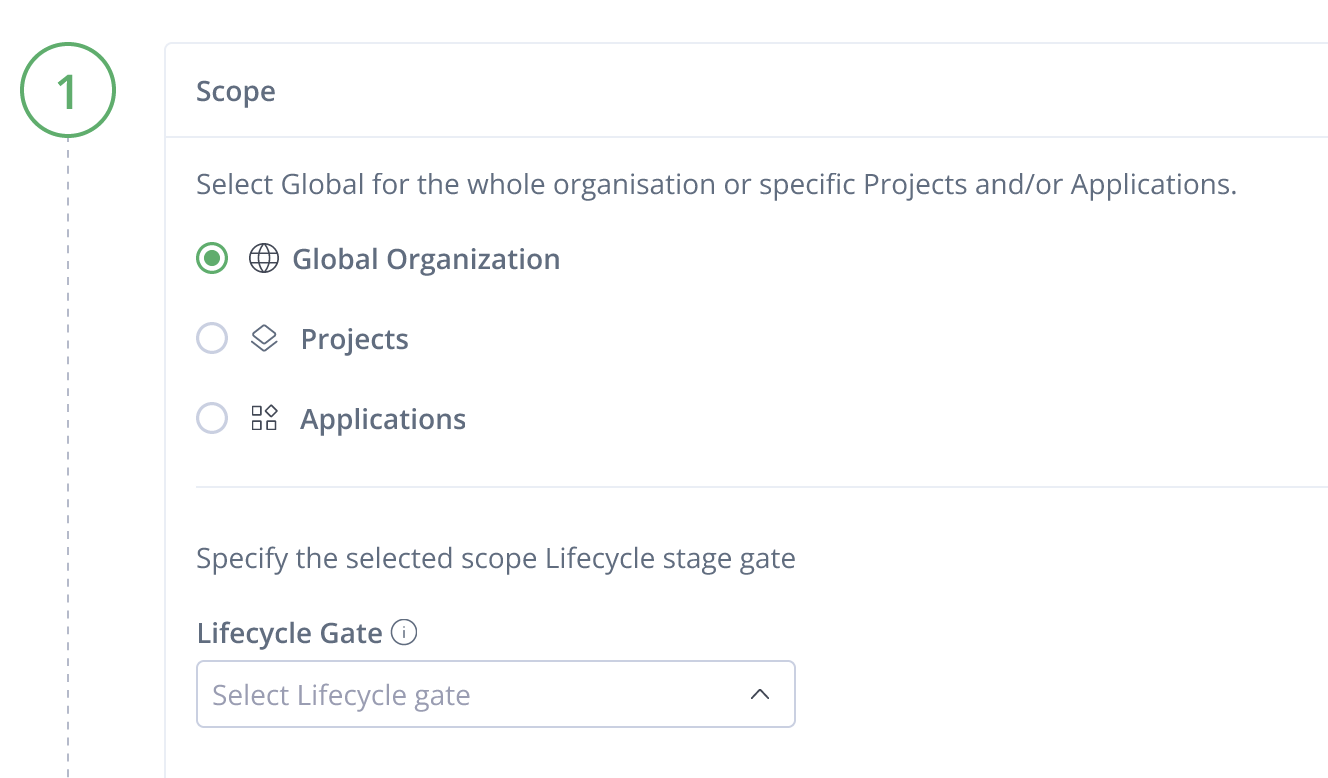
- Choose the policy Scope:
- Global: Choose Global Organization. The policy will apply to application versions in all applications in all projects. Applied on global lifecycle stages only.
- Project: Choose All Projects at the top of the left menu. Then under Scope, choose up to 10 projects from the Projects dropdown. In addition, you can filter by Application labels to apply the policy only to applications with matching labels. A label applies across projects to all applications that have the label. If you use more than one label, the policy will apply only to the applications that have all the labels you entered.
- Application: Choose up to 10 applications from the Applications dropdown.
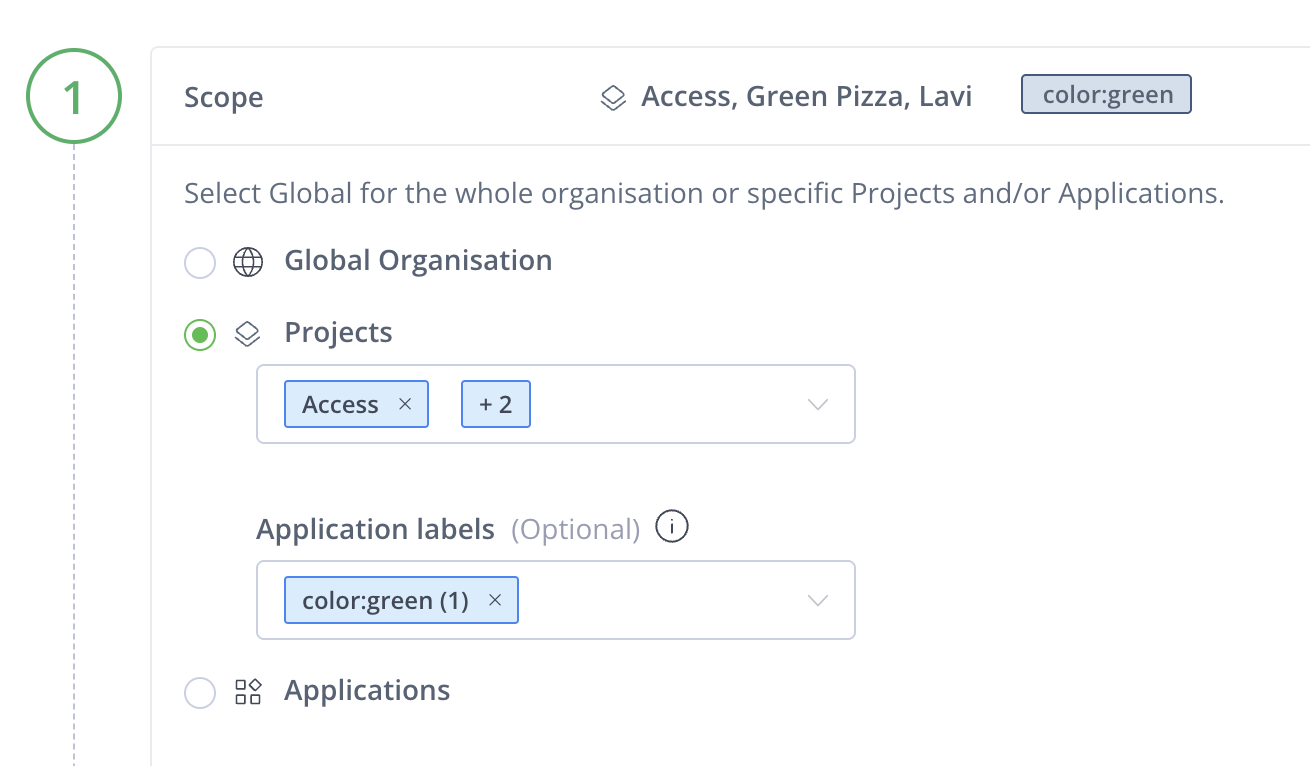
-
Select the Lifecycle Gate where the policy will apply (for example, Commit, Dev Entry, Dev Exit, QA, Prod Release), and click Next.
-
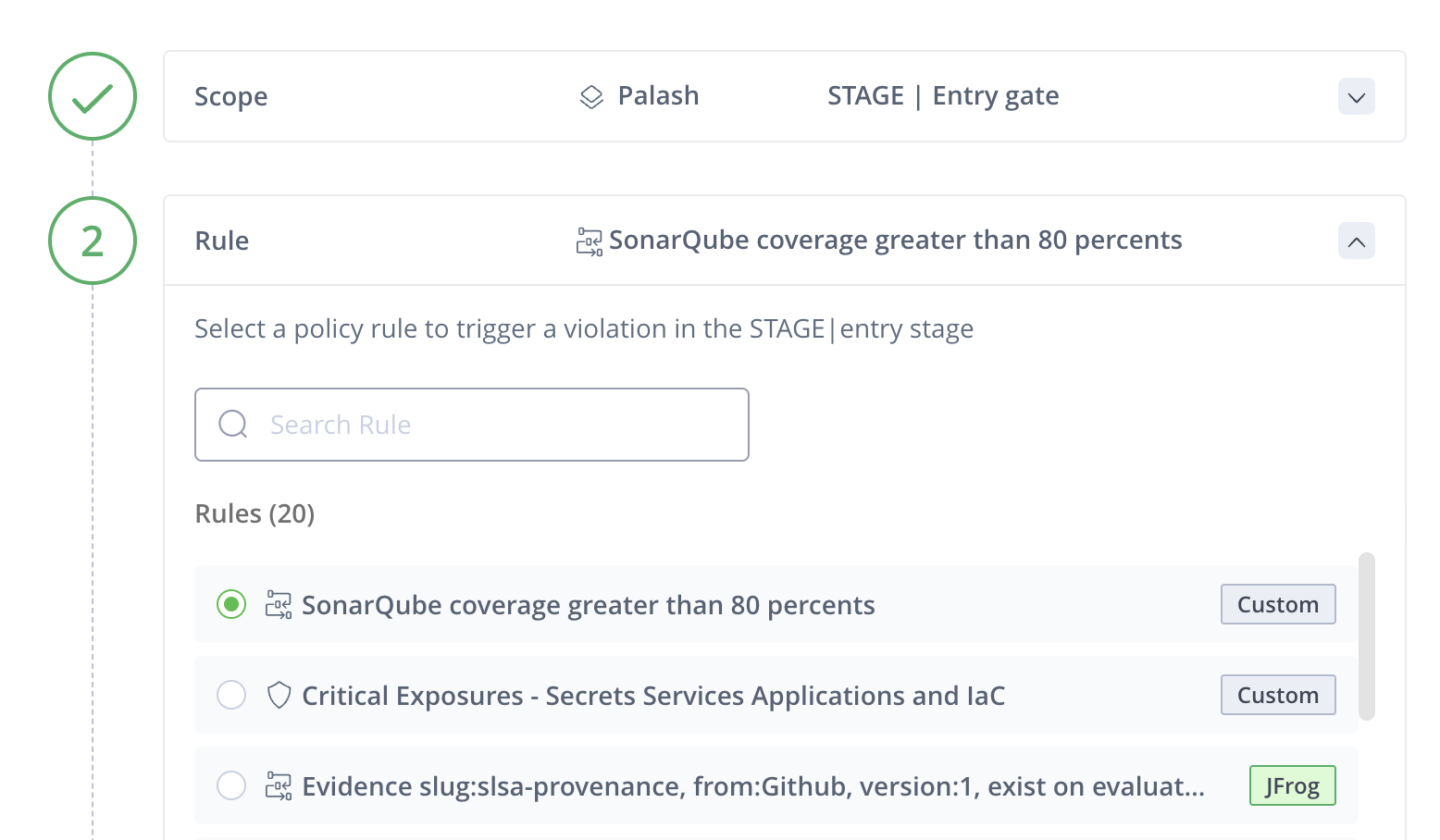
Choose a Rule from the list and click Next.
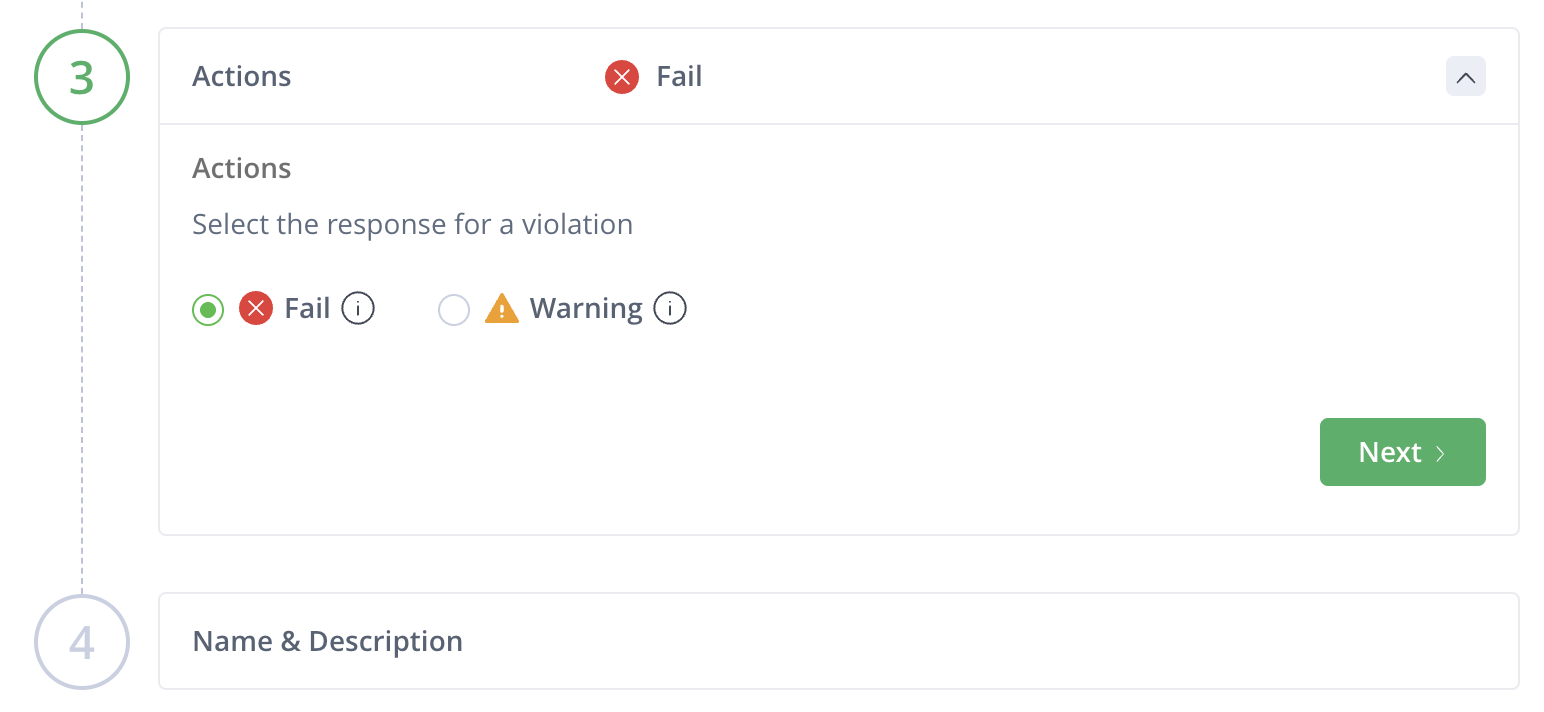
- Choose the Action if the rule is violated:
- Fail: Blocks entry to or exit from the selected stage.
- Warning: Allows the entry to or exit from the stage, but records the violation.
-
Enter a Policy Name and a brief Description.
-
Review the policy in the right-hand summary panel, and click Create Lifecycle Policy to save.
A confirmation message appears, and the policy is listed in the Lifecycle Policies table.
Lifecycle Policy Rules
-
Out-of-the-Box Rules
a. Security Rules
| Rule Name | Description |
|---|---|
| Medium CVE with CVSS score between 4.0 and 6.9 (skip if not applicable) | Triggers an issue when an application resource (such as a Docker image) contains a package or component affected by a CVE listed in the NVD with a CVSS score in the Medium range (4.0–6.9). Skip “Not Applicable” option: The violation is skipped when the JFrog Applicability Scanner marks the finding as Not Applicable. Otherwise, the issue is triggered. |
| High CVE with CVSS score between 7.0 and 8.9 (skip if not applicable) | Triggers an issue when an application resource (such as a Docker image) contains a package or component affected by a CVE listed in the NVD with a CVSS score in the High range (7.0–8.9). Skip “Not Applicable” option: The violation is skipped when the JFrog Applicability Scanner marks the finding as Not Applicable. Otherwise, the issue is triggered. |
| Critical CVE with CVSS score between 9.0 and 10.0 (skip if not applicable) | Triggers an issue when an application resource (such as a Docker image) contains a package or component affected by a CVE listed in the NVD with a CVSS score in the Critical range (9.0–10.0). Skip “Not Applicable” option: The violation is skipped when the JFrog Applicability Scanner marks the finding as Not Applicable. Otherwise, the issue is triggered. |
| Medium CVE with CVSS score between 4.0 and 6.9 (ignore applicability) | Triggers an issue when an application resource (such as a Docker image) contains a package or component affected by a CVE listed in the NVD with a CVSS score in the Medium range (4.0–6.9). Ignore applicability: Results from the JFrog Applicability Scanner are ignored for this rule. |
| High CVE with CVSS score between 7.0 and 8.9 (ignore applicability) | Triggers an issue when an application resource (such as a Docker image) contains a package or component affected by a CVE listed in the NVD with a CVSS score in the High range (7.0–8.9). Ignore applicability: Results from the JFrog Applicability Scanner are ignored for this rule. |
| Critical CVE with CVSS score between 9.0 and 10.0 (ignore applicability) | Triggers an issue when an application resource (such as a Docker image) contains a package or component affected by a CVE listed in the NVD with a CVSS score in the Critical range (9.0–10.0). Ignore applicability: Results from the JFrog Applicability Scanner are ignored for this rule. |
| All Severities Exposures - Secrets Services Applications | Triggers a policy violation when an application version contains secrets, services, or application security findings of any severity. |
| High and Critical Exposures - Secrets Services Applications | Triggers a policy violation when an application version contains secrets, services, or application security findings with High or Critical severity. |
b. Evidence
| Rule Name | Description |
|---|---|
| Evidence slug:gradle-build-tool, from:Gradle, version:1, exist on evaluated resource | Triggers a policy violation if the evidence slug:gradle-build-tool, from:Gradle, version:1, predicate type: https://gradle.com/attestations/build-tool/v1 is not attached to the evaluated resource. |
| Evidence slug:cyclonedx-sbom, from:JFrog, version:1.6, exist on evaluated resource | Triggers a policy violation if the evidence slug:cyclonedx-sbom from:JFrog, version:1.6, predicate type: https://jfrog.com/evidence/cyclonedx/sbom/v1.6, is not attached to the evaluated resource. |
| Evidence slug:gradle-java-toolchain, from:Gradle, version:1, exist on evaluated resource | Triggers a policy violation if the evidence slug:gradle-java-toolchain, from:Gradle, version:1, predicate type: https://gradle.com/attestations/build-tool/v1 is not attached to the evaluated resource. |
| Evidence slug:gradle-resolved-dependencies-repository, from:Gradle, version:1 , exist on evaluated resource | Triggers a policy violation if the evidence slug:gradle-resolved-dependencies-repository, from:Gradle, version:1, predicate type: https://gradle.com/attestations/resolved-dependencies-repository/v1 is not attached to the evaluated resource. |
| Evidence slug:gradle-resolved-dependencies, from:Gradle, version:1 , exist on evaluated resource | Triggers a policy violation if the evidence slug:gradle-resolved-dependencies, from:Gradle, version:1, predicate type: https://gradle.com/attestations/resolved-dependencies/v1 is not attached to the evaluated resource. |
| Evidence slug:coguard-scan-results, from:CoGaurd, version:1 , exist on evaluated resource | Triggers a policy violation if the evidence slug:coguard-scan-results, from:CoGaurd, version:1, predicate type: https://coguard.io/evidence/scan/results/v1 is not attached to the evaluated resource. |
| Evidence slug:dagger-trace-url, from:Dagger, version:1 , exist on evaluated resource | Triggers a policy violation if the evidence slug:dagger-trace-url, from:Dagger, version:1, predicate type: https://dagger.io/evidence/trace-url/v1 is not attached to the evaluated resource. |
| Evidence slug:akuity-promotion, from:Akuity,, version:1 , exist on evaluated resource | Triggers a policy violation if the evidence slug:akuity-promotion, from:Akuity, version:1, predicate type: https://akuity.io/evidence/promotion/v1 is not attached to the evaluated resource. |
| Evidence slug:troj-test-result, from:Troj.ai, version:1 , exist on evaluated resource | Triggers a policy violation if the evidence slug:troj-test-result, from:Troj.ai, version:1, predicate type: https://troj.ai/attestation/test-result/v1 is not attached to the evaluated resource. |
| Evidence slug:nightvision-vulnscan, from:NightVision, version:1 , exist on evaluated resource | Triggers a policy violation if the evidence slug:nightvision-vulnscan, from:NightVision, version:1, predicate type: https://nightvision.net/evidence/vulnscan/v1 is not attached to the evaluated resource. |
| Evidence slug:servicenow-change-approval, from:ServiceNow, version:1 , exist on evaluated resource | Triggers a policy violation if the evidence https://servicenow.com/approval/v1 slug:servicenow-change-approval, from:ServiceNow, version:1, predicate type: https://servicenow.com/approval/v1 is not attached to the evaluated resource. |
| Evidence slug:sonarsource-sonarqube, from:Sonar, version:1 , exist on evaluated resource | Triggers a policy violation if the evidence slug:sonarsource-sonarqube, from:Sonar, version:1, predicate type: https://sonarsource.com/evidence/sonarqube/v1 is not attached to the evaluated resource. |
| Evidence slug:cosign, from:OCI, version:1 , exist on evaluated resource | Triggers a policy violation if the evidence slug:cosign, from:OCI, version:1, predicate type: https://cosign.sigstore.dev/attestation/v1 is not attached to the evaluated resource. |
| Evidence slug:slsa-provenance, from:Github, version:1 , exist on evaluated resource | Triggers a policy violation if the evidence slug::slsa-provenance, from:GitHub, version:1, predicate type: https://slsa.dev/provenance/v1 is not attached to the evaluated resource. |
-
Custom Rules: Add Custom Rules to Existing Templates
To add custom rules to an existing template, use the Create Rule API.
| Template Name | Template Description | Templates Parameters |
|---|---|---|
{stage.gate} AppTrust Gate Certification exist | Triggers violation if AppTrust gate certification evidence for stage.gate is missing. | stage.gate, evidence_slug, evidence_provider, predicate_type_url, predicate_type_version |
| Missing Evidence Slug from Provider | Triggers violation if evidence with specified slug, provider, and version is missing. | evidence_slug, evidence_provider, evidence_version, predicate_type_url, evidence_predicate_type, application_resource |
{CVE severity} CVE with CVSS score between {min value} and {max value} | Triggers violation if CVE score falls in range; optionally skips “Not Applicable”. | CVE_severity, min_value, max_value, skip_not_applicable, application_resource, evaluation_link |
What's Next?
- Learn how to create your own policy rule templates with Rego.
- Learn how to edit a lifecycle policy .
Updated about 1 month ago