

Upload the Public Key to Artifactory
After creating the key pair, it is recommended (but not required) that the administrator upload the public key to Artifactory so that it can be used to verify the evidence on the server. The public key can be uploaded using the platform UI or a REST API.
Upload the Public Key using the Platform UI
-
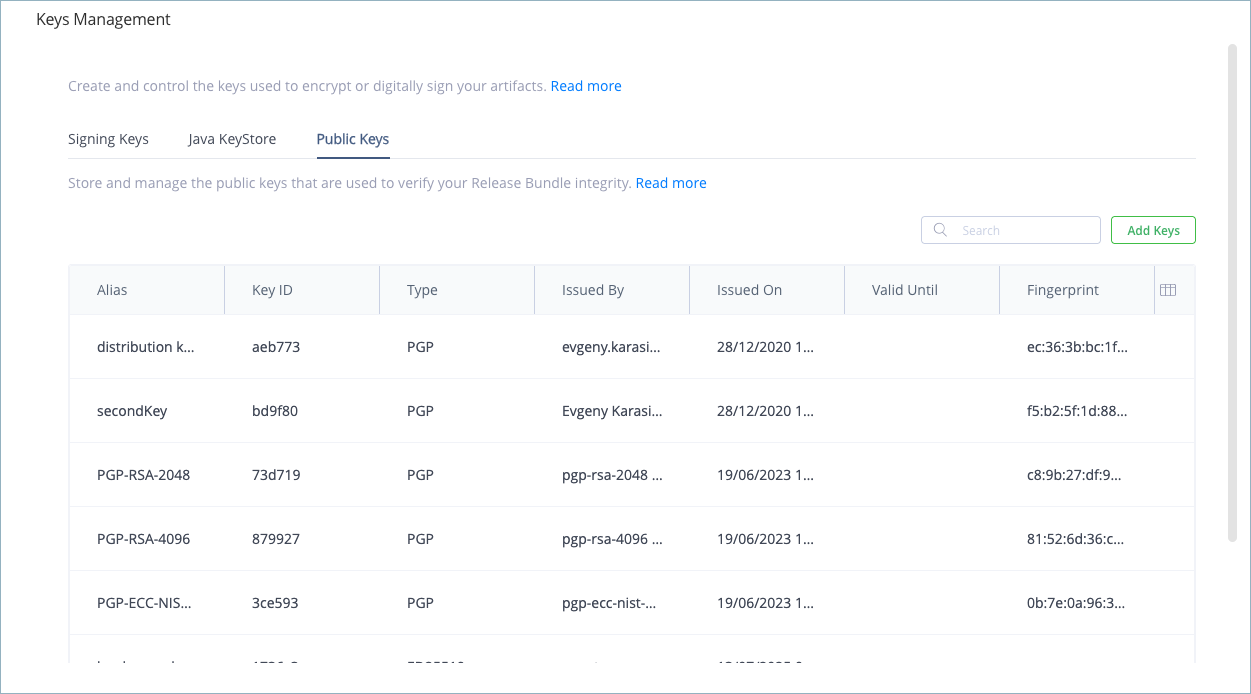
In the Administration module, select Security > Keys Management.
-
Select the Public Keys tab.
-
Click Add Keys.
-
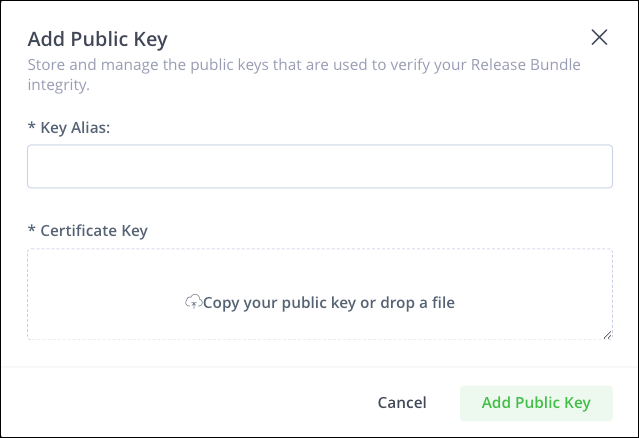
Enter an alias for the public key. This will be the descriptive name for the key in the platform UI.
-
Copy the public key to the Certificate Key field. Make sure to copy the characters just before and after the key itself, for example:
- Before the key:
"-----BEGIN PGP PUBLIC KEY BLOCK----- - After the key:
-----END PGP PUBLIC KEY BLOCK-----"
- Before the key:
-
Click Add Public Key. The new public key appears in the table.
Upload the Public Key using the REST API
To upload the public key to Artifactory, use the following REST API:
POST /artifactory/api/security/keys/trusted
As shown in the example below:
POST https://[JFrogPlatformURL]/artifactory/api/security/keys/trusted
 Content-Type: application/json
 Authorization : Basic XXXXXXXXX
 Body : {
 "alias" : "distribution key 1.0.0",
 "public_key" : "-----BEGIN PGP PUBLIC KEY BLOCK-----
Version: BCPG C# v1.6.1.0

mQENBFpDamEBCACrrAoudjlwnrRqqjdrCgPwEPyHqYddXPLDHViOVZfiREp9ENkq
2PIThlj79Cj+60ePaE4Kxaze+uH1ckTxhCNIblHWiGUluKxH8Cpy7huCBdwqkD/y

...

x4w+26u0BNxE+4xlWaJ3NUb4CWtXLERfr8aKdkf1RXdMF3c96EXCBtGzLJbhrw==
=D24P
-----END PGP PUBLIC KEY BLOCK-----"
}

Expected Response:{
 "kid": "46635b",
 "fingerprint": "f5:80:6a:1b:08:35:e7:8c:fa:a8:a0:fc:b4:fd:30:87:93:7d:19:22",
 "key": "-----BEGIN PGP PUBLIC KEY BLOCK-----
Version: BCPG C# 1.6.1.0\n\nmQENBFpDamEBCACrrAoudjlwnrRqqjdrCgPwEPyHqYddXPLDHViOVZfiREp9ENkq
2PIThlj79Cj+60ePaE4Kxaze+uH1ckTxhCNIblHWiGUluKxH8Cpy7huCBdwqkD/y

...

x4w+26u0BNxE+4xlWaJ3NUb4CWtXLERfr8aKdkf1RXdMF3c96EXCBtGzLJbhrw==
=D24P
-----END PGP PUBLIC KEY BLOCK-----",
 "issued_on": "2017-12-27T09:39:45.000Z",
 "issued_by": "[email protected]",
 "valid_until": "1970-01-01T00:00:00.000Z"
}Important
When working in a Federated environment, you must upload the public key manually to each Federation member. Evidence can be verified only on those members that contain the public key.
Updated 9 months ago