

Scanning Release Bundle v2 Versions with Xray
Learn how JFrog Xray scans Release Bundle v2 versions and can block promotion or distribution.
Subscription Information
This feature is supported with Enterprise X and Enterprise+ licenses.
As a Release Bundle v2 version is promoted through different stages towards production and eventual distribution to Edge nodes, you need to ensure that the Release Bundle does not contain potential security risks.
JFrog Xray is a universal software composition analysis (SCA) solution that enables you to validate the security risk of a Release Bundle v2 version and optionally prevent its promotion and distribution when a risk is detected.
For other management tasks, see Manage Release Bundle v2 Versions.
Note
The ability to scan Release Bundle v2 versions requires JFrog Artifactory version 7.68.6 or later and Xray version 3.82.6 or later.
The following workflow describes how Release Bundle v2 versions are scanned with Xray.
One-time Setup for Security Admins
Security Administrators need to perform the following steps to enable Release Bundle scanning.
Indexing Resources
For Xray to scan the Release Bundle v2, the Release Bundle must first be added as an indexed resource in Xray. For more information, see Index Xray Resources.
Creating Security Policies
An Xray administrator can create policies with specific rules that, if violated, can trigger actions including blocking the Release Bundle from being promoted or distributed.
For more information about policies, see Create Policies.
Attaching Policies to Watches
Watches apply a defined policy to specific indexed resources. Watches ensure that Release Bundles are scanned by the appropriate policy. For more information, see Create Watches.
During the Software Development Process
The following sections describes how scanning works as part of your release lifecycle.
Scanning Release Bundles
Xray scans the Release Bundle version as soon as it exists as an indexed resource. Any SCA vulnerabilities discovered in the artifacts that comprise the Release Bundle version can be viewed in the Xray tab for that version.
When you promote a Release Bundle v2 version or distribute Release Bundles v2, the status of the scan is retrieved from Xray. If Xray detects that the Release Bundle version violates one of the rules in the policy defined by the Watch, Xray performs the action defined by the policy. These actions can include blocking the promotion or distribution operation.
Note
The status of the promotion or distribution action remains
PROCESSINGuntil the scan is complete.If the policy blocks the Release Bundle version from being promoted or distributed, you can view a list of violations discovered by Xray.
Viewing and Evaluating Scan Results
You can view the scan results in the Xray tab of the Release Bundle version.
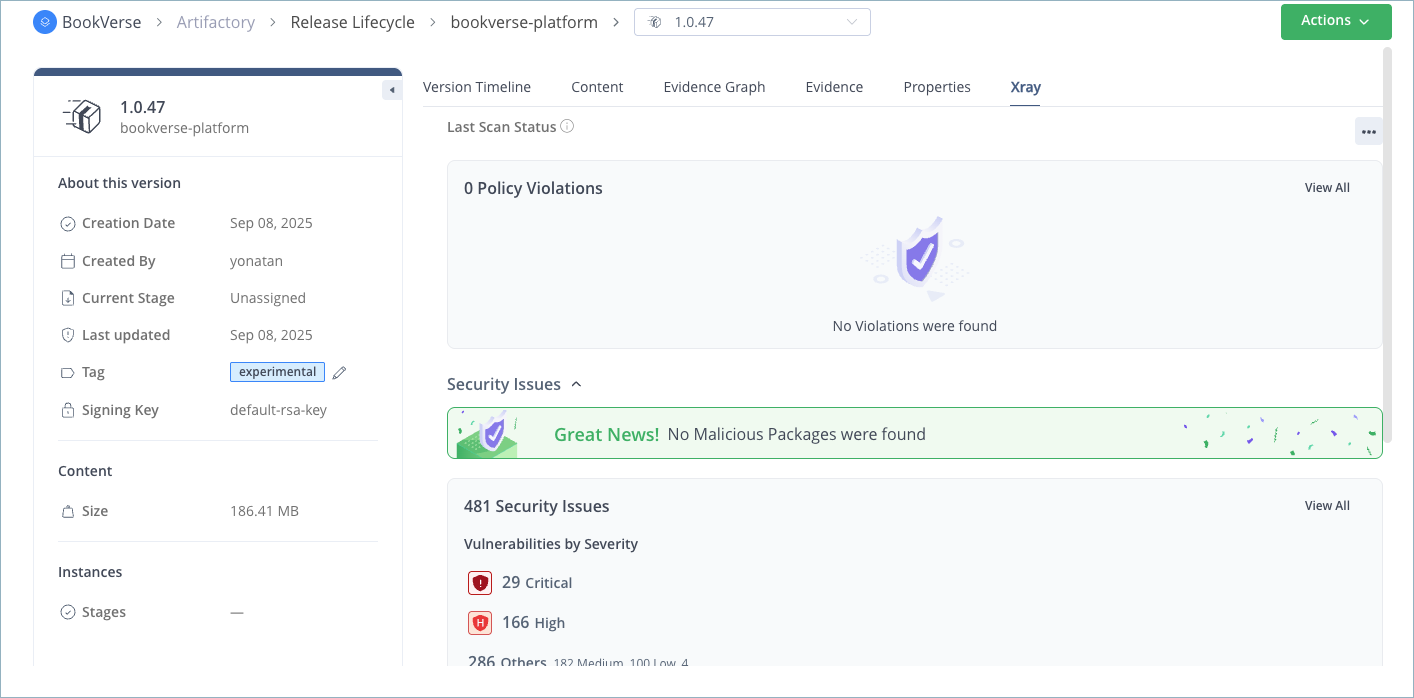
The scan results include the number of policy violations detected by Xray and the number of security issues that were uncovered.
Tip
You can also collect scan results using REST APIs:
- Release Bundle V2 Scan Status: Returns a list of Release Bundle v2 versions that have been scanned by Xray.
- Release Bundle Details: Returns security, license, and operational risk violations found in a specific Release Bundle v2.
Resolving Security Issues
Security issues can be resolved as necessary so that promotion and distribution can proceed. For more information about the different scans provided by Xray and how to resolve issues, see Understanding and Analyzing Xray Scan Results.
Xray Evidence
Enterprise+ users can view the evidence related to Xray scans during Release Bundle v2 creation, promotion, and distribution. Evidence can be viewed in the Content Graph as well as on the timeline of the Release Bundle version.
When a Release Bundle v2 is created and scanned by Xray, two pieces of evidence are created: an SBOM that lists all the artifacts that comprise the Release Bundle and a second file containing a list of any known vulnerabilities. Both files follow the CycloneDX standard by default.
Note
To use the SPDX (Software Package Data Exchange) standard instead, you can set the
evidenceSbomFormatproperty in the Xray system YAML tospdx(instead of the defaultcyclone).
Understanding the Blocking Process
A Release Bundle v2 version is blocked by Xray from being promoted or distributed when all of the following conditions are met:
- Xray 3.82.6 or higher is installed, enabled, and available.
Note
There is an optional Xray setting that allows promotion and distribution without scanning if Xray is enabled but unavailable. For more information, see Advanced Settings.
- The Release Bundle has been indexed as a resource.
- There is a Watch defined that ties together this Release Bundle with a policy that triggers an action (for example, blocking promotion or distribution) if the criteria defined by the policy are met. For example, if a direct vulnerability of a certain severity is discovered in one of the scanned artifacts that comprise the Release Bundle, promotion and distribution of the Release Bundle are blocked.
Note
In certain circumstances, the indexing process might take a long time to complete. There is a defined timeout setting, which if exceeded, causes the promotion or distribution action to fail if indexing is still in progress or otherwise stuck.
Frequently Asked Questions
This section provides answers to frequently asked questions about scanning Release Bundle v2 versions with JFrog Xray.
FAQs
Q: What do I need before Xray can scan a Release Bundle v2 version?
A: Index the Release Bundle as an Xray resource, create security policies, and attach those policies to Watches. See One-time Setup for Security Admins. Scanning also requires JFrog Artifactory 7.68.6 or later and Xray 3.82.6 or later.
Q: When does Xray scan a Release Bundle v2 version?
A: Xray scans the version as soon as it exists as an indexed resource. When you promote or distribute the version, Xray scan status is retrieved and policy actions can run. See Scanning Release Bundles.
Q: Where can I view Xray scan results for a Release Bundle version?
A: Open the Xray tab for that Release Bundle version. The tab shows policy violations and security issues. See Viewing and Evaluating Scan Results.
Q: When does Xray block promotion or distribution?
A: Blocking occurs when Xray is available (3.82.6 or higher), the Release Bundle is indexed, and a Watch ties the Bundle to a policy that triggers blocking when its criteria are met. See Understanding the Blocking Process.
Q: What evidence does Xray create for a scanned Release Bundle v2?
A: Xray creates an SBOM of the Release Bundle artifacts and a file listing known vulnerabilities. Both use CycloneDX by default. See Xray Evidence.
Related Topics
Updated 10 days ago