

Use the Release Bundle Version Timeline
Learn how to use the Release Bundle v2 version timeline to review events and statuses in JFrog Artifactory.
The timeline contains a record of all events related to the Release Bundle v2 version listed in reverse chronological order. Use the timeline Actions menu to perform various actions on the Release Bundle version and to view details of a specific event.
For other management tasks, see Manage Release Bundle v2 Versions.
To open the Release Bundle version timeline:
-
In the Platform module, select Artifactory > Release Lifecycle.
-
Click the name of the relevant Release Bundle. The Versions tab is displayed by default.
-
Click the name of the relevant Release Bundle version. The Version Timeline tab is displayed by default.
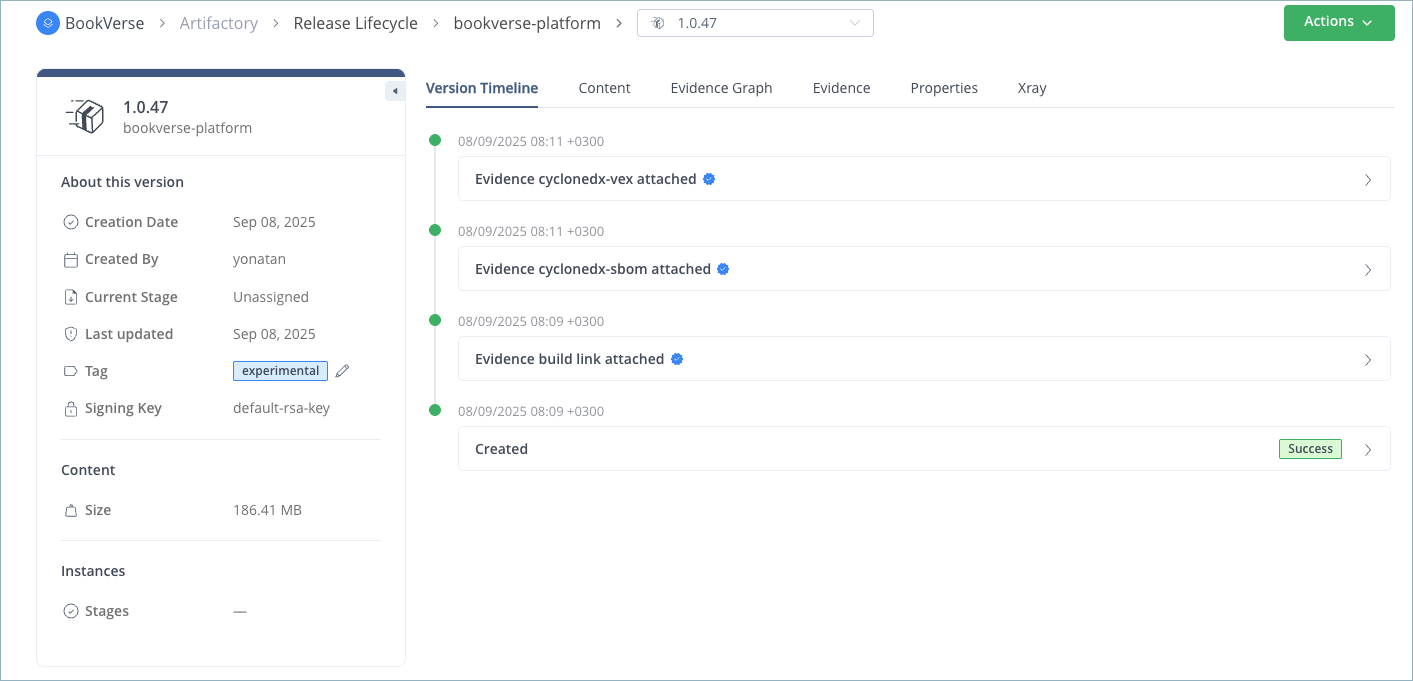
The first event always records the creation of the Release Bundle version. New events are added to the timeline as other actions are performed on the version (using the JFrog Platform UI, REST APIs, or JFrog CLI), such as promotion, distribution, export, and deletion. Users with access to evidence management receive timeline events for evidence generated automatically as Release Bundles are created, promoted, and distributed. Events are also added for external evidence attached to the Release Bundle.
Tip
You can select a different version of the Release Bundle from the version dropdown list on the timeline page.
Each timeline event contains a detailed status description and color indicator:
| Status | Color | Description |
|---|---|---|
| In Progress | Blue | The operation is currently in progress. |
| Failed | Red | The operation failed. |
| Success | Green | The operation was successful. |
| Deleting | Blue | Deletion of the Release Bundle version or promotion is currently in progress. |
| Deleted | Gray | The Release Bundle version (or version promotion) has been deleted. |
| Canceled | Yellow | The distribution or export operation was canceled. |
| Verified |  | Indicates the evidence file has been verified using the public key created for this purpose. For more information, see Upload the Public Key to Artifactory. |
Timeline Events in Federated Environments
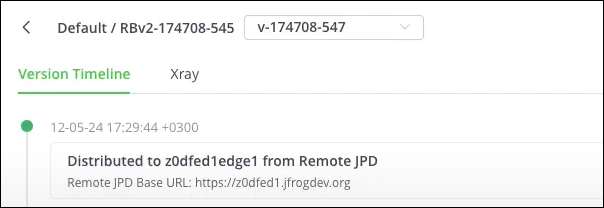
When working with Federated repositories as part of a multi-site environment, operations performed on a Release Bundle version on one Federation member are propagated to the timelines of the other members. This includes Release Bundle creation, promotion, and distribution.
Frequently Asked Questions
This section provides answers to frequently asked questions about the Release Bundle v2 version timeline.
FAQs
Q: How do I open the Release Bundle v2 version timeline in the JFrog Platform UI?
A: In the Platform module, select Artifactory > Release Lifecycle, open a Release Bundle and version, and view the Version Timeline tab. See Open the Release Bundle Version Timeline.
Q: What events appear on the Release Bundle v2 version timeline?
A: The first event records creation. Additional events include promotion, distribution, export, deletion, and evidence-related actions. See About the Version Timeline.
Q: What do the timeline status colors mean?
A: Status colors include blue for in progress or deleting, red for failed, green for success, gray for deleted, yellow for canceled, and a verified icon for verified evidence. See the status table in About the Version Timeline.
Q: How are timeline events shared in federated environments?
A: Operations on one Federation member propagate to timelines on other members, including creation, promotion, and distribution. See Timeline Events in Federated Environments.
Q: What can I do from the timeline Actions menu?
A: Use the timeline Actions menu to perform version actions and view Release Bundle v2 version details for a specific event.
Related Topics
Updated 10 days ago