

View the Release Bundle Version Evidence Table
Learn how to view the Release Bundle v2 evidence table and download all evidence from the JFrog Platform UI.
Use the Evidence tab to view evidence files for a Release Bundle v2 version and its contents, or download all evidence as a single JSON file.
For other management tasks, see Manage Release Bundle v2 Versions.
To view the Release Bundle v2 version evidence table:
-
In the Platform module, select Artifactory > Release Lifecycle.
-
Click the name of the relevant Release Bundle. The Versions tab is displayed by default.
-
Click the name of the relevant Release Bundle version. The Version Timeline tab is displayed by default.
-
Click the Evidence tab.
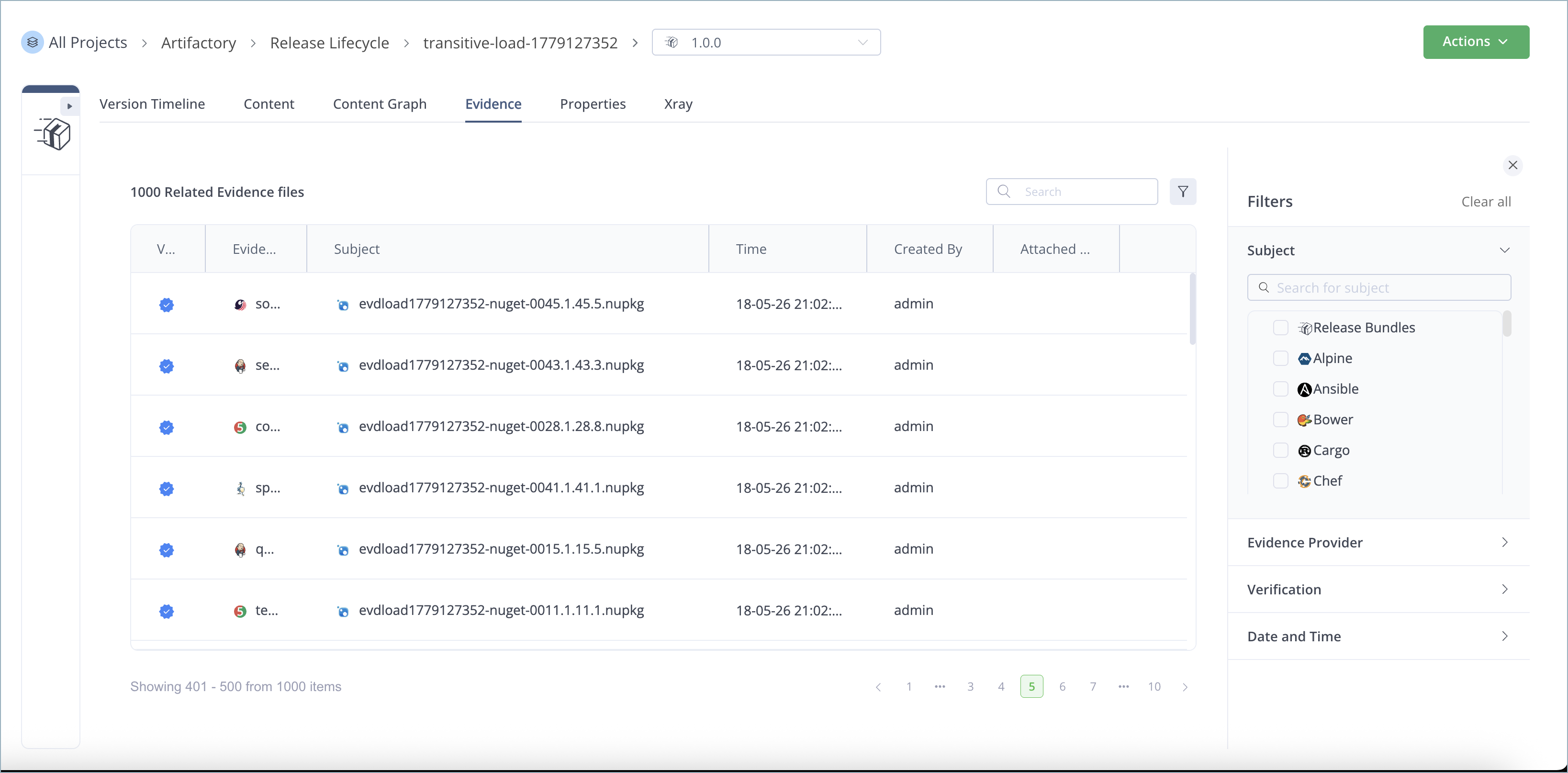
The table includes the following information about each piece of evidence:
- Whether the evidence has been verified using the public key saved in JFrog Artifactory
- The type of evidence (for example, an SBOM)
- The evidence subject (for example, a specific package)
- The timestamp of the evidence
- The creator of the evidence
You can perform the following actions from the actions menu at the end of each table row:
- Download the evidence to your local system
- View the evidence details
Download All Evidence for a Release Bundle Version
You can download a JSON file that contains all the evidence attached to a selected Release Bundle version. The JSON file contains both internal evidence created by Artifactory (for example, during Release Bundle promotion) as well as external evidence added using the JFrog CLI. This feature enables you to save a copy of the evidence locally in a single file.
To download all evidence attached to a Release Bundle version:
- In the Platform module, select Artifactory > Release Lifecycle.
- Click the name of the relevant Release Bundle. The Versions tab is displayed by default.
- Click the name of the relevant Release Bundle version. The Version Timeline tab is displayed by default.
- From the Actions menu, select Download All Evidence. A single JSON file containing all internal and external evidence related to the Release Bundle version is downloaded to your local system. The name of the file is [Release_Bundle_name]-[version]-Evidence.json.
Frequently Asked Questions
This section provides answers to frequently asked questions about viewing the Release Bundle version evidence table.
FAQs
Q: How do I open the Evidence tab for a Release Bundle v2 version?
A: Open a Release Bundle version from Artifactory > Release Lifecycle, then click the Evidence tab. See View the Release Bundle Version Evidence Table.
Q: What information does the evidence table show?
A: Each row shows whether the evidence was verified with the public key in JFrog Artifactory, the evidence type (for example, an SBOM), the timestamp, and the creator.
Q: What actions can I take on a single evidence file?
A: From the actions menu at the end of each table row, you can download the evidence to your local system or view the evidence details.
Q: How do I download all evidence for a Release Bundle version?
A: From the Actions menu on the Release Bundle version, select Download All Evidence to save a single JSON file. See Download All Evidence for a Release Bundle Version.
Related Topics
Updated 10 days ago