

Content
Listing of packages and builds included in the version.
Use the Contents tab to see the releasables associated with the application version. A releasable is a package or standalone artifact that will be released to users as part of the version.
To view the releasable contents of an application version:
- In the JFrog Platform, go to AppTrust > Applications.
- In the Applications table, click the name of the relevant application.
- In the sidebar, click Lifecycle. The Stages Board tab appears.
- In the Stages Board, click the relevant application version to drill down into the version.
- Above the version timeline, click the Content tab.
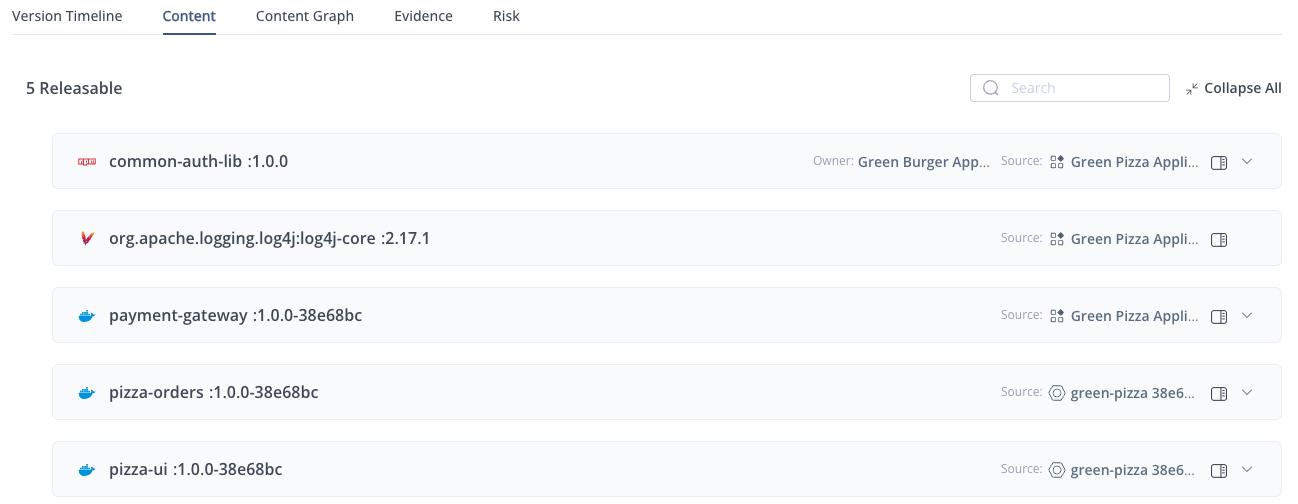
The Content tab displays a table of releasables included in the application version. Each row includes:
- Releasable: The name and version of the package (or standalone artifact). Click the link to jump to the page for that package version, as described in Viewing Package Version Information. Listed underneath is the name of the application that owns this releasable. In the example above, the pizza-shop package is part of selected application (also called Pizza Shop), which makes this a 1st party package.
- Source: The origin of the releasable. This column indicates whether the package was added to the application directly (1st party) or was inherited from a different application or build. For example, in the case of a 2nd party package developed by another team within your organization, the name and version of that application appears. Click the link to jump to that application.
- Evidence: The icon indicates whether the releasable has evidence attached to it. If the icon is grayed out, there is no evidence available for that releasable.
Updated 3 months ago
Did this page help you?