

Policies & Evaluations
Governance policies and evaluations in JFrog AppTrust
In JFrog AppTrust, lifecycle policies are governance controls that define how a software version is allowed to progress from each stage to the next in the software development lifecycle (SDLC). This page describes the basic concepts relating to policies and how AppTrust uses them to automate governance and compliance in your SDLC.
Policy
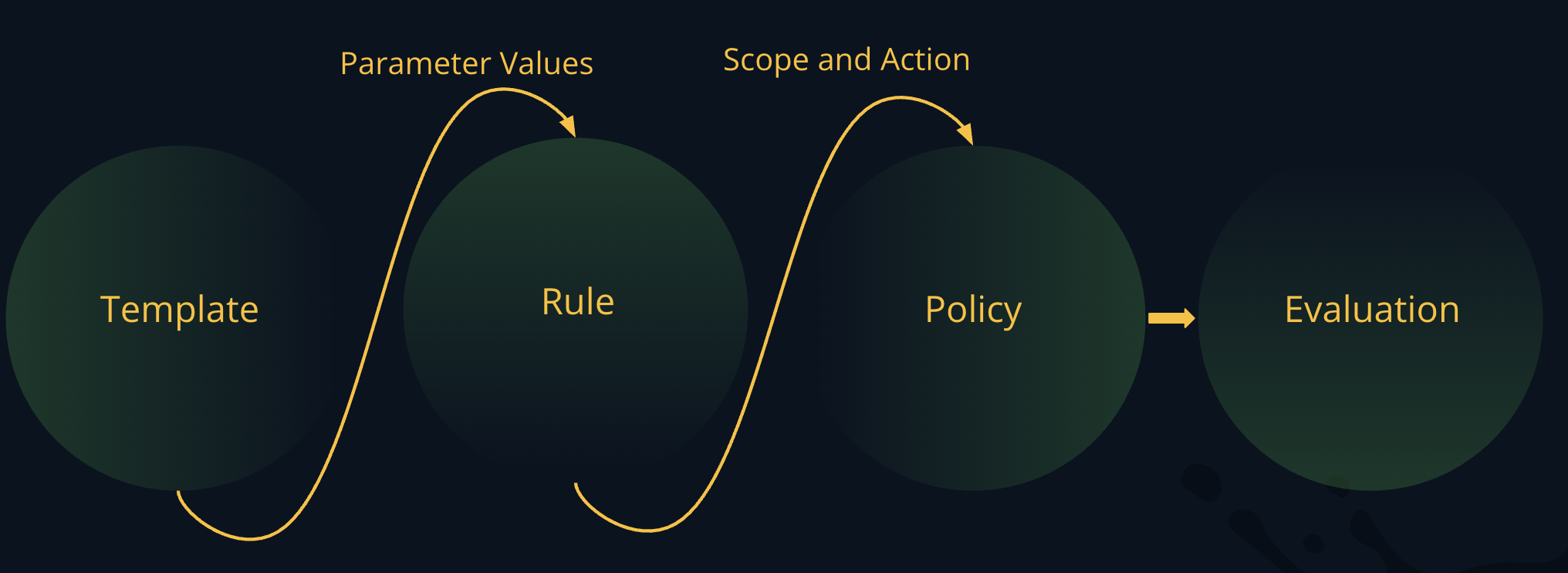
A policy consists of the combination of a rule, a scope, and an action. These elements are described below.
Rule
A rule describes a condition about the application version that must be met. When a promotion is initiated, the rule will be evaluated. The following are examples of possible rules and their descriptions:
- QA Exit Gate Certification: Requires QA exit gate certification evidence for the QA stage.
- Critical CVE with CVSS score between 9.0 and 10.0: Triggers an issue when an application resource (such as a Docker image) contains a package or component affected by a CVE listed in the NVD with a CVSS score in the Critical range (9.0–10.0).
AppTrust supplies a number of default rules that you can choose from. In addition, you can create your own rules using templates, and create your own templates using Rego code. For more information, see the JFrog Lifecycle Policy APIs.
Scope
A scope is the combination of an organization in which the policy is applicable and a stage gate in the SDLC. A scope can be one of the following types:
- Global: The policy will apply to application versions in all of the projects and applications in your JFrog account.
- Project: The policy will apply to application versions in all the applications in the project. Optionally, you can choose from a list of projects and/or use application labels to apply the policy only to applications that have the label(s) you choose. By choosing different projects and using the application labels, you can apply a policy to specific applications in different projects as long as the applications have the same label.
- Application: The policy will apply only to the application(s) you choose.
Depending on which scope type you choose, an organization in a scope can be one or more applications, one or more projects, or the entire JFrog account (also called Organization). A scope can have up to 10 project keys or application keys.
The stage gate is the point at which the policy is applied. When an application version crosses a stage gate, the policies applied to that stage gate are evaluated. Examples of stage gates are Dev|Exit Gate, Stage|Entry Gate, and Prod|Release Gate.
Action
An action is the measure AppTrust takes when a policy is violated. Possible actions are to fail the promotion or to allow the promotion, but issue a warning.
Template
A template contains the logic and parameters for a policy rule without the specific values for the rules. For example, you could create a template that contains the logic for having a CVSS score between (minimum_value) and (maximum_value). From that template, you could then create several rules that have different values for (minimum_value) and (maximum_value), for example:
- Medium CVE with CVSS score between 4.0 and 6.9
- High CVE with CVSS score between 7.0 and 8.9
In turn, you could use these rules to create different policies.
Relationship between Template, Rule, and Policy
The illustration below summarizes the relationship between a template, a rule, and a policy.
For more information about creating templates, see Rego Policy Code.
Evaluations
Each policy is evaluated automatically when an application version reaches a defined lifecycle gate—such as Dev|Exit, QA|Entry, or Prod|Release—to determine whether the version can proceed. When an evaluation passes, the application version can move on to the next lifecycle stage. When a policy evaluation fails, AppTrust takes the action you defined in the policy, either Fail or Warn.
AppTrust maintains a log of all evaluation events that you can view. If a promotion fails, you can check the evaluations to find exactly which policy (or policies) caused the failure. For more information, see View Application Evaluations.
Waivers
If a policy violation is causing delays in the progress of your application version through the lifecycle, AppTrust enables a system of waivers. You can request a waiver, and it must be approved in your organization to become effective. For more information about waivers, see Waivers.
Relationship to Evidence
Evidence plays a central role in lifecycle policy enforcement. Many rules rely on the presence of specific evidence—such as a signed SBOM, a build provenance, or a change approval—to determine compliance.
When an application version reaches a policy gate, AppTrust verifies that the required evidence is attached to the evaluated resource. If the required evidence is missing, a policy violation is triggered. Together, lifecycle policies and evidence create an auditable framework for validating trust, security, and compliance throughout the SDLC.
Roles and Actions Required
To use the lifecycle policies in AppTrust, you need one of the following Actions defined in a Global or a Project Role in JFrog Platform:
- Read AppTrust Policy: Allows you to read policy information
- Manage AppTrust Policy: Allows you to create, view, edit, and delete AppTrust policies
For information about setting up the Roles and Actions for users, see Manage Project Roles and Members. A Platform Administrator is required to set up the Roles and Actions.
Updated 3 months ago
What’s Next
Learn how to Create Lifecycle Policies.