

Bind Packages to an Application
In JFrog AppTrust, packages can be bound to a specific application. This feature promotes traceability, as each package is tied to an application that in effect "owns" that package. If a vulnerability is discovered in the package at any time, even after the application version has been released, the fact that the package is bound to a particular application makes it easy to turn to the application owners to address the vulnerability, thereby enhancing efficiency and accountability.
AppTrust uses OIDC integration between the JFrog platform and your CI/CD pipelines to perform the binding process in a transparent fashion, enabling all packages that pass through the pipeline to be bound automatically with a specified application.
The procedure below describes the process required when working with GitHub.
To bind packages to an application:
-
Set up OIDC integration between the JFrog platform and GitHub. For step-by-step instructions, see the following topics:
OIDC integration not only enables GitHub to authenticate with the JFrog platform, but also enables packages in the GitHub pipeline to be bound automatically to a specified application, as explained below.
-
In the root dir of your git repository, create a new folder called .jfrog.
-
In the .jfrog folder, create a file called config.yml. The contents of the file should be as follows:
application: key: -
Copy the application key of the relevant application to config.yml. The recommended method for copying the application key is as follows:
- In the Platform module, select AppTrust > Applications.
- In the table, go to the menu at the end of the row for the relevant application, and select Copy Application Key from the popup menu.
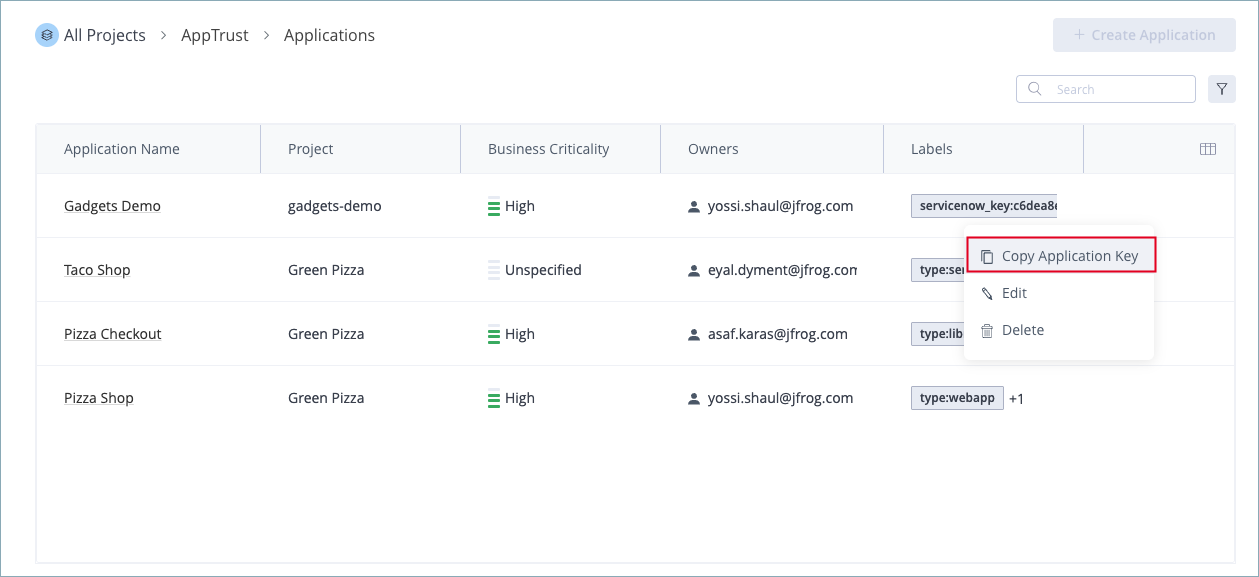
- Paste the key in the
keyline of config.yml. - Save your changes. Your GitHub workflow now has what it needs to bind the packages processed by this workflow to the application specified in config.yml. Those packages will appear automatically as resources of the application. For more information, see View Application Resources.
Bind Packages Manually using the REST API
You can use the Bind Package Version REST API to bind individual packages to an application.
Updated 2 months ago