

Promotion Rollback
Learn how promotion rollback undoes the latest Release Bundle v2 promotion.
RLM Deprecation
All feature development, patches, and security fixes for Release Lifecycle Management ended on July 31, 2026, except for critical security fixes. This deprecation removes the ability to promote Release Bundle v2 versions between defined lifecycle stages. It will still be possible to create Release Bundles, add properties and attach evidence, and distribute those Release Bundles to targets such as Edge nodes. RLM End of Life is currently scheduled for January 31, 2028. For more information, see JFrog Release Lifecycle Management Deprecation - End of Life.
The promotion rollback feature provides an important mechanism for managing your release lifecycle. Rollback enables you to undo the latest promotion of a Release Bundle v2 version and restore the version to its previous stage.
For the UI procedure, see Perform Promotion Rollback.
Understanding Rollback
When you execute promotion rollback, both the promotion itself and its associated evidence are deleted. This effectively erases the record of the promotion from the Release Bundle's history. However, while the promotion is deleted, the promotion audit log is preserved and will be visible in the Release Bundle v2 version timeline. In the timeline, the removed promotion is crossed out, and a new entry is added to record the rollback, as shown in the following image.
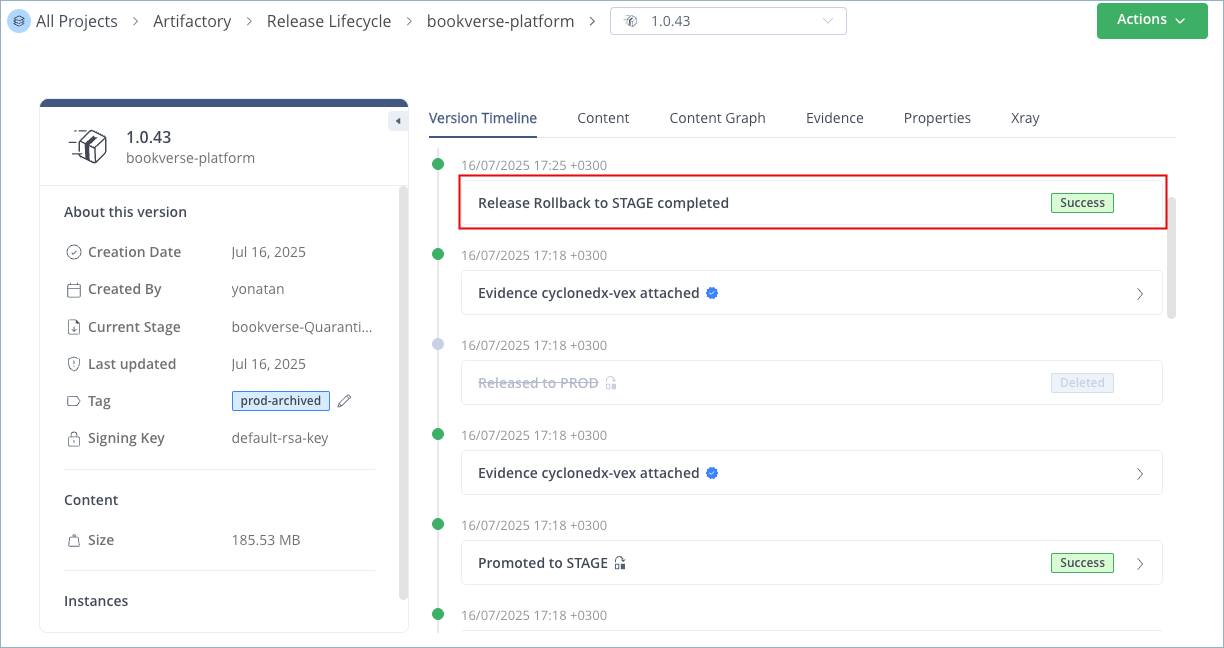
In addition, the artifacts included in the Release Bundle are also rolled back. The specific behavior of this artifact rollback depends on the type of promotion that was originally performed, a copy or a move promotion.
Rolling Back a Copy Promotion
Rolling back a copy operation is straightforward. In a copy promotion, the artifacts from the source stage's repositories are duplicated into the target stage's repositories. When this kind of promotion is rolled back, the artifacts are deleted from the repositories in the target stage, and the previous stage is reinstated for the version. Since the previous stage's repositories already contain a complete copy of all the necessary artifacts, no further artifact manipulation is required. The evidence and properties associated with these artifacts remain exactly as they were before the promotion occurred.
For example, if you perform a copy promotion from the DEV stage to QA, the artifacts that were in the DEV repositories are copied to repositories in QA. If you roll back this promotion, the Release Bundle version and its artifacts are removed from QA, and DEV is reinstated as the current stage with the copy of the version it already contains.
Rolling Back a Move Promotion
The rollback process for a move promotion is more complex. In a move promotion, the artifacts are relocated from repositories in the source stage to repositories in the target stage. This means the source repositories no longer contain these artifacts.
To accommodate this, the rollback for a move promotion leverages the internal release-bundles-v2 system repository, which maintains a secure copy of every Release Bundle v2 version's artifacts and metadata as they existed at the time of their creation.
The rollback procedure for a move promotion is as follows:
- The artifacts are deleted from the repositories of the current stage.
- The artifacts, along with their associated evidence and properties, are copied from the
release-bundles-v2system repository to the repositories associated with the previous stage. - The previous stage is marked as the current stage for the Release Bundle v2 version.
Note
If you promote the same Release Bundle version multiple times to the same stage (for example, you might repeat the promotion after changing the repositories associated with that stage), rollback reverses the last promotion only.
Perform Promotion Rollback
You can roll back the latest promotion of a Release Bundle v2 version using the JFrog Platform UI or the Roll Back Release Bundle v2 Version Promotion REST API.
To perform promotion rollback using the JFrog Platform UI:
-
In the Platform module, select JFrog Artifactory > Release Lifecycle.
-
Click the name of the relevant Release Bundle. The Versions tab is displayed by default.
-
Click the name of the relevant Release Bundle version. The Version Timeline tab is displayed by default.
-
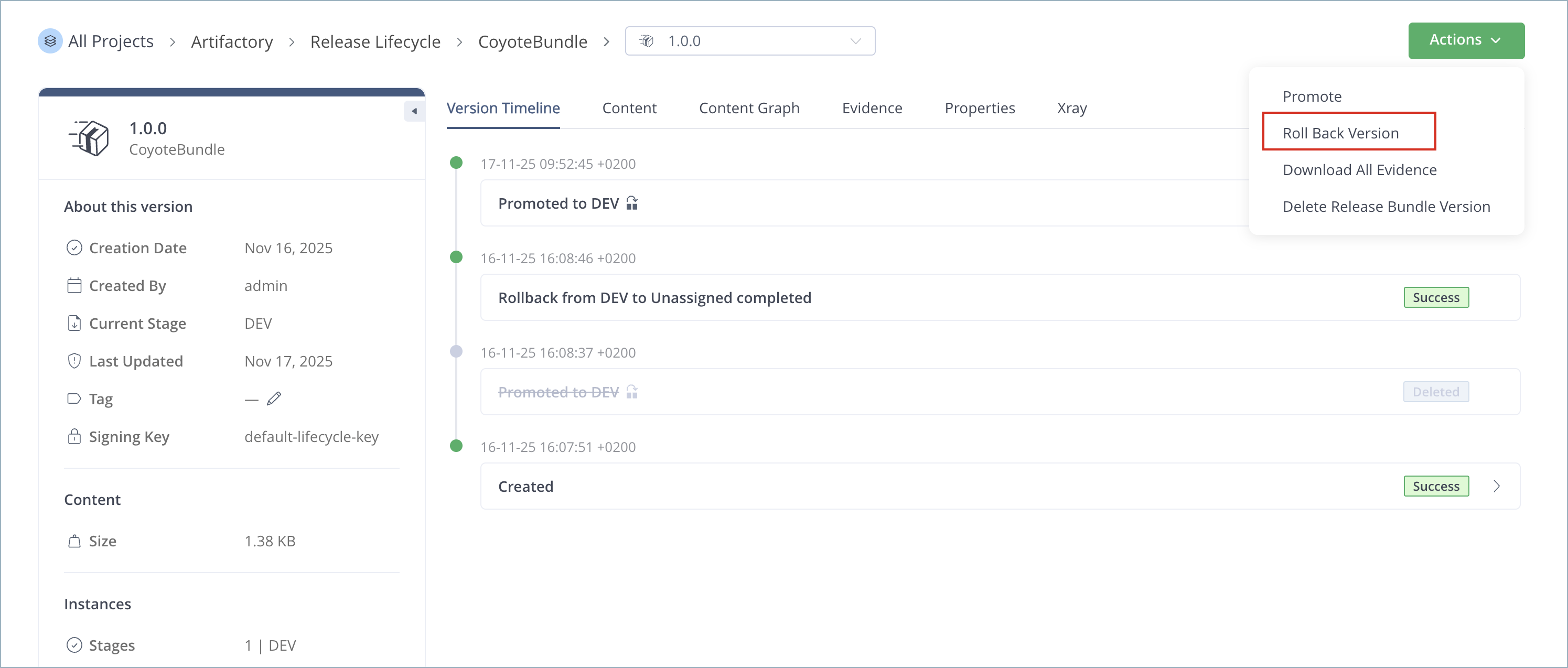
Click Actions and then select Roll Back Version.
-
In the confirmation window, click Roll Back. The Release Bundle v2 version is returned to its previous stage.
Note
Don't roll back a promotion while the same version is being promoted, as it can lead to unpredictable behavior. If you start a promotion and then want to roll it back, allow the promotion to complete before you execute the rollback.
Frequently Asked Questions
This section provides answers to frequently asked questions about Release Bundle v2 promotion rollback.
FAQs
Q: What happens when I roll back a Release Bundle v2 promotion?
A: Promotion rollback deletes the promotion and its associated evidence from the Release Bundle history. The promotion audit log is preserved in the Release Bundle v2 version timeline, where the removed promotion appears crossed out and a rollback entry is added.
Q: What is the difference between rolling back a copy promotion and a move promotion?
A: Rolling back a copy promotion deletes artifacts from the target stage repositories and reinstates the previous stage. Rolling back a move promotion restores artifacts from the release-bundles-v2 system repository to the previous stage's repositories.
Q: Can I roll back more than one promotion for the same version?
A: No. Rollback reverses the last promotion only. If you promoted the same version to the same stage multiple times, rolling back undoes the most recent promotion.
Q: How do I perform promotion rollback in the JFrog Platform UI?
A: Open Artifactory > Release Lifecycle, select the Release Bundle and version, then click Actions > Roll Back Version. See Perform Promotion Rollback for the full procedure.
Q: Can I roll back a promotion while another promotion is in progress?
A: No. Don't roll back while the same version is being promoted, as it can cause unpredictable behavior. Allow the promotion to complete before you execute the rollback.
Related Topics
- Promote a Release Bundle v2 Version
- Promote a Release Bundle v2 Version in the Platform UI
- Roll Back Release Bundle v2 Version Promotion REST API
- Use the Release Bundle Version Timeline
- Understanding Release Bundles v2
Updated 3 months ago