

View Received Release Bundle v2 Versions
Learn how to view received Release Bundle v2 versions on JFrog Artifactory Edge and download or delete distributed versions.
RLM Deprecation
All feature development, patches, and security fixes for Release Lifecycle Management ended on July 31, 2026, except for critical security fixes. RLM End of Life is currently scheduled for January 31, 2028. For more information, see JFrog Release Lifecycle Management Deprecation - End of Life.
You can view a list of distributed Release Bundles v2 versions that were received by a distribution target, such as an Edge node. You can drill down into a version to view the list of artifacts contained in the version and its associated evidence, if evidence was included in the distribution.
Note
The following procedure applies to Release Bundle v2 versions that were distributed after upgrading to Artifactory 7.144.2 or later. Versions distributed prior to this upgrade can be viewed by selecting Distribution > Release Bundles > Received in the Artifactory Edge UI, as described in View Release Bundles on Edge Nodes.
- View Received Release Bundle v2 Versions on an Edge Node
- Download All Evidence for the Received Release Bundle v2 Version
- Delete a Received Release Bundle v2 Version
- View Received Release Bundle v2 Versions on an Artifactory Instance
View Received Release Bundle v2 Versions on an Edge Node
Use this procedure to open the list of received Release Bundle v2 versions on an Edge node and review version details in the Platform UI.
To view received Release Bundle v2 versions on an Edge node:
-
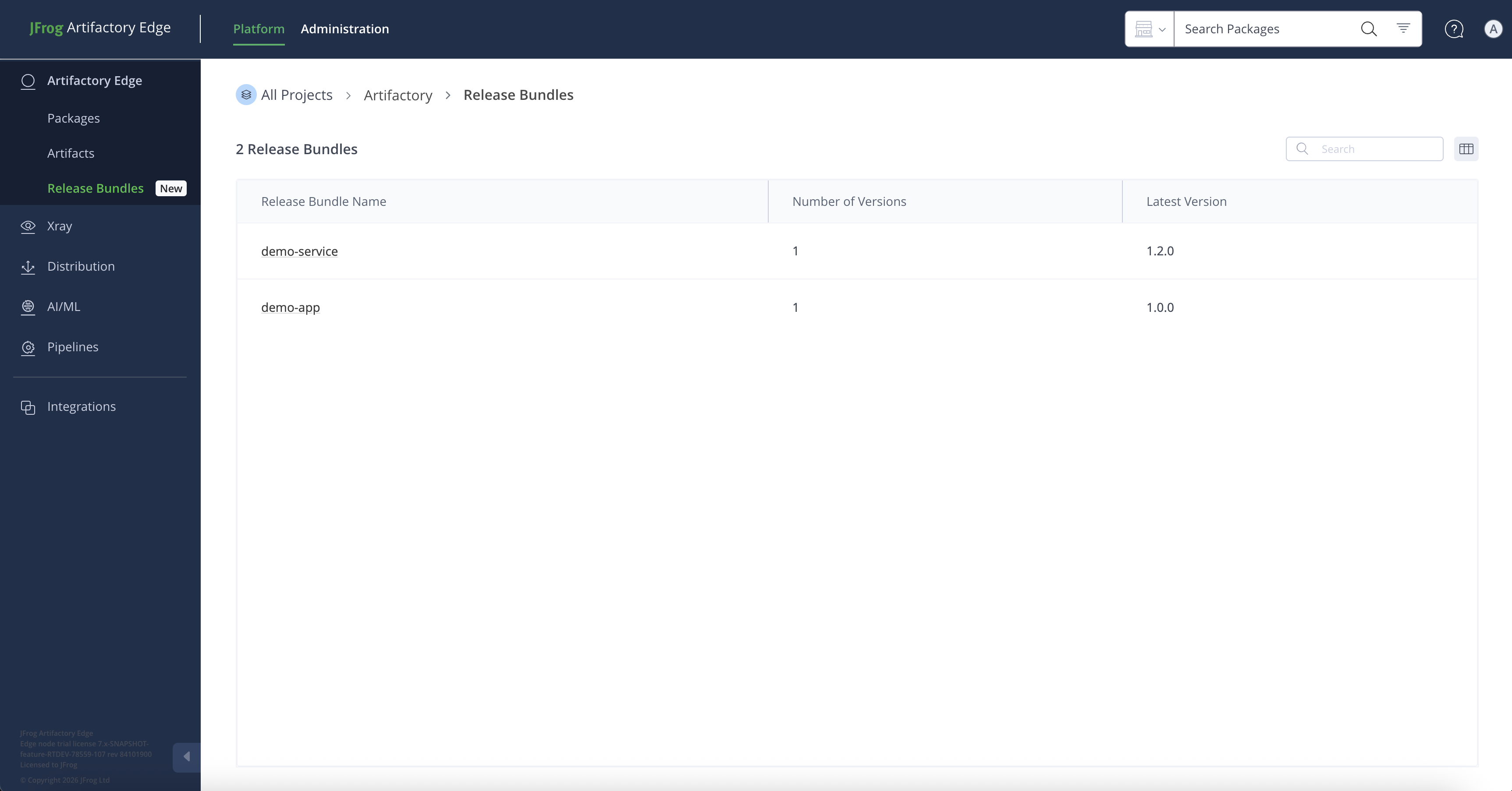
In the Platform module, select Artifactory Edge > Release Bundles. The Release Bundles table includes the following information about each received Release Bundle:
-
Release Bundle name
-
Number of versions received
-
Latest version received
-
-
Click the name of a Release Bundle to view a table of received versions, including:
- Version name
- Identifying tag, if any
- Received date
-
Click the name of the relevant Release Bundle version. The Version Timeline tab is displayed by default. The sidebar contains details about the received Release Bundle version.
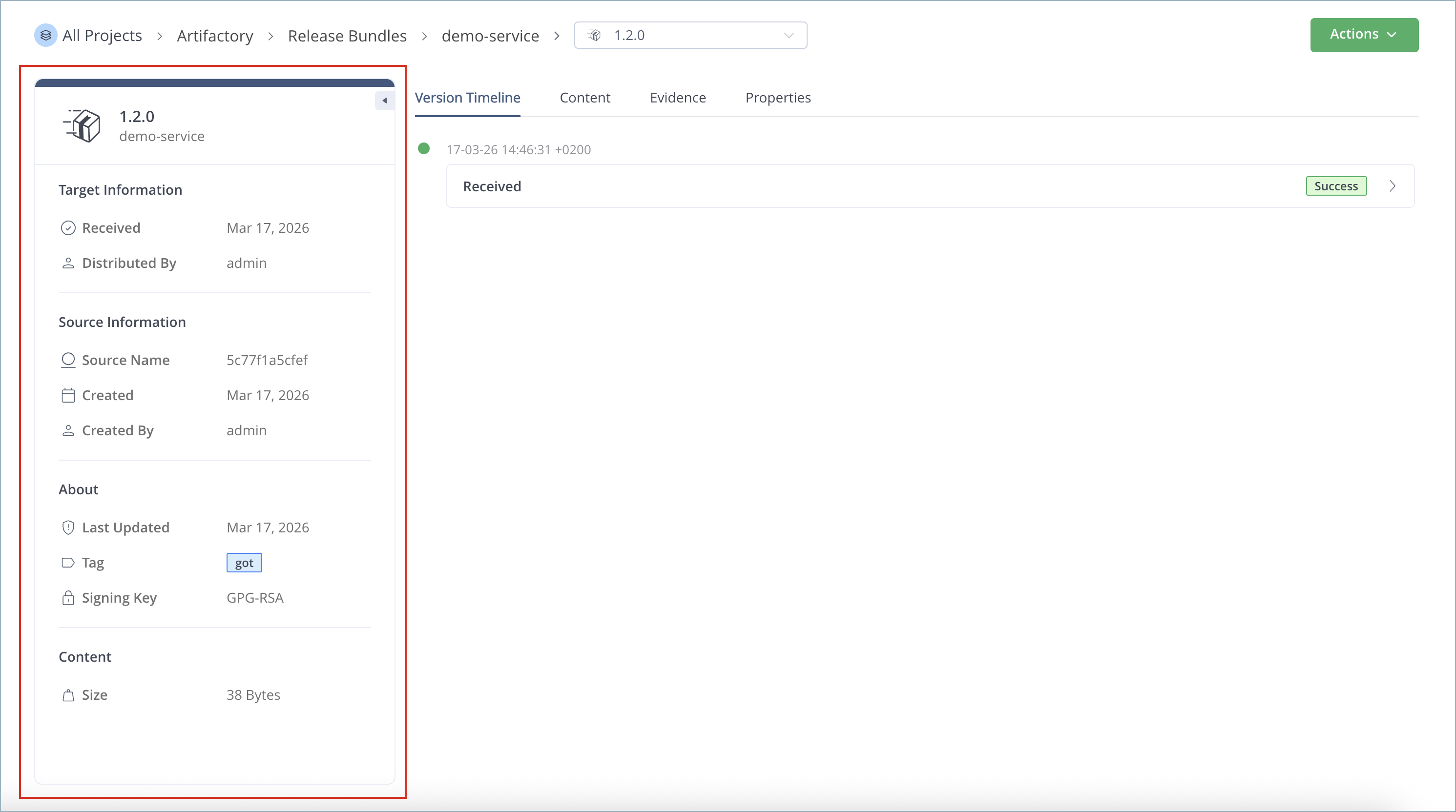
The following tabs contain additional information about the received Release Bundle v2 version:
| Tab | Description |
|---|---|
| Version Timeline | Contains a history of actions on this Edge node related to this version. For more information, see Use the Release Bundle Version Timeline. |
| Content | Contains the list of releasables (packages and standalone artifacts) included in this version. For more information, see View the Contents of a Release Bundle v2 Version in the Platform UI. |
| Evidence | Contains a list of associated evidence that was distributed to this Edge node along with the version. Click an evidence item to view its details. For more information, see View the Release Bundle Version Evidence Table. |
| Properties | Contains the list of properties defined for this version. For more information, see Add Properties to a Release Bundle v2 Version. |
Click the Actions button to perform the following actions on a received Release Bundle v2 version:
Download All Evidence for the Received Release Bundle v2 Version
You can download all evidence associated with the received Release Bundle v2 version in JSON format.
To download all evidence associated with the received Release Bundle v2 version:
- In the Platform module, select Artifactory Edge > Release Bundles.
- Click the name of the received Release Bundle to view the Versions page.
- Click the name of the relevant Release Bundle version. The Version Timeline tab is displayed by default.
- From the Actions menu, select Download all evidence. A single JSON file containing all internal and external evidence related to the Release Bundle version is downloaded to your local system. The name of the file is
[Release_Bundle_name]-[version]-Evidence.json.
Note
If the evidence associated with the Release Bundle version was not distributed with it, a message appears in the Evidence tab directing you to the source Artifactory to view it there.
Delete a Received Release Bundle v2 Version
Deleting a Release Bundle v2 version removes all the artifacts and evidence associated with the version.
To delete a received Release Bundle v2 version:
-
In the Platform module, select Artifactory Edge > Release Bundles.
-
Click the name of the received Release Bundle to view the Versions page.
-
Click the name of the relevant Release Bundle version. The Version Timeline tab is displayed by default.
-
From the Actions menu, select Delete Release Bundle version.

-
In the confirmation window, click Delete. The Release Bundle version and its artifacts are deleted. Related evidence is also deleted.
View Received Release Bundle v2 Versions on an Artifactory Instance
When distributing to another Artifactory instance (Enterprise+), the received Release Bundle versions are included in the same table as the Release Bundles created on that instance. For more information, see View Release Bundle v2 Versions.
Frequently Asked Questions
This section provides answers to frequently asked questions about viewing received Release Bundle v2 versions.
FAQs
Q: How do I view received Release Bundle v2 versions on an Edge node?
A: In the Platform module, select Artifactory Edge > Release Bundles, then drill down into a Release Bundle and version. See View Received Release Bundle v2 Versions on an Edge Node.
Q: What tabs are available for a received Release Bundle v2 version on Edge?
A: The version page includes Version Timeline, Content, Evidence, and Properties tabs. See the tabs table in View Received Release Bundle v2 Versions on an Edge Node.
Q: How do I download all evidence for a received Release Bundle v2 version?
A: Open the version Version Timeline tab, click Actions, and select Download all evidence. See Download All Evidence for the Received Release Bundle v2 Version.
Q: How do I delete a received Release Bundle v2 version?
A: Open the version Version Timeline tab, click Actions, and select Delete Release Bundle version. Confirm in the dialog. See Delete a Received Release Bundle v2 Version.
Q: Where are received Release Bundle v2 versions shown on an Artifactory instance?
A: On Enterprise+ targets, received versions appear in the same Release Bundles table as locally created versions. See View Received Release Bundle v2 Versions on an Artifactory Instance.
Related Topics
Updated about 1 month ago