

Delete Lifecycle Policy
If a policy is no longer needed, you can delete it from the Lifecycle Policies list. Once deleted, the policy is permanently removed from the list, and AppTrust will no longer enforce it on future evaluations at a lifecycle gate.
Prerequisite:
- Project Administrator or higher permissions and a role that includes either the Delete AppTrust Policy or the Manage AppTrust Policy action
To delete a lifecycle policy:
- In the JFrog Platform, go to AppTrust > Lifecycle Policies.
- Locate the policy you want to delete.
- Click Delete in the Action column.
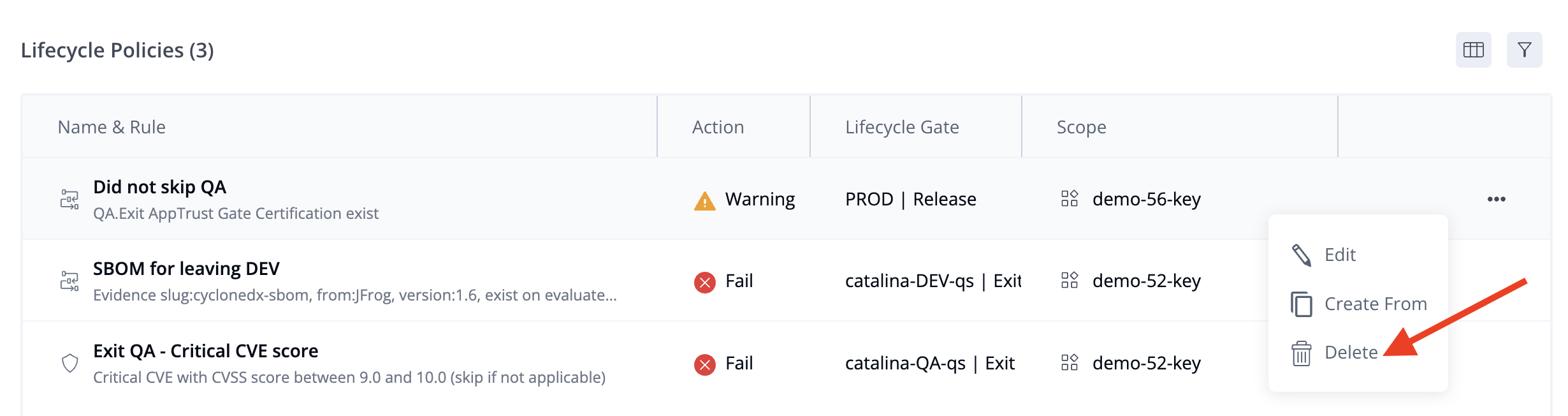
- Confirm the deletion when prompted.
Updated 3 months ago
Did this page help you?