

VCS Repositories
The JFrog Artifactory integration with VCS allows you to manage binaries in Artifactory. VCS is an open-source platform that enables you to automate IT processes, including provisioning, application deployment, orchestration, and other related tasks. For more information, see VCS documentation.
As a Binary Repository Manager, Artifactory completes the picture by providing an easy, safe, and secure way to consume binaries that are derived from source code, and Artifactory’s VCS repositories are specifically designed to proxy and cache these binaries (such as tarballs) from a Git provider.
Using VCS with Artifactory provides the following benefits:
- The ability to list all the tags and branches of any VCS repository.
- Access to remote VCS repositories, including cloud providers like GitHub (https://github.com) and Bitbucket (https://bitbucket.org) , and self-hosted solutions like GitHub Enterprise Server and Bitbucket Server, through Remote Repositories, which provide the usual proxy and caching functionality.
- On-demand local caching of tags and branches for later use in case of network instability or hosted VCS service downtime.
- The ability to assign access privileges according to projects or development teams.
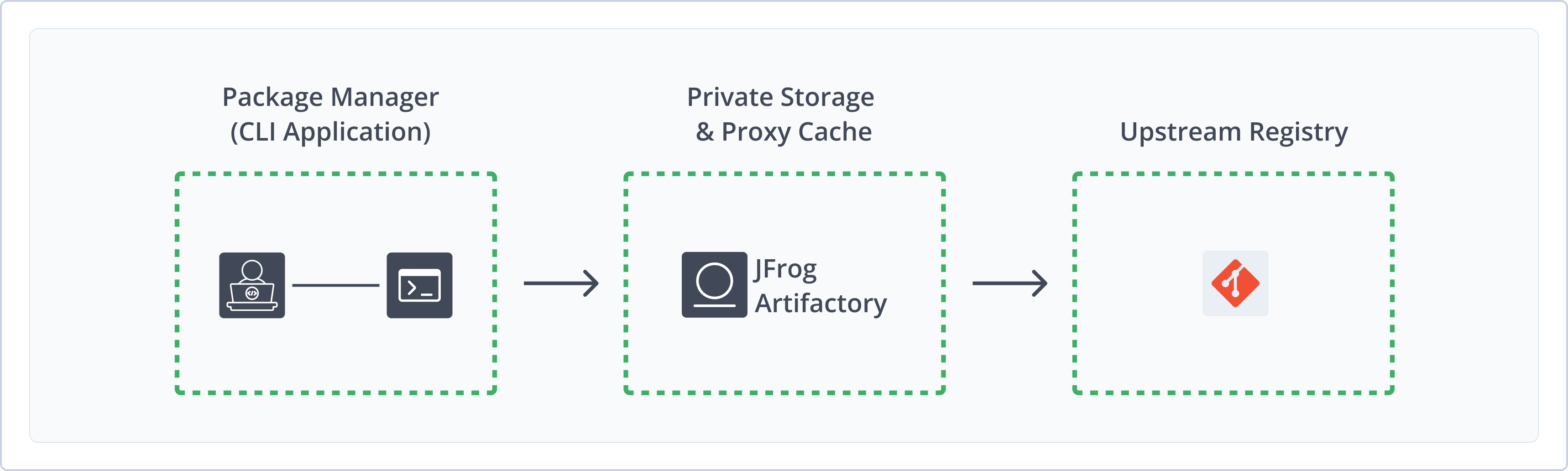
Get Started with VCS
To get started working with VCS, complete the following main steps:
Note
For VCS packages, Artifactory supports remote repositories only.
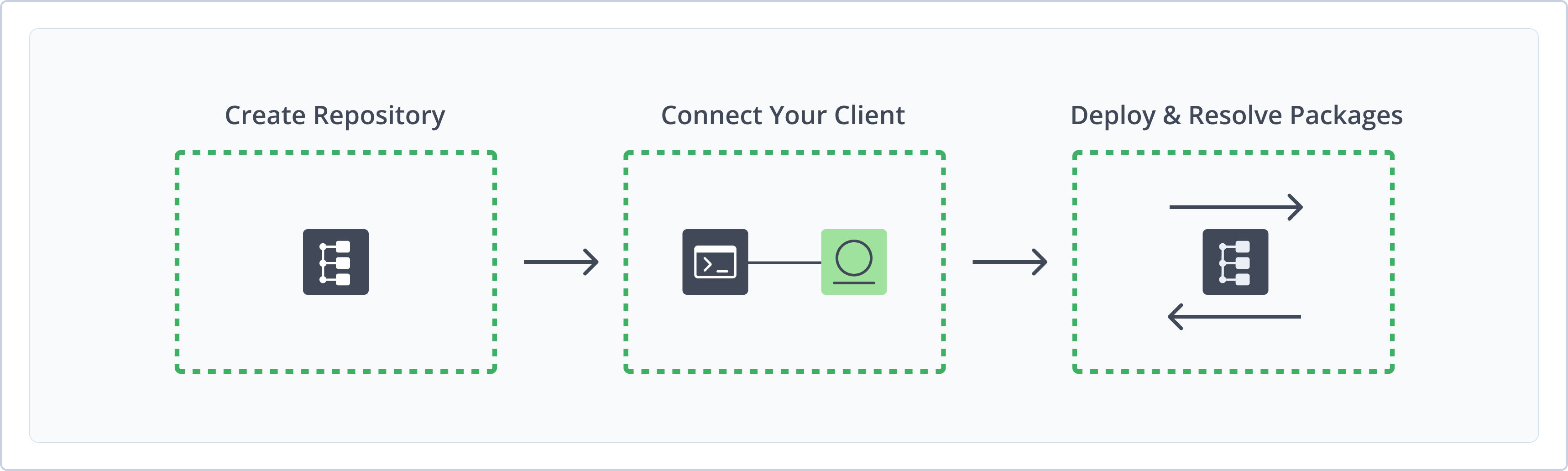
Create a VCS Repository
This topic describes how to create a VCS Repository. This is required before publishing and installing VCS packages. Artifactory supports the following repository types for VCS packages:
- Remote repositories: Enable you to download from any remote location, including external package registries or other Artifactory instances
Note
Artifactory does not support local or virtual repositories for VCS.
For more information on JFrog repositories, see Repository Management.
Prerequisite:
- You need to create a remote repository which serves as a caching proxy for github.com. If necessary, you can do the same for bitbucket.org or any other remote git repository that you need.
- You need Admin or Project Admin permissions to create a VCS repository. If you don't have Admin permissions, the option will not be available.
Artifacts (such as tar.gz files) requested from a remote repository are cached on demand. You can remove downloaded artifacts from the remote repository cache. You can not manually deploy artifacts to a remote repository.
To create a VCS repository:
-
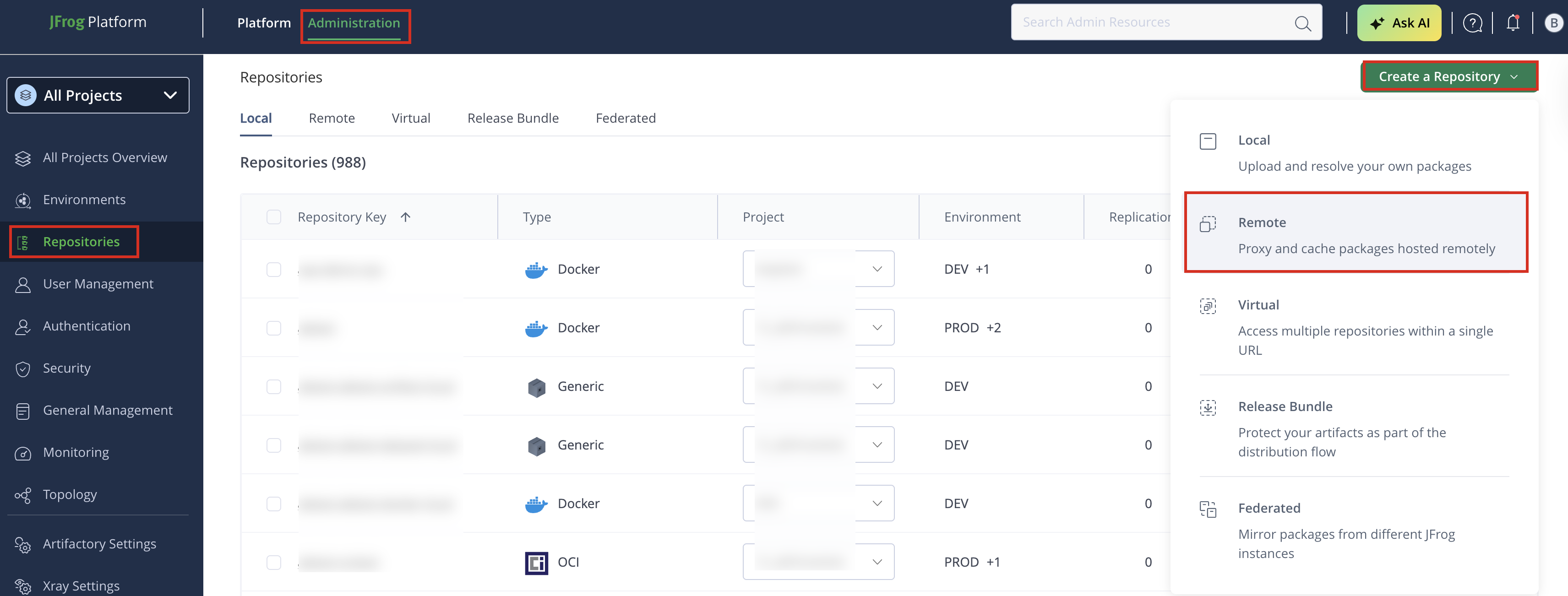
In the Administration tab, click Repositories > Create a Repository and from the dropdown list select Remote. The Select Package Type screen appears.
-
In the Select Package Type screen, select VCS.
-
Set the Repository Key, and specify the URL to be
https://github.com(or your GitHub Enterprise URL endpoint) as displayed below: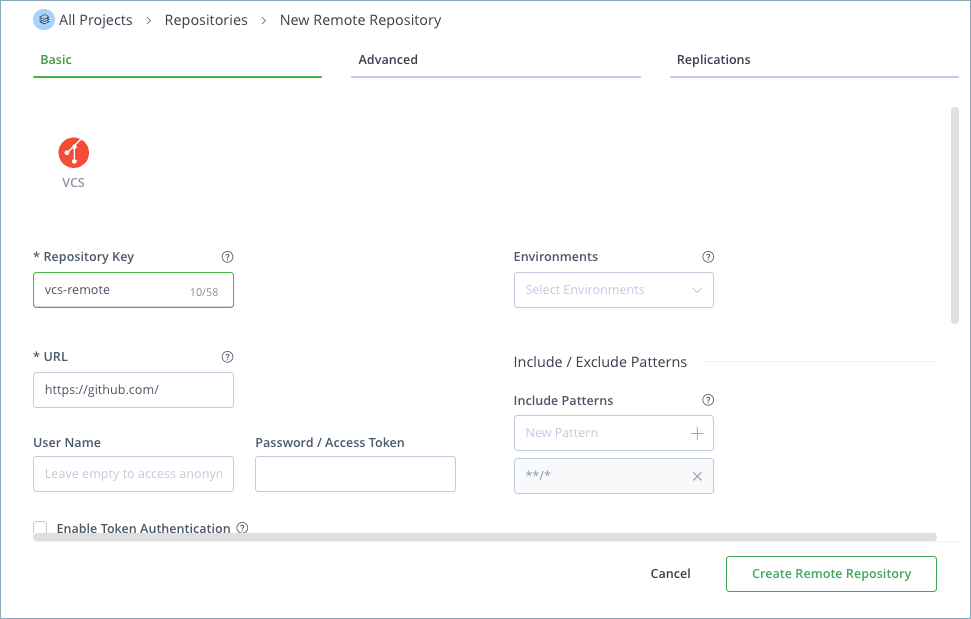
-
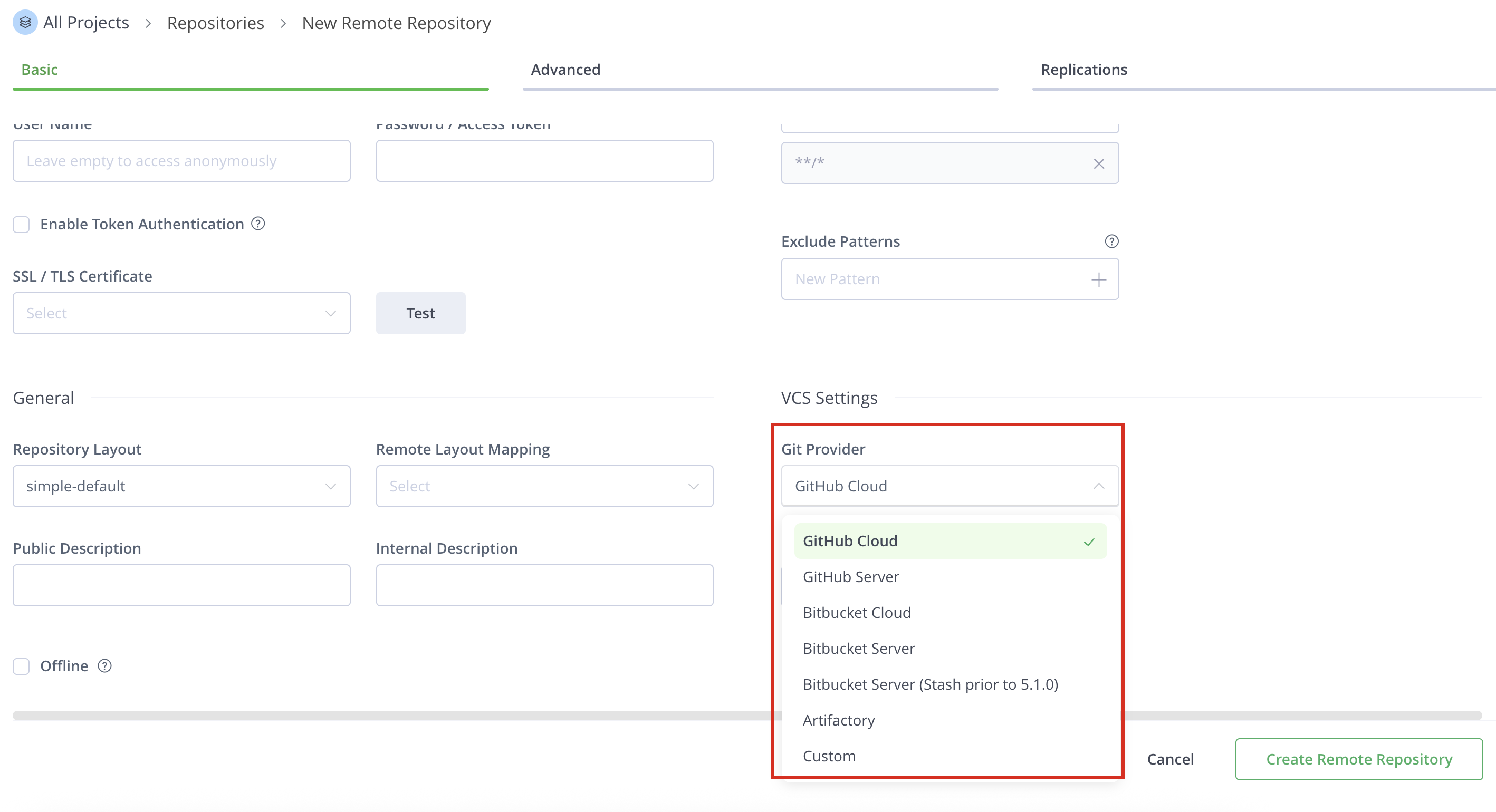
Scroll down to VCS Settings and select one of the following settings for the Git Provider:
-
GitHub Cloud: For repositories hosted on
https://github.com.Example:
https://github.com/myorg/myrepo.git -
GitHub Server: For repositories hosted on a private GitHub Enterprise Server.
Example:
https://git.mycompany.com/myorg/myrepo.git -
Bitbucket Cloud: For repositories hosted on
https://bitbucket.org.Example:
https://bitbucket.org/myorg/myrepo.git -
Bitbucket Server: For repositories hosted on a self-managed Bitbucket Server or Bitbucket Data Center.
Example:
https://bitbucket.mycompany.com/scm/myproj/myrepo.git -
Bitbucket Server (Stash prior to 5.1.0): For Atlassian Stash installations (Bitbucket prior to v5.1).
Example:
https://stash.mycompany.com/scm/myproj/myrepo.git -
Artifactory: For remote repositories hosted on another JFrog Artifactory instance.
Example:
https://artifactory.mycompany.com/artifactory/my-repo -
Custom: For VCS providers not listed. Provide the URL and credentials manually.
-
Note
The VCS repository feature, including the Custom provider, currently only supports a two-level path structure (e.g.,
organization/repository). Nested repository paths common in GitLab (e.g.,group/subgroup/repository) are not supported.
- Click Create Remote Repository.
Configure a VCS Repository Layout
A VCS repository requires an appropriate repository layout to support a more hierarchical layout of the cached items.
To use a hierarchical layout for your repository, you can either use the built-in vcs-default layout that comes with Artifactory out-of-the-box, or define a Custom Layout. This will ensure that different maintenance features like Version Cleanup will work correctly.
Integration Benefits: JFrog Artifactory and Git
Repository layout is final
When you create a remote repository, you cannot change its layout. We recommend you define the layout before creating the repository.
Built-in Custom Layout: vcs-default
Artifactory's built-in default layout for VCS repositories (vcs-default) can work with both GitHub and Bitbucket.
Below is an example of a Custom Layout named vcs-default:
You can configure the Custom Layout, or simply copy the code snippet below into the relevant section in the Administration module**,** under Artifactory Settings | Repositories Layouts.
<repoLayout>
        <name>vcs-default</name>
    <artifactPathPattern>[orgPath]/[module]/[refs<tags|branches>]/[baseRev]/[module]-[baseRev](-[fileItegRev]) (-[classifier]).[ext]</artifactPathPattern>
    <distinctiveDescriptorPathPattern>false</distinctiveDescriptorPathPattern>
    <folderIntegrationRevisionRegExp>.*</folderIntegrationRevisionRegExp>
    <fileIntegrationRevisionRegExp>[a-zA-Z0-9]{40}</fileIntegrationRevisionRegExp>
</repoLayout>
If a repository package layout is in a corresponding folder hierarchy, the Artifactory Version Cleanup tool correctly detects previously installed versions.
Searching for artifact versions using the REST API works properly.
$ curl "http://localhost:8081/artifactory/api/search/versions?g=jquery&a=jquery&repos=github-cache"
{
        "results" : [ {
                "version" : "2.0.3",
                "integration" : false
        }, {
                "version" : "master-062b5267d0a3538f1f6dee3df16da536b73061ea",
                "integration" : true
        } ]
}
Resolve VCS Packages
You can resolve VCS packages from Remote VCS Repositories specified as supporting VCS packages.
Note
Applicable for Remote repositories.
List All Tags
Use the following command to list all tags:
curl -L -u <USERNAME>:<PASSWORD> -XGET https://[JFrogPlatformURL]/artifactory/api/vcs/tags/<REPOSITORY>/<USER_ORG>/<REPO>Example:
curl -L -u john:mypassword123 -XGET https://company.jfrog.io/artifactory/api/vcs/tags/john-vcs-remote/jfrog/jfrog-cliList All Branches
Use the following command to list all branches:
curl -L -u <USERNAME>:<PASSWORD> -XGET https://[JFrogPlatformURL]/artifactory/api/vcs/branches/<REPOSITORY>/<USER_ORG>/<REPO>Example:
curl -L -u john:mypassword123 -XGET https://company.jfrog.io/artifactory/api/vcs/branches/john-vcs-remote/jfrog/jfrog-cliDownload a Tag
Use the command below to download a tag. You can specify if the package will be downloaded as a tar.gz or a zip; default is tar.gz.
curl -L -u <USERNAME>:<PASSWORD> -XGET https://[JFrogPlatformURL]/artifactory/api/vcs/downloadTag/<REPOSITORY>/<USER_ORG>/<REPO>/<TAG_NAME>?ext=<tar.gz|zip>Example (tar.gz):
curl -L -u john:mypassword123 -XGET https://company.jfrog.io/artifactory/api/vcs/downloadTag/john-vcs-remote/jfrog/jfrog-cli/v3.0.0?ext=tar.gzDownload a File Within a Tag
Use the following command to download a file within a tag as a zip:
curl -L -u <USERNAME>:<PASSWORD> -XGET https://[JFrogPlatformURL]/artifactory/api/vcs/downloadTagFile/<REPOSITORY>/<USER_ORG>/<REPO>/<TAG_NAME>!<PATH_TO_FILE>?ext=zipExample:
curl -L -u john:mypassword123 -XGET https://company.jfrog.io/artifactory/api/vcs/downloadTagFile/john-vcs-remote/jfrog/jfrog-cli/v3.0.0!README.md?ext=zipDownload a Branch
Use the command below to download a branch. You can specify a tar.gz or a zip by adding a parameter in the URL; default is tar.gz. (Downloading can be executed conditionally according to properties by specifying the properties query param. In this case only cached artifacts are searched.)
curl -L -u <USERNAME>:<PASSWORD> -XGET https://[JFrogPlatformURL]/artifactory/api/vcs/downloadBranch/<REPOSITORY>/<USER_ORG>/<REPO>/<BRANCH_NAME>?ext=<tar.gz|zip>[&properties=key=value]Example (tar.gz):
curl -L -u john:mypassword123 -XGET https://company.jfrog.io/artifactory/api/vcs/downloadBranch/john-vcs-remote/jfrog/jfrog-cli/main?ext=tar.gzDownload a File Within a Branch
Use the following command to download a file within a branch as a zip:
curl -L -u <USERNAME>:<PASSWORD> -XGET https://[JFrogPlatformURL]/artifactory/api/vcs/downloadBranchFile/<REPOSITORY>/<USER_ORG>/<REPO>/<BRANCH_NAME>!<PATH_TO_FILE>?ext=zipExample:
curl -L -u john:mypassword123 -XGET https://company.jfrog.io/artifactory/api/vcs/downloadBranchFile/john-vcs-remote/jfrog/jfrog-cli/main!README.md?ext=zipWhere:
<USERNAME>: Your Artifactory username (e.g., john).<PASSWORD>: Your Artifactory password or API key.[JFrogPlatformURL]: The URL of your JFrog Platform deployment (e.g., productdemo.jfrog.io).<REPOSITORY>: The VCS remote repository (e.g., john-vcs-remote).<USER_ORG>: The organization or namespace in your VCS provider (e.g., jfrog).<REPO>: The repository name (e.g., jfrog-cli).<TAG_NAME>: The tag to download (e.g., v3.0.0).<BRANCH_NAME>: The branch to download (e.g., main).<PATH_TO_FILE>: The path to a file inside a branch or tag (e.g., README.md).
Additional VCS Actions
The following additional actions are available with VCS repositories:
Use VCS To Proxy Git Providers
Artifactory can be configured to proxy Git repositories by creating a Generic remote repository and pointing it to the Git provider's URL. The configuration is handled by setting the remote repository's URL to the git provider's URL, such as https://github.com or a self-hosted Git server URL. Artifactory supports proxying the following Git providers, as displayed below:
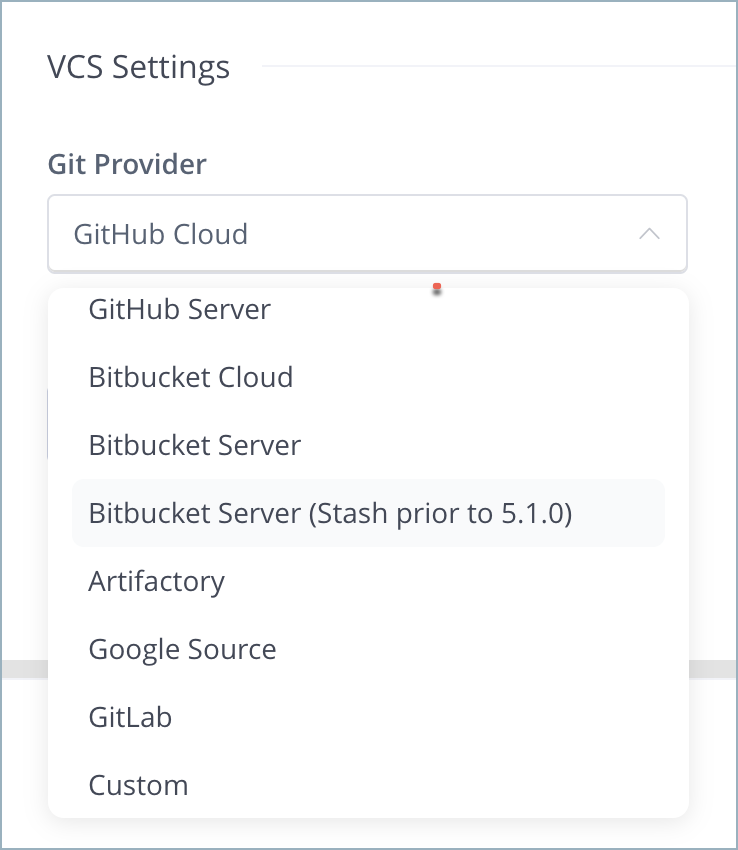
Use the custom provider if you have a Git repository that does not exist in the pre-defined list. In this case, you need to provide Artifactory with the download paths for your Git tarballs.
You do so by providing 4 placeholders:
| Placeholder | Description |
|---|---|
{0} | Identifies the username or organization name. |
{1} | Identifies the repository name. |
{2} | Identifies the branch or tag name. |
{3} | Identifies the file extension to download. |
This placeholder system is designed for a simple owner/repository path. It does not support additional path segments, meaning nested repository structures like GitLab's group/subgroup/repository are incompatible.
For example, GitHub exposes tarball downloads at: https://github.com/<user>/<repo>/archive/<tag/branch>.<extension>
Therefore, the custom download path configured for Artifactory should be {0}/{1}/archive/{2}.{3}
REST API Support for VCS
VCS repositories must be prefixed with api/vcs in the path
When accessing a VCS repository through Artifactory, the repository URL must be prefixed with api/vcs in the path.
For example, if you are using Artifactory standalone or as a local service, you would access your VCS repositories using the following URL:
https://[JFrogPlatformURL]/artifactory/api/vcs/<repository key>Or, if you are using Artifactory Cloud, the URL would be:
https://company.jfrog.io/artifactory/api/vcs/<repository key>
Artifactory exposes REST APIs that let you do the following with VCS repositories:
- Get VCS Tags API
- Get VCS Branches API
- Get VCS Refs API
- Download a VCS Tag API
- Download File within a VCS Tag API
- Download a VCS Branch API
- Download File within a VCS Branch API
- Download a VCS Release API
- Download a VCS Commit API
The following APIs should be used with VCS remote repositories that have subgroup repositories:
- Download a VCS Branch from a Subgroup Repository API
- Download a VCS Tag from a Subgroup Repository API
- Download a File in a VCS Branch in a Subgroup Repository API
- Download a File in a VCS Tag in a Subgroup Repository API
Access Private VCS Repositories
Artifactory also supports accessing private VCS repositories, such as a private GitHub or any self-hosted authenticated one.
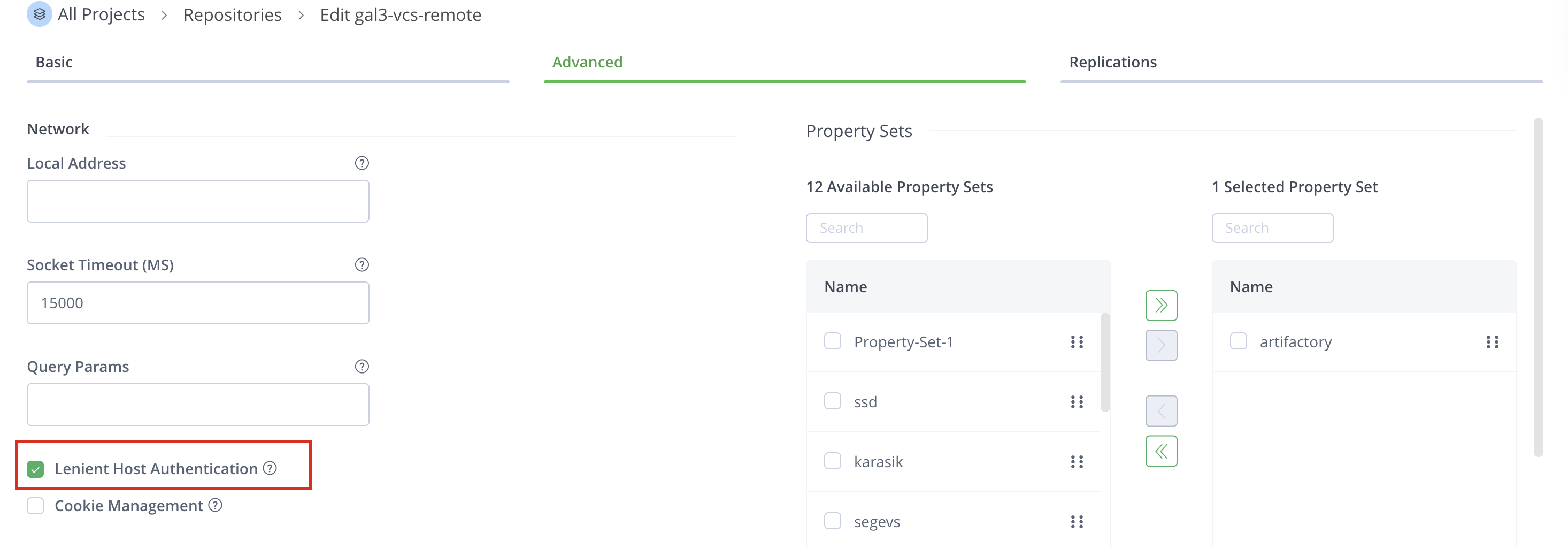
To do so, simply add your credentials under Advanced Settings of the remote repository configuration panel.
Credentials when redirected
Some git providers (GitHub included) redirect download requests to a CDN provider.
You will need your credentials to pass along with the redirected request. Simply check the Lenient Host Authentication , and the credentials will pass transparently on each redirected request.
Updated 4 months ago