

Smart Remote Repositories
Learn how Artifactory Smart Remote repositories proxy a repository on another instance.
A Smart Remote repository is a remote repository that proxies a local, remote, or Federated repository from another instance of Artifactory or an Edge node. In addition to the usual benefits of Remote Repositories, Smart Remote repositories offer additional benefits:
Reported Download Statistics
Artifactory maintains download statistics for repositories so you can evaluate if artifacts are still being used and manage your cleanup policies. When you proxy a repository in another instance of Artifactory and cache an artifact downloaded from the other instance, the distant Artifactory is not aware if users on your end continue to use the artifact (by downloading it from your local cache), and may end up cleaning up the original artifact. An Artifactory Smart Remote Repository lets you notify the distant instance whenever a cached artifact is downloaded, so it can update an internal counter for remote downloads.
Download statistics may vary between Artifactory instances
Downloads are reported through the proxy chain only from the time this option is set, so the actual download statistics reported for an artifact may differ between the local Artifactory instance and the remote Artifactory instance.
Synchronized Properties
When you proxy a repository in another instance of Artifactory and cache an artifact downloaded from it, you may not be aware of changes that may have been made to the original artifact’s properties if they are changed after you cache it. By synchronizing properties, any changes to artifact properties in the remote instance are propagated to your cached instance of the artifact.
Note
Docker Smart Remote repositories don't synchronize properties for pulls resolved by digest. A digest pull doesn't include a tag, so Artifactory can't identify a unique source manifest when multiple tag paths share the same digest with different properties.
Remote Repository Browsing
When List Remote Folder Items is checked for a repository, Artifactory lets you navigate the contents of the repository at the remote Artifactory instance, for all package types, even if the artifacts have not been cached in the repository defined in your instance of Artifactory. This enables you to browse remote files as if they were local without having to request a particular file. If the remote server discloses its files in an HTML index, Artifactory tries to list them.
Source Absence Detection
When viewing a cached artifact, Artifactory indicates if the original artifact in the remote instance has been deleted. This enables you to copy the artifact from your remote repository cache to a local repository to maintain access to it.
Note
When configuring a Smart Remote Repository, it is generally recommended that a local or remote Artifactory repository be used as an endpoint. A virtual repository is not recommended, as it might result in inconsistent behavior. However, a virtual repository must be used as an endpoint for Go Smart Remote repositories.
Configure a Smart Remote Repository
You create a Smart Remote repository by setting the repository URL to a repository in another instance of Artifactory. Many package types require you to add the prefix api/<package_type> to the URL.
The following procedures describe additional Smart Remote setup:
- Identify a Smart Remote Repository Using the REST API
- Create a Go Smart Remote Repository
- Create a NuGet Smart Remote Repository
- Create a PyPI Smart Remote Repository
- Create a Terraform Smart Remote Repository
To create a Smart Remote repository:
-
Set the repository URL to point to a repository in another instance of Artifactory. For many package types, add the prefix
api/<package_type>to the URL.For example:
http://<JFrog URL>/artifactory/api/<package type>/<repository key>
The prefix is required for the following repository types:
| Type | Prefix |
|---|---|
| AI Editor Extensions | api/aieditorextensions |
| Ansible | api/ansible |
| Bower | api/bower |
| Cargo | api/cargo |
| Chef | api/chef |
| CocoaPods | api/pods |
| Composer | api/composer |
| Conan | api/conan |
| Conda | api/conda |
| Docker | api/docker |
| Gems | api/gems |
| Go |
For more information, see Configure a Go Smart Remote Repository. |
| Helm | api/helm |
| Helm OCI | api/oci |
| HuggingFace | api/huggingfaceml |
| Machine Learning | api/machinelearning |
| NIM Model | api/nimmodel |
| npm | api/npm |
| NuGet |
For more information, see Configure a NuGet Smart Remote Repository. |
| OCI | api/oci |
| Pub | api/pub |
| Puppet | api/puppet |
| PyPI | When pointing to a local repository: When pointing to a remote repository: no prefix required For more information, see Create a PyPI Smart Remote Repository. |
| Swift | api/swift |
| Terraform |
Required for the Registry URL and Providers URL only. For more information, see Create a Terraform Smart Remote Repository. |
| VCS | api/vcs |
All other package types do not require the api/<package_type> prefix.
After you finish entering the URL and move to another field, Artifactory detects automatically that the remote URL is on another instance of Artifactory and displays a banner on the URL field.
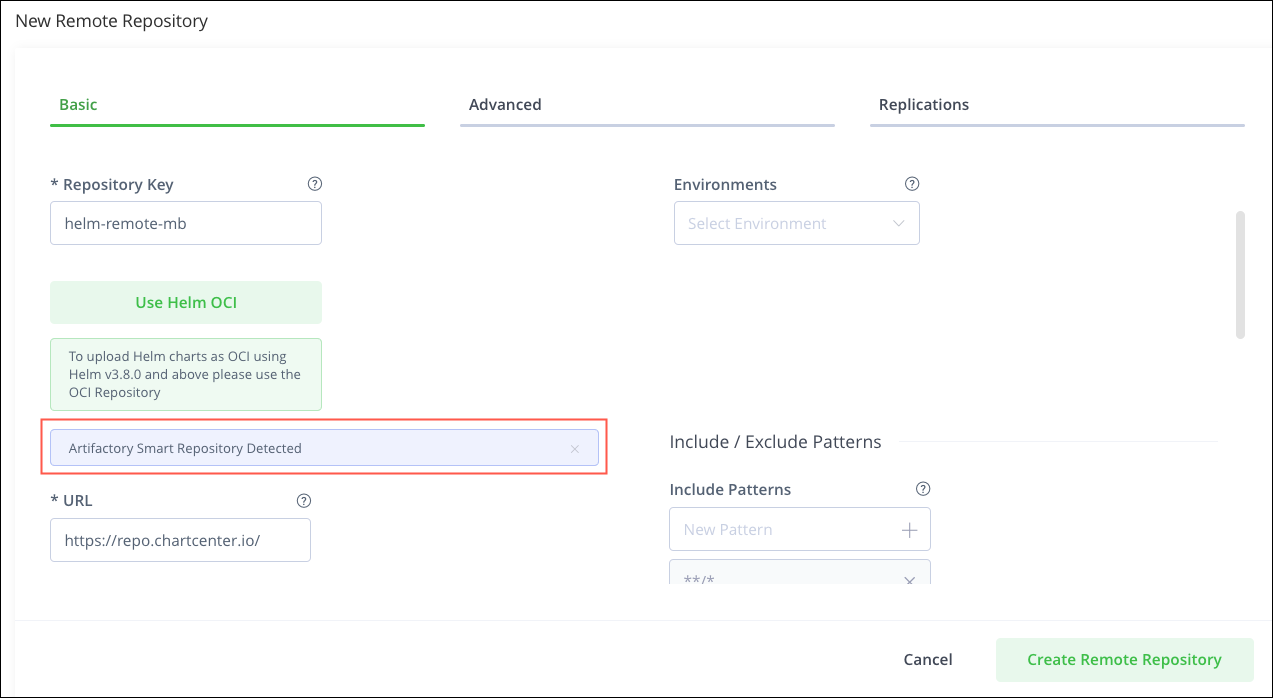
The Basic tab of the New Remote Repository screen contains additional fields where you can configure the behavior of your Smart Remote repository.
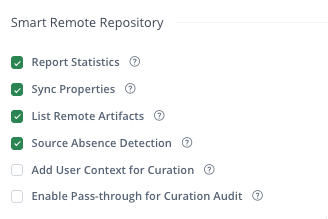
| Field | Description |
|---|---|
| Report Statistics | If set, Artifactory notifies the remote instance whenever an artifact in the Smart Remote Repository is downloaded locally so that it can update its download counter. If this option is not set, there may be a discrepancy between the number of artifacts reported to have been downloaded in the local and remote Artifactory instances. |
| Sync Properties | When enabled, Artifactory updates properties for cached artifacts after the corresponding properties change at the remote Artifactory endpoint. Artifactory syncs the properties when you download the artifact from the remote repository to the cache of the local Artifactory endpoint after the Metadata Retrieval Cache Period has passed. Metadata Retrieval Cache Period has a default value of 7200 seconds (2 hours). To reduce the time it takes to synchronize properties, set the Metadata Retrieval Cache Period to a lower value. A lower value causes more system traffic, so consider the traffic impact before changing this setting. |
| List Remote Artifacts | If set, enables you to navigate a remote repository directly from the Artifactory UI even if those artifacts haven't been downloaded or cached locally. For more information, see Remote Browsing. |
| Source Absence Detection | If set, Artifactory displays an indication on cached items if they have been deleted from the corresponding repository in the remote Artifactory instance.
|
| Add User Context for Curation | If enabled, Artifactory includes the user's context in requests sent to the configured remote repository. Curation uses the user's context for traceability. This context includes the user's email address as well as repository information, such as the repository ID. Ensure this is compliant with your regulatory and security requirements. Relevant for users with JFrog Curation. |
| Enable Pass-through for Curation Audit | To enable pass-through, first enable Add User Context for Curation. This allows the Relevant for users with JFrog Curation. |
You can modify these settings at any time from the Edit Repository screen.
Identify a Smart Remote Repository Using the REST API
For a repository to be identified as a Smart Remote repository, go to the Repository Configuration JSON and under contentSynchronisation set the enabled flag to true.
Smart Remote Repository With a JFrog Bridge
A JFrog Bridge is a persistent TCP data connection between a SaaS site and a Self-managed site. Communication using the Bridge can be authenticated only with a Java Web Token (JWT). This means that a Smart Remote Repository cannot access a virtual repository on a Bridged site using password-based authentication or the Enable Token Authentication option (which uses other JFrog tokens).
Create a Go Smart Remote Repository
Go package resolution is supported exclusively through virtual repositories. Therefore, the configuration of a Smart Remote repository for Go differs from other package types.
To create a Go Smart Remote repository:
- On the first Artifactory instance (
JFROG_INSTANCE_1), do the following:-
In the Administration module, go to Repositories > Create a Repository > Remote.
-
Choose Go as the package type.
-
In the Basic tab, verify that the URL is set to the default (https://proxy.golang.org).
-
Enter additional basic and advanced settings as required, and then click Create Remote Repository.
You now have a virtual repository that points to the official Go registry.
-
- On the first Artifactory instance, create a virtual repository that aggregates the remote repository you just created. For more information, see Configure a Virtual Repository.
- On the second Artifactory instance, create a Smart Remote repository that points to the virtual repository on the first Artifactory instance. The URL will look like this:
https://<JFROG_INSTANCE_1>/artifactory/api/go/<JFROG_INSTANCE_1_VIRTUAL_REPO> - Enter your username and password for
JFROG_INSTANCE_1. Alternatively, enter a valid access token issued by JFROG_INSTANCE_1. - Click the Test button to verify the connection to the first Artifactory instance.
- To configure your Go client with the newly created Smart Remote repository, see Connect Your Go Client to Artifactory.
Create a NuGet Smart Remote Repository
The procedure for creating a Smart Remote repository for NuGet involves additional configuration, as described in the following steps.
To create a NuGet Smart Remote repository:
-
On the first Artifactory instance (
JFROG_INSTANCE_1), do the following:- In the Administration module, go to Repositories > Create a Repository > Remote.
- Choose NuGet as the package type.
- In the Basic tab, enter the URL of the desired remote NuGet registry (default: https://www.nuget.org).
- Enter additional basic and advanced settings as required, and then click Create Remote Repository. You now have a remote repository that points to the remote NuGet registry.
-
On the second Artifactory instance, create a Smart Remote repository that points to the remote repository on the first Artifactory instance. The URL looks like this:
https://<JFROG_INSTANCE_1>/artifactory/api/nuget/<JFROG_INSTANCE_1_REMOTE_REPO> -
Enter your username and password for
JFROG_INSTANCE_1. Alternatively, enter a valid access token issued byJFROG_INSTANCE_1. -
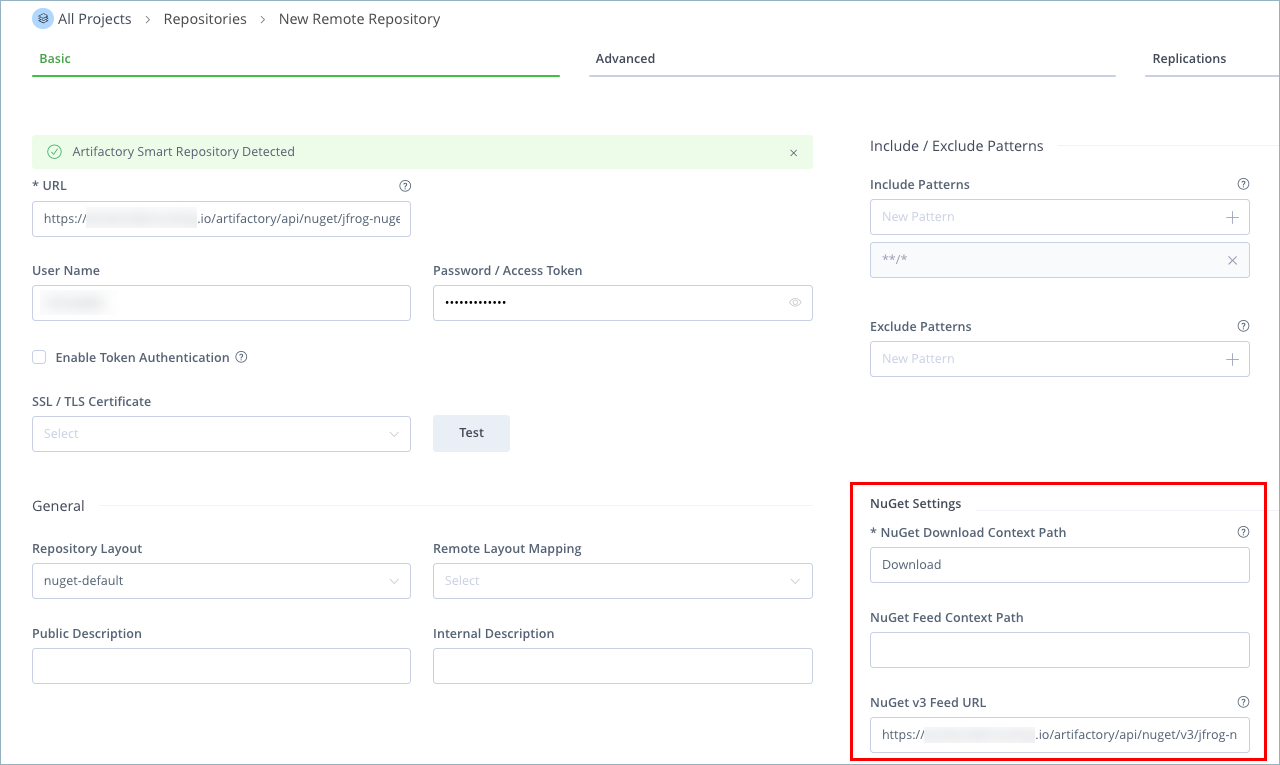
In the Basic tab of the second Artifactory instance, configure the following settings:
- NuGet Download Context Path: Download
- NuGet Feed Context Path: Leave blank
- NuGet v3 Feed URL (see note below):
https://<JFROG_INSTANCE_1>/artifactory/api/nuget/v3/<JFROG_INSTANCE_1_REMOTE_REPO>/
-
Click the Test button to verify the connection to
JFROG_INSTANCE_1. -
To configure your NuGet client with the newly created Smart Remote repository, see Connect Your NuGet Client to Artifactory.
Note:
The Feed URL is used to download the index.json/feed.json file, which serves as the service index for NuGet packages. Make sure to point this Feed URL to your Smart Remote repository (
JFROG_INSTANCE_1)so that it serves as your service index and feed. Without this, the Smart Remote repository tries to go directly to nuget.org for feed resolution, which preventsJFROG_INSTANCE_1from caching artifacts correctly and may be blocked by network restrictions.
Create a PyPI Smart Remote Repository
The procedure for creating a Smart Remote repository for PyPI involves an additional step, as described in the following steps.
To create a PyPI Smart Remote repository:
-
On the first Artifactory instance (
JFROG_INSTANCE_1), do the following:-
In the Administration module, go to Repositories > Create a Repository > Remote.
-
Choose PyPI as the package type.
-
In the Basic tab, enter a repository key. The following default settings for PyPI are predefined:
- The URL is set to https://files.pythonhosted.org.
- The Registry URL is set to https://pypi.org.
-
Enter additional basic and advanced settings as required, and then click Create Remote Repository.
You now have a remote repository that points to the official PyPI upstream registry.
-
-
On the second Artifactory instance, set up a Smart Remote repository that proxies the first repository:
-
Create a remote PyPI repository, as described in step 1.
-
Enter a repository key and enter additional settings as required.
-
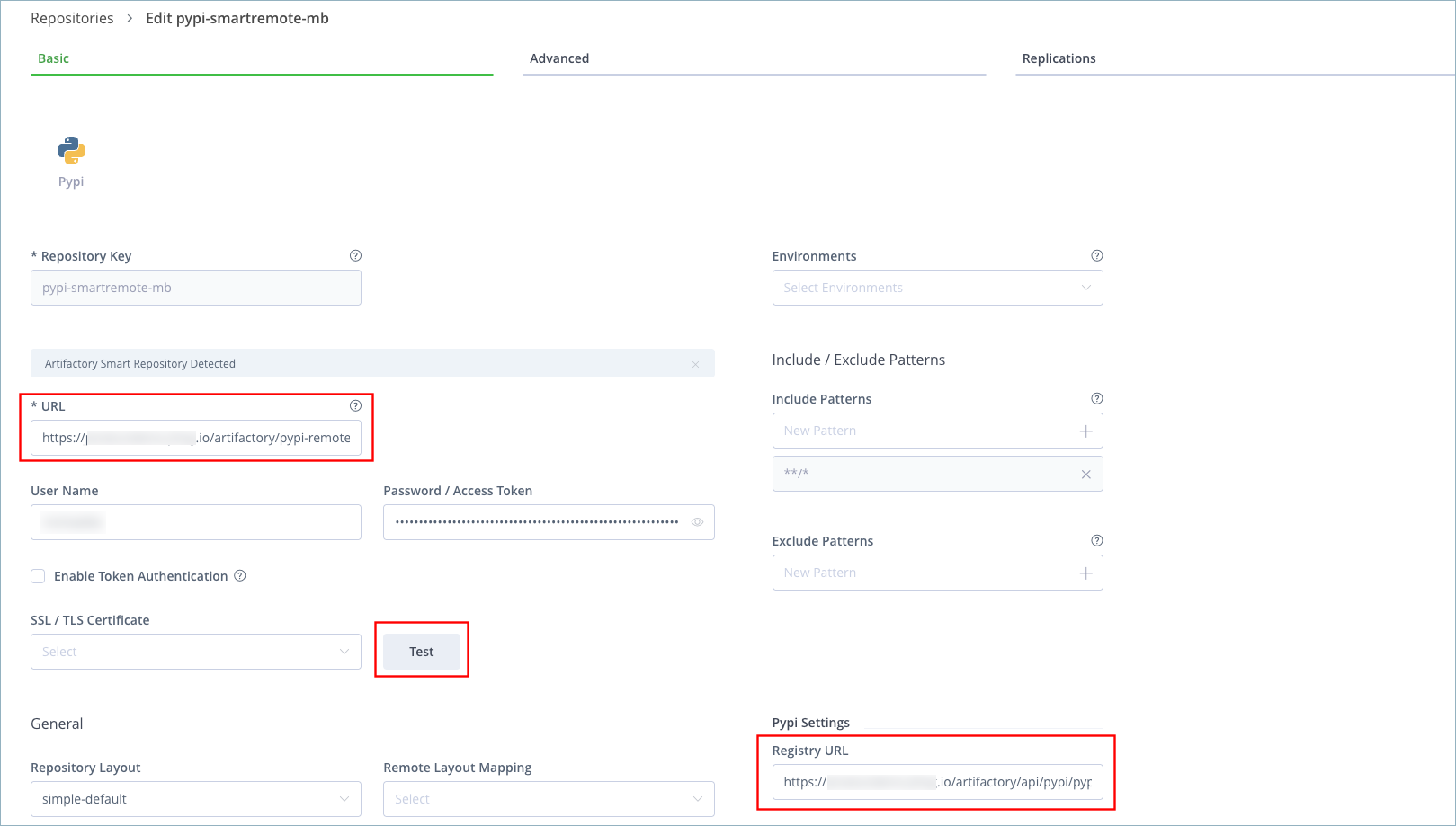
Modify the URL and Registry URL fields as follows:
- URL:
https://<JFROG_INSTANCE_1_URL>/artifactory/<REPO_KEY_IN_JFROG_INSTANCE_1> - Registry URL:
https://<JFROG_INSTANCE_1_URL>/artifactory/api/pypi/<REPO_KEY_IN_JFROG_INSTANCE_1>
In both of these URLs,
<REPO_KEY_IN_JFROG_INSTANCE_1>is the name of the PyPI remote repository you created on the first Artifactory instance<JFROG_INSTANCE_1>.Note
To resolve PyTorch packages through a smart remote repository that points to
download-r2.pytorch.org, the Remote URL and the Registry URL must both include the/api/pypi/segment. For more information, see How to configure PyTorch remote repo and resolve packages from Artifactory, including Smart Remote Configuration. - URL:
-
-
Enter your username and password for
JFROG_INSTANCE_1. Alternatively, enter a valid access token issued byJFROG_INSTANCE_1. -
Click the Test button to verify the connection to the first Artifactory instance.
-
To configure your PyPI client with the newly created Smart Remote repository, see Connect Your PyPI Client to Artifactory.
Create a Terraform Smart Remote Repository
The procedure for creating a Smart Remote repository for Terraform involves an additional step, as described in the following steps.
To create a Terraform Smart Remote repository:
-
On the first Artifactory instance (
JFROG_INSTANCE_1), do the following:-
In the Administration module, go to Repositories > Create a Repository > Remote.
-
Choose Terraform/OpenTofu as the package type.
-
Configure the repository, as described in Remote Terraform Repository, and then click Create Remote Repository.
You now have a remote repository that points to your Terraform upstream registry.
-
-
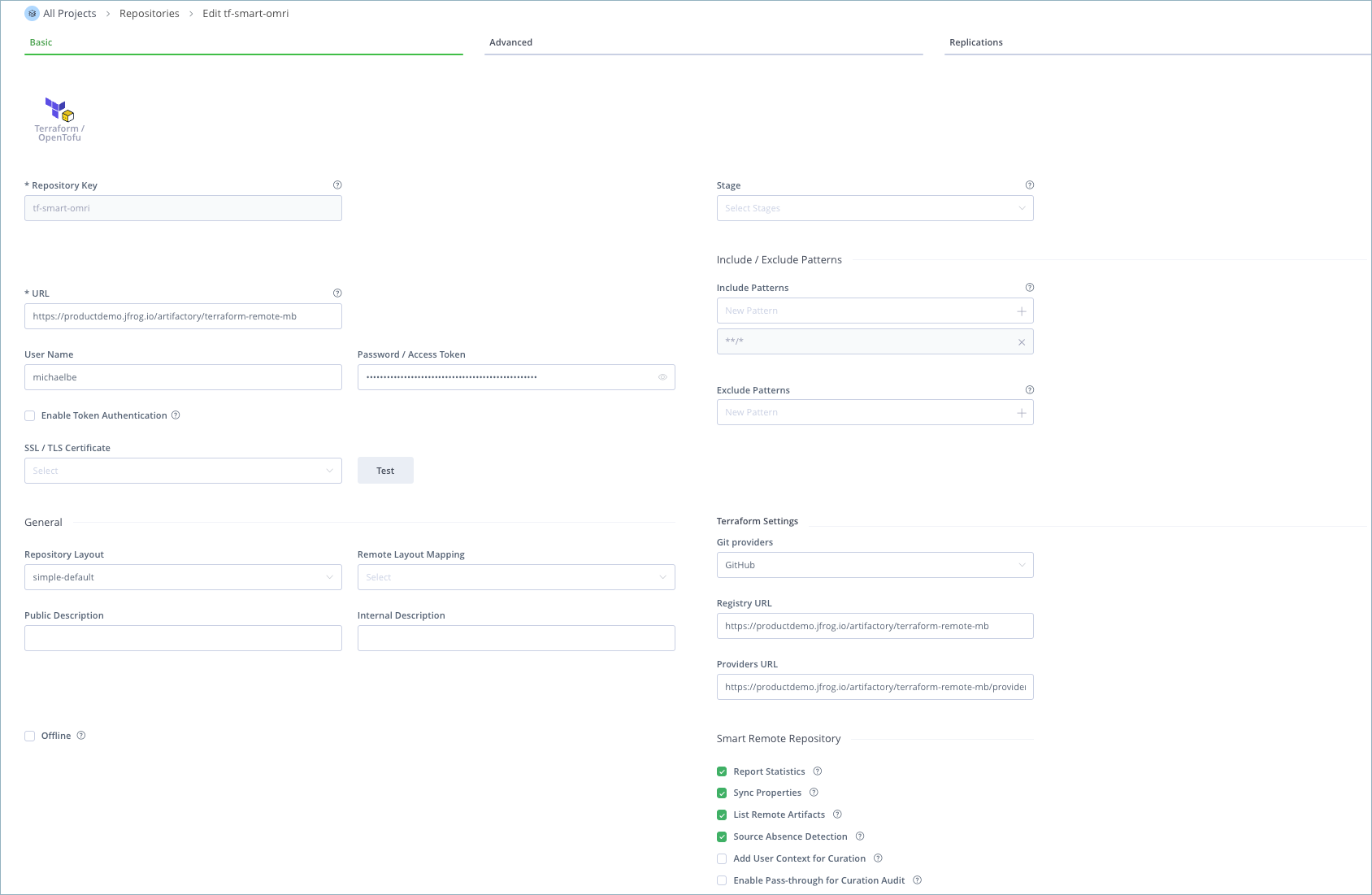
On the second Artifactory instance, set up a Smart Remote repository that proxies the first repository:
- Create a remote Terraform repository, as described in step 1.
- Enter a repository key and enter additional settings as required.
- Modify the URL, Registry URL, and Providers URL fields as follows:
- URL:
https://<JFROG_INSTANCE_1_URL>/artifactory/<REPO_KEY_IN_JFROG_INSTANCE_1> - Registry URL:
https://<JFROG_INSTANCE_1_URL>/artifactory/api/terraform/<REPO_KEY_IN_JFROG_INSTANCE_1> - Providers URL:
https://<JFROG_INSTANCE_1_URL>/artifactory/api/terraform/<REPO_KEY_IN_JFROG_INSTANCE_1>/providers
- URL:
Note
<REPO_KEY_IN_JFROG_INSTANCE_1>refers to the name of the Terraform remote repository you created on the first Artifactory instance (<JFROG_INSTANCE_1>) in step 1. -
Enter your username and password for
JFROG_INSTANCE_1. Alternatively, enter a valid access token issued by JFROG_INSTANCE_1. -
Click the Test button to verify the connection to the first Artifactory instance.
-
To configure your Terraform client with the newly created Smart Remote repository, see Connect Your Terraform/OpenTofu Client to Artifactory.
Frequently Asked Questions
This section provides answers to frequently asked questions.
FAQs
Q: How do I create a Smart Remote repository in Artifactory?
A: Create a remote repository and set its URL to a repository on another Artifactory instance or Edge node. For many package types, add the api/<package_type> prefix to that URL. For more information, see Configure a Smart Remote Repository.
Q: What is the difference between a Smart Remote repository and a regular remote repository?
A: A Smart Remote repository still proxies a remote URL, but the source is another Artifactory instance or Edge node. It can also report download statistics, synchronize properties, browse remote folders, and detect when the source artifact is missing.
Q: What happens if I use a virtual repository as the Smart Remote endpoint?
A: A virtual endpoint can cause inconsistent behavior. Use a local or remote repository instead, except for Go, which must use a virtual repository. For more information, see Create a Go Smart Remote Repository.
Q: What do I need before I can set up a Smart Remote repository?
A: You need another Artifactory instance or Edge node that hosts the source repository, and credentials or a token that can access it. Many package types also need the matching api/<package_type> URL prefix. For more information, see Configure a Smart Remote Repository.
Q: Can Artifactory report Smart Remote downloads back to the source instance?
A: When Report Statistics is set, Artifactory notifies the distant instance when a cached artifact is downloaded so it can update its remote download counter. Statistics are reported only from the time you enable the option. For more information, see Reported Download Statistics.
Related Topics
Updated 25 days ago