

Hugging Face Repositories
Hugging Face is an open-source platform that provides tools and resources for building, training, and deploying machine learning models. By integrating Hugging Face with JFrog Artifactory, you can create a secure, private, and centralized repository for your ML models. This enables you to manage your organization's proprietary models alongside proxied models from the public Hugging Face Hub. With these capabilities, Artifactory provides a single source of truth for your MLOps workflows with enhanced security, governance, and reliability. For more information, see the Hugging Face documentation.
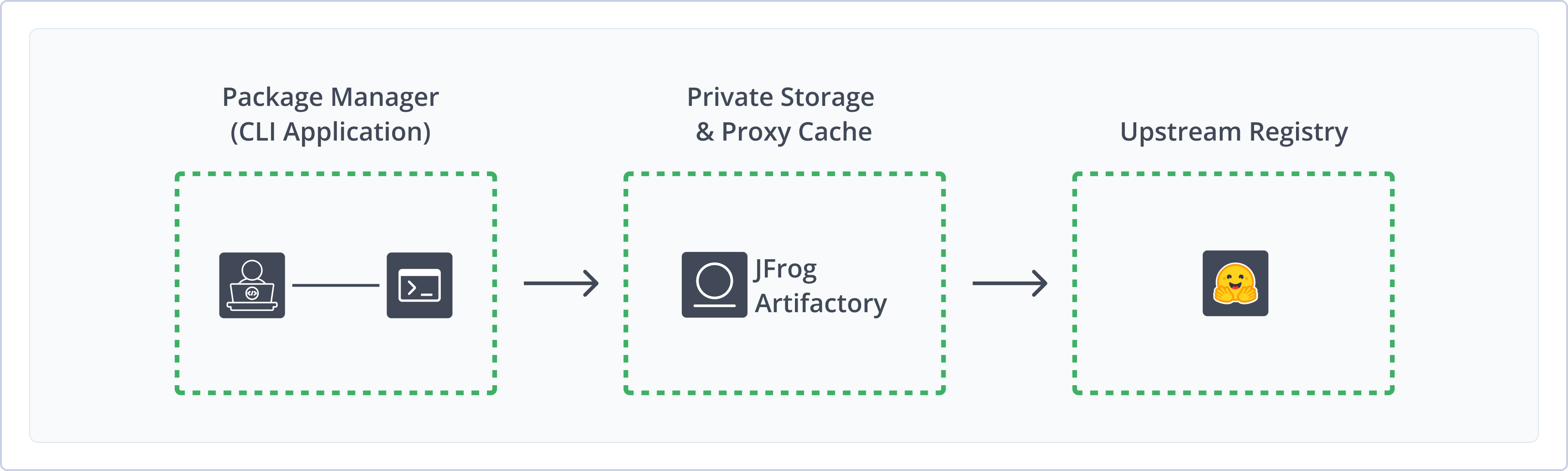
Using Artifactory with Hugging Face provides the following benefits:
- Unified Repository Management: Consolidate all your Hugging Face models, datasets, and related files using Artifactory as a system of record. Set up secure local repositories, access a cached version of Hugging Face Hub, and create a virtual repository as a single point of access to all your resources.
- Xray Scanning: Secure your machine learning model lifecycle by scanning the licenses of machine learning models and scanning for malicious models.
- Support for Hugging Face Client: Use the Hugging Face SDK to seamlessly deploy, resolve, and manage your ML models in Artifactory.
- Robust Access Control: Secure your repositories with fine-grained permissions and manage who can access, deploy, and manage specific models and repositories.
- Enterprise Readiness: Scale your Hugging Face use in Artifactory with enterprise-grade features like high availability, multi-site repository replication, and massively scalable storage options to support global teams and large-scale projects.
Get Started with Hugging Face
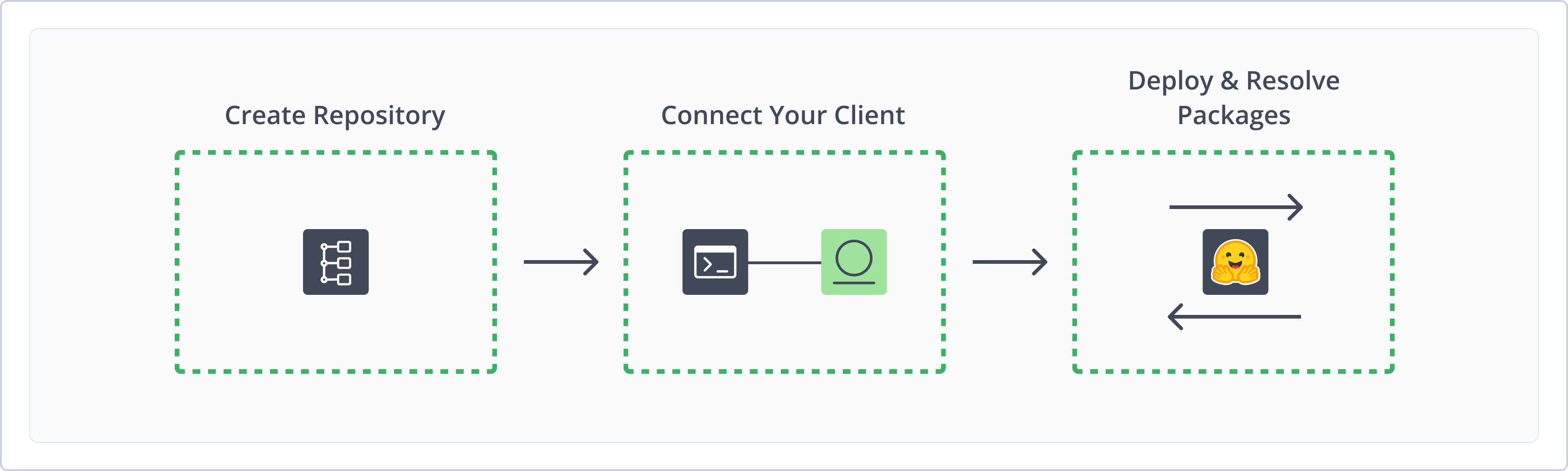
To get started working with Hugging Face, complete the following main steps:
- Create a Hugging Face Repository
- Connect Hugging Face to Artifactory
- Deploy and resolve Hugging Face packages
Create a Hugging Face Repository
This topic describes how to create a Hugging Face repository. This is required before deploying and resolving Hugging Face packages. Artifactory supports the following kinds of Hugging Face repositories:
- Local repositories: Store and share first- and second-party packages with your organization
- Remote repositories: Download packages from
https://huggingface.co - Virtual repositories: Aggregate remote and local repositories, enabling your organization to scale by providing a single URL that provides access to multiple repositories and types
To learn more about repository structure for local and remote repositories, see Hugging Face Repository Structure (Legacy).
Note
Hugging Face organizations, model names, and revision identifiers deployed to local Artifactory repositories must follow specific naming conventions and limitations. For more information, see Hugging Face Limitations in Artifactory.
For more information on JFrog repositories, see Repository Management.
Prerequisite: You need Admin or Project Admin permissions in Artifactory to create a repository. If you don't have Admin permissions, the option will not be available.
To create a Hugging Face repository:
-
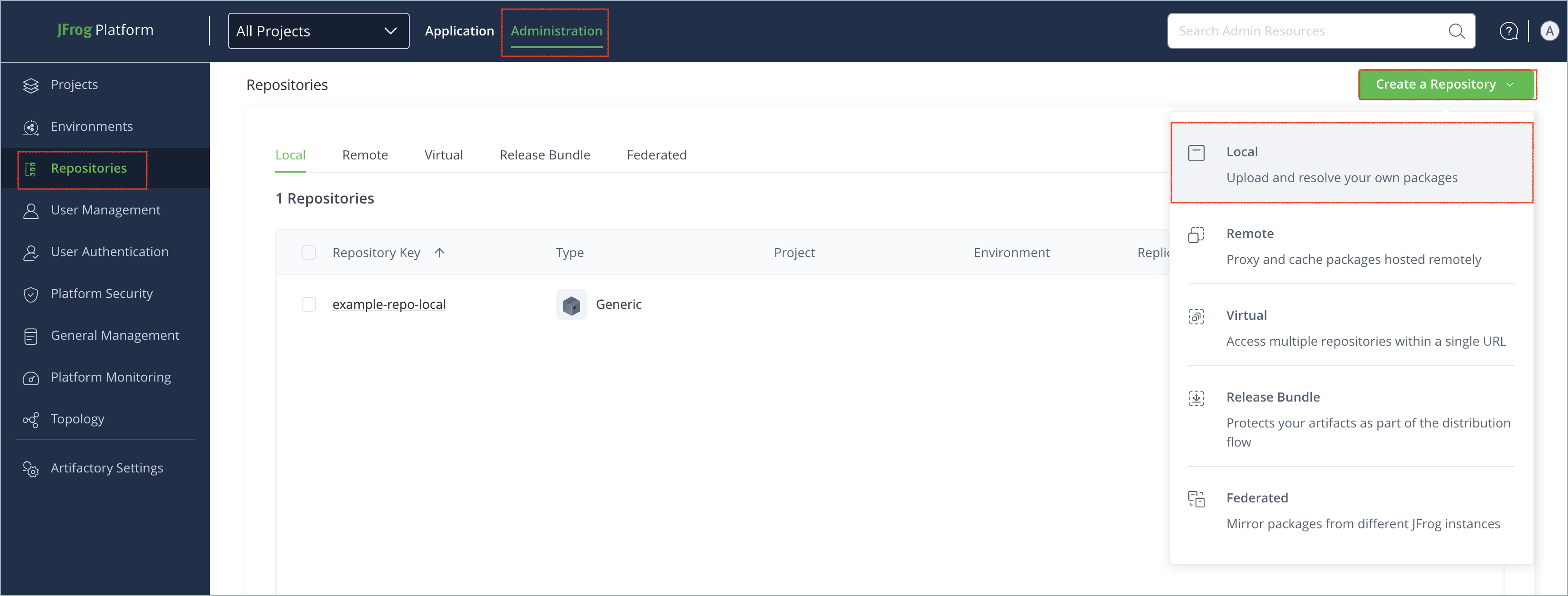
In the Administration tab, click Repositories > Create a Repository.
-
Select the type of repository you want to create: Local, Remote, or Virtual.
-
Select the Hugging Face package type.
-
Configure the required fields for the repository:
-
For local repositories, in the Repository Key field, type a meaningful name for the repository. For example,
huggingface-local. For more information on local repositories and their settings, see Local Repositories. -
For remote repositories, verify the Repository URL. The only supported remote URL for Hugging Face repositories in Artifactory is
https://huggingface.co. For more information on remote repositories and their settings, see Remote Repositories.To configure a remote repository to resolve models from a private repository, see Resolve Hugging Face Models From Private Repositories.
-
For virtual repositories, select one or more local or remote repositories to include in the virtual repository. For more information on virtual repositories and their settings, see Virtual Repositories.
-
-
Click Create Repository. The repository is created and the Repositories window is displayed.
Hugging Face Repository Layout Deprecation
As of June 2026, the Hugging Face repository layout will be deprecated.
All new local and remote Hugging Face repositories use the new Machine Learning repository layout by default. Any older repositories must be migrated before June 2026 to preserve complete functionality.
For more information, see Migrate Legacy Hugging Face Repositories.
Connect Hugging Face to Artifactory
Connect the Hugging Face SDK to Artifactory to deploy and resolve packages from Artifactory repositories.
Prerequisite: Before connecting the Hugging Face SDK to Artifactory, you must have an existing Hugging Face repository in Artifactory. For more information, see Create a Hugging Face Repository.
Logged in vs. Anonymous User: You can work with Hugging Face and Artifactory as a logged-in user or anonymously. To work with Artifactory using Anonymous Access, configure that access under Admin > Security > General. For details, refer to Allow Anonymous Access.
To connect the Hugging Face SDK to Artifactory:
-
Run the following command to add the Artifactory repository to your Hugging Face SDK:
export HF_HUB_ETAG_TIMEOUT=86400
export HF_HUB_DOWNLOAD_TIMEOUT=86400
export HF_ENDPOINT=https://[JFrogPlatformURL]/artifactory/api/huggingfaceml/<REPO_NAME>
Where:
[JFrogPlatformURL]: The URL of your JPD<REPO_NAME>: The name of the target repository in Artifactory
For example:
export HF_HUB_ETAG_TIMEOUT=86400 export HF_HUB_DOWNLOAD_TIMEOUT=86400 export HF_ENDPOINT=https://company.jfrog.io/artifactory/api/huggingfaceml/huggingface-local -
Run the following command to authenticate the Hugging Face SDK to Artifactory:
export HF_TOKEN=<TOKEN>Where:
<TOKEN>: Your Artifactory identity token
For example:
export HF_TOKEN=ajK2m4p6N8r9TbuFvWxYz1C3E5G7H9JtywzZ55JCAwpHhTZsOr7Uv-L7oeCKZ3y
Note
You can also use JFrog Set Me Up to copy the snippet populated with your token and environment. For more information, see Use Artifactory Set Me Up for Configuring Package Manager Clients.
Next steps:
Deploy Hugging Face Packages
You can deploy Hugging Face models and datasets to Artifactory repositories. Artifactory supports datasets as of version 7.90.x.
Deployed Hugging Face packages must follow Hugging Face naming restrictions. For more information, see Hugging Face Limitations in Artifactory.
To deploy a Hugging Face model or dataset:
Run the following command:
from huggingface_hub import HfApi
api = HfApi()
api.upload_folder(
    folder_path="<FOLDER_NAME>",
    repo_id="<PACKAGE_NAME>",
    revision="<REVISION_ID>",
    repo_type="<REPO_TYPE>"
)
Where:
<FOLDER_NAME>: The name of the folder on your local machine where the model or dataset resides<PACKAGE_NAME>: The name of the model or dataset, formatted according to Hugging Face repository naming structureorganization/name<REVISION_ID>: The revision ID of the package, corresponding to a Git commit hash<REPO_TYPE>: The type of Hugging Face repository, eithermodelordataset
For example:
from huggingface_hub import HfApi
api = HfApi()
api.upload_folder(
    folder_path="vit-base-patch16-224",
    repo_id="nsi319/legal-pegasus",
    revision="54ef2872d33bbff28eb09544bdecbf6699f5b0b8",
    repo_type="model"
)Note
You can also use JFrog Set Me Up to copy the snippet populated with your token and environment. For more information, see Use Artifactory Set Me Up for Configuring Package Manager Clients.
Resolve Hugging Face Packages
This section contains information on how to resolve Hugging Face packages. Artifactory supports resolving datasets starting from version 7.90.x.
Resolve Hugging Face Models
Artifactory supports two methods of resolving Hugging Face models:
Note
Virtual repositories support resolving models using
snapshot_downloadonly.
Resolve Hugging Face Models via API
Artifactory supports resolving all model files using the snapshot_download API.
Note
Resolving Hugging Face models from Artifactory may take some time due to the size of the models.
To resolve all model files:
Run the following command:
from huggingface_hub import snapshot_download
snapshot_download(
    repo_id="<MODEL_NAME>", revision="<REVISION_ID>", etag_timeout=86400
)
Where:
-
<MODEL_NAME>: The name of the model you want to resolve, formatted according to Hugging Face repository naming structureorganization/name -
<REVISION_ID>: The revision ID for the model
Tip
To find the model's revision ID, navigate to the model card on Hugging Face Hub, open the Files and versions tab, and click History to view all commits. Click the copy icon to copy the full commit hash.
For example:
from huggingface_hub import snapshot_download
snapshot_download(
    repo_id="nsi319/legal-pegasus", revision="54ef2872d33bbff28eb09544bdecbf6699f5b0b8", etag_timeout=86400
)Note
You can also use JFrog Set Me Up to copy the snippet populated with your token and environment. For more information, see Use Artifactory Set Me Up for Configuring Package Manager Clients.
Resolve Hugging Face Models using Libraries
Artifactory supports resolving specific models and related files using libraries like Transformers and Diffusers, among others.
Requirements:
- Artifactory version 7.77 and above
- Hugging Face client version 0.19.0 and above
HF_HUB_ETAG_TIMEOUTparameter enabled
If these requirements are not met, you can resolve Hugging Face models by resolving whole repositories via API. For more information, see Resolve Hugging Face Models via API.
To resolve a model using libraries:
-
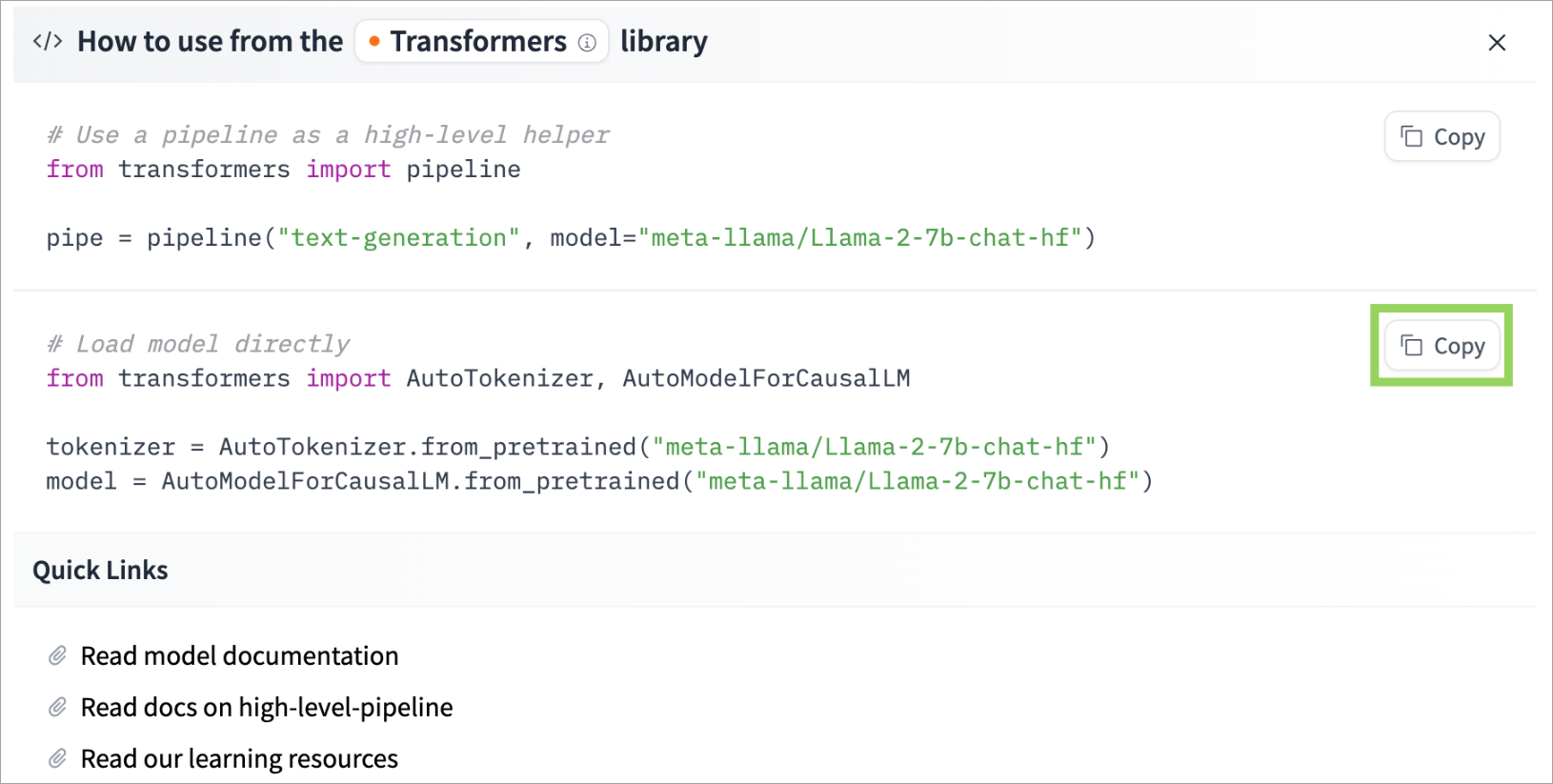
On the model card in Hugging Face Hub, click Use this model on the top right side of the screen, and select a library.

-
Click Copy next to the command you want to use
-
Run the command in your code to resolve the model.
Resolve Hugging Face Datasets
Artifactory supports two methods of resolving Hugging Face datasets:
- Resolve entire dataset repositories using the snapshot_download API
- Resolve datasets using libraries
Note
- Virtual repositories support resolving datasets using
snapshot_downloadonly.- Some datasets repositories in Hugging Face point to an external location, and do not host the dataset directly. Currently, Artifactory only caches datasets that are hosted directly on Hugging Face.
Resolve Hugging Face Datasets via API
Artifactory supports resolving entire dataset repositories using the snapshot_download API.
To resolve an entire dataset repository:
Run the following command:
from huggingface_hub import snapshot_download
snapshot_download(
    repo_id="<DATASET_NAME>", revision="<REVISION_ID>", repo_type="dataset", etag_timeout=86400
)
Where:
-
<DATASET_NAME>: The name of the dataset you want to resolve, formatted according to Hugging Face repository naming structureorganization/name -
<REVISION_ID>: The revision ID for the dataset
Tip
To find the revision ID, navigate to the dataset card on Hugging Face Hub, open the Files and versions tab, and click History to view all commits. Click the copy icon to copy the full commit hash.
For example:
from huggingface_hub import snapshot_download
snapshot_download(
    repo_id="nousresearch/hermes-3-dataset", revision="b1fddbdcae4e6714889365d1e6ce266a45289cc9", etag_timeout=86400
)Note
You can also use JFrog Set Me Up to copy the snippet populated with your token and environment. For more information, see Use Artifactory Set Me Up for Configuring Package Manager Clients.
Resolve Hugging Face Datasets using Libraries
Requirements:
- Artifactory version 7.77 and above
- Hugging Face client version 0.19.0 and above
HF_HUB_ETAG_TIMEOUTparameter enabled
If these requirements are not met, you can resolve Hugging Face datasets by resolving whole repositories via API. For more information, see Resolve Hugging Face Datasets via API.
To resolve Hugging Face datasets using libraries:
Run the following command:
from datasets import load_dataset
dataset = load_dataset("<DATASET_NAME>")
Where:
<DATASET_NAME>: The name of the dataset you want to resolve, formatted according to Hugging Face repository naming structureorganization/name
For example:
from datasets import load_dataset
dataset = load_dataset("wikimedia/wikipedia")
Additional Hugging Face Information
The following pages provide additional information about using Hugging Face with Artifactory:
- Hugging Face Repository Structure (Legacy)
- Migrate Legacy Hugging Face Repositories
- Resolve Hugging Face Models From Private Repositories
- Enable Xet Protocol for Hugging Face Repositories
Hugging Face Repository Structure (Legacy)
Hugging Face Repository Layout Deprecation
As of June 2026, the Hugging Face repository layout will be deprecated. As of Artifactory 7.111.1, all new local and remote Hugging Face repositories use the Machine Learning repository layout by default. Any older repositories must be migrated before June 2026 to preserve complete functionality.
Virtual Hugging Face repositories only support virtual and remote repositories that use the new repository layout. For more information, see Migrate Legacy Hugging Face Repositories.
Hugging Face repositories are structured using two types of versions:
- Integration versions: These versions are similar to branches in a Git repository. In local repositories, the only integration version is Main, and in remote repositories, the integration version is created according to the requested branch.
- Release versions: These versions can be tags, commits, or revisions.
Local Repository Structure
 ├── hf-local
    ├── models
        ├── org (optional)
            ├── model-name
                ├── main
                    ├── timestamp
                        ├── .jfrog_huggingface_dataset_info.json
                        ├── file1
                        ├── file2
                    ├── timestamp
                        ├── .jfrog_huggingface_dataset_info.json
                        ├── file1
                        ├── file2
                    ├── timestamp (server)
                        ├── .jfrog_huggingface_dataset_info.json
                        ├── file1
                        ├── file2
                ├── v1
                    ├── timestamp
                        ├── .jfrog_huggingface_dataset_info.json
                        ├── file1
                        ├── file2
    ├── datasets
        ├── org (optional)
            ├── dataset-name
                ├── main
                    ├── timestamp
                        ├── .jfrog_huggingface_dataset_info.json
                        ├── file1
                        ├── file2
                    ├── timestamp
                        ├── .jfrog_huggingface_dataset_info.json
                        ├── file1
                        ├── file2
                    ├── timestamp (server)
                        ├── .jfrog_huggingface_dataset_info.json
                        ├── file1
                        ├── file2
                ├── v1
                    ├── timestamp
                        ├── .jfrog_huggingface_dataset_info.json
                        ├── file1
                        ├── file2
Note the following:
-
When resolving (downloading) a model or dataset without specifying a revision, the latest model or dataset version will be saved with the timestamp under the ‘main’ branch in the model or dataset name folder. Previous versions are retrievable using the SHA1 value, which is stored as the property
huggingfaceml.generated.revision.sha1in the.jfrog_huggingface_model_info.jsonfile. -
When deploying (uploading) a model or dataset with a specific version, it will be saved with a timestamp under that version name in the model or dataset's name folder. If the same model or dataset has been deployed already with the same version number, the new deployment will overwrite it, and the previous deployment will not be retrievable using the Artifactory-generated SHA1 value.
Note
For Artifactory to overwrite the model, go into Administration > User Management > Permissions, and verify that the Delete/Overwrite permission is enabled. Otherwise, when trying to deploy a model that has been deployed before with the same version number, Artifactory will return a 409 error.
Remote Repository Structure
Starting from Artifactory version 7.77, the repository structure for remote repositories is as follows:
Note
As of Artifactory 7.117,
.latest_huggingface_model_info.jsondoes not appear.
├── hf-remote
    ├── models
        ├── org (optional)
            ├── model-name
                ├── main
                    ├── .latest_huggingface_model_info.json
                    ├── timestamp 1
                        ├── .jfrog_huggingface_model_info.json
                        ├── file1
                        ├── file2
                    ├── timestamp 2
			├── .jfrog_huggingface_model_info.json
                        ├── file1
                        ├── file2
                    ├── timestamp 3
                        ├── .jfrog_huggingface_model_info.json
                        ├── file1
                        ├── file2
                ├── v1
                    ├── .latest_huggingface_model_info.json
                    ├── timestamp 1
			├── .jfrog_huggingface_model_info.json
                        ├── file1
                        ├── file2
                    ├── timestamp 2
                        ├── .jfrog_huggingface_model_info.json
                        ├── file1
                        ├── file2
                ├── original hash
                    ├── .latest_huggingface_model_info.json
                    ├── timestamp 1
			├── .jfrog_huggingface_model_info.json
                        ├── file1
                        ├── file2
    ├── datasets
        ├── org (optional)
            ├── dataset-name
                ├── main
                    ├── .latest_huggingface_dataset_info.json
                    ├── timestamp 1
                        ├── .jfrog_huggingface_dataset_info.json
                        ├── file1
                        ├── file2
                    ├── timestamp 2
			├── .jfrog_huggingface_dataset_info.json
                        ├── file1
                        ├── file2
                    ├── timestamp 3
                        ├── .jfrog_huggingface_dataset_info.json
                        ├── file1
                        ├── file2
                ├── v1
                    ├── .latest_huggingface_dataset_info.json
                    ├── timestamp 1
			├── .jfrog_huggingface_dataset_info.json
                        ├── file1
                        ├── file2
                    ├── timestamp 2
                        ├── .jfrog_huggingface_dataset_info.json
                        ├── file1
                        ├── file2
                ├── original hash
                    ├── .latest_huggingface_dataset_info.json
                    ├── timestamp 1
			├── .jfrog_huggingface_dataset_info.json
                        ├── file1
                        ├── file2
Note the following:
-
When resolving (downloading) a model or dataset without specifying a revision, the latest model or dataset version will be saved with the timestamp under the ‘main’ branch in the model or dataset's name folder. Previous versions are retrievable using the SHA1 value, which is stored as the property
huggingfaceml.generated.revision.sha1on the.jfrog_huggingface_model_info.jsonfile. -
When resolving (Downloading) a model or dataset with a specific version using a commit hash or tag, it will be saved with a timestamp under the requested revision in the model or dataset's name folder.
Migrate Legacy Hugging Face Repositories
Hugging Face Repository Layout Deprecation
As of June 2026, the Hugging Face repository layout will be deprecated. As of Artifactory version 7.111.11, all new local and remote Hugging Face repositories use the new Machine Learning repository layout by default. Any older repositories must be migrated before June 2026 to preserve complete functionality.
Migrate your repositories to the new Machine Learning repository structure to ensure complete and ongoing functionality.
Prerequisite: Administrator user
To migrate a Hugging Face repository from the legacy layout to the Machine Learning layout:
-
In Artifactory, select the Administration tab and go to Repositories.
-
In the Repositories list, find the Hugging Face repository on which you want to perform the migration.
-
Go to the right end of the row of the repository and click the three dots
 at the end of the row. An Actions pop-up menu appears, as shown below.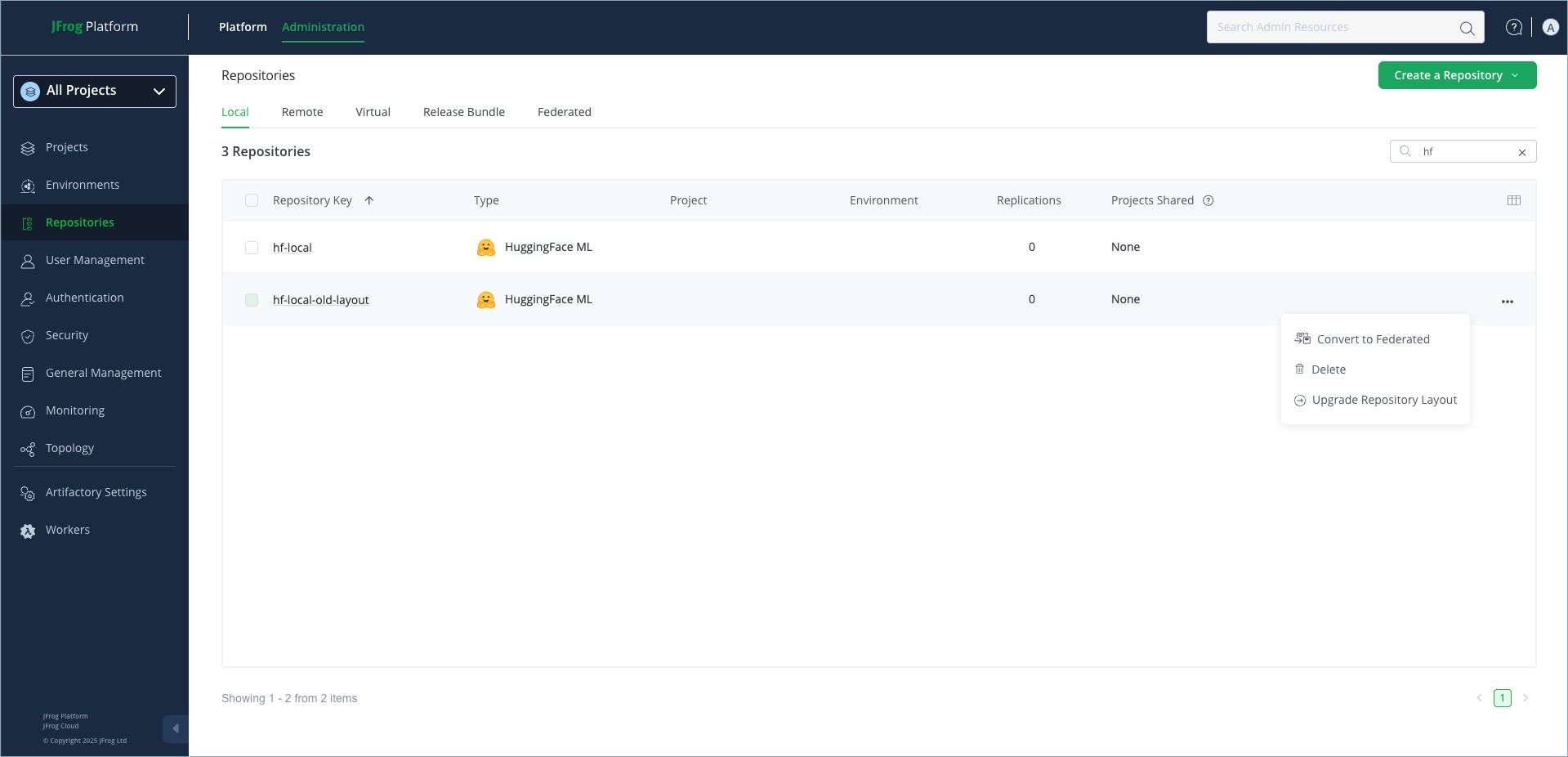
-
In the Actions pop-up menu, click Upgrade Repository Layout. The following upgrade notice appears:
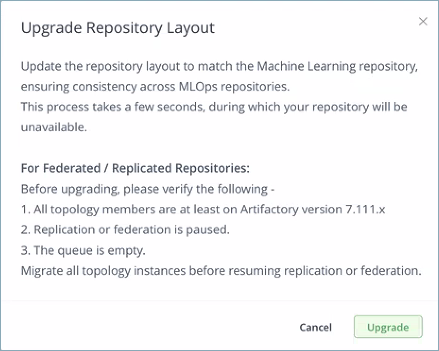
-
Click Upgrade in the upgrade message. After you click Upgrade, the upgrade message disappears and in the Repositories list a popup message is briefly displayed stating: "Layout convert for HuggingFace repository
<repo-name>completed with result: Conversion for repo<repo-name>done."
Restore the Legacy Layout
Note
Only restore the legacy layout as a remediation measure if migration to the new layout fails.
In case of migration failure or other technical issues, you can restore the legacy layout by calling the REST API.
Usage: POST http://<YOUR_DOMAIN>/artifactory/api/artifactactions/restore_layout
Query Parameters:
| Field | Description |
|---|---|
repoKey | The repository key. |
packageType | This parameter should always have the value HuggingFaceML. |
When this API call is successful, a 200 success message is returned with the message: "Restore layout for HuggingFaceML repository <repository_key> completed with result: Restore layout for repo <repository_key> done."
Limitations and Considerations
The process for migrating Hugging Face repositories from the legacy layout to the Machine Learning layout has the following limitations:
-
Federated/replicated repositories: Machine Learning repositories cannot be federated to legacy Hugging Face repositories. The layouts are not compatible. To maintain federation in this situation, verify the following before migration:
- All topology members are at least on Artifactory version 7.111.x.
- Replication or federation is paused.
- The queue is empty.
- Migrate all topology instances before resuming replication or federation.
-
Limitation on the Restore Layout API: The restore capability only applies to content that was saved during the migration process. When migrating to the new layout, Artifactory generates a snapshot of your existing repositories. This means that if you migrate to the new layout and then add packages to the repository, if you choose to restore the old layout the newly added packages will be deleted and the snapshot of the old layout will be restored. So there can be data loss when restoring.
Resolve Hugging Face Models From Private Repositories
Starting from Artifactory version 7.77.x, Artifactory supports resolving models from private Hugging Face repositories.
To configure a remote repository to resolve models from a private repository:
-
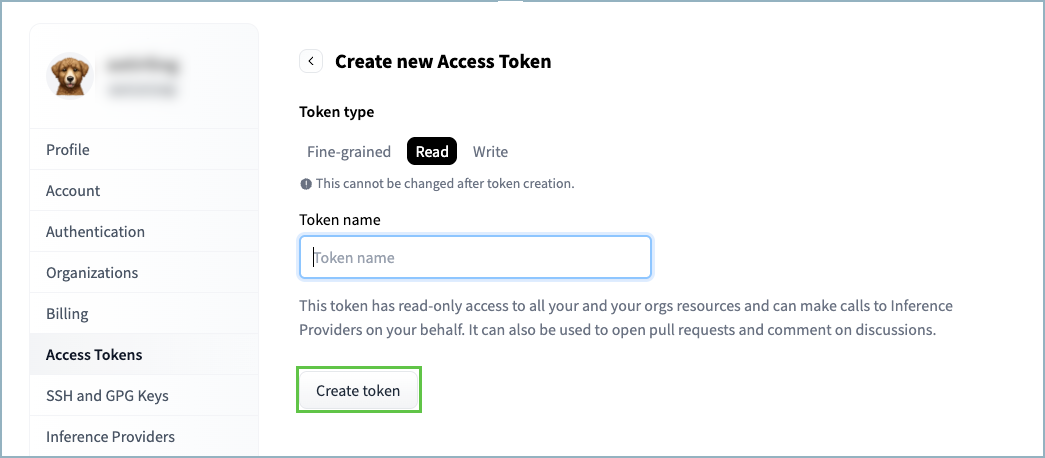
Go to Hugging Face Hub, click on your profile on the top right side of the screen, and click Settings.
-
Select Access Tokens.
-
Click Create new token.
-
Under Token type, select Read.
-
Enter a name for the token.
-
Click Create token.
-
Go to your remote repository settings in Artifactory, and enter the token you copied from Hugging face in the Password / Access Token field. There is no need to fill in the User Name field.
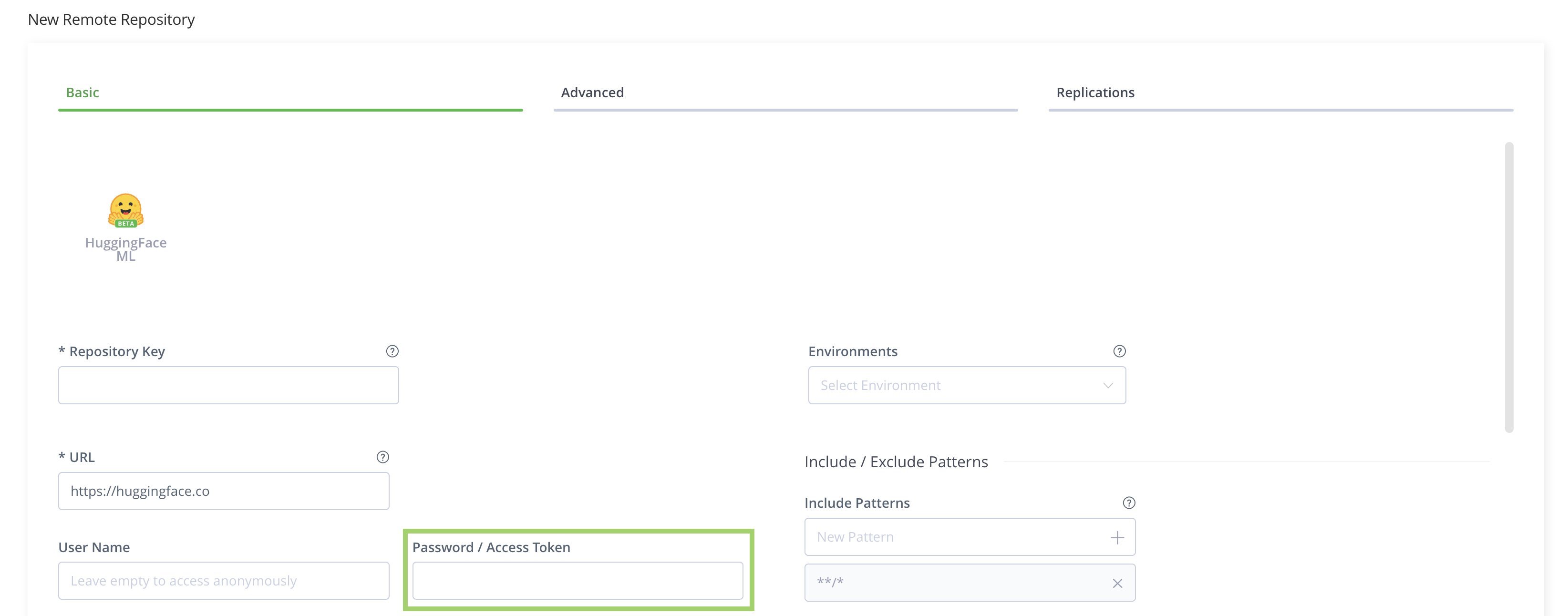
You can now resolve models from your private repository to your Hugging Face remote repository.
Enable Xet Protocol for Hugging Face Repositories
Artifactory supports Xet protocol for local, virtual, and remote repositories. Xet protocol enhances download speeds and capacity, including handling files larger than 50 GB. For more information, including about client-side Xet enablement, see the Xet documentation in Hugging Face.
Note
If you enabled Xet protocol for remote repositories only, Xet is automatically enabled for compatible local and virtual repositories as of Artifactory SaaS 7.160.0 and self-managed version 7.161.15.
Prerequisites:
- Admin or Project Admin permissions. You will not be able to edit Artifactory settings without admin permissions.
- Hugging Face client version 0.30 or higher.
- Artifactory 7.139.1 (SaaS) or 7.146.7 (Self-Managed) or higher.
- A Hugging Face repository in Artifactory that uses the new Machine Learning layout.
As of Artifactory version 7.111.11, all new Hugging Face repositories use the new layout by default. For information about migrating older repositories, see Migrate Legacy Hugging Face Repositories. - For self-managed instances of Artifactory, add the domains listed at the following address to your allowlist: https://huggingface.co/.well-known/meta.json
To enable Xet protocol for Hugging Face repositories:
- On the Administration module, navigate to Artifactory Settings > Packages Settings.
- Under HuggingFaceML, select the Enable xet protocol checkbox.
- Click Save.
Note
For self-managed instances of Artifactory earlier than version 7.146.7, you can enable Xet protocol by setting the system property
artifactory.huggingfaceml.enable.remote.xet=true. For more information, see Artifactory System Properties.
Self-Managed Version Support for Xet Protocol
The following table explains Xet support and configuration methods for self-managed versions of Artifactory.
| Self-Managed Version | Xet Support | Configuration Method |
|---|---|---|
| 7.133.3 | Remote repositories | Artifactory system properties |
| 7.146.7 | Remote repositories | Packages Settings in Artifactory UI |
| 7.161.15 | Local, virtual, and remote repositories | Packages Settings in Artifactory UI |
Limitations of Xet Protocol in Artifactory
- Version support: Xet protocol is supported up to and including
huggingface_hubversion 1.18.0 andhf_xetversion 1.4.3. - Repository layout: Xet protocol is only supported with the new Machine Learning repository structure. Before enabling Xet, migrate legacy Hugging Face repositories to the new structure. For more information, see Migrate Legacy Hugging Face Repositories.
- File compilation: In rare edge cases, a known issue with race conditions in high-speed downloads using Xet may cause files to not be compiled as required when download is complete. This is a client issue that has been formally raised with the Xet team.
- Redirect download: Xet protocol is not supported for repositories configured to use download redirection. For more information about download redirection, see Specify Repositories for Direct Download.
Hugging Face Limitations in Artifactory
The following are the limitations of Hugging Face in Artifactory:
-
Version Support: The following version support limitations apply to Hugging Face repositories in Artifactory.
- Hugging Face repositories are supported from Artifactory version 7.77.1.
- Deploying and resolving datasets is supported from Artifactory version 7.90.x. Security scanning of datasets is coming soon.
- Hugging Face client versions after 1.18.0 are not supported.
-
Hugging Face Spaces: Artifactory does not currently support Hugging Face Spaces.
-
Naming Restrictions: When deploying models to Hugging Face repositories, structure all names and revision identifiers according to the Hugging Face limitations:
- Organization names: Can only contain letters, numbers, and hyphens (
-). Cannot start or end with a hyphen, or use consecutive hyphens (--). Cannot contain only numbers. - Model names: Can only contain letters, numbers, hyphens (
-), underscores (_), and periods (.) - Revision identifiers: Can only contain letters, numbers, hyphens (
-), and periods (.). Cannot contain spaces or control characters like^or&.
- Organization names: Can only contain letters, numbers, and hyphens (
-
Model Deployment Limitations on Earlier Artifactory Versions: Due to limitations in the implementation of the Hugging Face client, you can only deploy lighter models to Hugging Face local repositories on Artifactory versions earlier than 7.75.3.
Updated 18 days ago