

Cargo Repositories
Configure Cargo repositories in Artifactory to publish and install Rust crates.
Cargo is the official build tool and package manager for the Rust programming language, used to manage project dependencies called crates. Cargo automates the process of downloading dependencies, compiling packages, running tests, and creating distributable packages. Use Cargo repositories in JFrog Artifactory to simplify your Rust development workflow with centralized crate management and seamless integration with the Cargo client. You can also use Artifactory as a secure proxy and cache of the public Cargo registry. For more information, see the Cargo documentation.
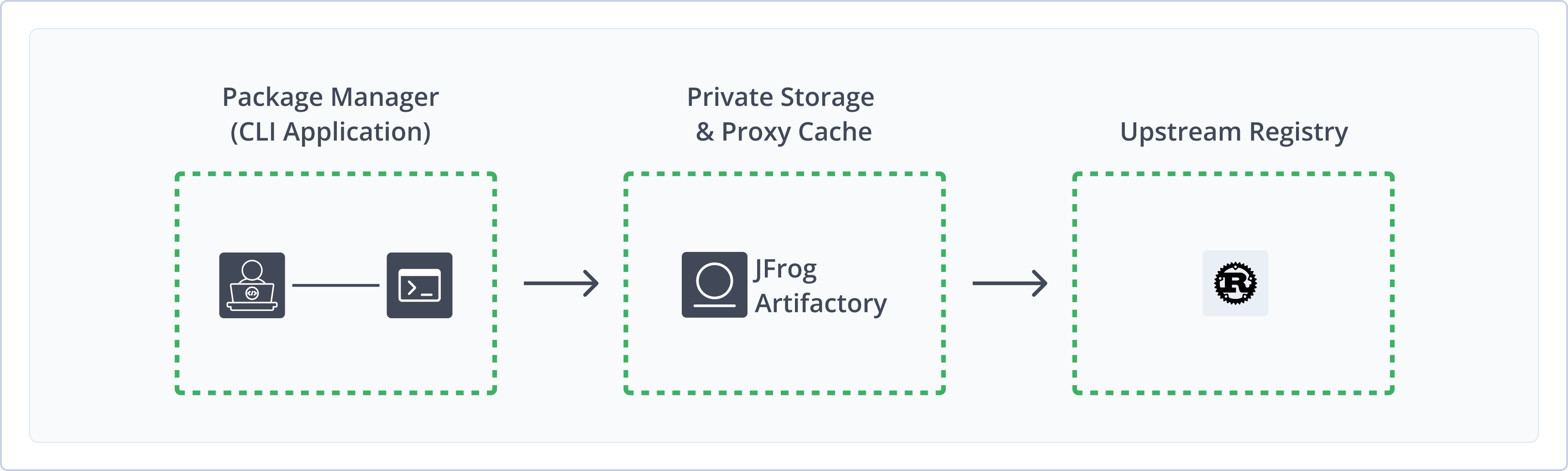
Artifactory supports the following capabilities for Cargo repositories:
- Robust Metadata Capabilities: Calculate metadata for crates hosted in Artifactory's local repositories.
- Unified Repository Management: Consolidate all your Cargo repositories in Artifactory as a single source of truth. Set up secure local repositories, access cached versions of remote registries like
crates.io. - Support for Cargo CLI: Natively use the Cargo client to deploy, remove, and manage packages in Artifactory.
- Fine-Grained Access Control: Manage user and group permissions for your Cargo repositories, giving access based on projects or development teams.
Getting Started with Cargo
The following sections cover the main Cargo workflow in Artifactory:
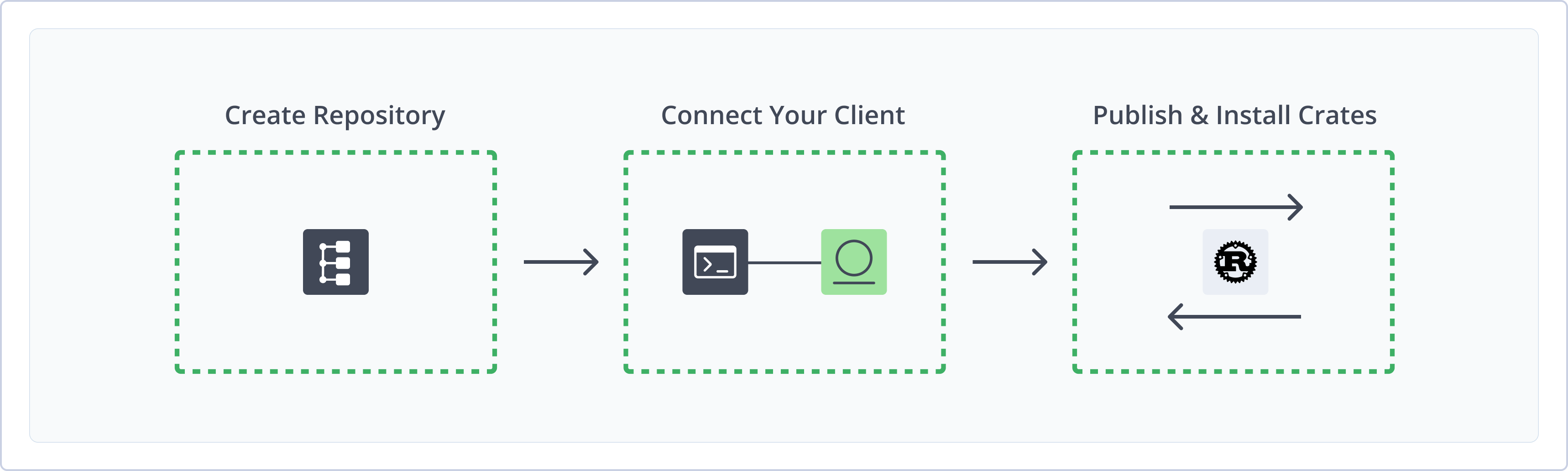
Create a Cargo Repository
This topic describes how to create a Cargo repository. This is required before publishing and installing Cargo packages. Artifactory supports two kinds of Cargo repositories:
- Local repositories: Store and share first- and second-party packages with your organization
- Remote repositories: Download packages from remote locations including external package registries or other Artifactory instances
For more information on JFrog repositories, see Repository Management.
Prerequisites:
- You need Admin or Project Admin permissions in Artifactory to create a repository.
- Your Artifactory instance must have a custom base URL configured. For more information, see General Settings.
To create a Cargo repository:
-
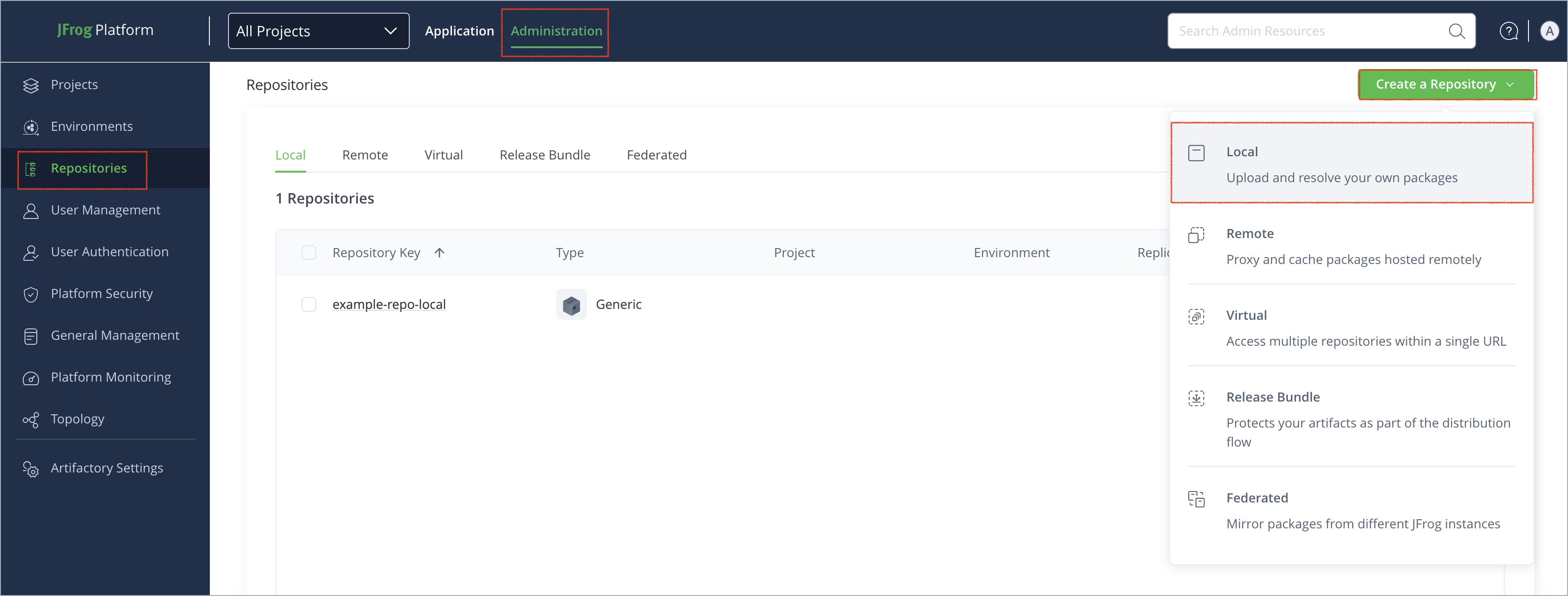
In the Administration tab, click Repositories > Create a Repository.
-
Select the type of repository you want to create: local or remote.
-
Select the Cargo package type.
-
Configure the required fields for the repository:
-
In the Repository Key field, type a meaningful name for the repository. For example,
cargo-local. For more information on local repositories and their settings, see Local Repositories. -
For remote repositories, verify the Registry URL and update as needed. For more information on remote repositories and their settings, see Remote Repositories.
-
Note
For Smart remote repositories, the URL should be the same as the local repository URL, for example:
https://company.jfrog.io/artifactory/cargo-repo, while the Registry URL should point to the index path, for example:https://company.jfrog.io/artifactory/api/cargo/cargo-repo/index/.
- Click Create Repository. The repository is created and the Repositories page is displayed.
Connect Cargo to Artifactory
Prerequisites: Before connecting your Cargo client to Artifactory, you must have an existing Cargo repository in Artifactory. For more information, see Create a Cargo Repository.
Logged in versus Anonymous User: You can work with Cargo and Artifactory as a logged-in user or anonymously. To work with Artifactory using Anonymous Access, configure that access under Admin > Security > General. For more information, see Allow Anonymous Access.
Note
Older versions of the Cargo client without sparse index protocol do not authenticate
installandsearchcommands. To solve this, turn on the Anonymous download and search setting for the repository. This setting may be required for Cargo version 1.67 and earlier.
To connect the Cargo client to Artifactory:
-
Open your Cargo configuration file in a text editor. The file is located in the Cargo home directory, for example
~/.cargo/config.toml. -
Add the following snippet to point your Cargo client to Artifactory:
[registry]
default = "artifactory"

[registries.artifactory]
index = "sparse+https://<JFrogPlatformURL>/artifactory/api/cargo/<REPO_NAME>/index/"
Where:
<JFrogPlatformURL>: Your organization's Artifactory URL<REPO_NAME>: The name of your Cargo repository
For example:
[registry] default = "artifactory" [registries.artifactory] index = "sparse+https://company.jfrog.io/artifactory/api/cargo/cargo-local/index/" -
Save the changes to the configuration file.
-
Open your Cargo credentials file in a text editor. The file is located in the Cargo home directory, for example
~/.cargo/credentials.toml. -
Add the following snippet to set credentials for API requests like
yankandpublish:[registries.artifactory] token = "<TOKEN>"Where:
<TOKEN>: Your Artifactory identity token
For example:
[registries.artifactory] token = "<TOKEN>" -
Save the changes to the credentials file.
Note
You can also use JFrog Set Me Up to copy the snippet populated with your token and environment. For more information, see Use Artifactory Set Me Up for Configuring Package Manager Clients.
Next steps:
Publish Crates
Once your Cargo client is connected to Artifactory, you can publish crates natively using the Cargo command line. You can also publish crates using the Artifactory web UI or using the Artifactory API.
Publish Crates Using the Cargo CLI
After you connect the Cargo client to Artifactory, publish crates with the Cargo command line.
To publish a crate:
-
Run the following command:
cargo publish --registry artifactory
Tip
You can override the configured credentials by adding the
--tokenflag in the format--token "<TOKEN>", where<TOKEN>is your Artifactory identity token or Base64-encodedusername:password.
Publish Crates via API
You can use the Artifactory API to publish crates directly with a cURL command.
To publish a crate using cURL:
-
Run the following command:
curl -u<USERNAME>:<TOKEN> -XPUT "https://<JFrogPlatformURL>/artifactory/<REPO_NAME>/crates/<TARGET_PATH>" -T <LOCAL_FILE>Where:
<USERNAME>: Your Artifactory username<TOKEN>: Your Artifactory identity token<JFrogPlatformURL>: Your organization's Artifactory URL<REPO_NAME>: The name of your Cargo repository in Artifactory<TARGET_PATH>: The target path for publishing the crate in your Cargo repository. For more information, see Cargo Path Format<LOCAL_FILE>: The path to the crate file on your local machine
For example:
curl -u jeffry:<TOKEN> -XPUT "https://company.jfrog.io/artifactory/cargo-local/crates/package/package-1.0.0.crate" -T package-1.0.0.crate
Cargo Path Format
When deploying crates directly, make sure the target path is a valid Cargo path format:
crates/<PACKAGE_NAME>/<PACKAGE_NAME>-<VERSION>.crateIf the path deviates from this structure, Artifactory does not identify the package as a Cargo crate and the package will not be indexed. Additionally, make sure your Cargo configuration files contain relevant dependencies and registry URLs.
To avoid indexing errors and other issues, the recommended publishing method is to use the Cargo command line. For more information, see Publish Crates.
Install Crates
After you connect the Cargo client to Artifactory, you can install crates from your Cargo repositories.
To install a crate:
-
Run the following command:
cargo install <PACKAGE>Where
<PACKAGE>is the name of the crate you want to install. For example:cargo install ripgrep
Tip
To resolve multiple registries, add the optional flag
--registry <REGISTRY_ID>.
Additional Cargo Information
The following pages provide additional information about using Cargo with Artifactory:
- Cargo and Rust Made Easy
- Cargo Package Federation Limitation and Workaround
- Community Assistance To Support Cargo Virtual Repositories
- Index Cargo Repositories
- Yank Cargo Crates
Cargo Package Federation Limitation and Workaround
Unlike other package managers, Cargo packages contain the URL of the registry where they have been uploaded to. The Cargo client does not support a global URL replacement method, so the client can't modify dynamic URLs. Artifactory cannot change the URLs in each Cargo package because this would change the package checksum and the package would be considered compromised by the client.
This limitation makes it difficult for Artifactory to enable Virtual repositories and Federation unless you use the following workaround.
Cargo Rewrite Workaround Solution
Cargo recommends using Source Replacement on each developer machine to cope with the URL validation from different sources.
For each instance in the federation, configure .cargo/config.toml to identify all the other federation members. Use the replace-with option for each federation source with the target URL. To use FED1, add a source for FED2, and use FED2 replace-with FED1. In this case, all the crates that have FED2 dependencies will be resolved from FED1 as expected.
For information about source replacement, see the official Cargo documentation.
Cargo Rewrite Code Example
[registry]
default = "artifactory-local"
global-credential-providers = ["cargo:token"]

[registries.artifactory-local]
index = "sparse+http://my-awesome.jfrog.io/artifactory/api/cargo/cargo-local/index/"

[source.artifactory-fed1]
registry = "sparse+http://my-awesome.jfrog.io/artifactory/api/cargo/cargo-fed1/index/"
replace-with = "artifactory-fed2"

[source.artifactory-fed2]
registry = "sparse+http://my-awesome.jfrog.io/artifactory/api/cargo/cargo-fed2/index/"
replace-with = "artifactory-fed1"

# artifactory-remote points to the github registry
[source.artifactory-remote]
registry = "sparse+http://my-awesome.jfrog.io/artifactory/api/cargo/cargo-remote/index/"

[source.crates-io]
replace-with = "artifactory-remote"
Community Assistance To Support Cargo Virtual Repositories
Currently, JFrog Artifactory cannot support Cargo Virtual Repositories due to a Cargo Client limitation that does not provide a method to override dependencies for all Cargo Artifactory users.
What Is the Problem?
Cargo packages have a configuration file embedded into the package which lists the package's dependencies. Each dependency contains a URL field that is supposed to point to the same location of the package but often the URLs point to a source in a different location than the package itself.
Specifically in the JFrog Artifactory context the ability to modify the source URLs in a scalable manner is crucial to provide the Virtual Repository capability since each dependency can point once to a Local repository and another to a Remote repository.
With this being said, Cargo has provided developers with a solution to override dependencies as documented in Overriding Dependencies - The Cargo Book . Still, unfortunately, it is mostly for development use cases where a single user would set up their specific environment to point to local resources, and it does not provide a scalable method to override dependencies for all users consuming Cargo packages from Artifactory.
For further details, see the full discussions:
- Add the ability to replace any source in .cargo/config.toml file
- Possibility to replace any source in config.toml
How Can You Help?
If you are a Cargo developer waiting for virtual repository support in JFrog Artifactory, your assistance in steering and providing a scalable solution would be appreciated.
Email [email protected].
Index Cargo Repositories
Artifactory indexes Cargo repositories using the sparse HTTP index. The legacy Git index is deprecated and no longer supported.
Index Cargo Repositories Using Sparse Indexing
From Artifactory version 7.46.3, Cargo sparse indexing is supported. The sparse HTTP index is the supported index for Cargo repositories. Sparse indexing allows you to control the connections that are entered into the index database. Sparse indexing also allows for:
- Faster build times, since no Git clones or pulls are involved
- Using a proxy for Remote Cargo Repositories.
Note
Cargo sparse indexing is supported from Cargo version 1.68 and higher (from Cargo 1.60 it is supported as a nightly feature).
Configure Cargo repositories to use the sparse HTTP index:
- Via the JFrog Platform UI: Select the Enable sparse index support checkbox in the General Settings section of the Cargo Repository Basic tab.
- Via REST API: Add the
"cargoInternalIndex": trueflag to the Repository Configuration JSON file.
Creating or updating a local, remote, or Federated Cargo repository that uses the legacy Git index is blocked. Use the sparse HTTP index instead.
For existing repositories that still use the legacy Git index, migrate the repository to the sparse HTTP index by enabling sparse index support, then reindex. For new repositories that use sparse indexing, no initialization time is required, as no Git clone is created behind the scenes.
Smart Remote Repository URL Syntax
- When configuring as a Smart Remote repository, the URL should use the following syntax:
https://<JFrogPlatformURL>/artifactory/<REPO_NAME>/ - While the registry URL should use this syntax:
https://<JFrogPlatformURL>/artifactory/api/cargo/<REPO_NAME>/index/
To use the official Rust Remote Repository URL, create a remote repository with the URL and registry URL https://index.crates.io.
For more information, see the Rust documentation.
Index Cargo Repositories Using Git Indexing
Warning
The legacy Git index is deprecated and no longer supported. Use the sparse HTTP index instead.
- You cannot create or update a local, remote, or Federated Cargo repository that uses the legacy Git index.
- For repositories that still use the legacy Git index, Cargo client operations such as
cargo publishandcargo searchfail until you migrate the repository to the sparse HTTP index.
To migrate an existing repository that uses the legacy Git index, enable Enable sparse index support for the repository and reindex it. For client configuration that uses the sparse HTTP registry, see Connect Cargo to Artifactory and Index Cargo Repositories Using Sparse Indexing.
Re-index a Cargo Repository
You can trigger an asynchronous re-indexing of a local Cargo repository either through the UI or using the REST API.
This recalculates the repository index and also indexes the remote repositories.
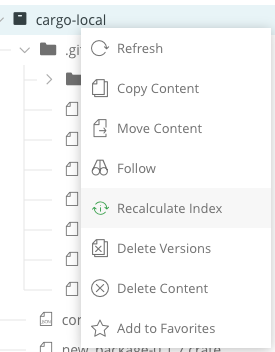
In the Artifact Tree Browser, select your Cargo repository, right-click and select Recalculate Index from the list. Requires Admin privileges.
To reindex a Cargo repository through the REST API, see Calculate Cargo Repository Metadata.
For integration benefits, see Cargo Registry.
Yank Cargo Crates
Artifactory supports yanking crates in local repositories. Yank a crate to remove the version of the crate from the registry's index and make it unavailable for new dependencies, without removing the code or breaking existing projects that use the crate.
Note
To synchronize yanking in Smart remote repositories and replications, you must sync the properties.
To yank a Cargo crate:
-
Run the following command:
cargo yank <CRATE> --vers <VERSION> --token "<TOKEN>"Where:
<CRATE>: The name of the crate<VERSION>: The version of the crate you want to yank<TOKEN>: Your Artifactory identity token
For example:
cargo yank hello_world --vers 0.1.4 --token "<TOKEN>"
Tip
You can add the
--undoflag at the end of the command to un-yank the crate.
Cargo Limitations in Artifactory
The following are the limitations of Cargo in Artifactory:
-
Repository Layout: You need to maintain a path structure to manage crates in local Cargo repositories. Cargo Source packages are uploaded by default using the relative path:
crates/<PACKAGE_NAME>/<PACKAGE_NAME>-<VERSION>.crate. -
Version Support:
- Artifactory supports Cargo version 1.49.0 and above.
- Artifactory's sparse index requires Cargo version 1.60 or later. For Cargo versions 1.60 through 1.67, you must add the
-Z sparse-registryflag to your commands.
-
Git Index Deprecation: The legacy Git index is deprecated and no longer supported. Creating or updating a Cargo repository that uses the legacy Git index is blocked. Migrate existing repositories that use the legacy Git index to the sparse HTTP index. For more information, see Index Cargo Repositories Using Git Indexing and Index Cargo Repositories Using Sparse Indexing.
-
Authentication with Older Versions of Cargo: If your Cargo repository requires authentication and you are using Cargo version 1.67 or earlier, you may need to enable the Allow anonymous download and search setting for
installandsearchcommands to work. This is because older versions of the Cargo client without sparse indexing do not send authentication headers withinstallandsearchcommands. -
Federation Limitations and Workaround: Due to the hardcoded registry URLs in crate files, which cannot be modified without invalidating the package checksum, Federation and virtual repositories are not supported for Cargo in Artifactory. However, there is a workaround for Federation. For more information, see Cargo Package Federation Limitation and Workaround.
Frequently Asked Questions
This section provides answers to frequently asked questions about using Cargo repositories in Artifactory.
FAQs
Q: How do I connect the Cargo client to Artifactory?
A: Add a sparse registry index URL for your Cargo repository in ~/.cargo/config.toml, then set your identity token in ~/.cargo/credentials.toml. For the full steps, see Connect Cargo to Artifactory.
Q: What permissions do I need to create a Cargo repository?
A: You need Admin or Project Admin permissions in Artifactory, and your instance must have a custom base URL configured. See Create a Cargo Repository.
Q: What is the difference between local and remote Cargo repositories?
A: Local repositories store and share first- and second-party crates in your organization. Remote repositories download crates from external registries such as crates.io or from other Artifactory instances. See Create a Cargo Repository.
Q: What happens if I publish a crate with an invalid path format?
A: Artifactory does not identify the package as a Cargo crate and does not index it. Use the path crates/<PACKAGE_NAME>/<PACKAGE_NAME>-<VERSION>.crate, or publish with the Cargo CLI. See Cargo Path Format.
Q: Does Artifactory support Cargo virtual repositories?
A: Virtual repositories and Federation are not supported for Cargo because crate files hardcode registry URLs that cannot be rewritten without changing the package checksum. For the Federation workaround, see Cargo Package Federation Limitation and Workaround.
Q: Which Cargo index should I use in Artifactory?
A: Use the sparse HTTP index. The legacy Git index is deprecated and no longer supported for create or update operations. Sparse indexing is supported from Artifactory 7.46.3. See Index Cargo Repositories Using Sparse Indexing.
Related Topics
Updated about 2 months ago