

Machine Learning Repositories
Use Machine Learning (ML) Repositories in Artifactory to manage ML models with the same security, governance, and automation you apply to your traditional software packages. Using ML repositories and the FrogML Python library, you can connect AI/ML frameworks with Artifactory as a single source of truth to log, load, and manage models. This unification streamlines deployment, optimization, and governance, helping you scale trusted AI applications. For more information, see JFrog ML documentation.
Note
Machine Learning is not a package type in Artifactory. Machine Learning repositories provide a repository structure that allows storage of multiple ML package types, like Hugging Face and PyTorch, in one central location. For more information, see Machine Learning Repository Structure.
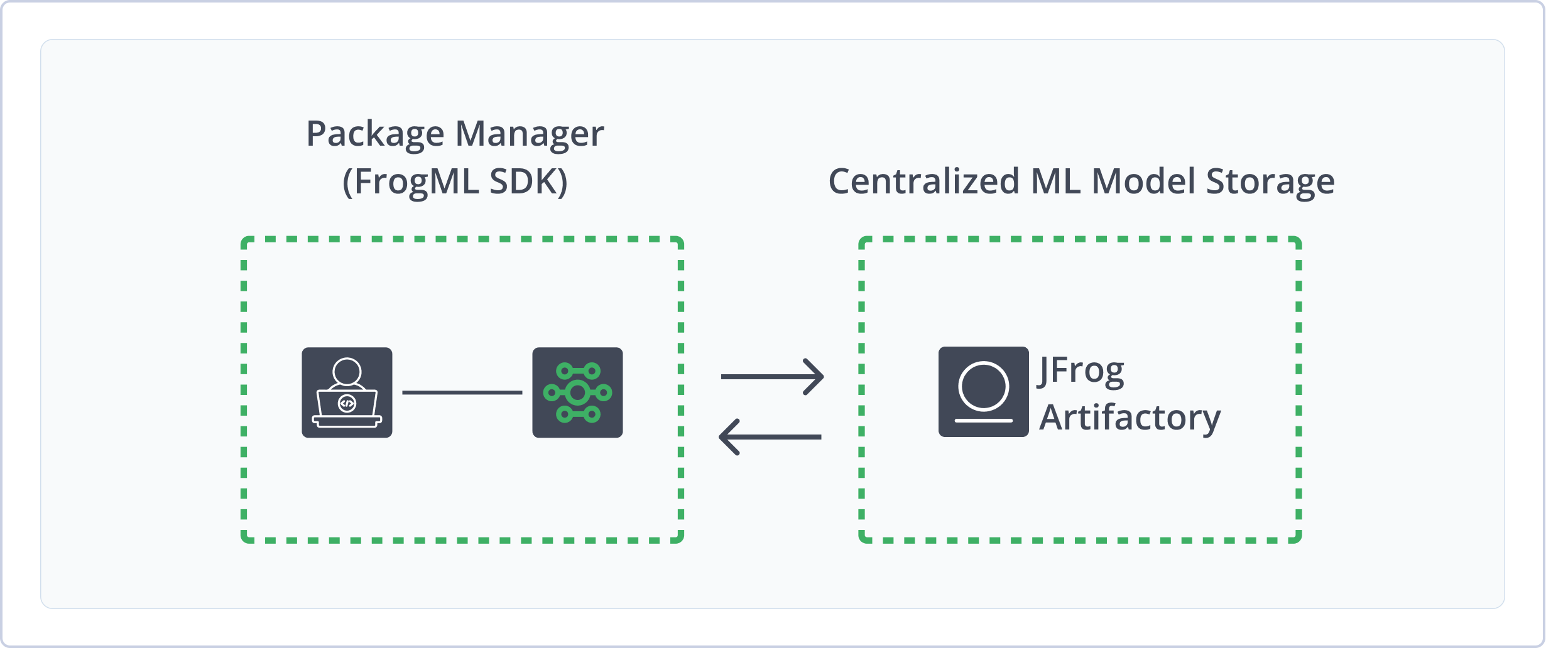
Using ML repositories and FrogML in Artifactory provides the following benefits:
- Secure Storage: Protect your proprietary information by deploying models and additional resources to Artifactory local repositories, giving you fine-grain control of the access to your models.
- Format-Aware SDK: Use the FrogML SDK to log and load complete, ready-to-use ML models in several supported formats.
- Rich Metadata and Search: Enhance models with rich metadata, including custom properties and automatically extracted attributes. Use the Artifactory Query Language (AQL) to easily search for and manage models based on their metadata.
- Easy Collaboration: Manage and share ML models with teammates alongside all your other application dependencies in a single system.
Get Started with Machine Learning
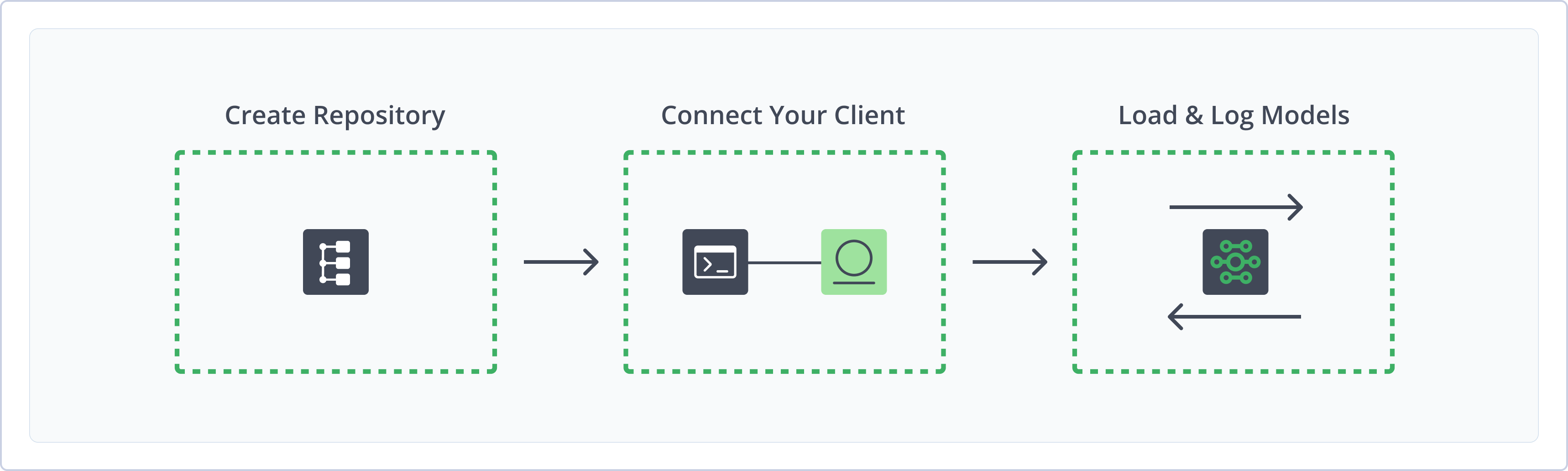
To get started working with Machine Learning, complete the following main steps:
- Create a Machine Learning Repository
- Connect FrogML to Artifactory
- Log and load file-based models and format-aware models using the FrogML Library
Create a Machine Learning Repository
This topic describes how to create a Machine Learning repository. This is required before logging and loading Machine Learning models. Artifactory supports local repositories for Machine Learning models, allowing you to store and share first- and second-party packages with your organization. To learn about local ML repository structure in Artifactory, see Machine Learning Repository Structure.
For more information on JFrog repositories, see Repository Management.
Prerequisite: You need Admin or Project Admin permissions in Artifactory to create a repository. If you don't have Admin permissions, the option will not be available.
To create a Machine Learning repository:
-
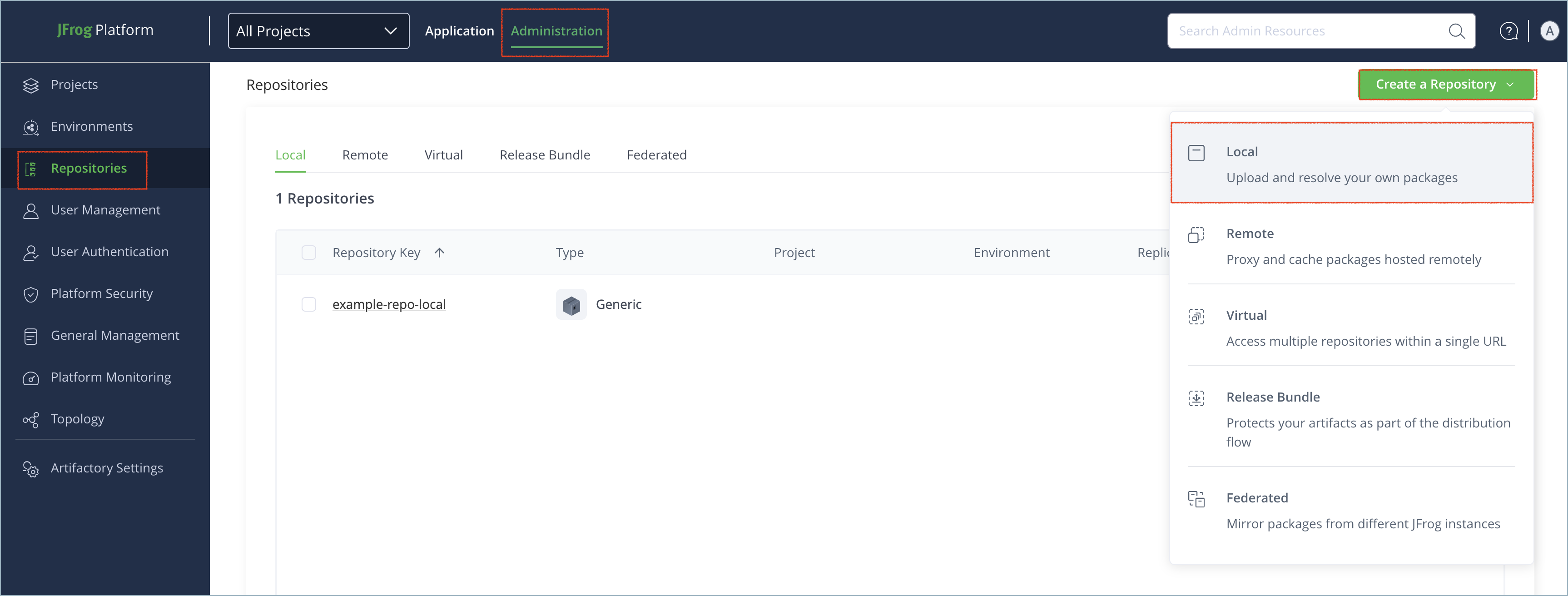
In the Administration tab, click Repositories | Create a Repository.
-
Select the Local repository type.
-
Select the Machine Learning package type.
-
In the Repository Key field, type a meaningful name for the repository. For example,
ml-local. For more information on local repositories and their settings, see Local Repositories. -
Click Create Repository. The repository is created and the Repositories window is displayed.
Connect FrogML to Artifactory
The FrogML SDK library is a Python tool designed to streamline the Machine Learning (ML) models and associated artifacts stored in JFrog Artifactory. With FrogML, you can upload and download models seamlessly and efficiently. FrogML is the main SDK library for JFrog ML. For more information, see Get Started with AI/ML in JFrog.
Prerequisite: Before connecting FrogML to Artifactory, you must have an existing Machine Learning repository in Artifactory. For more information, see Create a Machine Learning Repository.
To connect FrogML to Artifactory:
-
Run the following command to install the FrogML SDK:
pip install frogml -
Run the following command to authenticate FrogML against Artifactory:
export JF_ACCESS_TOKEN=<AUTH_TOKEN>
export JF_URL=https://[JFrogPlatformURL]
Where:
<AUTH_TOKEN>: Your Artifactory access token[JFrogPlatformURL]: The URL of your JPD
For example:
export JF_ACCESS_TOKEN=ajK2m4p6N8r9TbuFvWxYz1C3E5G7H9JtywzZ55JCAwpHhTZsOr7Uv-L7oeCKZ3y
export JF_URL=https://company.jfrog.io
Note
You can also use JFrog Set me up to copy the snippet populated with your token and environment. For more information, see Use Artifactory Set Me Up for Configuring Package Manager Clients.
Next steps:
Log and load ML models:
For more information about FrogML, see the JFrog ML documentation.
File-Based Models
File-based machine learning models are managed as opaque containers with no specific knowledge of the internal format. This approach offers universal flexibility, but requires that you determine and manage the exact dependencies and code required to successfully load and execute the model.
Artifactory ML repositories support the file types .cbm, .pretrained_model, .onnx, .pkl, .pth, and .joblib.
The following topics provide information about working with file-based models in Artifactory:
Artifactory also supports several format-aware model types. For more information, see Format-Aware Models.
Log File-Based Models
This is a universal, format-agnostic method for loading file-based models. The model must be a single file and cannot be a directory of files. For information about logging format-aware file types, see Format-Aware Models.
You can upload a single model file to a Machine Learning repository using the frogml.log_model() function. This function uses checksum-based storage. Artifactory calculates a checksum for each file and uploads it only if the file does not already exist in the repository.
After uploading the model, FrogML generates a file named model-manifest.json, which contains the model name and its related files and dependencies.
To log machine learning models:
Run the following command:
import frogml
frogml.files.log_model(
   source_path="<MODEL_FILE>",
   repository="<REPO_NAME>",
   model_name="<MODEL_NAME>",
   version="<MODEL_VERSION>", #optional
   properties = {"<KEY1>": "<VALUE1>"}, # optional
   dependencies = ["<MODEL_DEPENDENCIES>"], # optional
   code_dir = "<CODE_PATH>", # optional
   parameters = {"<HYPERPARAM_NAME>": "<VALUE>"}, # optional
   metrics = {"<METRIC_NAME>": "<VALUE>"}, # optional
   predict_file = "<PREDICT_PATH>", # optional
)Important
The parameters
code_dir,dependencies, andpredict_filemust be provided as a complete set. You must specify all of them or none at all.
Where:
-
<MODEL_FILE>: The local path to the model file you want to upload -
<REPO_NAME>: The name of the target repository in Artifactory -
<MODEL_NAME>: The unique name of the model -
<MODEL_VERSION>(Optional): The version of the model you want to upload. If version is not specified, the current timestamp is used -
<KEY1>and<VALUE1>(Optional): Properties key pair values to add searchable metadata to the model (optional). Separate multiple key pairs with a comma -
<MODEL_DEPENDENCIES>(Optional): Dependencies required to run the model, in one of the following formats:- A list of specific package requirements, for example
["catboost==1.2.5", "scikit-learn==1.3.2"] - A path to a single
requirements.txt,pyproject.toml, orconda.ymlpackage manager file - A two-item list containing paths to the Poetry files
pyproject.tomlandpoetry.lock
- A list of specific package requirements, for example
-
<CODE_PATH>(Optional): The path to the directory containing the source code -
<HYPERPARAM_NAME>and<VALUE>(Optional): Hyperparameters used to train the model -
<METRIC_NAME>and<VALUE>(Optional): Metrics key pair values to add searchable numeric metadata to the model. Separate multiple key pairs with a comma -
<PREDICT_PATH>(Optional): The path to a script that defines how to make predictions with the model.
For example:
import frogml

frogml.files.log_model(
   source_path="./models/prod_churn_model_v1.4.rds",
   repository="ml-local",
   model_name="ranger-randomforest-classifier",
   version="1.4",
   properties={
       "framework": "R",
       "r-version": "4.4.1",
       "algorithm-package": "ranger",
       "model-type": "binary-classifier",
       "trained-by": "data-science-team"
   },
   metrics={"validation-auc": 0.89},
)Note
You can also use JFrog Set me up to copy the snippet populated with your token and environment. For more information, see Use Artifactory Set Me Up for Configuring Package Manager Clients.
Load File-Based Models
Run the following command:
import frogml
from pathlib import Path

loaded_model: Path = frogml.files.load_model(
    repository="<REPO_NAME>",
    model_name="<MODEL_NAME>",
    version="<MODEL_VERSION>",
    target_path="<PATH_TO_FOLDER>" # optional
)
Where:
<REPO_NAME>: The name of the repository where the model is stored<MODEL_NAME>: The unique name of the target model<MODEL_VERSION>: The target version of the model you want to load<PATH_TO_FOLDER>(Optional): The path to the local directory where you want to save the model's files
For example:
import frogml
from pathlib import Path

loaded_model: Path = frogml.files.load_model(
    repository="ml-local",
    model_name="ranger-randomforest-classifier",
    version="1.4",
    target_path="./downloaded_models"
)Note
You can also use JFrog Set me up to copy the snippet populated with your token and environment. For more information, see Use Artifactory Set Me Up for Configuring Package Manager Clients.
Format-Aware Models
Format-aware models load directly into a ready-to-use object in your Python script, with all dependencies and associated code included. FrogML supports these format-aware model types:
For information about working with a model type not listed here, see File-Based Models.
CatBoost
This section contains information about working with CatBoost models in Artifactory:
Log CatBoost Models
Run the following command:
import frogml

repository = "<REPO_NAME>"
name = "<MODEL_NAME>"
version = "<MODEL_VERSION>" # optional
properties = {"<KEY1>": "<VALUE1>"} # optional
dependencies = ["<MODEL_DEPENDENCIES>"] # optional
code_dir = "<CODE_PATH>" # optional
parameters = {"<HYPERPARAM_NAME>": "<VALUE>"} # optional
metrics = {"<METRIC_NAME>": "<VALUE>"} # optional
predict_file = "<PREDICT_PATH>" # optional
catboost_model = get_catboost_model()

frogml.catboost.log_model(
    model=catboost_model,
    repository=repository,
    model_name=name,
    version=version,
    properties=properties,
    dependencies=dependencies,
    code_dir=code_dir,
    parameters=parameters,
    metrics=metrics,
    predict_file=predict_file,
)Important
The parameters
code_dir,dependencies, andpredict_filemust be provided as a complete set. You must specify all of them or none at all.
Where:
-
<REPO_NAME>: The name of the Artifactory repository where the model is stored -
<MODEL_NAME>: The unique name of the model you want to download -
<MODEL_VERSION>(Optional): The version of the model you want to upload. If version is not specified, the current timestamp is used -
<KEY1>and<VALUE1>(Optional): Properties key pair values to add searchable string-based tags or metadata to the model. Separate multiple key pairs with a comma -
<MODEL_DEPENDENCIES>(Optional): Dependencies required to run the model, in one of the following formats:- A list of specific package requirements, for example
["catboost==1.2.5", "scikit-learn==1.3.2"] - A path to a single
requirements.txt,pyproject.toml, orconda.ymlpackage manager file - A two-item list containing paths to the
pyproject.tomlandpoetry.lockfiles
- A list of specific package requirements, for example
-
<CODE_PATH>(Optional): The path to the directory containing the source code -
<HYPERPARAM_NAME>and<VALUE>(Optional): Hyperparameters used to train the model -
<METRIC_NAME>and<VALUE>(Optional): Metrics key pair values to add searchable numeric metadata to the model. Separate multiple key pairs with a comma -
<PREDICT_PATH>(Optional): The path to a script that defines how to make predictions with the model.
For example:
import frogml

repository = "ml-local"
name = "churn_classifier_v2"
version = "2.0"
properties = {"training_dataset": "processed_data_v4.csv"}
dependencies = ["catboost==1.2.5", "scikit-learn==1.3.2", "pandas==2.2.0"]
metrics = {
    "accuracy": 0.92,
    "f1_score": 0.88,
}
code_dir = "src/training/"
predict_file = "src/training/predict.py"
catboost_model = get_catboost_model()

frogml.catboost.log_model(
    model=catboost_model,
    repository=repository,
    model_name=name,
    version=version,
    properties=properties,
    dependencies=dependencies,
    metrics=metrics,
    code_dir=code_dir,
)
Load CatBoost Models
Run the following command:
import frogml

repository = "<REPO_NAME>"
name = "<MODEL_NAME>"
version = "<MODEL_VERSION>"

catboost_deserialized_model = frogml.catboost.load_model(
    repository=repository,
    model_name=name,
    version=version,
)
Where:
<REPO_NAME>: The name of the Artifactory repository where the model is stored<MODEL_NAME>: The unique name of the model you want to download<MODEL_VERSION>: The version number of the model you want to load
For example:
import frogml

repository = "ml-local"
name = "churn_classifier_v2"
version = "2.0"

catboost_deserialized_model = frogml.catboost.load_model(
    repository=repository,
    model_name=name,
    version=version,
)
Hugging Face
This section contains information about working with Hugging Face models in Machine Learning repositories in Artifactory:
Artifactory also supports Hugging Face repositories, which work natively with the Hugging Face Hub library and CLI. For more information, see Hugging Face Repositories.
Log Hugging Face Models
Run the following command:
import frogml

repository = "<REPO_NAME>"
name = "<MODEL_NAME>"
version = "<MODEL_VERSION>" # optional
properties = {"<KEY1>": "<VALUE1>"} # optional
dependencies = ["<MODEL_DEPENDENCIES>"] # optional
code_dir = "<CODE_PATH>" # optional
parameters = {"<HYPERPARAM_NAME>": "<VALUE>"} # optional
metrics = {"<METRIC_NAME>": "<VALUE>"} # optional
predict_file = "<PREDICT_PATH>" # optional
model = get_huggingface_model()
tokenizer = get_huggingface_tokenizer()

frogml.huggingface.log_model(
    model=model,
    tokenizer=tokenizer,
    repository=repository,
    model_name=name,
    version=version,
    properties=properties,
    dependencies=dependencies,
    code_dir=code_dir,
    parameters=parameters,
    metrics=metrics,
    predict_file=predict_file,
)Important
The parameters
code_dir,dependencies, andpredict_filemust be provided as a complete set. You must specify all of them or none at all.
Where:
-
<REPO_NAME>: The name of the Artifactory repository where the model is stored -
<MODEL_NAME>: The unique name of the model you want to download -
<MODEL_VERSION>: The version of the model you want to upload. If version is not specified, the current timestamp is used -
<KEY1>and<VALUE1>: Key pair values to add searchable metadata to the model. Separate multiple key pairs with a comma -
<MODEL_DEPENDENCIES>(Optional): Dependencies required to run the model, in one of the following formats:- A list of specific package requirements, for example
["catboost==1.2.5", "scikit-learn==1.3.2"] - A path to a single
requirements.txt,pyproject.toml, orconda.ymlpackage manager file - A two-item list containing paths to the
pyproject.tomlandpoetry.lockfiles
- A list of specific package requirements, for example
-
<CODE_PATH>: The path to the directory containing the source code -
<HYPERPARAM_NAME>and<VALUE>(Optional): Hyperparameters used to train the model -
<METRIC_NAME>and<VALUE>(Optional): Key pair values to add searchable numeric metadata to the model. Separate multiple key pairs with a comma -
<PREDICT_PATH>(Optional): The path to a script that defines how to make predictions with the model.
For example:
import frogml

repository = "ml-local"
name = "sentiment-analyzer"
version = "1.2.0"
properties = {
    "base_model": "distilbert-base-uncased-finetuned-sst-2-english",
    "dataset": "SST-2 (Stanford Sentiment Treebank)",
    "accuracy": 0.93
}
dependencies = ["environment.yaml"]
code_dir = "src/fine_tuning/"
predict_file = "src/fine_tuning/predict.py"
model = get_huggingface_model()
tokenizer = get_huggingface_tokenizer()

frogml.huggingface.log_model(
    model=model,
    tokenizer=tokenizer,
    repository=repository,
    model_name=name,
    version=version,
    properties=properties,
    dependencies=dependencies,
    code_dir=code_dir,
)
Load Hugging Face Models
Run the following command:
import frogml

repository = "<REPO_NAME>"
name = "<MODEL_NAME>"
version = "<MODEL_VERSION>"

huggingface_deserialized_model = frogml.huggingface.load_model(
    repository=repository,
    model_name=name,
    version=version,
)
Where:
<REPO_NAME>: The name of the Artifactory repository where the model is stored<MODEL_NAME>: The unique name of the model you want to download<MODEL_VERSION>: The version number of the model you want to load
For example:
import frogml

repository = "ml-local"
name = "sentiment-analyzer"
version = "1.2.0"

huggingface_deserialized_model = frogml.huggingface.load_model(
    repository=repository,
    model_name=name,
    version=version,
)
ONNX
This section contains information about working with ONNX models in Artifactory:
Log ONNX Models
Run the following command:
import frogml

repository = "<REPO_NAME>"
name = "<MODEL_NAME>"
version = "<MODEL_VERSION>" # optional
properties = {"<KEY1>": "<VALUE1>"} # optional
dependencies = ["<MODEL_DEPENDENCIES>"] # optional
code_dir = "<CODE_PATH>" # optional
parameters = {"<HYPERPARAM_NAME>": "<VALUE>"} # optional
metrics = {"<METRIC_NAME>": "<VALUE>"} # optional
predict_file = "<PREDICT_PATH>" # optional
onnx_model = get_onnx_model()

frogml.onnx.log_model(
    model=onnx_model,
    repository=repository,
    model_name=name,
    version=version,
    properties=properties,
    dependencies=dependencies,
    code_dir=code_dir,
    parameters=parameters,
    metrics=metrics,
    predict_file=predict_file,
)Important
The parameters
code_dir,dependencies, andpredict_filemust be provided as a complete set. You must specify all of them or none at all.
Where:
-
<REPO_NAME>: The name of the Artifactory repository where the model is stored -
<MODEL_NAME>: The unique name of the model you want to download -
<MODEL_VERSION>(Optional): The version of the model you want to upload. If version is not specified, the current timestamp is used -
<KEY1>and<VALUE1>(Optional): Key pair values to add searchable string-based tags or metadata to the model. Separate multiple key pairs with a comma -
<MODEL_DEPENDENCIES>(Optional): Dependencies required to run the model, in one of the following formats:- A list of specific package requirements, for example
["catboost==1.2.5", "scikit-learn==1.3.2"] - A path to a single
requirements.txt,pyproject.toml, orconda.ymlpackage manager file - A two-item list containing paths to the
pyproject.tomlandpoetry.lockfiles
- A list of specific package requirements, for example
-
<CODE_PATH>(Optional): The path to the directory containing the source code -
<HYPERPARAM_NAME>and<VALUE>(Optional): Hyperparameters used to train the model -
<METRIC_NAME>and<VALUE>(Optional): Key pair values to add searchable numeric metadata to the model. Separate multiple key pairs with a comma -
<PREDICT_PATH>(Optional): The path to a script that defines how to make predictions with the model.
For example:
import frogml

repository = "ml-local"
name = "yolo-object-detector"
version = "1.2.0"
properties = {
    "source_framework": "PyTorch",
    "precision": "FP16"
}
dependencies = ["torch==2.2.0", "onnx==1.16.0"]
code_dir = "src/conversion_scripts/"
predict_file = "src/conversion_scripts/predict.py"
onnx_model = get_onnx_model()

frogml.onnx.log_model(
    model=onnx_model,
    repository=repository,
    model_name=name,
    version=version,
    properties=properties,
    dependencies=dependencies,
    code_dir=code_dir,
)
Load ONNX Models
Run the following command:
import frogml

repository = "<REPO_NAME>"
name = "<MODEL_NAME>"
version = "<MODEL_VERSION>"

onnx_deserialized_model = frogml.onnx.load_model(
    repository=repository,
    model_name=name,
    version=version,
)
Where:
<REPO_NAME>: The name of the Artifactory repository where the model is stored<MODEL_NAME>: The unique name of the model you want to download<MODEL_VERSION>: The version number of the model you want to load
For example:
import frogml

repository = "ml-local"
name = "yolo-object-detector"
version = "1.2.0"

onnx_deserialized_model = frogml.onnx.load_model(
    repository=repository,
    model_name=name,
    version=version,
)
PyTorch
This section contains information about working with PyTorch models in Artifactory:
Log PyTorch Models
Run the following command:
import frogml
import torch.nn as nn

repository = "<REPO_NAME>"
name = "<MODEL_NAME>"
version = "<MODEL_VERSION>" # optional
properties = {"<KEY1>": "<VALUE1>"} # optional
dependencies = ["<MODEL_DEPENDENCIES>"] # optional
code_dir = "<CODE_PATH>" # optional
parameters = {"<HYPERPARAM_NAME>": "<VALUE>"} # optional
metrics = {"<METRIC_NAME>": "<VALUE>"} # optional
predict_file = "<PREDICT_PATH>" # optional

class Classifier(nn.Module):
    def __init__(self):
        super().__init__()
        self.hidden1 = nn.Linear(8, 12)
        self.act1 = nn.ReLU()
        self.hidden2 = nn.Linear(12, 8)
        self.act2 = nn.ReLU()
        self.output = nn.Linear(8, 1)
        self.act_output = nn.Sigmoid()

    def forward(self, x):
        x = self.act1(self.hidden1(x))
        x = self.act2(self.hidden2(x))
        x = self.act_output(self.output(x))
        return x

frogml.pytorch.log_model(
    model=Classifier(),
    repository=repository,
    model_name=name,
    version=version,
    properties=properties,
    dependencies=dependencies,
    code_dir=code_dir,
    parameters=parameters,
    metrics=metrics,
    predict_file=predict_file,
)Important
The parameters
code_dir,dependencies, andpredict_filemust be provided as a complete set. You must specify all of them or none at all.
Where:
-
<REPO_NAME>: The name of the Artifactory repository where the model is stored -
<MODEL_NAME>: The unique name of the model you want to download -
<MODEL_VERSION>(Optional): The version of the model you want to upload. If version is not specified, the current timestamp is used -
<KEY1>and<VALUE1>(Optional): Properties key pair values to add searchable string-based tags or metadata to the model. Separate multiple key pairs with a comma -
<MODEL_DEPENDENCIES>(Optional): Dependencies required to run the model, in one of the following formats:- A list of specific package requirements, for example
["catboost==1.2.5", "scikit-learn==1.3.2"] - A path to a single
requirements.txt,pyproject.toml, orconda.ymlpackage manager file - A two-item list containing paths to the
pyproject.tomlandpoetry.lockfiles
- A list of specific package requirements, for example
-
<CODE_PATH>(Optional): The path to the directory containing the source code -
<HYPERPARAM_NAME>and<VALUE>(Optional): Hyperparameters used to train the model -
<METRIC_NAME>and<VALUE>(Optional): Metrics key pair values to add searchable numeric metadata to the model. Separate multiple key pairs with a comma -
<PREDICT_PATH>(Optional): The path to a script that defines how to make predictions with the model.
For example:
import frogml
import torch
import torch.nn as nn

repository = "ml-local"
name = "sales-lead-classifier"
version = "1.2.0"
code_dir = "src/training_scripts/"
properties = {"data-sensitivity": "confidential"}
dependencies = [f"torch==2.2.0", "pandas==1.2.3"]

parameters = {
    "learning_rate": 0.001,
    "epochs": 50,
    "batch_size": 32,
}

metrics = {
    "validation_loss": 0.253,
    "validation_accuracy": 0.915
}

predict_file = "src/training_scripts/predict.py"

class Classifier(nn.Module):
    def __init__(self):
        super().__init__()
        self.hidden1 = nn.Linear(8, 12)
        self.act1 = nn.ReLU()
        self.hidden2 = nn.Linear(12, 8)
        self.act2 = nn.ReLU()
        self.output = nn.Linear(8, 1)
        self.act_output = nn.Sigmoid()

    def forward(self, x):
        x = self.act1(self.hidden1(x))
        x = self.act2(self.hidden2(x))
        x = self.act_output(self.output(x))
        return x

trained_model = Classifier()

frogml.pytorch.log_model(
    model=trained_model,
    repository=repository,
    model_name=name,
    version=version,
    properties=properties,
    dependencies=dependencies,
    code_dir=code_dir,
    parameters=parameters,
    metrics=metrics,
)
Load PyTorch Models
Run the following command:
import frogml

repository = "<REPO_NAME>"
name = "<MODEL_NAME>"
version = "<MODEL_VERSION>"

model = frogml.pytorch.load_model(
    repository=repository,
    model_name=name,
    version=version,
)
Where:
<REPO_NAME>: The name of the Artifactory repository where the model is stored<MODEL_NAME>: The unique name of the model you want to download<MODEL_VERSION>: The version number of the model you want to load
For example:
import frogml

repository = "ml-local"
name = "sales-lead-classifier"
version = "1.2.0"

model = frogml.pytorch.load_model(
    repository=repository,
    model_name=name,
    version=version,
)
scikit-learn
This section contains information about working with scikit-learn models in Artifactory:
Log scikit-learn Models
Run the following command:
import frogml

repository = "<REPO_NAME>"
name = "<MODEL_NAME>"
version = "<MODEL_VERSION>" # optional
properties = {"<KEY1>": "<VALUE1>"} # optional
dependencies = ["<MODEL_DEPENDENCIES>"] # optional
code_dir = "<CODE_PATH>" # optional
parameters = {"<HYPERPARAM_NAME>": "<VALUE>"} # optional
metrics = {"<METRIC_NAME>": "<VALUE>"} # optional
predict_file = "<PREDICT_PATH>" # optional
joblib_model = get_scikit_learn()

frogml.scikit_learn.log_model(
    model=joblib_model,
    repository=repository,
    model_name=name,
    version=version,
    properties=properties,
    dependencies=dependencies,
    code_dir=code_dir,
    parameters=parameters,
    metrics=metrics,
    predict_file=predict_file,
)Important
The parameters
code_dir,dependencies, andpredict_filemust be provided as a complete set. You must specify all of them or none at all.
Where:
-
<REPO_NAME>: The name of the Artifactory repository where the model is stored -
<MODEL_NAME>: The unique name of the model you want to download -
<MODEL_VERSION>(Optional): The version of the model you want to upload. If version is not specified, the current timestamp is used -
<KEY1>and<VALUE1>(Optional): Properties key pair values to add searchable string-based tags or metadata to the model. Separate multiple key pairs with a comma -
<MODEL_DEPENDENCIES>(Optional): Dependencies required to run the model, in one of the following formats:- A list of specific package requirements, for example
["catboost==1.2.5", "scikit-learn==1.3.2"] - A path to a single
requirements.txt,pyproject.toml, orconda.ymlpackage manager file - A two-item list containing paths to the
pyproject.tomlandpoetry.lockfiles
- A list of specific package requirements, for example
-
<CODE_PATH>(Optional): The path to the directory containing the source code -
<HYPERPARAM_NAME>and<VALUE>(Optional): Hyperparameters used to train the model -
<METRIC_NAME>and<VALUE>(Optional): Metrics key pair values to add searchable numeric metadata to the model. Separate multiple key pairs with a comma -
<PREDICT_PATH>(Optional): The path to a script that defines how to make predictions with the model.
For example:
import frogml

repository = "ml-local"
name = "customer-churn-predictor"
version = "1.2.0"
properties = {"feature_set_version": "v3"}
dependencies = ["scikit-learn==1.4.2", "pandas==2.2.2"]
code_dir = "src/training/"
predict_file = "src/training/predict.py"
joblib_model = get_scikit_learn()

frogml.scikit_learn.log_model(
    model=joblib_model,
    repository=repository,
    model_name=name,
    version=version,
    properties=properties,
    dependencies=dependencies,
    code_dir=code_dir,
)
Load scikit-learn Models
Run the following command:
import frogml

repository = "<REPO_NAME>"
name = "<MODEL_NAME>"
version = "<MODEL_VERSION>"

scikit_learn_deserialized_model = frogml.scikit_learn.load_model(
    repository=repository,
    model_name=name,
    version=version,
)
Where:
<REPO_NAME>: The name of the Artifactory repository where the model is stored<MODEL_NAME>: The unique name of the model you want to download<MODEL_VERSION>: The version number of the model you want to load
For example:
import frogml

repository = "ml-local"
name = "customer-churn-predictor"
version = "1.2.0"

scikit_learn_deserialized_model = frogml.scikit_learn.load_model(
    repository=repository,
    model_name=name,
    version=version,
)
Additional Machine Learning Information
The following pages provide additional information about using Machine Learning repositories in Artifactory:
Get Model Information
Run the following command:
import frogml

repository = "<REPO_NAME>"
name = "<MODEL_NAME>"
version = "<MODEL_VERSION>"

model_information = frogml.<FORMAT>.get_model_info(
    repository=repository,
    model_name=name,
    version=version,
)
Where:
-
<REPO_NAME>: The name of the repository where the model is located -
<MODEL_NAME>: The unique name of the model -
<MODEL_VERSION>: The target version of the model -
<FORMAT>: The format of the model, which must be one of the following values:catboostfileshuggingfaceonnxpytorchscikit_learn
For example:
import frogml

repository = "ml-local"
name = "sentiment-analyzer"
version = "1.2.0"

model_information = frogml.huggingface.get_model_info(
    repository=repository,
    model_name=name,
    version=version,
)
Machine Learning Repository Structure
The FrogML repository structure for local repositories is as follows:
├── ${REPOSITORY_NAME}
    └── models
        └── ${MODEL_NAME}
            └── ${MODEL_VERSION}
                ├── model-manifest.json
                ├── model/
                    ├── file1
                    └── file2
                └── code/
                    ├── code.zip
                    └── requirements.txt
predict.py File Requirements
When providing a predict.py file for any log_model function, the file must meet these requirements:
-
File Name: The file must be named
predict.py. -
File Location:
predict.pymust reside within thecode_dirdirectory hierarchy. This includes being a direct child ofcode_diror in any of its subdirectories. -
Function Signature: Must contain a function with the exact signature
def predict (<param1>, <param2> **kwargs>)- Signature must start with
def predict(and end with**kwargs) - Signature must have exactly two parameters between
predict(and**kwargs) - Each parameter must contain at least one non-whitespace character and cannot contain a comma
- Flexible whitespace is allowed around keywords, parentheses, and commas
- Signature must start with
Machine Learning Limitations in Artifactory
The following are the limitations of Machine Learning repositories in Artifactory:
- Xray Scanning: Xray scanning for ML resources is not supported.
Updated 7 months ago