

Puppet Repositories
Learn how to use JFrog Artifactory with Puppet to manage collections, deploy packages, and configure repositories for your automation workflows.
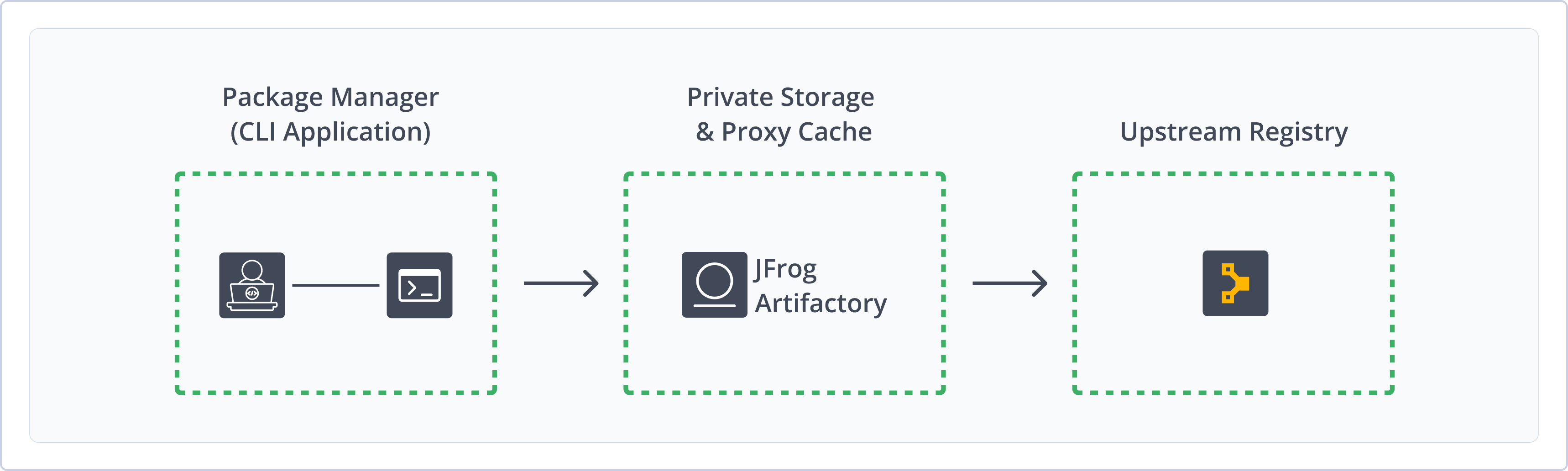
The JFrog Artifactory integration with Puppet allows you to manage collections in Artifactory. Puppet is an open-source platform that enables you to automate IT processes such as provisioning, application deployment, orchestration, and more. For more information, see Puppet documentation.
As a fully-fledged Puppet repository, on top of its capabilities for advanced artifact management, Artifactory's support for Puppet provides:
- The ability to provision Puppet modules from Artifactory to the Puppet command line tool for all repository types.
- Calculation of Metadata for Puppet modules hosted in Artifactory's local repositories.
- Access to remote Puppet repositories, such as https://forgeapi.puppet.com/, using remote repositories, which provide proxy and caching functionalities.
- Access to multiple Puppet repositories from a single URL by aggregating them under a Virtual Repository. This overcomes the limitation of the Puppet client, which can only access a single registry at a time.
- Support for flexible puppet repository layouts that allow you to organize your Puppet modules and assign access privileges according to projects or development teams.
Puppet version support
Puppet does not natively support a context path in the module repository URL up to version 4.9.1. We recommend using Artifactory with Puppet version 4.9.2 and above (or 5.x and above) to avoid the need for a reverse proxy workaround. Please see the section Use Puppet 4.9.1 and Below if you are using Puppet 4.9.1 or earlier.
Get Started with Puppet
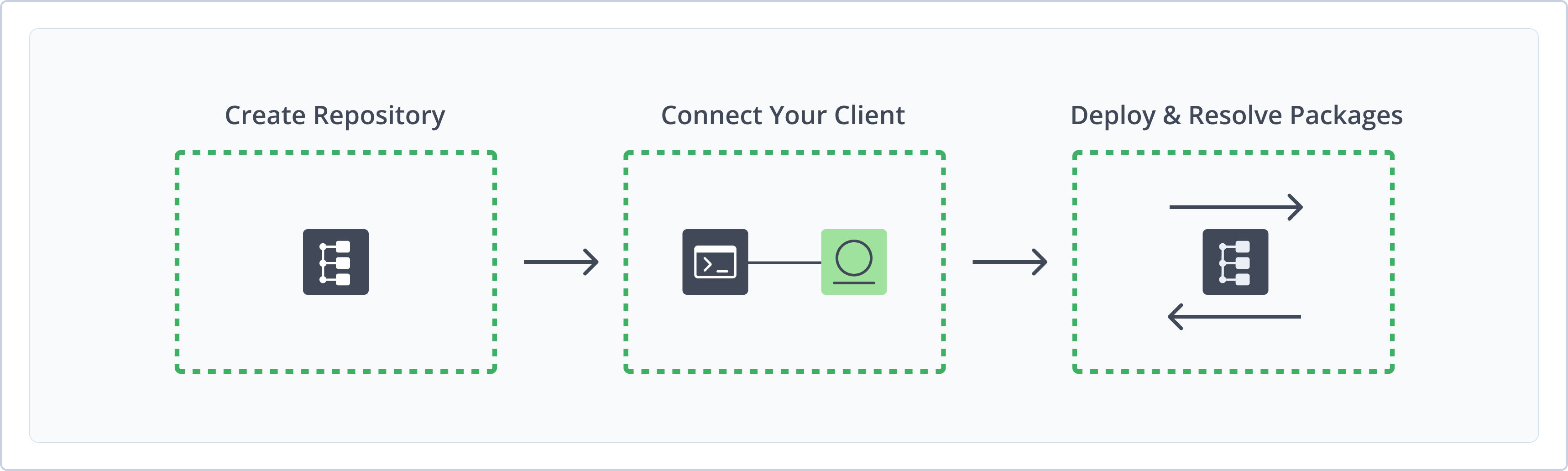
To get started working with Puppet, complete the following main steps:
- Create a Puppet Repository
- Connect Puppet to Artifactory
- Deploy and Resolve Puppet Packages
Create a Puppet Repository
This topic describes how to create a Puppet repository. This is required before publishing and installing Puppet packages. There are three primary types of repositories:
- Local repositories: Where you store and share 1st and 2nd party packages with your organization
- Remote repositories: Enable you to download from any remote location, including external package registries or other Artifactory instances
- Virtual repositories: Enable aggregating remote and local repositories, enabling your organization to scale by providing a single URL that provides access to multiple repositories and types
For more information on JFrog repositories, see Repository Management.
Prerequisite: You need Admin or Project Admin permissions to create a Puppet repository. If you don't have Admin permissions, the option will not be available.
To create a puppet repository:
-
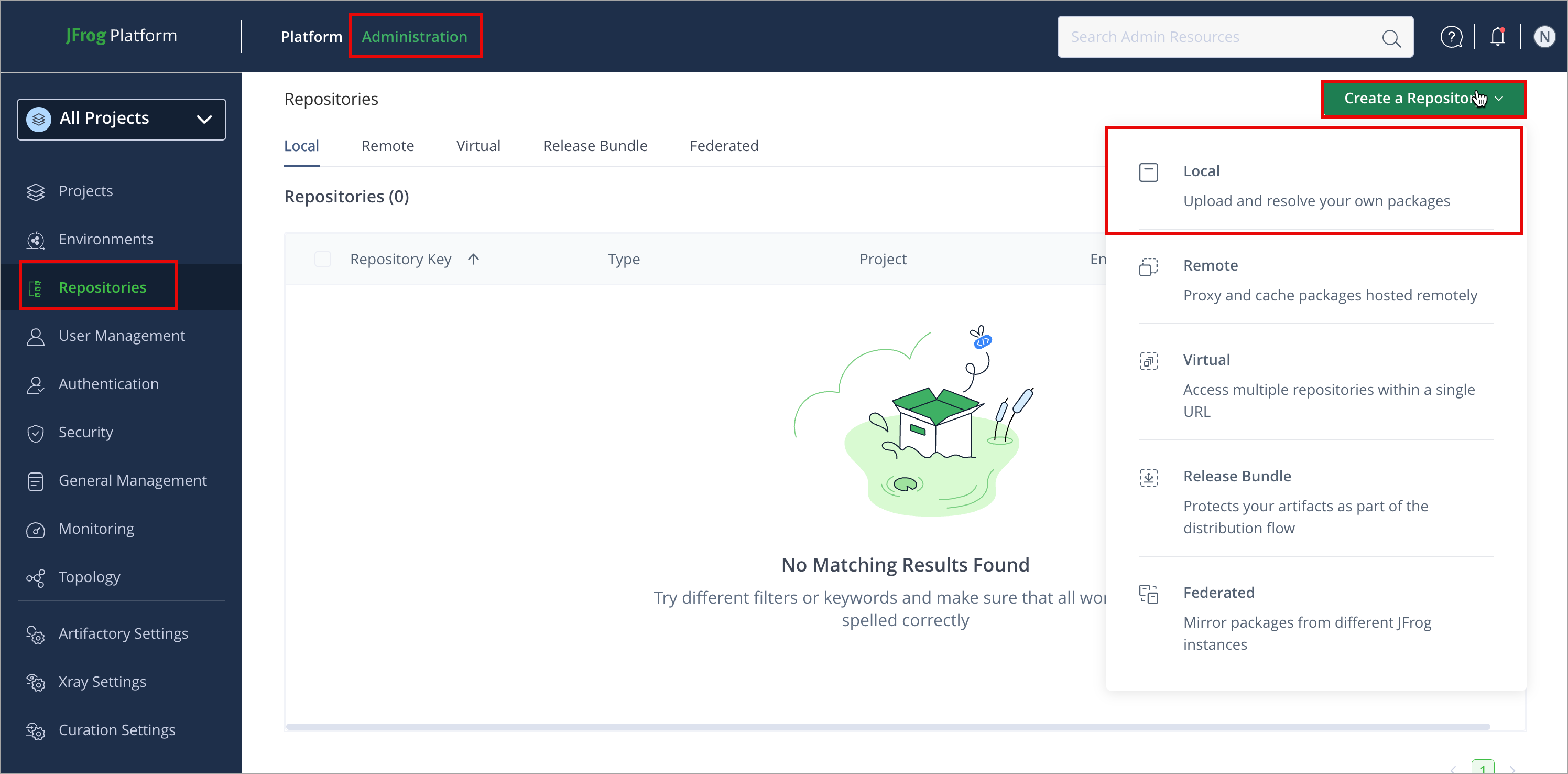
In the Administration tab, click Repositories > Create a Repository
Use Puppet Repository Layout
Artifactory allows you to define any layout for your Puppet repositories. To upload a module according to your custom layout, you need to package your Puppet files using
puppet module build.This creates a .tar.gz file for your module, which you can then upload to any path within your local Puppet repository.
- Select the repository type you want to create: local, virtual, or remote.
- Configure the required fields for the repository:
- For local repositories, in the Repository Key field, type a meaningful name for the repository. For example,
pub-local. For more information on local repositories and their settings, see Local Repositories. - For remote repositories, verify the Repository URL and update as needed. For more information on remote repositories and their settings, see Remote Repositories.
- For virtual repositories, select one or more local or remote repository types to include in the virtual repository. For more information on virtual repositories and their settings, see Virtual Repositories.
- For local repositories, in the Repository Key field, type a meaningful name for the repository. For example,
- Click Create Repository. The repository is created, and the Repositories window is displayed.
Connect Puppet to Artifactory
To authenticate your Puppet client to Artifactory, you need to add your Artifactory credentials to your puppet.conf file.
To connect Puppet to Artifactory:
- Open your
puppet.conffile in a text editor. - Add the following snippet:
Where:[main] module_repository=https://<USERNAME>:<TOKEN>@<JFrogPlatformURL>/artifactory/api/puppet/<REPO_NAME><USERNAME>: Your Artifactory username<TOKEN>: Your Artifactory identity token<JFrogPlatformURL>: The hostname of your JFrog Platform<REPO_NAME>: The name of the target repository
For example:
[main] module_repository=https://jeffry:Random_Token4sDSTGhjwheabu9234fyw3497fje@<JFrogPlatformURL>/artifactory/api/puppet/puppet-local - Save the changes to the file.
Note
You can also use JFrog Set Me Up to copy the snippet populated with your token and environment. For more information, see Use Artifactory Set Me Up for Configuring Package Manager Clients.
Deploy Puppet Packages
Deploying Puppet packages makes them available to other users. There are two ways to deploy puppet modules: using the Artifactory UI, and using the Artifactory REST API.
Deploy Puppet Modules Using the Artifactory UI
-
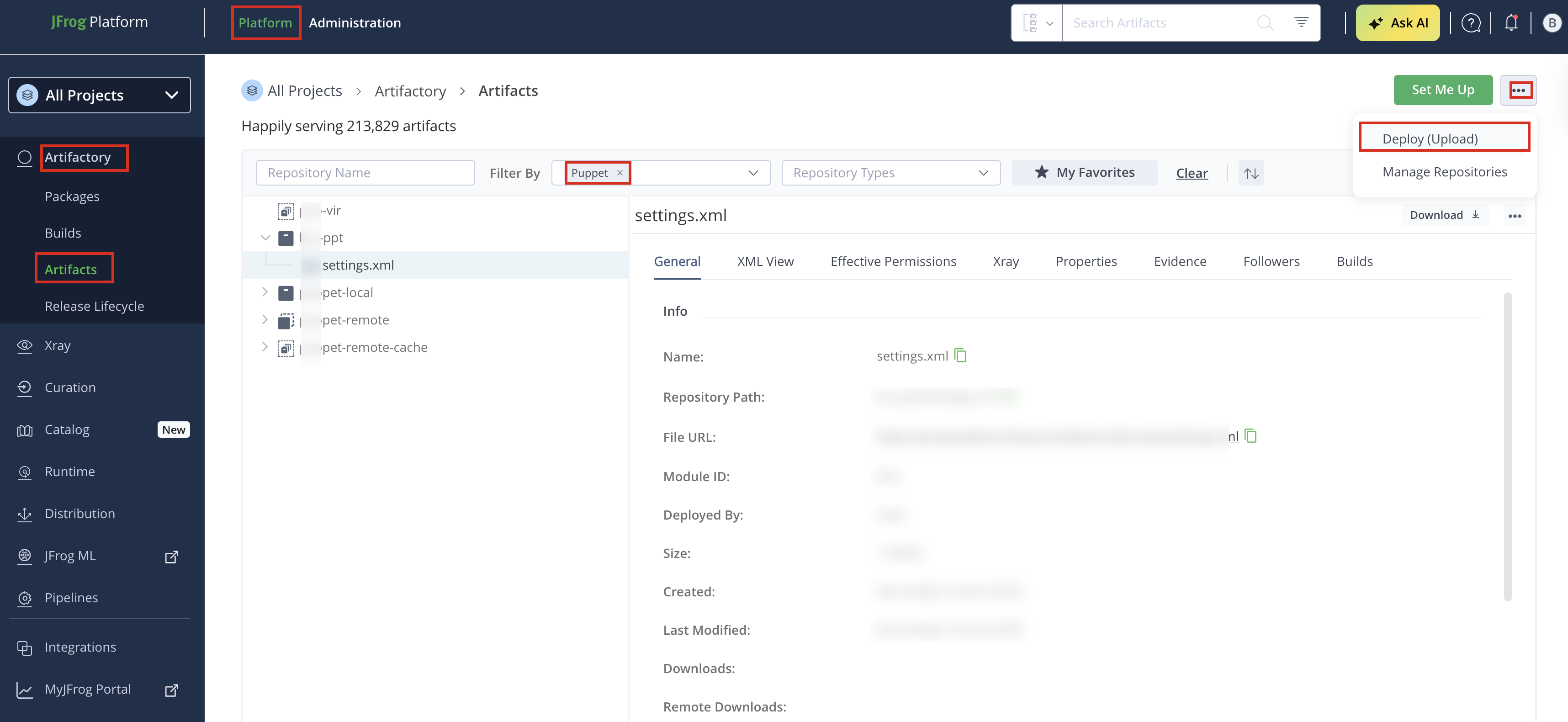
In the Platform tab, click Artifactory | Artifacts, then click ellipsis |Deploy(Upload). Deploy options are displayed.
-
Select your Puppet repository as the Target Repository, and upload the file you want to deploy.
-
Verify the deploy options, then click Deploy. The package is deployed.
Deploy Puppet Modules Using Artifactory REST API
To deploy a Puppet module into an Artifactory repository, you need to use Artifactory's REST API or the Web UI.For example, to deploy a Puppet module into this repository using the REST API, use the following command:
Note
Only applicable to Local Puppet Repositories
curl -L -u <USERNAME>:<PASSWORD> -XPUT https://company.jfrog.io/artifactory/puppet-local/<TARGET_FILE_PATH> -T <PATH_TO_FILE>Example
curl -L -u john:APd1hK5d7Lp -XPUT https://company.jfrog.io/artifactory/puppet-local/mymodule/mymodule-1.0.0.tar.gz -T mymodule-1.0.0.tar.gzResolve Puppet Packages
To install a module by specifying Artifactory repository:
Run the following command:
puppet module install --module_repository=https://<USERNAME>:<TOKEN>@<JFrogPlatformURL>/artifactory/api/puppet/<REPO_NAME> <MODULE_NAME>Where:
<USERNAME>: Your Artifactory username<TOKEN>: Your Artifactory identity token<JFrogPlatformURL>: The hostname of your JFrog Platform<REPO_NAME>: The name of the target repository<MODULE_NAME>: The name of the module you want to resolve
For example:
puppet module install --module_repository=https://john:[email protected]/artifactory/api/puppet/pup-virtual puppetlabs-apacheAdditional puppet Actions
The following additional actions are available with puppet repositories:
- Use the Puppet Command Line
- Use r10k for Puppet
- Use Puppet 4.9.1 and Below
- Use librarian-puppet
- Use Puppet Search
- Work with Artifactory and Puppet without Anonymous Access
- Clean Up the Local Puppet Cache
- REST API Support for Puppet
Use the Puppet Command Line
When accessing a Puppet repository through Artifactory, the repository URL path must be prefixed with api/puppet.
This applies to all Puppet commands, including puppet module install and puppet module search.
For example, if you are using Artifactory standalone or as a local service, you would access your Puppet repositories using the following URL:
https://localhost:8081/artifactory/api/puppet/<REPO_KEY>Or, if you are using Artifactory Cloud, the URL would be:
https://<server name>.jfrog.io/artifactory/api/puppet/<REPO_KEY>To use the Puppet command line, you need to make sure Puppet is installed on your client.
Once you have created your Puppet repository, you can select it in the Platform | Artifactory | Artifacts Tree Browser and click the Set Me Up button to get helpful code snippets. These allow you to change your Puppet repository URL in the puppet.conf file, and resolve modules using the Puppet command line tool.
Replacing the default repository
To replace the default repository with a URL pointing to a Puppet repository in Artifactory, add the following in your puppet.conf file:
Note: This example uses a repository with the key puppet.
[main]
module_repository=http://localhost:8081/artifactory/api/puppet/puppetTip: We recommend referencing a Virtual Repository URL as a repository. This gives you the flexibility to reconfigure and aggregate other external sources and local repositories of Puppet modules you deploy.
Note that the --module_repository parameter on the command line will override the module_repository setting in your puppet.conf file.
Once the Puppet command line tool is configured, every Puppet module install command will fetch packages from the Puppet repository specified above. For example:
$ puppet module install --module_repository=http://localhost:8081/artifactory/api/puppet/puppet puppetlabs-mysql
Notice: Preparing to install into /Users/jainishs/.puppetlabs/etc/code/modules ...
Notice: Downloading from http://localhost:8081/artifactory/api/puppet/puppet ...
Notice: Installing -- do not interrupt ...
/Users/jainishs/.puppetlabs/etc/code/modules
└── puppetlabs-mysql (v3.10.0)
Use r10k for Puppet
r10k is a Puppet environment and module deployment tool. From version 5.4.5, you can use r10k to fetch Puppet environments and modules from an Artifactory Puppet repository for deployment.
To configure r10k to fetch modules from Artifactory, add the following to your r10k.yaml file:
forge:
   baseurl: 'https://<ARTIFACTORY_HOST_NAME>:<ARTIFACTORY_PORT>/artifactory/api/puppet/<REPO_KEY>'
For example:
forge:
  baseurl: 'https://localhost:8081/artifactory/api/puppet/puppet-local'
To fetch and install the Puppet modules from Artifactory, run the following command:
r10k puppetfile installUse Puppet 4.9.1 and Below
Up till version 4.9.1, the Puppet client does not support context path for remote Puppet Forge repositories. Therefore, we recommend using Artifactory with Puppet 4.9.2 and above.
If you need to use Puppet 4.9.1 and below you can use a workaround that uses NGINX or Apache to rewrite all requests from /v3/* to /artifactory/api/puppet/<repo-name>/v3/*.
For example, if you have a repository called puppet-virtual, and you are using Puppet 3.0, you would configure your proxy server to rewrite /v3/* to /artifactory/api/puppet/puppet-virtual/v3/*.
Once you have your reverse proxy configured, you can install modules from Artifactory using the following commands:
Ports Method
puppet module install --module_repository http://localhost:8001 puppetlabs-apacheSubdomain Method
puppet module install --module_repository http://puppet-virtual.artifactory-cluster puppetlabs-apacheThe following sections show sample configurations for NGINX and Apache for both the ports method and the sub-domain method to use a virtual repository named puppet-virtual.
Sample NGINX Configuration using Ports Method
## server configuration
server {
    listen 8001 ;
    location ^~/v3 {
    rewrite ^/v3/(.*) /artifactory/api/puppet/puppet-virtual/v3/$1 break;
    proxy_redirect off;
    proxy_pass http://localhost:8080/artifactory/;
    }
}
Sample NGINX Configuration using Subdomain Method
## server configuration
server {
    listen 443 ssl;
    listen 80 ;
    server_name ~(?<repo>.+)\.artifactory-cluster artifactory-cluster;

    if ($http_x_forwarded_proto = '') {
        set $http_x_forwarded_proto  $scheme;
    }
    ## Application specific logs
    ## access_log /var/log/nginx/artifactory-cluster-access.log timing;
    ## error_log /var/log/nginx/artifactory-cluster-error.log;
    rewrite ^/$ /artifactory/webapp/ redirect;
    rewrite ^/artifactory/?(/webapp)?$ /artifactory/webapp/ redirect;
    rewrite ^/(v1|v2)/(.*) /artifactory/api/docker/$repo/$1/$2;
    rewrite ^/v3/(.*) /artifactory/api/puppet/$repo/v3/$1;
    chunked_transfer_encoding on;
    client_max_body_size 0;
    location /artifactory/ {
    proxy_read_timeout  900;
    proxy_pass_header   Server;
    proxy_cookie_path   ~*^/.* /;
    if ( $request_uri ~ ^/artifactory/(.*) $ ) {
        proxy_pass          http://artifactory/artifactory/$1;
    }
    proxy_pass          http://artifactory/artifactory/;
    proxy_next_upstream http_503 non_idempotent;
    proxy_set_header    X-Artifactory-Override-Base-Url $http_x_forwarded_proto://$host:$server_port/artifactory;
    proxy_set_header    X-Forwarded-Port  $server_port;
    proxy_set_header    X-Forwarded-Proto $http_x_forwarded_proto;
    proxy_set_header    Host              $http_host;
    proxy_set_header    X-Forwarded-For   $proxy_add_x_forwarded_for;
    }
}
Sample Apache HTTP Server Configuration using Ports Method
###########################################################
## this configuration was generated by JFrog Artifactory ##
###########################################################


## add HA entries when ha is configured
<Proxy balancer://artifactory>
    BalancerMember http://10.6.16.125:8080 route=14901314097097
ProxySet lbmethod=byrequests
ProxySet stickysession=ROUTEID
</Proxy>
<VirtualHost *:80>
    ProxyPreserveHost On
    ServerName artifactory-cluster
    ServerAlias *.artifactory-cluster
    ServerAdmin server@admin


    ## Application specific logs
    ## ErrorLog ${APACHE_LOG_DIR}/artifactory-cluster-error.log
    ## CustomLog ${APACHE_LOG_DIR}/artifactory-cluster-access.log combined
    AllowEncodedSlashes On
    RewriteEngine on
    RewriteCond %{SERVER_PORT} (.*)
    RewriteRule (.*) - [E=my_server_port:%1]
    ##  NOTE: The 'REQUEST_SCHEME' Header is supported only from apache version 2.4 and above
    RewriteCond %{REQUEST_SCHEME} (.*)
    RewriteRule (.*) - [E=my_scheme:%1]


    RewriteCond %{HTTP_HOST} (.*)
    RewriteRule (.*) - [E=my_custom_host:%1]


    RewriteRule ^/$                /artifactory/webapp/ [R,L]
    RewriteRule ^/artifactory(/)?$      /artifactory/webapp/ [R,L]
    RewriteRule ^/artifactory/webapp$   /artifactory/webapp/ [R,L]


    RequestHeader set Host %{my_custom_host}e
    RequestHeader set X-Forwarded-Port %{my_server_port}e
    ## NOTE: {'{my_scheme}'} requires a module which is supported only from apache version 2.4 and above
    RequestHeader set X-Forwarded-Proto %{my_scheme}e
    RequestHeader set X-Artifactory-Override-Base-Url %{my_scheme}e://artifactory-cluster:%{my_server_port}e/artifactory
    ProxyPassReverseCookiePath /artifactory /artifactory


    ProxyRequests off
    ProxyPreserveHost on
    ProxyPass /artifactory/ balancer://artifactory/artifactory/
    ProxyPassReverse /artifactory/ balancer://artifactory/artifactory/
    Header add Set-Cookie "ROUTEID=.%{BALANCER_WORKER_ROUTE}e; path=/artifactory/" env=BALANCER_ROUTE_CHANGED
</VirtualHost>


Listen 8001
<VirtualHost *:8001>
    ProxyPreserveHost On
    ServerName artifactory-cluster
    ServerAlias *.artifactory-cluster
    ServerAdmin server@admin
    ## Application specific logs
    ## ErrorLog ${APACHE_LOG_DIR}/artifactory-cluster-error.log
    ## CustomLog ${APACHE_LOG_DIR}/artifactory-cluster-access.log combined


    AllowEncodedSlashes On
    RewriteEngine on


    RewriteCond %{SERVER_PORT} (.*)
    RewriteRule (.*) - [E=my_server_port:%1]
    ##  NOTE: The 'REQUEST_SCHEME' Header is supported only from apache version 2.4 and above
    RewriteCond %{REQUEST_SCHEME} (.*)
    RewriteRule (.*) - [E=my_scheme:%1]


    RewriteCond %{HTTP_HOST} (.*)
    RewriteRule (.*) - [E=my_custom_host:%1]
    RewriteRule "^/v3/(.*) $" "/artifactory/api/puppet/puppet-virtual/v3/$1" [P]


    RewriteRule ^/$                /artifactory/webapp/ [R,L]
    RewriteRule ^/artifactory(/)?$      /artifactory/webapp/ [R,L]
    RewriteRule ^/artifactory/webapp$   /artifactory/webapp/ [R,L]


    RequestHeader set Host %{my_custom_host}e
    RequestHeader set X-Forwarded-Port %{my_server_port}e
    ## NOTE: {'{my_scheme}'} requires a module which is supported only from apache version 2.4 and above
    RequestHeader set X-Forwarded-Proto %{my_scheme}e
    RequestHeader set X-Artifactory-Override-Base-Url %{my_scheme}e://artifactory-cluster:%{my_server_port}e/artifactory
    ProxyPassReverseCookiePath /artifactory /artifactory


    ProxyPass /artifactory/ balancer://artifactory/artifactory/
    ProxyPassReverse /artifactory/ balancer://artifactory/artifactory/
    Header add Set-Cookie "ROUTEID=.%{BALANCER_WORKER_ROUTE}e; path=/artifactory/" env=BALANCER_ROUTE_CHANGED
</VirtualHost>
Sample Apache HTTP Server Configuration using Subdomain Method
###########################################################
## this configuration was generated by JFrog Artifactory ##
###########################################################


## add HA entries when ha is configured
<Proxy balancer://artifactory>
    BalancerMember http://10.6.16.125:8080 route=14901314097097
ProxySet lbmethod=byrequests
ProxySet stickysession=ROUTEID
</Proxy>
<VirtualHost *:80>
    ProxyPreserveHost On
    ServerName artifactory-cluster
    ServerAlias *.artifactory-cluster
    ServerAdmin server@admin


    ## Application specific logs
    ## ErrorLog ${APACHE_LOG_DIR}/artifactory-cluster-error.log
    ## CustomLog ${APACHE_LOG_DIR}/artifactory-cluster-access.log combined


    AllowEncodedSlashes On
    RewriteEngine on


    RewriteCond %{SERVER_PORT} (.*)
    RewriteRule (.*) - [E=my_server_port:%1]
    ##  NOTE: The 'REQUEST_SCHEME' Header is supported only from apache version 2.4 and above
    RewriteCond %{REQUEST_SCHEME} (.*)
    RewriteRule (.*) - [E=my_scheme:%1]


    RewriteCond %{HTTP_HOST} (.*)
    RewriteRule (.*) - [E=my_custom_host:%1]


    RewriteCond "%{REQUEST_URI}" "^/(v1|v2|v3)/"
    RewriteCond "%{HTTP_HOST}" "^(.*)\.artifactory-cluster$"
    RewriteRule "^/v3/(.*) $" "/artifactory/api/puppet/%1/v3/$1" [PT]
    RewriteRule "^/(v1|v2)/(.*) $" "/artifactory/api/docker/%1/$1/$2" [PT]


    RewriteRule ^/$                /artifactory/webapp/ [R,L]
    RewriteRule ^/artifactory(/)?$      /artifactory/webapp/ [R,L]
    RewriteRule ^/artifactory/webapp$   /artifactory/webapp/ [R,L]


    RequestHeader set Host %{my_custom_host}e
    RequestHeader set X-Forwarded-Port %{my_server_port}e
    ## NOTE: {'{my_scheme}'} requires a module which is supported only from apache version 2.4 and above
    RequestHeader set X-Forwarded-Proto %{my_scheme}e
    RequestHeader set X-Artifactory-Override-Base-Url %{my_scheme}e://artifactory-cluster:%{my_server_port}e/artifactory
    ProxyPassReverseCookiePath /artifactory /artifactory


    ProxyRequests off
    ProxyPreserveHost on
    ProxyPass /artifactory/ balancer://artifactory/artifactory/
    ProxyPassReverse /artifactory/ balancer://artifactory/artifactory/
    Header add Set-Cookie "ROUTEID=.%{BALANCER_WORKER_ROUTE}e; path=/artifactory/" env=BALANCER_ROUTE_CHANGED
</VirtualHost>
Use librarian-puppet
librarian-puppet is a bundler for your Puppet infrastructure. From version 5.4.5, you can use librarian-puppet with Artifactory as a Puppet repository to manage the Puppet modules your infrastructure depends on.
To configure librarian-puppet to fetch modules from Artifactory, add the following to your Puppetfile:
forge "https://<ARTIFACTORY_HOST_NAME>:<ARTIFACTORY_PORT>/artifactory/api/puppet/<REPO_KEY>"For example, a Puppetfile that uses librarian-puppet could look something like this:
forge "https://localhost:8081/artifactory/api/puppet/puppet-local"

mod  'puppetlabs-mysql', '3.7.0'
mod  'puppetlabs-apache', '1.5.0'
To fetch and install the Puppet modules from Artifactory, run the following command:
librarian-puppet install --no-use-v1-apiUse Puppet Search
Artifactory supports a variety of ways to search for artifacts. For details, please refer to Searching for Artifacts_OLD. However, a module may not be available immediately after being published, for the following reasons:
- When publishing modules to a local repository, Artifactory calculates the search index asynchronously and will wait for indexing the newly published module.
- Since a virtual repository may contain local repositories, a newly published package may not be available immediately for the same reason.
- In the case of remote repositories, a new package will only be found once Artifactory checks for it according to the Retrieval Cache Period setting.
Tip
Artifactory annotates each deployed or cached Puppet module with two properties:
puppet.nameandpuppet.versionYou can use Property Search to search for Puppet packages according to their name or version.
Work with Artifactory and Puppet without Anonymous Access
By default, Artifactory allows anonymous access to Puppet repositories. This is defined in the Administration module under Security | General. For more information, see Allow Anonymous Access.
To be able to trace how users interact with your repositories, you need to uncheck the Allow Anonymous Access setting.
Clean Up the Local Puppet Cache
The Puppet client saves caches of downloaded modules and their JSON metadata responses (called json.cache).
The JSON metadata cache files contain the Puppet modules' metadata.
We recommend removing the Puppet caches, both modules and metadata, before using Artifactory for the first time. This is to ensure that your caches only contain elements that are due to requests from Artifactory and not directly from https://forge.puppet.com.
REST API Support for Puppet
The following REST API endpoints are available to facilitate automation for configuration management with Puppet. Artifactory also uses these endpoints to support the librarian-puppet and r10k clients:
- Get Puppet Modules: Returns a list of all Puppet modules hosted by the specified repository.
- Get Puppet Module: Returns information about a specific Puppet module.
- Get Puppet Releases: Returns a list of all Puppet releases hosted by the specified repository.
- Get Puppet Release: Returns information about the specific Puppet module's release.
Updated 4 months ago