

Conan Repositories
Conan is a free, open-source, and decentralized package manager for C and C++ developers. It allows you to manage project dependencies and distribute compiled binaries, making it easier to build and share your projects on any operating system. Integrating Conan with Artifactory provides a robust, scalable, and secure solution for managing your C/C++ packages, offering fine-grained access control and a centralized, reliable source for your binaries. For more information, see the Conan documentation.
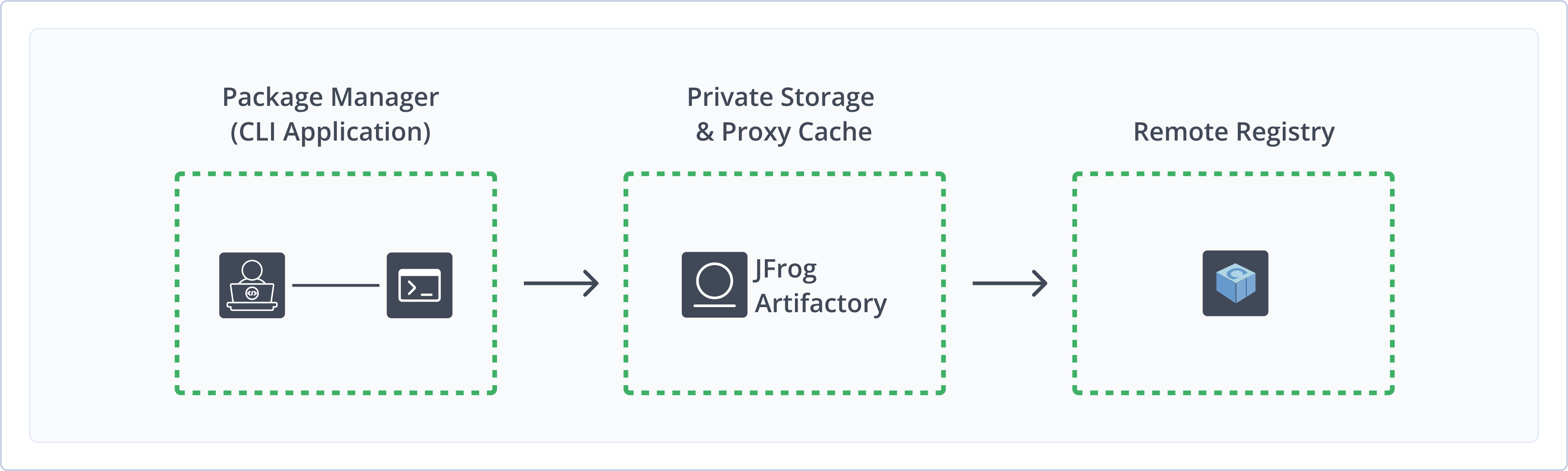
Artifactory fully supports Conan repositories, including the following capabilities:
- Unified Repository Management: Consolidate all your C/C++ packages by using Conan repositories in Artifactory as a single source of truth. Set up secure local repositories, access cached versions of remote registries, and create a single access point for all sources with virtual repositories.
- Automated Package Layout: Artifactory automatically handles the layout and storage of your C/C++ packages for all platforms configured in the Conan client, simplifying multi-platform development.
- Robust Access Control: Secure your repositories with fine-grained permissions based on projects or development teams, ensuring only authorized users can access or publish packages.
- Enterprise Readiness: Scale your C/C++ development with enterprise-grade features like high availability, multi-site repository replication, and massively scalable storage options to support global teams and large-scale projects.
Get Started with Conan
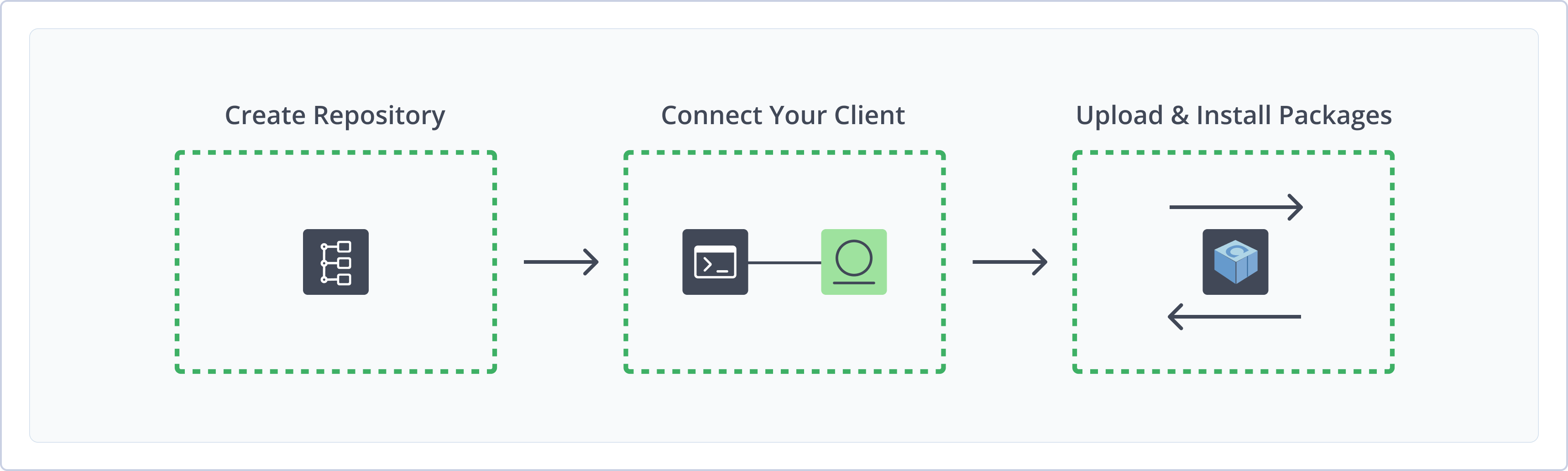
To get started working with Conan, complete the following main steps:
- Create a Conan Repository
- Connect Conan to Artifactory
- Upload and install Conan packages
Create a Conan Repository
This topic describes how to create a Conan repository. This is required before publishing and installing Conan packages. There are three primary types of repositories:
- Local repositories: Store and share first- and second-party packages with your organization
- Remote repositories: Download packages from any remote location, including external package registries or other Artifactory instances
- Virtual repositories: Aggregate remote and local repositories, enabling your organization to scale by providing a single URL that provides access to multiple repositories and types
For more information on JFrog repositories, see Repository Management.
Prerequisite: You need Admin or Project Admin permissions in Artifactory to create a repository. If you don't have Admin permissions, the option will not be available.
To create a Conan repository:
-
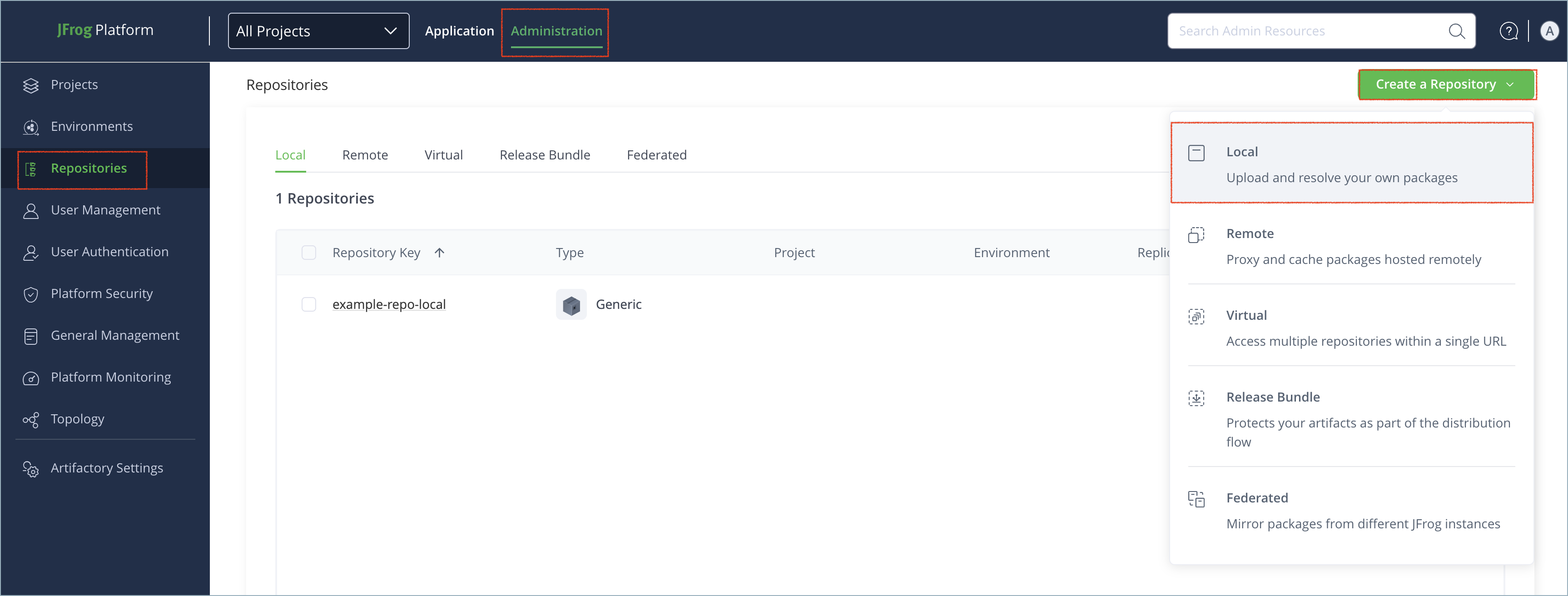
In the Administration tab, click Repositories | Create a Repository.
-
Select the type of repository you want to create:
-
Select the Conan package type.
-
Configure the required fields for the repository:
- For local repositories, in the Repository Key field, type a meaningful name for the repository. For example,
conan-local. For more information on local repositories and their settings, see Local Repositories. - For remote repositories, verify the Repository URL and update as needed. For more information on remote repositories and their settings, see Remote Repositories.
- For virtual repositories, select one or more local or remote repository types to include in the virtual repository. For more information on virtual repositories and their settings, see Virtual Repositories.
- For local repositories, in the Repository Key field, type a meaningful name for the repository. For example,
-
Click Create Repository. The repository is created and the Repositories window is displayed.
Connect Conan to Artifactory
You can connect the Conan client to Artifactory to install and upload packages from Artifactory repositories. When you connect to a Conan repository through Artifactory, the repository URL must contain the /api/conan prefix in the path before the repository name.
Artifactory recommends using Conan V2. Conan V1 is supported as a legacy tool. For more information, see Use Conan V1 (Legacy) .
"Remote" Terminology
The
conan remotecommand connects the Conan client to a local or virtual Artifactory repository. In other words, your local or virtual Artifactory repository is your Conan remote.In Artifactory, a remote repository is a caching proxy for a repository at a remote URL.
Prerequisite: Before connecting your Conan client to Artifactory, you must have an existing Conan repository in Artifactory. For more information, see Create a Conan Repository.
Logged in vs. Anonymous User: You can work with Conan and Artifactory as a logged-in user or anonymously. To work with Artifactory using Anonymous Access, configure that access under Admin | Security | General. For details, refer to Allow Anonymous Access.
To connect the Conan client to Artifactory:
-
Run the following command to add the Artifactory repository to your Conan configuration:
conan remote add <REMOTE_NAME> https://[JFrogPlatformURL]/artifactory/api/conan/<REPO_NAME>Where:
<REMOTE_NAME>: The local alias you want to set for the Artifactory repository[JFrogPlatformURL]: The URL of your JPD<REPO_NAME>: The name of the target repository in Artifactory
For example:
conan remote add artifactory https://company.jfrog.io/artifactory/api/conan/conan-virtual
Tip
Note that if you run this command copied directly from JFrog Set Me Up, the remote name will match the repository name. If you want to set a different remote name, change the value before running the command.
-
To authenticate to Artifactory, run the following command:
conan remote login -p <TOKEN> <REMOTE_NAME> <USERNAME>Where:
<TOKEN>: Your Artifactory identity token<REMOTE_NAME>: The local alias of the Artifactory repository<USERNAME>: Your Artifactory username
For example:
conan remote login -p gH5fLdFhJkLpA2sD4fG6hJ8kM1nB3cV5xZ7aW9qE2sR4t artifactory jeffryfrog
Note
You can also use JFrog Set me up to copy the snippet populated with your token and environment. For more information, see Use Artifactory Set Me Up for Configuring Package Manager Clients.
Next steps:
Upload Conan Packages
A Conan recipe is a Python script that serves as a blueprint for creating a C/C++ software package. The recipe defines all necessary steps and metadata to automate the process of turning the source code into a reusable binary.
Note
You can only upload Conan recipes through the Conan client. Artifactory only indexes Conan recipes that are uploaded through the Conan client, and does not index recipes uploaded from the JFrog web UI or REST API.
To upload a Conan recipe and its binary packages with Conan V2:
Run the following command:
conan upload "<PATTERN>" --remote=<REMOTE_NAME> --confirmWhere:
-
<PATTERN>: The package you want to upload. This can be a wildcard like*to designate all packages in the local cache, or a recipe reference.Recipe references follow the format
<NAME>/<VERSION>, where:<NAME>: The software library or component you are packaging<VERSION>: The version of the software you are packaging
For example,
fmt/9.1.0. -
<REMOTE_NAME>: The local alias of the Artifactory repository
For example:
conan upload "*" --remote=artifactory --confirmNote
You can also use JFrog Set me up to copy the snippet populated with your token and environment. For more information, see Use Artifactory Set Me Up for Configuring Package Manager Clients.
Install Conan Packages
You can use the Conan CLI to install dependencies from Artifactory that are defined in the project's conanfile.txt file.
Note
You cannot install Conan packages directly from remote repositories. To install Conan packages from a remote source, aggregate the remote repository in a virtual repository.
To install Conan packages:
Run the following command:
conan install . -r <REMOTE_NAME>Where:
<REMOTE_NAME>: The local alias of the Artifactory repository
For example:
conan install . -r artifactoryNote
You can also use JFrog Set me up to copy the snippet populated with your token and environment. For more information, see Use Artifactory Set Me Up for Configuring Package Manager Clients.
Additional Conan Information
The following pages provide additional information about using Conan with Artifactory:
- Use Conan V1 (Legacy)
- Anonymous Access to Conan Repositories
- Conan V2 Package Support
- Conan and C/C++ Support in Xray
- Conan Cheat Sheet
Use Conan V1 (Legacy)
The following topics provide information about how to use Conan V1 with Artifactory.
Note
Note: Conan V1 is a legacy tool. JFrog recommends using Conan V2. For more information about configuring Conan V2 to work with Artifactory, see Connect Conan to Artifactory.
Connect Conan V1 to Artifactory
Artifactory supports using Conan V1 as a legacy tool to update and install packages from Artifactory.
conan remote vs Remote Repositories
The
conan remotecommand connects the Conan client to remote repositories. When configuring the Conan client to work with Artifactory, you use theconan remotecommand to connect to a local or virtual Artifactory repository.In Artifactory, a remote repository is a caching proxy for a repository at a remote URL.
Prerequisite: Before connecting your Conan client to Artifactory, you must have an existing Conan repository in Artifactory. For more information, see Create a Conan Repository.
To connect Conan V1 to Artifactory:
-
Run the following command to add the Artifactory repository to your Conan configuration:
conan remote add <REMOTE_NAME> https://[JFrogPlatformURL]/artifactory/api/conan/<REPO_NAME>Where:
<REMOTE_NAME>: The local alias you want to set for the Artifactory repository[JFrogPlatformURL]: The URL of your JPD<REPO_NAME>: The name of the target repository in Artifactory
For example:
conan remote add artifactory https://company.jfrog.io/artifactory/api/conan/conan-virtual
Tip
Important: Note that if you run this command copied directly from Set Me Up, the remote name will match the repository name. If you want a different remote name, change the value before running the command.
-
Run the following command:
export CONAN_REVISIONS_ENABLED=1 -
Log in by running this command:
conan user -p <TOKEN> -r <REMOTE_NAME> <USERNAME>Where:
<TOKEN>: Your Artifactory identity token<REMOTE_NAME>: The local alias of the Artifactory repository<USERNAME>: The username you use to access Artifactory
For example:
conan user -p gH5fLdFhJkLpA2sD4fG6hJ8kM1nB3cV5xZ7aW9qE2sR4t -r artifactory jeffryfrog
Note
You can also use JFrog Set me up to copy the snippet populated with your token and environment. For more information, see Use Artifactory Set Me Up for Configuring Package Manager Clients.
Next steps:
Upload Conan Packages with Conan V1
A Conan recipe is a Python script that serves as a blueprint for creating a C/C++ software package. The recipe defines all necessary steps and metadata to automate the process of turning the source code into a reusable binary.
Note
Note: You can only upload Conan recipes through the Conan client. Artifactory only indexes Conan recipes that are uploaded through the Conan client, and does not index recipes uploaded from the JFrog web UI or REST API.
To upload a Conan recipe and its binary packages with Conan V1:
Run the following command:
conan upload "<RECIPE>" -r <REMOTE_NAME> --allWhere:
-
<RECIPE>: The recipe reference, in the format<NAME>/<VERSION>@<USER>/<CHANNEL>.Where:
<NAME>: The software library or component you are packaging<VERSION>: The version of the software you are packaging<USER>: The user or namespace.<CHANNEL>: The stability of the package build.
For example,
fmt/9.1.0@jeffryfrog/stable. -
<REMOTE_NAME>: The local alias of the Artifactory repository
For example:
conan upload "fmt/9.1.0@jeffryfrog/stable" -r artifactory --allNote
You can also use JFrog Set me up to copy the snippet populated with your token and environment. For more information, see Use Artifactory Set Me Up for Configuring Package Manager Clients.
Anonymous Access to Conan Repositories
Warning
For security reasons, JFrog does not recommend allowing anonymous access. When you allow anonymous users access to your system, you might give unauthorized access to any existing local, remote, or virtual repositories, and to future repositories. For more information, see Allow Anonymous Access.
Artifactory supports Conan repositories with Allow Anonymous Access enabled. When anonymous access is enabled, Artifactory will not query the Conan client for authentication parameters by default, so you need to indicate to Artifactory to request authentication parameters in a different way.
You can override the default behavior by setting the Force Authentication checkbox in the New or Edit Repository dialog.

When set, Artifactory will first request authentication parameters from the Conan client before trying to access this repository.
Conan and C/C++ Support in Xray
Xray can scan Conan packages deployed to Artifactory. Xray can also scan C/C++ dependencies as part of a build.
Note
Requires Artifactory version 7.17.4 and above.
Scan Conan Packages and Builds
Packages
Xray scans Conan packages the same way it scans other package types. Xray data will only be displayed for the conanmanifest.txt file. An optional vendor field can be added in the Conan recipe file to prevent false positives.
Builds
Conan artifacts and dependencies can be provided as part of the BuildInfo using the conan art:build-info command.
Scan C/C++ Builds
Xray supports scanning C/C++ packages as build-dependencies only. The following steps are required:
- Create a build-info listing all the C/C++ packages you want to scan.
- Upload the build to Artifactory, and perform an Xray scan.
For more information, see the Build Upload REST API.
Note
This process requires creating and uploading C/C++ build-info manually in accordance with the build-info schema. It also requires the listing of all the C/C++ libraries to be scanned. For each component you need to provide name and version; vendor is optional.
In the BuildInfo, do the following:
-
Specify a cpp module, and set
cppas the modules type. -
In the dependencies section, list all of the cpp components of your build. Each cpp component must contain:
- Sha1
- ID: Consists of the component's vendor, name and version, in the form: "
[vendor]:name:version". Please note that the 'vendor' field is optional.
C/C++ Info Example:
{
   "version": "1.0.1",
   "name": "MyBuildName",
   "number": "42",
   "type": "GENERIC",
   "started": "2021-01-19T15:47:52.000Z",
   "buildAgent": {
       "name": "Private builder",
       "version": "1.0"
   },
   "modules": [
       {
           "id": "<MODULE-ID>",
           "type": "cpp",
           "dependencies": [
               {
                   "sha1": "<SHA1>",
                   "md5": "<MD5>",
                   "id": "<vendor1>:<name1>:<version1>",
                   "type": "cpp"
               },
               {
                   "sha1": "<SHA1>",
                   "md5": "<MD5>",
                   "id": "<vendor2>:<name2>:<version2>",
                   "type": "cpp"
               }
           ]
       }
   ]
}
Build-info Creation Example :
# Choose between A or B or C (depending where your dependencies are located) :
# # A. add Build info dependencies located on the local disk
# ##### jf rt bad cpp_build 1 "myLibs/"
# # B. add Build info dependencies located in Artifactory
# ##### jf rt bad cpp_build 1 "mcy-cpp-deps/" --from-rt=true
# # C. add Build info dependencies by downloading them from Artifactory
# #### jf rt dl --build-name cpp_build --build-number 1 "mcy-cpp-deps/"

# generate Build info and save it as JSON file
jf rt bp --dry-run=true  cpp_build 1 > build_info.json

# the following command will :
# 1. add type=cpp to the module
# 2. add type=cpp for each dependency
# 3. update the component id for each dependency
jq '.modules[] += {"type":"cpp"}' build_info.json |\
jq '.modules[].dependencies[] += {"type":"cpp"}'  |\
jq '(.modules[].dependencies[] | select(.id == "Poco.dll" ) | .id)    |= "poco:1.8.0"' |\
jq '(.modules[].dependencies[] | select(.id == "libcurl.dll" ) | .id) |= "haxx:libcurl:7.70.0"' |\
jq '(.modules[].dependencies[] | select(.id == "sqlite.dll" ) | .id)  |= "sqlite:3.15.1"' |\
jq '(.modules[].dependencies[] | select(.id == "zlib.dll" ) | .id)    |= "zlib:1.2.0"' > build_info_xray.json

# upload build info
jf rt cl ...
Conan V2 Package Support
Conan server API v2 is supported and introduces an extension of the binary layout to support Conan Package revisions. Revisions allow you to change your artifacts while keeping the same Conan reference and is intended to achieve package immutability, by preventing data from being overwritten on the server.
This example shows the layout with "9999" as the <packageId>, "1" is the Recipe Revision, and "4" is the Package Revision.
user/lib/1.0/channel/1/package/9999/4/*Revisions Support By Conan Client
When the Revision features is enabled, the Conan client searches for the latest revision in Artifactory per reference, unless specified otherwise by the user. It is not mandatory to upgrade your Conan client version to use Artifactory 6.9. However, if you want to work with revisions, you need to use Conan version 1.13 or higher with revision mode enabled.
The Conan client, by default, searches for the latest revision in Artifactory per reference, unless specified otherwise by the user.
Conan Package V1 Backward Compatibility
As of Artifactory 6.9.0, Artifactory provides backward compatibility for packages created with Conan server API v1 by automatically migrating the Conan server API v1 binary layout to the new format.
Migration to Conan server API V2 starts after the upgrade process is complete (in all nodes in case of High Availability) and all Conan API endpoints are blocked and cannot be accessed.
After migration, the default revision for all Conan server API v1 packages is set to "0" for both Recipe revision and Package revision, and endpoints will be accessible again.
By default, two threads are dedicated for the migration job. Before upgrading from versions previous to Artifactory 6.9, you can modify this setting in the $JFROG_HOME/artifactory/etc/artifactory.system.properties file ($JFROG_HOME/artifactory/var/etc/artifactory/artifactory.system.properties if modifying 7.x).
Note that you can allocate more threads during the migration process but need to restart Artifactory.
artifactory.conan.v2.migration.job.queue.workers = 2 (default)Conan Revision Indexing
Use the Conan client to deploy your packages. The Conan client will by default request the latest revision of a Conan reference requested.
Upon deployment using the Conan client, a .timestamp file is created under each revision root for each Recipe and Package revision root.
This file contains the epoch time of deployment (in milliseconds, for example, 1547984992855) and is created only when using the Conan client.
Only Use the Conan Client to deploy Conan Packages
Do not deploy the Conan packages in the UI or via REST API deployment to prevent index consistency and failed resolutions.
Conan Limitations in Artifactory
The following are the limitations of Conan in Artifactory:
- Recipe Indexing Limitations: You can only upload Conan recipes through the Conan client. Artifactory only indexes Conan recipes that are uploaded through the Conan client, and does not index recipes uploaded from the JFrog web UI or REST API.
Updated 21 days ago