

Repository Replication
Learn how Artifactory repository replication keeps teams in sync across sites.
JFrog Artifactory supports replication of repositories between two Artifactory instances to support development by different teams distributed over distant geographical sites. The benefits of replication are:
- Ensuring developers all work with the same version of remote artifacts
- Ensuring build artifacts are shared efficiently between the different development teams
- Overcoming connectivity issues such as network latency and stability when accessing remote artifacts
- Accessing specific versions of remote artifacts
Artifactory versions for replication
Perform replication between two servers running the same version of Artifactory. If one of the two servers has been upgraded to a newer version, replication can typically continue without issues, but you should upgrade the other server to the same version as soon as possible.
Warning
Don't use Artifactory repository replication together with AWS S3 cross-region replication of your filestore. Such a configuration can cause synchronization issues.
Note
Click here to learn more about how to tune Cron Replication for a large number of artifacts.
Two main methods of replication are supported:
-
Both scheduled and event-based push replication are supported, and multi-push replication is available with an Enterprise license
-
Both scheduled and event-based pull replication are supported. Event-based pull requires an Enterprise license.
Note
You can migrate eligible local repositories from push replication to unidirectional Federation with the Federation Migrator plugin. For more information, see Migrate Push Replication to Unidirectional Federation.
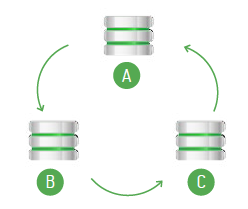
Avoid Replication Loops ("Cyclic Replication")
A replication loop occurs ("Cyclic" or "Bi-directional" replication) when two instances of Artifactory running on different servers are replicating content from one to the other concurrently.
For example, "Server A" is configured to replicate its repositories to "Server B", while at the same time, "Server B" is configured to replicate its repositories to "Server A".
Or "Server A" replicates to "Server B" which replicates to "Server C" which replicates back to "Server A".
Avoid cyclic replication. It can cause loss of data, or exponential growth of disk-space usage.
Push Replication
Push replication is used to synchronize Local Repositories, and is implemented by the Artifactory server on the near end invoking a synchronization of artifacts to the far end.
There are two ways to invoke push replication:
- Scheduled push: Pushes are scheduled asynchronously at regular intervals
- Event-based push: Pushes occur in near-real-time since each create, copy, move, or delete of an artifact is immediately propagated to the far end.
Advantages of Push Replication
- It is fast because it is asynchronous.
- It minimizes the time that repositories are not synchronized.
- It reduces traffic on the master node in case of a replication chain ("Server A" replicates to "Server B", "Server B" then replicates to "Server C", and so on).
When to Use Push Replication
Event-based push replication is recommended when it is important for the repository at the far end to be updated in near-real-time for any change (create, copy, move, or delete of an artifact) in the repository at the near end.
Regular scheduled replications run on top of event-based replication to guarantee full copy consistency even in cases of server downtime and network partitions.
Multi-push Replication
Note
Multi-push replication requires an Enterprise License.
Artifactory supports multi-push replication, allowing you to replicate a local repository from a single source to multiple enterprise target sites simultaneously.
Pull Replication
Pull replication provides a convenient way to populate a remote cache proactively, and is very useful when waiting for new artifacts to arrive on demand (when first requested) is not desirable due to network latency.
There are two ways to invoke a pull replication:
-
Scheduled pull: Pull replication is invoked by a remote repository, and runs asynchronously according to a defined schedule to synchronize repositories (local, remote or virtual) at regular intervals.
-
Event-based pull: Requires an Enterprise license.
Pulls occur nearly in real-time since each create, copy, move, or delete of an artifact is immediately propagated to the far end. As soon as a file is uploaded, it is replicated and immediately available to the target (pulling) instance without having to wait for the file upload to be completed at the source.
Advantages of Pull Replication
- Many target servers can pull from the same source server efficiently implementing a one-to-many replication.
- It is safer since each package only has one "hop".
- It reduces traffic on target servers since they do not have to pass on artifacts in a replication chain.
When and when not to use Pull Replication
Pull replication is recommended in the following cases:
- When you need to replicate a repository to many targets.
- When your source repository is located behind a proxy that prevents push replication (for example, replicating a repository hosted on Artifactory SaaS to a local repository at your site)
Pull replication can't be used to replicate a remote resource that is not an Artifactory repository. Artifacts from third-party repositories can be cached on-demand using the normal cache and proxy behavior of a Remote Repository.
Configure Authentication for Event-Based Pull Replication
Breaking change — security hardening
Event-based pull replication requires authenticated credentials configured on the remote repository (Site A to Site B). Anonymous access is no longer accepted on the channel endpoints.
The receiving Artifactory instance ("Site A", which pulls from Site B) opens a long-lived event channel against Site B and propagates replication events through three internal endpoints:
| Endpoint | Purpose |
|---|---|
POST /artifactory/api/replications/channels/establishChannel | Opens the event stream from Site B back to Site A. |
POST /artifactory/api/replications/channels/removeChannel | Tears the channel down. |
POST /artifactory/api/replications/propagateEvents | Injects replication events. |
These endpoints are internal and peer-to-peer. Artifactory calls them, end-users do not. As of the security hardening shipped in the Artifactory release that includes RTDEV-85226, all three endpoints reject anonymous callers with HTTP 401.
To configure authentication for event-based pull replication:
- In the Advanced section of the Remote Repository on Site A, configure a Username and Credentials (password or identity token) of a user that exists on Site B and has read access to the source local repository being replicated.
- If your cross-site setup previously relied on Site B's Allow Anonymous Access setting on the source repository, create a dedicated service user on Site B and reference that user's credentials in the Site A remote-repo configuration.
- Verify the connection by clicking Test in the remote repository's Advanced tab. A 401 response indicates missing or invalid credentials.
How to confirm you are affected
You are affected if all of the following are true:
- You run cross-site (or cross-instance) event-based pull replication.
- The remote repository on the pulling side has no Username/Credentials set.
- The source repository on the far side allows anonymous read.
After the upgrade, the Artifactory log on the pulling side will show repeated 401 responses from POST /artifactory/api/replications/channels/establishChannel until credentials are configured.
Limitations and Best Practices for Large Include/Exclude Patterns in Replication
When configuring repository replication in Artifactory, the Include/Exclude Patterns fields enable fine-grained control over which artifacts get replicated. However, certain large-scale use cases can lead to unexpected issues if those patterns become very large, as described in the following limitation.
Known Limitation
Replication job definitions internally store metadata (such as job parameters and pattern definitions) in database tables. When the combined include/exclude pattern list is exceptionally large, it may exceed internal storage constraints and result in job failures or unexpected behavior.
From Artifactory version 7.129.1, a validation mechanism was added to prevent replication of the total content stored in the database if it exceeds a certain limit. The database limit is 2048 characters, and validation is calculated as DB_LIMIT - artifactory.jobs.table.additional.details.statistics.buffer (2048 chars -200 chars =1848 chars). When exceeding this limit, a validation error is raised and the changes will not be saved.
Best Practices
- Prefer replication for ongoing synchronization, not for very large one-time migrations.
- For large one-time migrations, consider using dedicated migration tools instead of live replication.
- Keep include/exclude patterns as concise and specific as possible.
- Avoid replicating “everything and then deleting” when pushing to external or untrusted targets, as this can expose internal or sensitive content.
- Monitor the total size (length and count) of your pattern definitions to avoid reaching internal limits.
Schedule and Configure Replication Using the UI
Replication is configured via the user interface as a scheduled task. Local repositories can be configured for push replication, and remote repositories can be configured for pull replication.
All replication messages are logged in the main Artifactory service log.
The Replications tab for a local repository indicates if replication is configured for it. If replication is configured for a repository, you can invoke it from that tab.
Configure Push Replication
A push replication task for a Local Repository is configured in the Replication tab of the Configuring a Local Repository window.
To configure push replication:
- In the Cron Expression field, define the replication task schedule using a valid cron expression.
The Next Replication Time updates accordingly.
Cron Expression VS Event Base Replication
Replication of this repository to all of its targets occurs simultaneously according to the Cron Expression you define.
The event base replication will attempt to replicate only the artifacts affected by the event while the Cron Expression will trigger a sync of all artifacts in repository. This difference is important since in case one of the event sync has failed the next time the Cron Expression will trigger a sync all changed will be synced.
Once you have configured the replication properties for each of your replication targets, the Replication tab for your repository displays them.
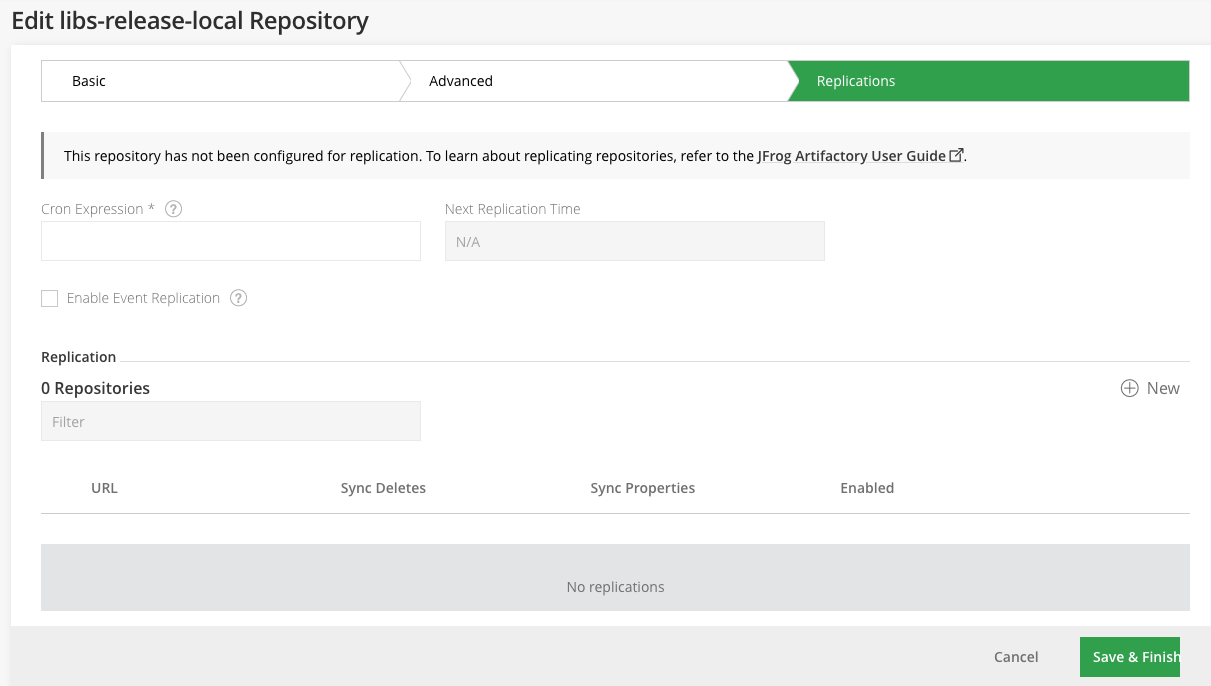
| Field | Description |
|---|---|
| Destination URLs | The replication targets you have defined |
| Enabled | When set, enables replication of this repository to the target specified in Push to |
| Enable Event Replication | When set, each event will trigger replication of the artifacts changed in this event. This can be any type of event on artifact, for example add, deleted or property change. |
Number of replication targets
If you do not have an Enterprise license, you may only define one replication target. With an Enterprise license, Artifactory supports multi-push replication and you may define as many targets as you need.
Add a Push Replication Target
To add a push replication target:
- Click Add to display the Replication Properties window.
- Fill in the following details.
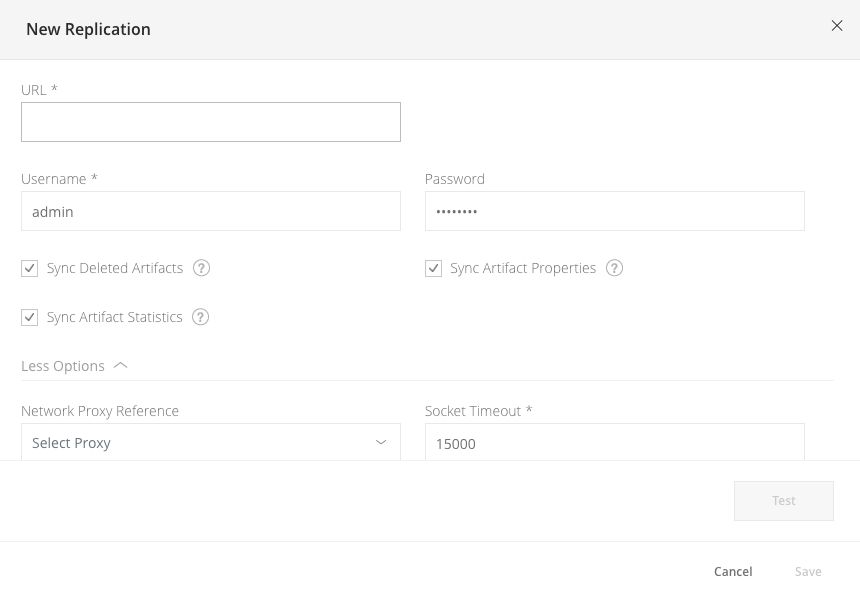
| Field | Description |
|---|---|
| Enable Active Replication of this Repository | When set, this replication will be enabled when saved |
| URL | The URL of the target local repository on a remote Artifactory server. Use the formathttps://<artifactory_url>/artifactory/<repository_name>. |
| Username | The HTTP authentication username. |
| Credentials | Use either the HTTP authentication password or identity token |
| Proxy | A proxy configuration to use when communicating with the remote instance. |
| Socket Timeout | The network timeout in milliseconds to use for remote operations. |
| Sync Deleted Artifacts | When set, items that were deleted locally should also be deleted remotely (also applies to properties metadata). Warning Enabling this option will delete artifacts on the target that do not exist in the source repository. If the source repository is empty, replication will purge the contents of the target repository. |
| Sync Artifact Properties | When set, the task also synchronizes the properties of replicated artifacts. |
| Sync Artifact Statistics | When set, the task also synchronizes artifact download statistics. Set to avoid inadvertent cleanup at the target instance when setting up replication for disaster recovery. |
| Path Prefix (optional) | Only artifacts that located in path that matches the subpath within the repository will be replicated. |
Configure Pull Replication
A pull replication task for a Remote Repository is configured in the Replication tab of the Edit Remote Repositories window.
To configure pull replication:
- In the Cron Expression field, define the replication task schedule using a valid cron expression.
The Next Replication Time updates accordingly.
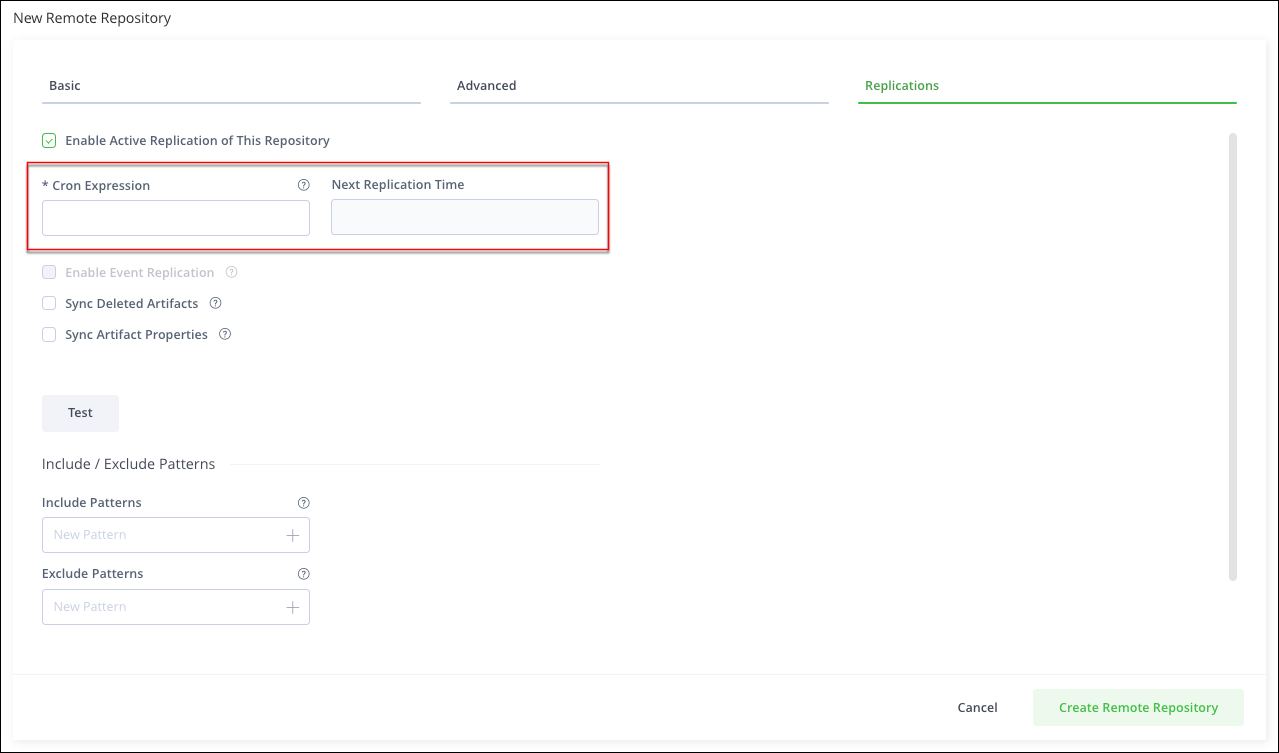
| Field | Description |
|---|---|
| Enable Active Replication of this Repository | When set, this replication will be enabled when saved |
| URL | The URL of the target local repository on a remote Artifactory server. Use the format Note For some packaging formats, when using the corresponding client to access a repository through Artifactory, the repository key in the URL needs to be prefixed with |
| Enable Event Replication | When set, each event will trigger replication of the artifacts changed in this event. This can be any type of event on artifact, for example added, deleted or property change. |
| Sync Deleted Artifacts | When set, items that were deleted locally should also be deleted remotely (also applies to properties metadata). |
| Sync Artifact Properties | When set, the task also synchronizes the properties of replicated artifacts. |
| Path Prefix (optional) | Only artifacts that located in path that matches the subpath within the remote repository will be replicated. |
Regarding credentials of the remote repository configuration
The remote repository's credentials are required for both the file listing and the event-based pull replication channel handshake (see Configure Authentication for Event-Based Pull Replication). They are defined under the repository's Advanced configuration section.
The remote files retrieved depend on the effective permissions of the configured user on the remote repository (on the other Artifactory instance).
Docker pull replication and Enable Token Authentication
If you enable Docker pull replication for both event-based and scheduled (cron) synchronization, disable Enable Token Authentication in the remote repository's Advanced settings. Username and credentials are still required.
Scheduled pull replication uses the Artifactory Storage REST API (
/api/storage/...?list), which requires Basic authentication. Enable Token Authentication configures the remote HTTP client for Docker Registry Bearer auth (/v2/token), which applies to event-based replication but not to the Storage list API. Scheduled replication then fails with HTTP 403.
Replicating with the REST API
You can also configure push and pull replication using the REST API. For more information, see the following:
- Get Repository Replication Configuration API
- Set Repository Replication Configuration API
- Update Repository Replication Configuration API
- Delete Repository Replication Configuration API
- Scheduled Replication Status API
- Pull/Push Replication API
Replication Properties
Once replication has been invoked, the system annotates the source repository being replicated and annotates it with properties that indicate the status of the replication. These can be viewed, along with other properties that may annotate the repository, in the Properties tab of the Tree Browser.
For single-push replication operations, the following properties are created or updated.
| Key | Value |
|---|---|
artifactory.replication.<source_repo_key>.started | Indicates when the replication started |
artifactory.replication.<source_repo_key>.status | Indicates the status of the replication operation once complete. It can take the following values:
|
artifactory.replication.<source_repo_key>.finished | Indicates when the replication finished |
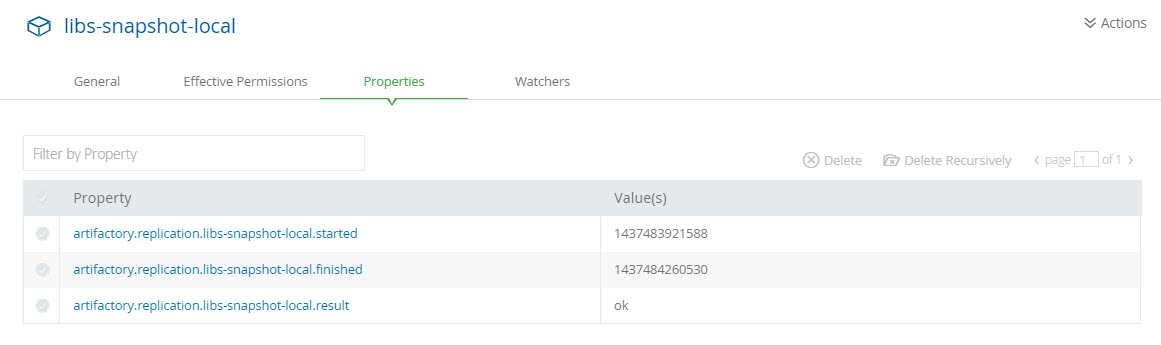
For multi-push replication operations (available if you have an Enterprise subscription), the following properties are created or updated.
| Key | Value |
|---|---|
artifactory.replication.<source_repo_key>_<target_repo_URL>.started | Indicates when the replication started |
artifactory.replication.<source_repo_key>_<target_repo_URL>.status | Indicates the status of the replication operation once complete. It can take the following values: ok: The replication succeeded failure: The replication failed. You should check the log files for errors |
artifactory.replication.<source_repo_key>_<target_repo_URL>.finished | Indicates when the replication finished |
Optimize Repository Replication Using Storage Level Synchronization Options
Note
Requires an Enterprise+ license.
You can set Artifactory to offload the heavy-lifting work of replicating data to the storage device, by only replicating the metadata while ensuring the data is available on the target binary store. This is recommended, for example, when you have two Artifactory instances configured with replication between them. The binary provider configured on Artifactory includes integrated support for replicating data on the storage level, allowing you to assign the replication process to the storage.
To run repository replication using storage level synchronization options:
- Synchronize the storage devices for the source and target Artifactory systems.
- Set the
checkBinaryExistenceInFilestoreflag totruein the Push or Pull Replication API commands in the source Artifactory. For more information, see the Pull/Push Replication API, Set Repository Replication Configuration API, and Update Repository Replication Configuration API commands. - Set the
checkBinaryExistenceAllowedflag totruein the target Artifactory with thechecksumReplicationAPI command. For more information, see Configure Checksum Replication API and Get Checksum Replication API commands.
Enable the Flag During Replication
When enabling the flag, during replication, Artifactory searches for the binary in the target Artifactory instance in the binary storage and if it exists, the source replicates only the metadata.
- It is the user's responsibility to replicate the data on the storage level.
- This feature is disabled by default and does not change any behavior.
Frequently Asked Questions
This section provides answers to frequently asked questions.
FAQs
Q: How do I configure push replication in Artifactory?
A: Open the Replication tab for a local repository, set a Cron Expression, and add one or more targets. For more information, see Configure Push Replication.
Q: What is the difference between push replication and pull replication?
A: Push replication syncs a local repository from the near Artifactory instance to the far end. Pull replication is invoked by a remote repository to populate a cache on a schedule or from events. For more information, see Push Replication and Pull Replication.
Q: What happens if I enable Sync Deleted Artifacts when the source repository is empty?
A: Replication deletes artifacts on the target that don't exist on the source. An empty source can purge the target repository. For more information, see Add a Push Replication Target.
Q: What credentials do I need for event-based pull replication?
A: On the pulling remote repository, set Username and Credentials for a user that exists on the source instance and has read access. Anonymous callers on the event channel are rejected with HTTP 401. For more information, see Configure Authentication for Event-Based Pull Replication.
Q: Can I configure repository replication with the REST API?
A: Yes. You can get, set, update, and delete replication configuration, check scheduled status, and run pull or push replication. For more information, see Replicating with the REST API.
Related Topics
Updated 25 days ago