

Terraform/OpenTofu and Terraform Backend Repositories
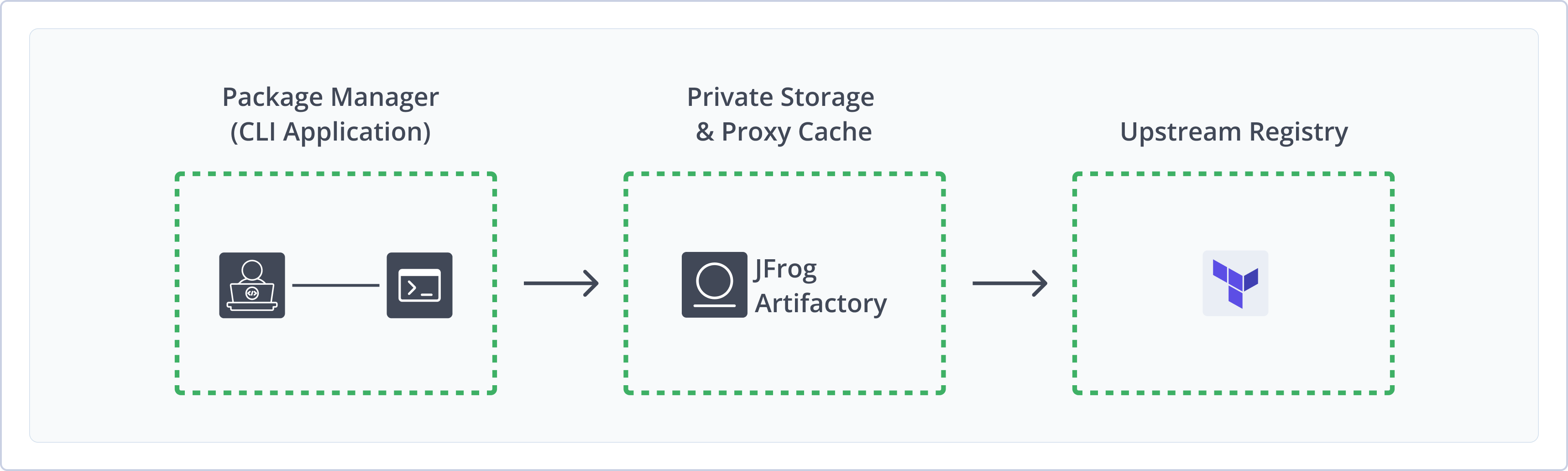
The Terraform Registry in JFrog Artifactory acts as a private, secure, and centralized repository for managing Terraform providers and modules within your organization. It allows teams to store, version, and share their custom or third-party Terraform components, ensuring consistent and reliable infrastructure-as-code (IaC) workflows.
JFrog provides a fully-fledged Terraform repository solution, giving you full control over your deployment and the resolution process of Terraform Modules, Providers, and Backend packages.
Terraform is an infrastructure as code (IaC) tool that allows developers to build, change, and version infrastructure safely and efficiently. Terraform is written in HCL language. Code in the Terraform language is stored in plain text files with the .tf file extension. For more information, see the Terraform Language.
Artifactory supports two types of Terraform registries:
-
Terraform Registry: The Terraform/OpenTofu in Artifactory allows you to create dedicated repositories for each of the following unique Terraform components:
-
Providers: A set of plugins that interact with cloud providers, SaaS providers, and other APIs.
Artifactory supports two modes of operation for Terraform providers:
- Provider Registry Protocol: Available from V 7.125 (Cloud and Self-managed). It is the official, authoritative source for providers hosted under your hostname. Terraform is designed to discover and trust these registries using a standardized protocol automatically. This means users can consume providers without any extra configuration in their CLI—beyond a one-time
terraform loginfor private registries. To enable this, the registry must handle GPG-based signing to secure and verify the providers it serves. - Network Mirror: Creates a local cache for Terraform providers. This requires you to add a network_mirror configuration to your Terraform CLI settings manually. With this setup, Terraform checks the downloaded files for corruption using checksums but relies on the original source for GPG signature trust
- Provider Registry Protocol: Available from V 7.125 (Cloud and Self-managed). It is the official, authoritative source for providers hosted under your hostname. Terraform is designed to discover and trust these registries using a standardized protocol automatically. This means users can consume providers without any extra configuration in their CLI—beyond a one-time
-
Modules: Serve as containers for multiple resources that are used together. Modules contain a collection of
.tffiles kept together in a directory.The Modules and Providers have different settings for local repositories, but are the same when it comes to configuring remote and virtual repositories.
Terraform Modules are Terraform configurations that can be called and configured by other configurations. They serve as containers for multiple resources that are used together. They contain a collection of
.tffiles kept together in a directory. To create a module, pack all your.tffiles into a Zip archive and deploy to the Terraform local repository. For more information, see Creating Terraform Modules.
-
-
Terraform Backend: A dedicated Remote State Storage Provider. It works together with and in parallel to the Terraform registry
From JFrog Artifactory 7.38.4, the Terraform Backend repository serves as a dedicated Remote State Storage Provider. It works together with and in parallel to the Terraform registry, which also serves as the dedicated Terraform registry for hosting your modules and providers in the JFrog Platform. For more information, see Terraform Backends.
Each Terraform Module can have an associated Backend that defines how operations are executed and a state file that tracks the resources created by your configuration and maps them to real-world resources. Certain backends support multiple named workspaces, allowing multiple states to be associated with a single configuration. The configuration still has only one backend, but multiple distinct instances of that configuration can be deployed without configuring a new backend or changing authentication credentials.
Warning
JFrog Artifactory provides encryption for Terraform state files stored in its backend repositories. The state files are encrypted using the Master Key. This encryption ensures that sensitive data within the Terraform state files is protected from unauthorized access. It is crucial to safeguard the master.key. If the master.key is lost the state files that rely on it for encryption are not recoverable. Therefore, proper measures should be taken to securely backup the master.key to prevent the loss of data secured by encryption.
Did you know?
Each Terraform configuration can specify a backend, which defines where and how operations are performed including where the snapshots are stored and more. Terraform uses persistent State data to keep track of the resources it manages and includes information on how real-world infrastructure objects correspond to the resources in a configuration. All users working on the collection of infrastructure resources need access to the same state data. For more information, see Terraform States.
State Locking
Terraform automatically locks all your operations that can change the State to prevent others from acquiring the lock and potentially damaging your state.
JFrog Terraform Backend Repository Meets the Hashicorp Standards
In the first half of 2022, Hashicorp announced the deprecation of a number of legacy providers, including the legacy
artifactoryprovider, which served as a basic backend that only stored States in a generic JFrog repository, created and maintained by Hashicorp.To avoid confusion, please note that the official JFrog Artifactory Terraform Backend repository, described in this article, is unaffected by the Hashicorp
artifactorybackend provider deprecation action.As part of JFrog's alignment with the common Hashicorp main practices, the JFrog Terraform Backend repository supports the official Hashicorp enterprise-grade Terraform backend provider, and supports features such as locking, encoding of the data, smart comparisons, and additional common practices.
Note
Replication of Terraform Backend Repositories is fully supported from Artifactory version 7.77.x and later. To perform replication of Terraform Backend Repositories between two different Artifactory platforms, you must disable the
encryptStatesflag (i.e. set it tofalse) in the Local Repository Configuration JSON (the default value for this flag istrue).
Note
After the initial configuration, all Terraform documentation instructions also apply to OpenTofu.
Benefits
-
The Terraform Registry in the JFrog Platform offers the following benefits:
- Secure and private local Terraform Modules registry
- Secure and private local Terraform Providers registry
- Proxy remote Terraform Module and Provider resources with caching to keep you independent of the network and the remote resource.
- Virtual Terraform repositories that support a single URL through which to manage the resolution and deployment of all your Terraform Modules and Providers.
-
The Terraform Backend Repository in the JFrog Platform offers the following benefits:
- A Remote State Storage Provider
- Support for multiple Workspaces
- Built-in Secure State Encryption storage
- Comprehensive State snapshot history
- State content viewer with advanced search abilities
Available From:
- Terraform: From JFrog Artifactory 7.38.4 Version
- Terraform Backend: From JFrog Artifactory 7.38.4 Version
- OpenTofu to manage Terraform Resources: From JFrog Artifactory 7.81.0 Version
Get Started with Terraform Registry and Terraform Backend
To get started working with Terraform Registry and Terraform Backend, complete the following main steps:
-
Connect your Terraform/OpenTofu Client to Work with the following:
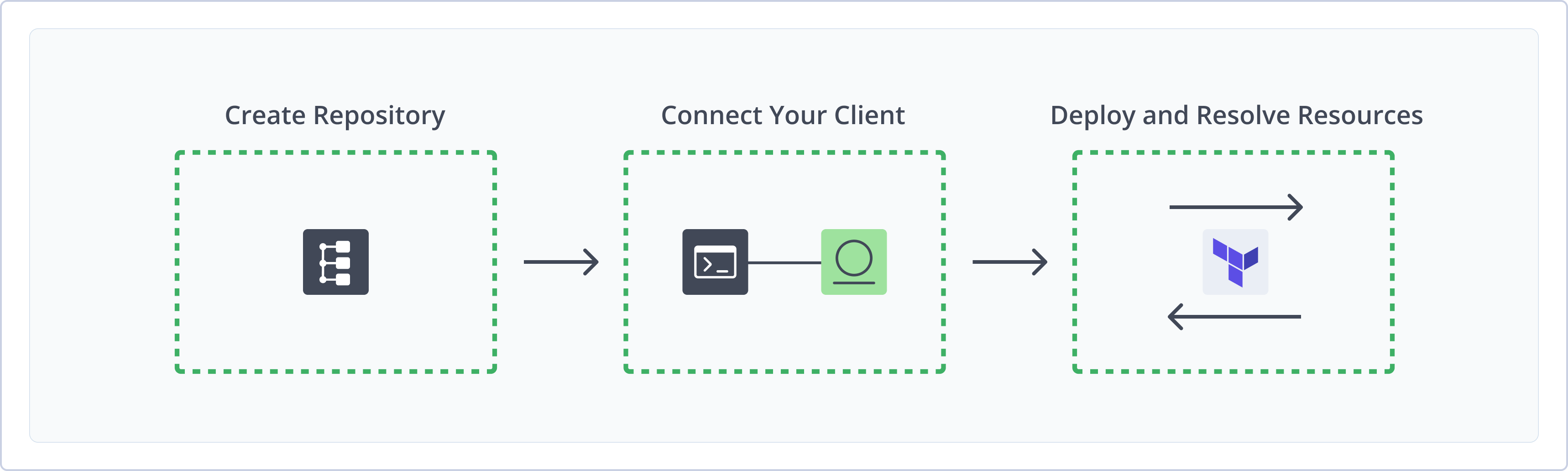
Create Terraform/OpenTofu and Terraform Backend Repository
This topic describes how to create a Terraform Repository. This is required before uploading and installing Terraform packages. There are three primary types of repositories:
- Local repositories: Where you store and share 1st and 2nd party packages with your organization
- Remote repositories: Enable you to download from any remote location including external package registries or other Artifactory instances
- Virtual repositories: Enable aggregating remote and local repositories enabling your organization to scale by providing a single URL that provides access to multiple repositories and types
For more information on JFrog repositories, see Repository Management.
Prerequisite: You need Admin or Project Admin permissions to create a Terraform repository. If you don't have Admin permissions, the option will not be available.
To create a Terraform repository:
Terraform BE
There is a dedicated Repository type for Terraform BE. Supports only Local repositories. Remote and Virtual repositories are not supported
-
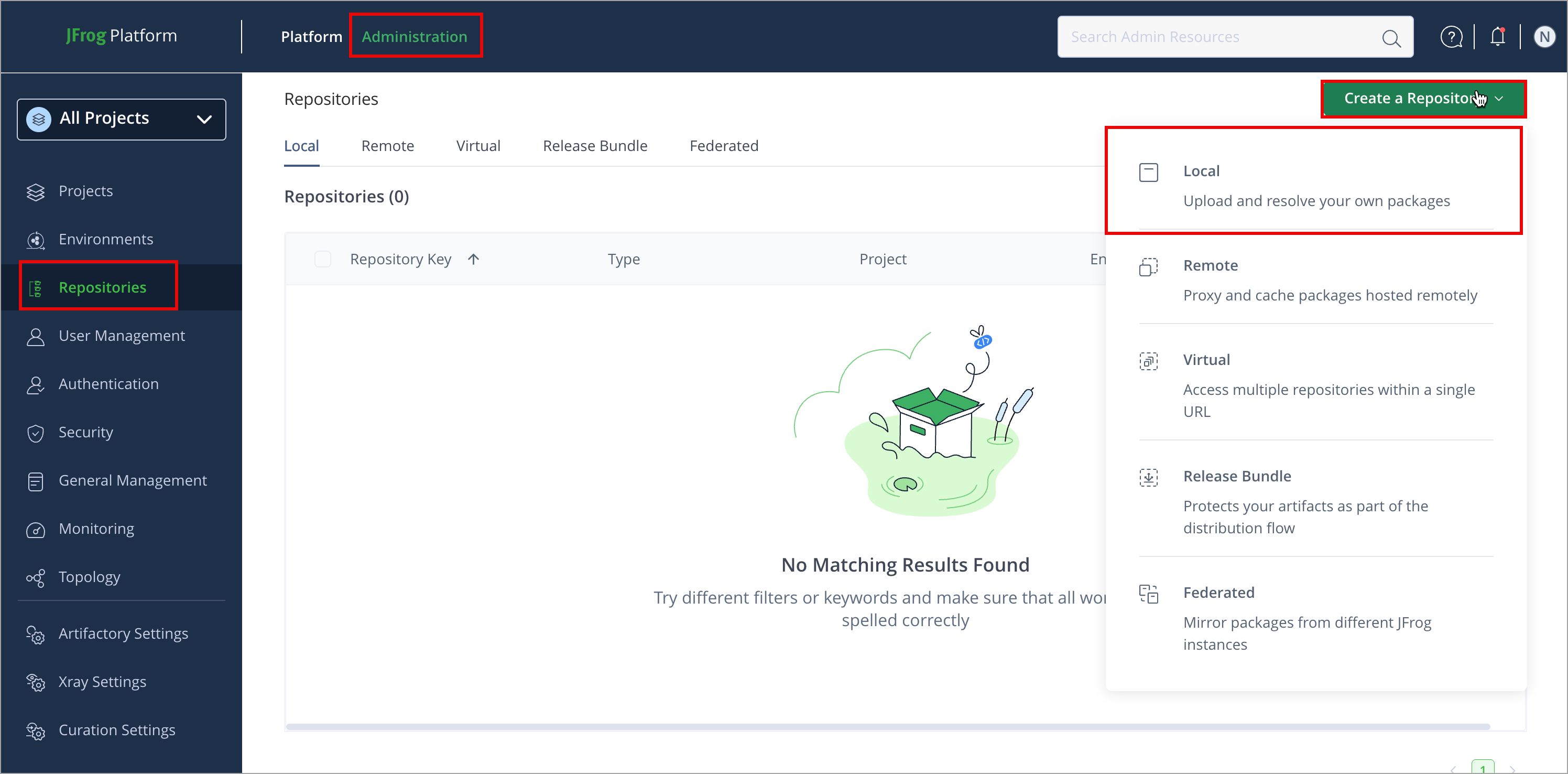
In the Administration tab, click Repositories | Create a Repository
-
Select the repository type you want to create, configure the required fields (described in the following list), then click Create Repository.
-
For Local Repositories, in the Repository Key field, type a meaningful name for the repository. For example,
Terraform-local-repository-1.From the Terraform Registry Type list, select Module/Provider as appropriate:
- Module:
terraform-module-defaultis the default repository layout - Provider:
terraform-provider-defaultis the default repository layout
- Module:
-
Terraform Providers: Origin Registry
To use Terraform Providers as Origin Registry, you must associate a GPG public key while creating a local repository. This key is used by Terraform to verify the integrity of the provider packages.
Prerequisite: Generate GPG Keys and Upload GPG Keys
For more information on local repositories and all their possible settings, see Local Repositories.
-
For Remote Repositories, additionally, verify the Repository URL and update if needed. For more information on Remote Repositories and all their possible settings, see Remote Repositories and Remote Terraform Repository.
-
For Virtual Repositories, additionally select one or more local or remote repository types to include in the virtual repository. For more information on virtual repositories and all their possible settings, see Virtual Repositories.
Note
The remote and the virtual repository settings are identical for both Providers and Modules.
- Click Create Repository. The repository is created, and the Repositories window is displayed.
Terraform Registry: Connect your Terraform/OpenTofu Client to Artifactory
This topic provides details on configuring Terraform/OpenTofu to work with Artifactory.
Pre-requisite: Before connecting your Terraform/OpenTofu client to Artifactory, you must have an existing Terraform repository in Artifactory. For more information, see Create Terraform/OpenTofu and Terraform Backend Repository
Supported Clients
- Terraform CLI: 1.0.0 or above
- OpenTofu CLI: TBD
Logged in vs. Anonymous User: You can work with Artifactory as either a logged in user or as an anonymous user. To work with Artifactory using Anonymous Access. You need to configure that access under Admin | Security | General. For details, refer to Allow Anonymous Access.
Note
You can also use JFrog Set me up to copy the snippet populated with your token and environment. For more information, see Use Artifactory Set Me Up for Configuring Package Manager Clients.
Configure your Terraform Client for Terraform Registry
To configure Terraform client, follow these steps:
-
Authenticate your client using the following command: Natively run the Terraform login to your Artifactory domain to generate an access token and save it in the Credentials file (
~/.terraform.d/credentials.tfrc.json).terraform login [JFrogPlatformURL][JFrogPlatformURL]: The URL of your JPDFor example:
terraform login company.jfrog.io -
Click Approve on the JFrog Platform login page.
The command line shows the success message after obtaining and saving the token.
-
To resolve the providers, add the following snippet to your Terraform configuration file, which can be found at
~/.terraformrc(Linux and Unix) or%APPDATA%/terraform.rc(Windows).provider_installation { direct { exclude = ["registry.terraform.io/*/*"] } network_mirror { url = "https://[JFrogPlatformURL]/artifactory/api/terraform/<REPOSITORY-KEY>/providers/" } }Where:
[JFrogPlatformURL]: The URL of your JPD<REPOSITORY-KEY>: Name of the repository. If the configured depth is 0, the baseurl should point to the root of the repository
For example:
provider_installation {
    direct {
        exclude = ["registry.terraform.io/*/*"]
    }
    network_mirror {
        url = "https://company.jfrog.io/artifactory/api/terraform/terraform-local/providers/"
    }
}
Provider Registry Protocol
Provider Registry Protocol does not require any changes to be applied to
.terraformrcfile.
Note
You can also use JFrog Set me up to copy the snippet populated with your token and environment. For more information, see Use Artifactory Set Me Up for Configuring Package Manager Clients.
Next Steps:
Configure your OpenTofu Client for Terraform Registry
To configure OpenTofu client, follow these steps:
-
Authenticate your client using the following command: Natively run the Terraform login to your Artifactory domain to generate an access token and save it in the Credentials file (
~/.terraform.d/credentials.tfrc.json)tofu login [JFrogPlatformURL][JFrogPlatformURL]: The URL of your JPDFor example:
tofu login company.jfrog.io -
Click Approve on the JFrog Platform login page.
The command line shows the success message after obtaining and saving the token.
-
To resolve the providers, add the following snippet to your Terraform configuration file, which can be found at
~/.terraformrc(Linux and Unix) or%APPDATA%/terraform.rc(Windows).provider_installation { direct { exclude = ["registry.opentofu.io/*/*"] } network_mirror { url = "https://[JFrogPlatformURL]/artifactory/api/terraform/<REPOSITORY-KEY>/providers/" } }Where:
[JFrogPlatformURL]: The URL of your JPD<REPOSITORY-KEY>: Name of the repository
For example:
provider_installation {
    direct {
        exclude = ["registry.opentofu.io/*/*"]
    }
    network_mirror {
        url = "https://company.jfrog.io/artifactory/api/terraform/hc-terraform-modules-local/providers/"
    }
}
Note
You can also use JFrog Set me up to copy the snippet populated with your token and environment. For more information, see Use Artifactory Set Me Up for Configuring Package Manager Clients.
Next Steps:
Terraform Backend: Connect your Terraform/OpenTofu Client to Artifactory
This topic provides details on configuring Terraform/OpenTofu to work with Artifactory.
Pre-requisite: Before connecting your Terraform/OpenTofu client to Artifactory, you must have an existing Terraform repository in Artifactory. For more information, see Create Terraform/OpenTofu and Terraform Backend Repository
Supported Clients
- Terraform CLI: 1.0.0 or above
- OpenTofu CLI: TBD
Logged in vs. Anonymous User: You can work with Artifactory as either a logged in user or as an anonymous user. To work with Artifactory using Anonymous Access. You need to configure that access under Admin | Security | General. For details, refer to Allow Anonymous Access.
Note
You can also use JFrog Set me up to copy the snippet populated with your token and environment. For more information, see Use Artifactory Set Me Up for Configuring Package Manager Clients.
Configure your Terraform Client for Terraform Backend
To configure Terraform client, follow these steps:
-
Authenticate your client using the following command: Natively run the Terraform login to your Artifactory domain to generate an access token and save it in the Credentials file (
~/.terraform.d/credentials.tfrc.json).terraform login [JFrogPlatformURL][JFrogPlatformURL]: The URL of your JPDFor example:
terraform login company.jfrog.io -
Click Approve on the JFrog Platform login page.
The command line shows the success message after obtaining and saving the token.
-
To resolve the providers, add the following snippet to your Terraform configuration file, which can be found at
~/.terraformrc(Linux and Unix) or%APPDATA%/terraform.rc(Windows).provider_installation { direct { exclude = ["registry.terraform.io/*/*"] } network_mirror { url = "https://[JFrogPlatformURL]/artifactory/api/terraform/<REPOSITORY-KEY>/providers/" } }Where:
[JFrogPlatformURL]: The URL of your JPD<REPOSITORY-KEY>: Name of the repository. If the configured depth is 0, the baseurl should point to the root of the repository
For example:
provider_installation {
    direct {
        exclude = ["registry.terraform.io/*/*"]
    }
    network_mirror {
        url = "https://company.jfrog.io/artifactory/api/terraform/terraform-local/providers/"
    }
}
Provider Registry Protocol
Provider Registry Protocol does not require any changes to be applied to
.terraformrcfile.
Note
You can also use JFrog Set me up to copy the snippet populated with your token and environment. For more information, see Use Artifactory Set Me Up for Configuring Package Manager Clients.
Next Steps:
Configure your OpenTofu Client for Terraform Backend
To configure OpenTofu client, follow these steps:
-
Authenticate your client using the following command: Natively run the Terraform login to your Artifactory domain to generate an access token and save it in the Credentials file (
~/.terraform.d/credentials.tfrc.json)tofu login [JFrogPlatformURL][JFrogPlatformURL]: The URL of your JPDFor example:
tofu login company.jfrog.io -
Click Approve on the JFrog Platform login page.
The command line shows the success message after obtaining and saving the token.
-
To resolve the providers, add the following snippet to your Terraform configuration file, which can be found at
~/.terraformrc(Linux and Unix) or%APPDATA%/terraform.rc(Windows).provider_installation { direct { exclude = ["registry.opentofu.io/*/*"] } network_mirror { url = "https://[JFrogPlatformURL]/artifactory/api/terraform/<REPOSITORY-KEY>/providers/" } }Where:
[JFrogPlatformURL]: The URL of your JPD<REPOSITORY-KEY>: Name of the repository
For example:
provider_installation {
    direct {
        exclude = ["registry.opentofu.io/*/*"]
    }
    network_mirror {
        url = "https://company.jfrog.io/artifactory/api/terraform/hc-terraform-modules-local/providers/"
    }
}
Note
You can also use JFrog Set me up to copy the snippet populated with your token and environment. For more information, see Use Artifactory Set Me Up for Configuring Package Manager Clients.
Next Steps:
Deploy Terraform Resources
Deploying Terraform resources makes them available to other users.
You can deploy Terraform resources via API or UI:
-
Deploy Terraform Resources via API
Deploy Terraform Modules via API
You can publish Terraform providers via the REST API. When using this method, you can deploy by checksum or from an archive.
For example, to deploy a Terraform module to a repository called Terraform-local, you could use the following:
The required parameters are namespace, module-name, provider-name (system) and version as follows:
curl -<USERNAME>:<TOKEN> -XPUT "https://[JFrogPlatformURL]/artifactory/<REPOSITORY-KEY>/<NAMESPACE>/<MODULE-NAME>/<PROVIDER-NAME>/<VERSION>.zip" -T <PATH_TO_FILE>where:
[JFrogPlatformURL]: The URL of your JPD<USERNAME>: Your JPD Username<TOKEN>: Your JPD Password<REPOSITORY-KEY>: The name of your repository<NAMESPACE>: The owner or organization for this provider<MODULE-NAME>: The name of the module<PROVIDER-NAME>: The name of the provider<VERSION>: The specific version of the provider you are deploying<PATH_TO_FILE>: This points to the file on your local machine that is being sent to Artifactory
For Example:
curl -uadmin:cmVmdGtuVnQ2JKc1J1 -XPUT "https://company.jfrog.io/artifactory/Terraform-local/jfrog/test-module/test-provider/1.0.0.zip" -T test-module-1.0.0.zipDeploy Terraform Providers via API
You can publish Terraform providers via the REST API. When using this method, you can deploy by checksum or from an archive.
For example, to deploy a Terraform provider to a repository called Terraform-local, you could use the following:
Provider Registry Protocol
To deploy a Terraform provider into an Artifactory repository, deploy the required files.
Run these commands with the relevant namespace, provider name (system), version, operating system (OS) and architecture:
-
Provider binary .zip file:
curl -u<USERNAME>:<TOKEN> -XPUT "https://[JFrogPlatformURL]/artifactory/<REPOSITORY-KEY>/<NAMESPACE>/<PROVIDER-NAME>/<VERSION>/terraform-provider-<PROVIDER-NAME>_<VERSION>_<OS>_<ARCH>.zip" -T <PATH_TO_FILE>For Example:
curl -uadmin:cmVmdGtuOM2JoWVF4WU9vajVnQ2JKc1J1 -XPUT "https://company.jfrog.io/artifactory/Terraform-local/terraform-main-provider/hashicorp/null/3.1.0/terraform-provider-null_3.1.0_linux_amd64.zip" -T test-provider-linux-amd64.zip -
GPG signature .sig file:
curl -u<USERNAME>:<TOKEN> -XPUT "https://[JFrogPlatformURL]/artifactory/<REPOSITORY-KEY>/<NAMESPACE>/<PROVIDER-NAME>/<VERSION>/terraform-provider-<PROVIDER-NAME>_<VERSION>_SHA256SUMS.sig" -T <PATH_TO_FILE>For Example:
curl -uadmin:cmVmdGtuOM2JoWVF4WU9vajVnQ2JKc1J1 -XPUT "https://company.jfrog.io/artifactory/Terraform-local/terraform-main-provider/hashicorp/null/3.1.0/terraform-provider-null_3.1.0_SHA256SUMS.sig" -T terraform-provider-null_3.1.0_SHA256SUMS.sig -
SHA256SUMS file:
curl -u<USERNAME>:<TOKEN> -XPUT "https://[JFrogPlatformURL]/artifactory/<REPOSITORY-KEY>/<NAMESPACE>/<PROVIDER-NAME>/<VERSION>/terraform-provider-<PROVIDER-NAME>_<VERSION>_SHA256SUMS" -T <PATH_TO_FILE>For Example:
curl -uadmin:cmVmdGtuOM2JoWVF4WU9vajVnQ2JKc1J1 -XPUT "https://company.jfrog.io/artifactory/Terraform-local/terraform-main-provider/hashicorp/null/3.1.0/terraform-provider-null_3.1.0_SHA256SUMS" -T terraform-provider-null_3.1.0_SHA256SUMS
Where:
[JFrogPlatformURL]: The URL of your JPD<USERNAME>: Your JPD Username<TOKEN>: Your JPD Password<REPOSITORY-KEY>: The name of your repository<NAMESPACE>: The owner or organization for this provider<PROVIDER-NAME>: The name of the provider<VERSION>: The specific version of the provider you are deploying<OS>: The target operating system for this provider build<ARCH>: The target CPU architecture for this provider build<PATH_TO_FILE>: This points to the file on your local machine that is being sent to Artifactory
Network Mirror
The required parameters are namespace, provider-name (system), version, operating-system (os) and architecture (arch) as follows:
curl -u<USERNAME>:<TOKEN> -XPUT "https://[JFrogPlatformURL]/artifactory/<REPOSITORY-KEY>/<NAMESPACE>/<PROVIDER-NAME>/<VERSION>/terraform-provider-<PROVIDER-NAME>_<VERSION>_<OS>_<ARCH>.zip" -T <PATH_TO_FILE>For Example:
curl -uadmin:cmVmdGtuOM2JoWVF4WU9vajVnQ2JKc1J1 -XPUT "https://company.jfrog.io/artifactory/Terraform-local/terraform-main-provider/hashicorp/null/3.1.0/terraform-provider-null_3.1.0_linux_amd64.zip" -T test-provider-linux-amd64.zipDeploy Terraform Resources via the UI
To deploy a Terraform resource via Artifactory UI:
-
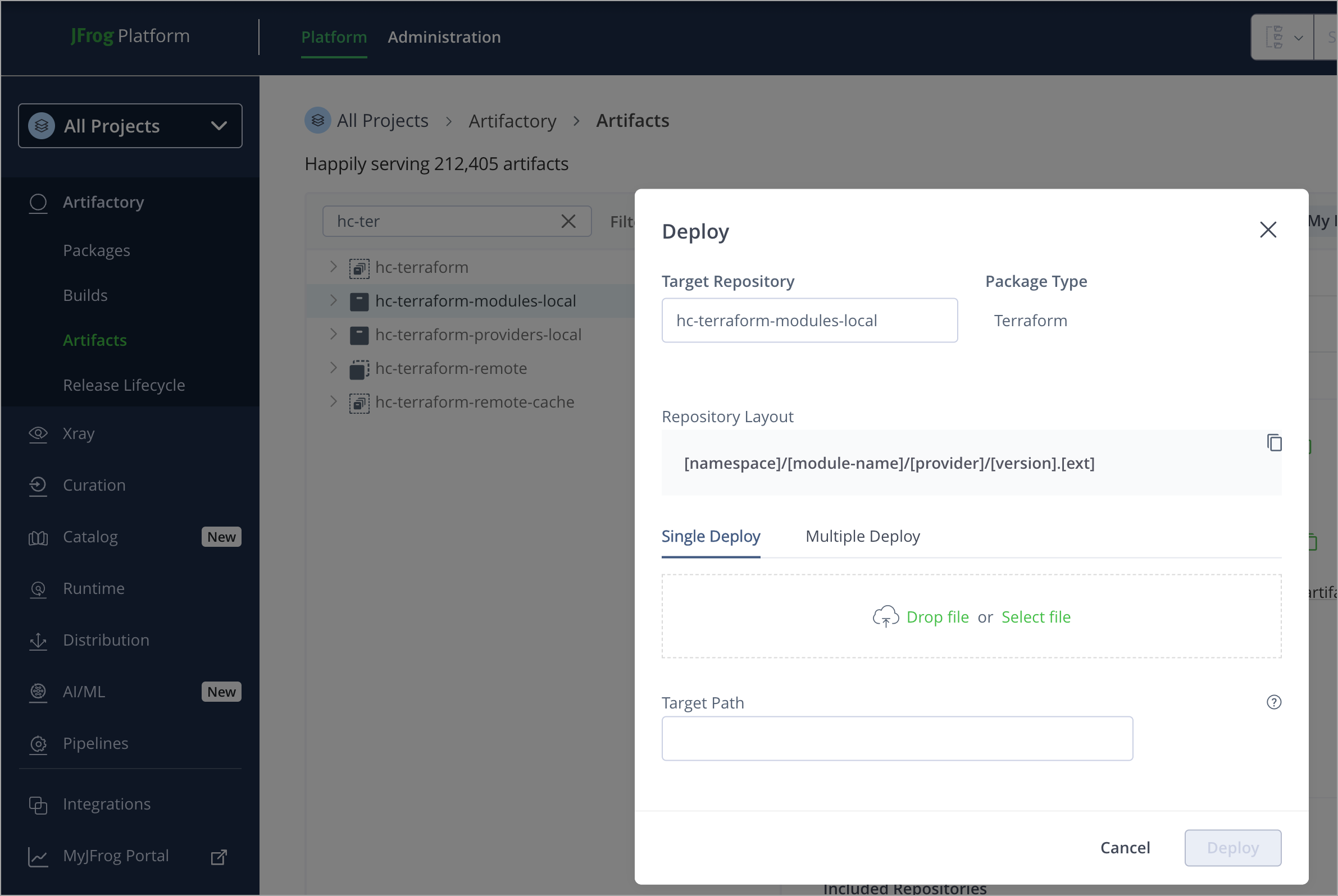
In the Platform tab, click Artifactory | Artifacts, then click Deploy. Deploy options are displayed.
-
Verify the deploy options, then click Deploy.
The resource is deployed.
Resolve Terraform Resources
The process of downloading a Terraform module or provider from Terraform is referred to as installing. You can install either Modules or Providers.
Resolve Terraform Modules
To resolve a Terraform module from an Artifactory repository, add the following information to your HCL file (.tf):
module "module-name" {
    source  = "[JFrogPlatformURL]/<REPOSITORY-KEY>__<NAMESPACE>/<MODULE-NAME>/<PROVIDER>"
}
Where:
[JFrogPlatformURL]: The URL of your JPD<MODULE-NAME>: The name of the module<REPOSITORY-KEY>: The name of your repository<NAMESPACE>: The owner or organization for this provider<PROVIDER-NAME>: The name of the provider
For example:
module "vpc" {
    source  = "company.jfrog.io/terraform-local__terraform-aws-modules/vpc/aws"
}
Resolve Terraform Providers
To resolve a Terraform provider from an Artifactory repository, add the following information to your HCL file (.tf):
Provider Registry Protocol
terraform {
    required_providers {
        provider-name = {
            source = "[JFrogPlatformURL]/<REPOSITORY-KEY>-rt-ns-<NAMESPACE>/<PROVIDER>"
            version = "<VERSION>"
        }
    }
}
Where:
-
[JFrogPlatformURL]: The URL of your JPD -
<REPOSITORY-KEY>: The name of your repository
Note
Include
rt-nsafter the repository name to differentiate the repository name from the namespace.
<NAMESPACE>: The owner or organization for the provider<PROVIDER>: The name of the provider<VERSION>: Version number
For example:
terraform {
    required_providers {
        docker = {
            source = "company.jfrog.io/terraform-local-rt-ns-kreuzwerker/docker"
            version = "1.0.0"
        }
    }
}
Network Mirror
terraform {
    required_providers {
        provider-name = {
            source = "<NAMESPACE>/<PROVIDER>"
        }
    }
}
Where:
<NAMESPACE>: The owner or organization for the provider<PROVIDER>: The name of the provider
For example:
terraform {
    required_providers {
        docker = {
            source = "kreuzwerker/docker"
        }
    }
}
Additional Terraform Actions
The following additional actions are available with Terraform repositories:
- Remote Terraform Repository
- Manually Generate an Access Token for Terraform
- Environment Variable Configuration (Recommended for CI/CD)
- Publish Terraform Modules Using the JFrog CLI
- Calculate a Terraform Repository Metadata
Remote Terraform Repository
Remote repositories enable you to proxy and cache your remote Terraform Modules and Providers packages.
To set up a remote repository that supports Terraform packages:
-
Click the Administration tab at the top of the Artifactory UI and then Repositories in the naviagation bar on the left.
-
Click the Create a Repository button.
-
In the popup menu, select Remote. The Select Package Type window appears.
-
Select Terraform/OpenTofu. The New Remote Repository screen appears, as shown below.
Note
The remote repository settings are identical for both Providers and Modules.
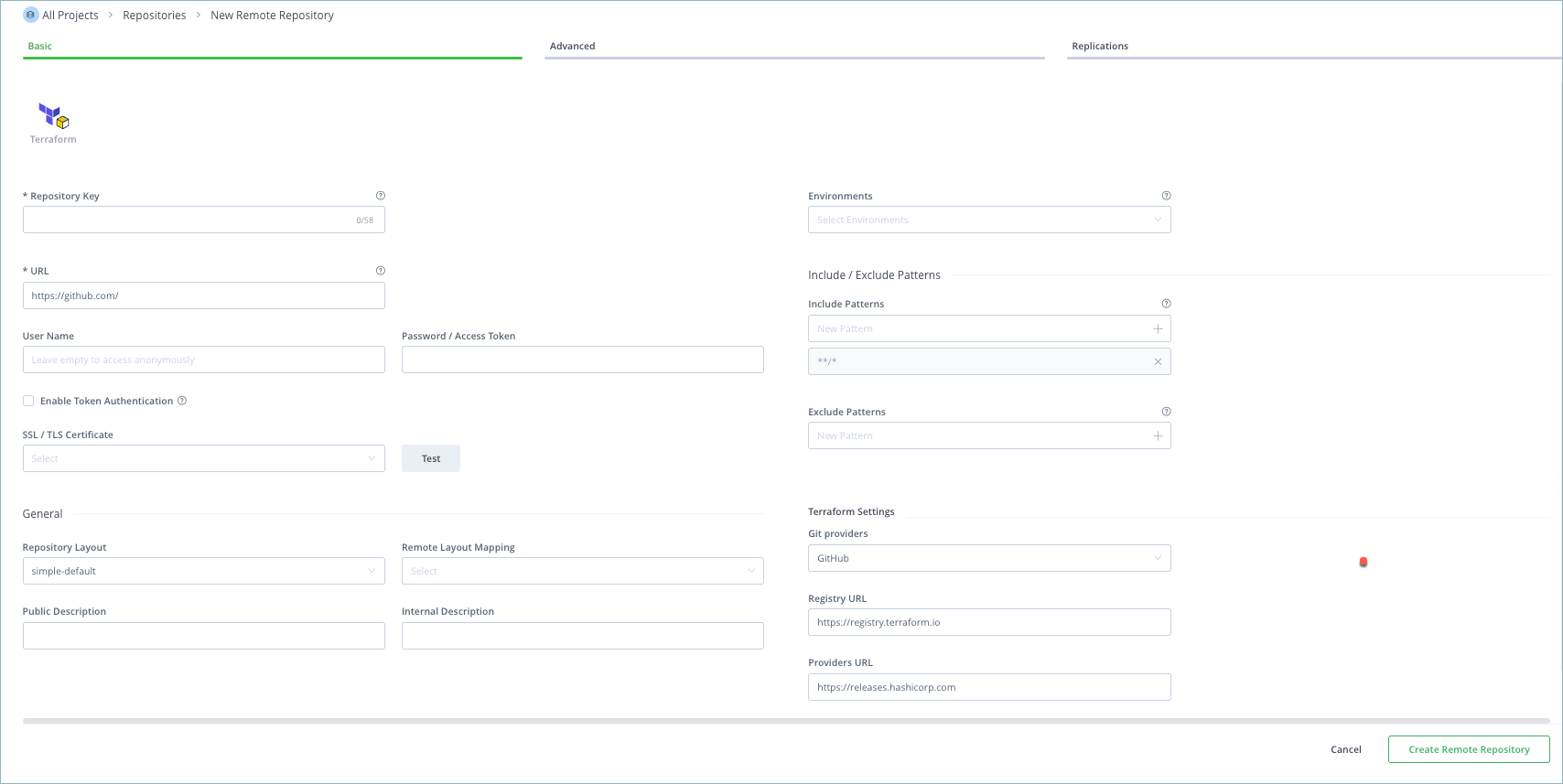
- Follow the instructions in the table below for specific Terraform settings.
| Field | Description |
|---|---|
| URL | The base URL of the Module storage API. When using Smart remote repositories, set the URL to |
| Password/Access Token | From Artifactory version 7.118.2 and later, if you are using a proxy GitLab or Terraform Cloud registry with this remote repository, you must enter your Bearer Token.
|
| Enable Token Authentication | You must enable this setting if you are using a proxy GitLab or Terraform Cloud registry with this remote repository. |
| Include Patterns/Exclude Patterns | Specify Ant-like patterns to filter repositories when resolving the artifact locations. Repositories are selected using the include patterns (default: all). Any repository matching an exclude pattern is filtered out (default: none). Exclude patterns take priority over include patterns. Below are examples of patterns for different provider types. Hashicorp Provider
|
| Git Providers | It is recommended to select GitHub when pointing to the official HashiCorp Terraform Registry. Other Git providers are not supported. |
| Registry URL | The base URL of the registry API.
|
| Providers URL | The base URL of the Provider's storage API.
|
Note
For information on the other settings in this screen, see Remote Repositories.
-
If you are using a proxy Gitlab or Terraform Cloud registry with this remote repository:
-
Click the Advanced tab at the top of the screen.
-
Scroll down to the section External Dependency Rewrite, and select Enable External Dependency Rewrite.
This allows you to define the trusted resources that the client can resolve from.
-
In the Patterns Allow List, add all the URLs that you want to download from.
- To resolve all Terraform modules in Terraform Cloud, add:
https://*terraform*.io/** - To resolve all Terraform modules in Gitlab, add:
https://gitlab.com/**
- To resolve all Terraform modules in Terraform Cloud, add:
-
-
When you are finished configuring the remote repository, click Create Remote Repository.
Note
Starting from version 7.39.4, The default Terraform behavior is to override the source URL when initializing a module. It is not recommended to disable this feature, but if you need to, you can do so by setting this system property:
artifactory.terraform.override.modules.source.hostname=false
Manually Generate an Access Token for Terraform
To use Artifactory with your Terraform/OpenTofu CLI, you will need to generate an access token either manually or automatically:
The token will enable you to resolve Terraform modules and provide packages using the Terraform Registry, as well as set up Artifactory as the remote state and locking provider using the Terraform Backend repository.
-
Generate an identity token that you can use to connect Artifactory to the Terraform CLI. For more information, see Generate Identity Token.
-
Create a file named '
credentials.tfrc.json' in your Terraform directory, ('~/.terraform.d/credentials.tfrc.json'). -
Update the token you generated in the
credentials.tfrc.jsonfile, as in the example below:#cat ~/.terraform.d/credentials.tfrc.json { "credentials": { "": { "token": "ACCESS-TOKEN" } } }For Example:
#cat ~/.terraform.d/credentials.tfrc.json

{
  "credentials": {
    "": {
      "token": "eyJ2ZXIy7tjWlgQUmSfjzCTzHz6TZPWycMNc17XbrPkvy91YF9nLYvwRnok25Uw"
    }
  }
}
Note
If you have added the access token in
credentials.tfrc.json, you do not need to log in again using Terraform login .
Environment Variable Configuration (Recommended for CI/CD)
For CI/CD pipelines and automated deployments, using environment variables is often more secure and convenient than storing credentials in configuration files. Terraform automatically detects and uses host-specific environment variables.
Setting Up Environment Variables
-
Set the JFrog URL.
export JFROG_URL=https://[JFrogPlatformURL] -
Set the Access Token.
export JFROG_ACCESS_TOKEN=your-access-token-here
Environment Variable Naming Convention
Terraform uses the following naming pattern for environment variables:
TF_VAR_<variable_name>for Terraform variables- Host-specific variables like
JFROG_URLandJFROG_ACCESS_TOKENfor provider configuration
CI/CD Pipeline Example
For GitHub Actions, GitLab CI, or other CI/CD systems:
# GitHub Actions example
- name: Configure JFrog credentials
  run: |
    echo "JFROG_URL=https://[JFrogPlatformURL]" >> $GITHUB_ENV
    echo "JFROG_ACCESS_TOKEN=${{ secrets.JFROG_ACCESS_TOKEN }}" >> $GITHUB_ENV
Benefits of Environment Variable Approach
- Security: Credentials are not stored in version control
- Simplicity: No need to create or manage configuration files
- Flexibility: Easy to switch between different environments
- CI/CD Friendly: Seamless integration with automated deployment pipelines
Fallback to Configuration File
If environment variables are not set, Terraform will fall back to:
- CLI configuration file (
~/.terraformrcor%APPDATA%\terraform.rc) - Terraform configuration files (
.tffiles)
To learn more, see Terraform CLI configuration.
Publish Terraform Modules Using the JFrog CLI
JFrog CLI provides full support for packing Terraform modules and deploying them to JFrog Artifactory.
Required Software Versions
- JFrog CLI version 2.12.0 and above.
- JFrog Artifactory version 7.38.10 and above.
Step 1: Create Terraform Repositories
Before you can use JFrog CLI to publish your Terraform modules to Artifactory, you first need to set the deployment repository for the project.
To set the repository:
- CD to the root of the Terraform project.
- Run the
jf terraform-configcommand.
| Argument/ Flag | Description |
|---|---|
| Command-name | terraform-config |
| Abbreviation | tfc |
| --global | [Default false] Set to true, if you'd like the configuration to be global (for all projects on the machine). Specific projects can override the global configuration. |
| --server-id-deploy | [Optional] Artifactory server ID for deployment. The server should be configured using the |
| --repo-deploy | [Optional] Repository for artifacts deployment. |
For example, to set repositories for this Terraform project, run the following command:
jf tfcTo set repositories for all Terraform projects on this machine, run the following command:
jf tfc --globalStep 2: Publish Terraform Modules to Artifactory
The terraform publish command packs and deploys the Terraform modules to the designated Terraform repository in Artifactory.
Before running the terraform publish command on a project for the first time, the project should be configured using the terraform-config command.
The modules are deployed to the configured Terraform repository according to the following layout.
Note that the moduleName is determined by the name of the module directory
namespace/moduleName/provider/tag.zipTo publish a specific module, access the Modules’ root directory.
Before running terraform publish, cd into the directory that contains the Terraform modules. Note that those modules will later share common layout arguments (namespace, provider, and tag) in Artifactory.
Rules and Guidelines for Packing Terraform modules
- The File system is scanned from the current working directory.
- A directory that contains at least one file with a
.tfextension is considered as a Terraform module and all its content will be packed in one zip file (including the submodules directories) and will be deployed to Artifactory. - Recursive scanning does not run inside the module directory after it is packed, as a result, the submodules will not be packed and deployed separately to Artifactory.
Adding Exclusions Using Patterns
There is an option to set patterns to exclude modules that may contain:
- A directory that matches the pattern will not be scanned.
- Files that match the pattern won’t be packed in the relevant zip file.
The following table lists the command arguments and flags:
| Argument/ Flag | Description |
|---|---|
| Command-name | terraform publish |
| Abbreviation | tfp |
| --exclusions | [Optional] A list of Semicolon-separated exclude patterns. Allows using wildcards. |
| Command arguments | |
| --namespace | The namespace of the Terraform project that its modules are being published. |
| --provider | The provider of the Terraform project that it’s modules are being published. |
| --tag | The tag of the modules that are being published. |
Example of Packing and Publishing Terraform Modules
Before running this command on a project for the first time, the project should be configured using theterraform-configcommand.
To pack and publish the Terraform module, run the following command.
This command packs and deploys all the modules under the current working directory.
The modules will be published to the configured repository, using this layout: tera/moduleName/aws/v0.1.2.zip.
Modules and files which include test and ignore will be excluded (read more in the “exclusions” section).
jf tf p -namespace=tera -provider=aws -tag=v0.1.2 -exclusions=”*test*;*ignore*"For more information try this terraform project example.
Calculate a Terraform Repository Metadata
You can trigger an asynchronous re-indexing of a local Terraform repository either through the UI or using the REST API.
This will also reindex the git index and, as a result, will also index the remote repositories.
In the Artifact Tree Browser, select your Terraform repository, right-click and select Recalculate Index from the list. Requires Admin privileges.
To reindex a Terraform repository through the REST API refer to the following REST API: Calculate Terraform Index API
Terraform Limitations in Artifactory
The following are the limitations of Terraform in Artifactory:
-
Federated Repositories are not supported for Terraform Backend Repositories
This limitation prevents inconsistencies in the system state, which could lead to unexpected behavior or errors.
-
Remote and Virtual repositories are not supported for Terraform Backend Repositories
Updated 4 months ago