

Bazel Modules Repositories
Bazel is an open-source build tool from Google. Bazel supports remote caching, working as a solution in JFrog Artifactory for storing build artifacts, build metadata, and dependency resolution. You can use Bazel repositories in Artifactory to cache and proxy the public Bazel Central Registry (BCR). This makes sure that developers pull approved and vetted dependencies, enhancing supply chain security and guarantees consistent builds. Integrate Bazel with Artifactory for streamlined software development and robust artifact management. For more information, see the Bazel documentation.
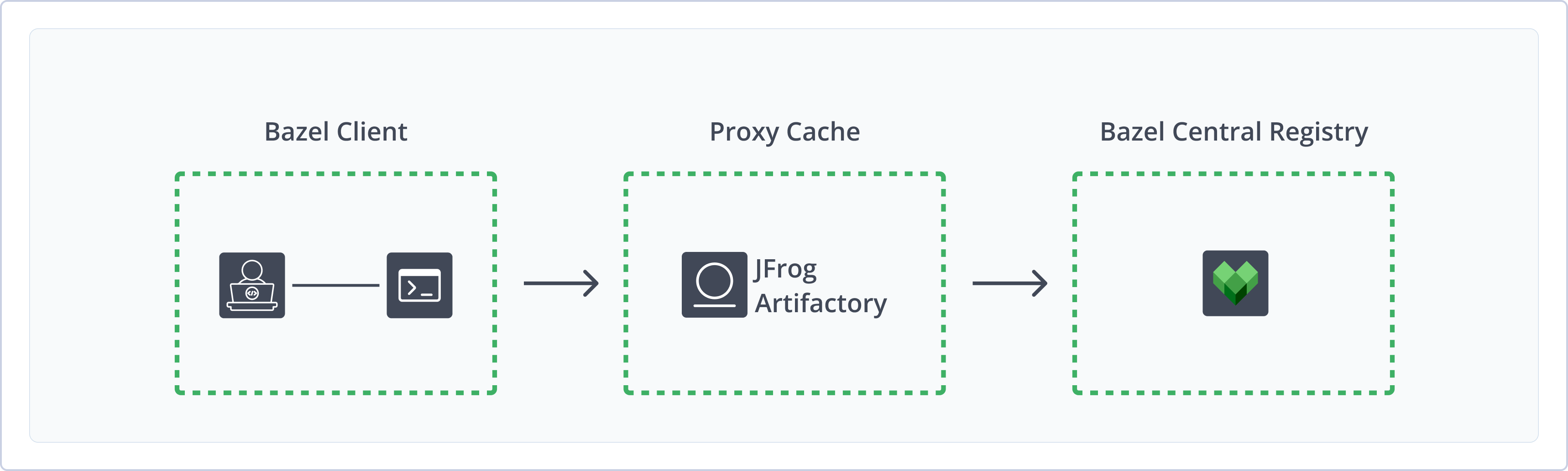
Artifactory supports the following capabilities for Bazel Module repositories:
- Security and Authentication: Authenticate to your Bazel repository in Artifactory for secure access to your proxy and cache of the BCR.
- CLI Support: Use Bazel CLI to natively manage modules, relying on the
MODULE.bazelfile to resolve dependencies from the Artifactory remote repository. - Bazel 9 Readiness: Bazel repositories in Artifactory support the Bazel 9-mandated removal of the legacy
WORKSPACEsystem and use of Bazel modules (bzlmod) for dependency management.
Note
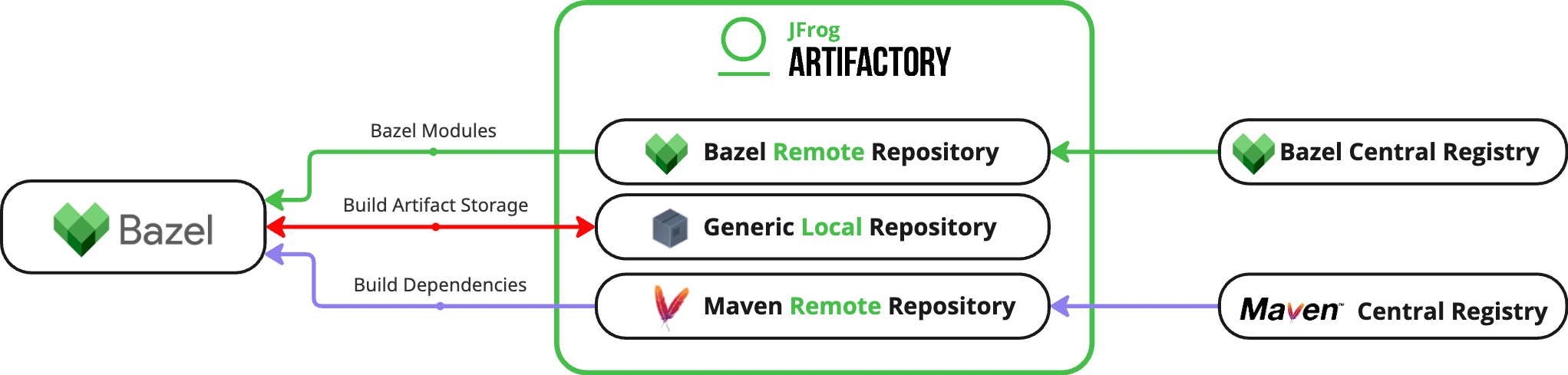
Bazel repositories in Artifactory support proxying BCR for Bazel modules only. You can use Generic and Maven repositories in Artifactory for build artifact storage and build dependencies in your Bazel projects.
To learn more about these integrations, see Additional Bazel Information.
Get Started with Bazel Modules
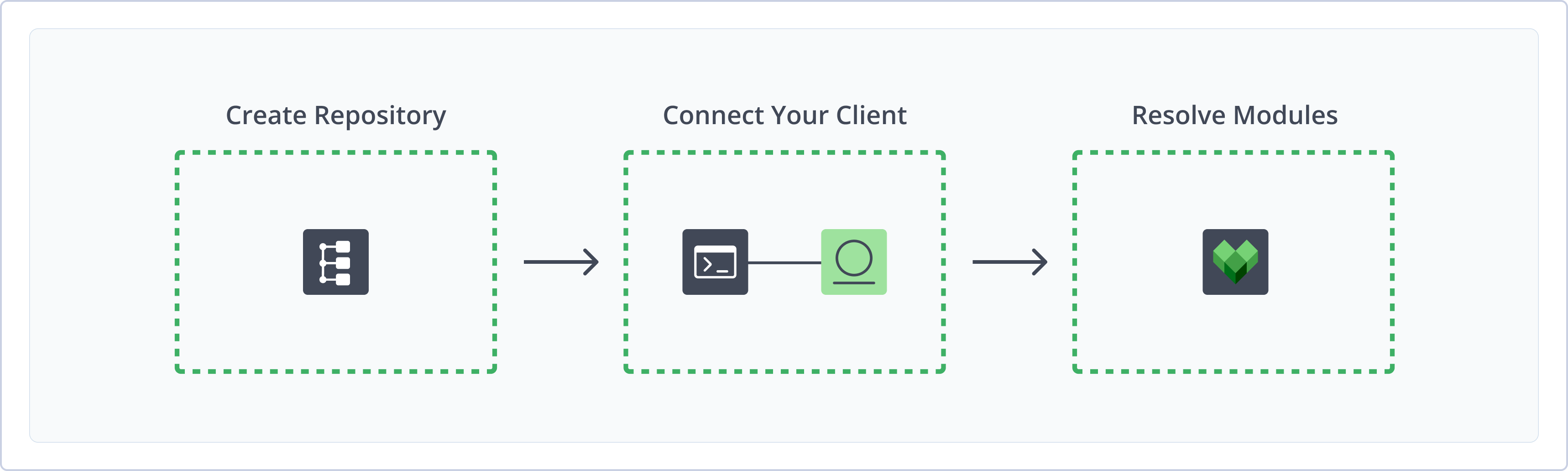
To get started working with Bazel Module repositories in Artifactory, complete the following main steps:
Create a Bazel Modules Repository
This topic describes how to create a Bazel Modules repository. This is required before resolving Bazel modules. Artifactory supports remote Bazel Module repositories, allowing you to resolve dependencies from your secure cache.
For more information on JFrog repositories, see Repository Management.
Prerequisite: You need Admin or Project Admin permissions in Artifactory to create a repository.
To create a Bazel Modules repository:
-
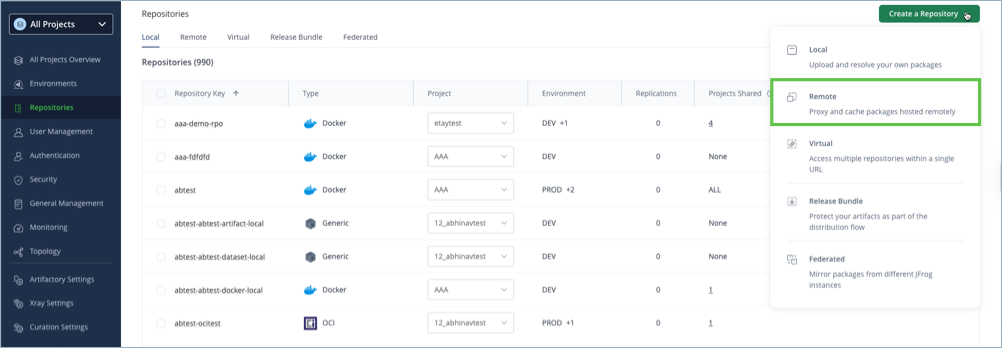
In the Administration tab, click Repositories | Create a Repository.
-
Select the Remote repository type.
-
Select the Bazel Modules package type.
-
Configure the required fields for the repository:
-
In the Repository Key field, type a meaningful name for the repository. For example,
bazel-remote. -
Verify the Repository URL and update as needed.
For more information on remote repositories and their settings, see Remote Repositories.
-
-
Click Create Repository. The repository is created and the Repositories window is displayed.
Connect Bazel to Artifactory
To use Artifactory as the registry for your Bazel client, you need to complete these two tasks:
Prerequisite: Before connecting the Bazel client to Artifactory, you must have an existing Bazel Modules repository in Artifactory. For more information, see Create a Bazel Modules Repository.
Authenticate Bazel to Artifactory
Before using your Bazel client with Artifactory, you need to add Artifactory authentication information to your netrc file. The credentials are required for Bazel to authenticate to your Artifactory repository.
To authenticate Bazel to Artifactory:
-
Open the
netrcfile in a text editor. The file location varies by OS, for example:- Linux and Unix (macOS):
~/.netrc - Windows:
%USERPROFILE%\_netrc
- Linux and Unix (macOS):
-
In the
netrcfile, add the following snippet:machine [JFrogPlatformURL] login <USERNAME> password <AUTH>Where:
[JFrogPlatformURL]: Your orgainzation's Artifactory URL<USERNAME>: Your Artifactory username<AUTH>: Your Artifactory identity token
For example:
machine company.jfrog.io login jeffry password k9M4f6V8b2c1n7H3g5T0j2x4R1z9Q5w7E3d8F6c4N2m1K8v0B3s5A -
Save the changes to your file.
Note
You can also use JFrog Set me up to copy the snippet populated with your token and environment. For more information, see Use Artifactory Set Me Up for Configuring Package Manager Clients.
Add Artifactory Registry to Bazel
After adding Artifactory credentials to your netrc file, you need to configure your Bazel client with the repository information.
To add the Artifactory registry to Bazel:
-
Open or create the
.bazelrcfile. If the file already exists, its location varies by operating system. For example:- Linux and Unix (macOS):
~/etc/bazel.bazelrc - Windows:
%ProgramData%\bazel.bazelrc
- Linux and Unix (macOS):
-
In the
.bazelrcfile, add the following snippet:<COMMAND> --registry=https://[JFrogPlatformURL]/artifactory/api/bazelmodules/<REPO_NAME>Where:
-
<COMMAND>: The command you want to configure to work with the Artifactory repository. Options include:common: Set all commands to resolve from Artifactorybuild: Setbuildcommands to resolve from Artifactoryfetch: Setfetchcommands to resolve from Artifactorytest: Settestcommands to resolve from Artifactory
-
[JFrogPlatformURL]: Your organization's Artifactory URL -
<REPO_NAME>: The name of your Bazel Modules repository in Artifactory
For example:
common --registry=https://company.jfrog.io/artifactory/api/bazelmodules/bazel-remote -
-
Save the changes to the file.
Note
You can also use JFrog Set me up to copy the snippet populated with your token and environment. For more information, see Use Artifactory Set Me Up for Configuring Package Manager Clients.
Next steps:
Resolve Bazel Modules
Once Bazel is configured to connect to the secure Artifactory cache, you can resolve Bazel module dependencies from your Artifactory repository. You can resolve modules in two ways:
Resolve Modules from Default Registry
Bazel commands automatically resolve modules from the registry you configure in the .bazelrc file.
To resolve Bazel modules from the default registry:
Run this command:
bazel build @<MODULE_NAME>Where <MODULE_NAME> is the name of the module you want to resolve. For example:
bazel build @rules_goResolve Modules from a Specific Registry
If you want to resolve Bazel modules from a different registry than the one specified in the .bazelrc file, you can specify a repository in the command.
To resolve Bazel modules from a specific registry:
Run this command:
bazel build --registry=https://[JFrogPlatformURL]/artifactory/api/bazelmodules/<REPO_NAME> @<MODULE_NAME>Where:
[JFrogPlatformURL]: Your organization's Artifactory hostname<REPO_NAME>: The name of the repository you want to resolve from<MODULE_NAME>: The name of the module you want to resolve
For example:
bazel build --registry=https://company.jfrog.io/artifactory/api/bazelmodules/bazel-modules-remote @rules_goAdditional Bazel Information
The following additional information is available for Bazel in Artifactory:
- Use Generic Repositories as Bazel Remote Cache Storage
- Use Maven Repositories as a Bazel Dependencies Cache
Use Generic Repositories as Bazel Remote Cache Storage
While Bazel repositories in Artifactory support Bazel modules and proxying the Bazel Central Repository, you can also use a Generic repository in Artifactory as your Bazel remote cache. This allows you to set up your Bazel project to publish and resolve build artifacts to Artifactory.
Note
This configuration involves security and access control considerations. Authorize only select users or build users to access and modify the cached artifacts.
To use Artifactory as your Bazel remote cache, complete the following steps:
- Create a Generic Repository
- Configure Artifactory as your Bazel Remote Cache
- Optional: Validate the Connection
Create a Generic Repository
Create a generic repository to act as your Bazel remote cache.
Prerequisites: You need Admin or Project Admin permissions in Artifactory to create a repository.
To create a Generic repository:
- On the Administration tab, click Repositories > Create a Repository.
- Select Local.
- Select the Generic package type.
- In the Repository Key field, type a meaningful name for the repository. For example,
bazel-remote-cache. For more information on local repositories and their settings, see Local Repositories. - Click Create Repository. The repository is created and the Repositories window is displayed.
Configure Artifactory as Bazel Remote Cache
Once you create the Generic repository, configure Bazel to point to this repository as the remote cache.
To configure Artifactory as your Bazel remote cache:
Run the following command:
bazel build --remote_cache=https://<USERNAME>:<AUTH>@<JFrogPlatformURL>/<REPOSITORY_PATH>Where:
<USERNAME>: Your Artifactory username<AUTH>: Your Artifactory identity token<JFrogPlatformURL>: The URL of your JFrog Platform<REPOSITORY_PATH>: The path to the target repository
For example:
bazel build --remote_cache=https://jeffry@[email protected]/bazel-remote-cacheDuring the build process, action result metadata is stored under the path /ac/, and output files are stored under the path /сas/, to be reused during the next build executions.
Validate Connection
Optionally, once configured you can verify that the connection between Artifactory and Bazel works by finding the PUT and GET requests from the HTTP caching protocol in your Artifactory logs.
Bazel supports remote caching via HTTP/1.1. protocol, which uploads binary data (BLOB) via PUT requests and downloads it via GET requests.
For example, for an environment with a Bazel remote cache where:
- Generic repository name:
cache-bazel - JFrog Platform URL:
http://localhost:8082/artifactory/cache-bazel - SHA256 value of the action to upload or download:
01ba4719c80b6fe911b091a7c05124b64eeece964e09c058ef8f9805daca546b
The PUT request will appear in the logs like this:
PUT /artifactory/cache-bazel/cas/15e2b0d3c33891ebb0f1ef609ec419420c20e320ce94c65fbc8c3312448eb225 HTTP/1.1
Host: localhost:8082
Accept: _/_
Content-Length: 9
Connection: Keep-Alive

0x310x320x330x340x350x360x370x380x39
The GET request will appear in the logs like this:
GET /artifactory/cache-bazel/ac/01ba4719c80b6fe911b091a7c05124b64eeece964e09c058ef8f9805daca546b HTTP/1.1
Host: localhost:8082
Accept: _/_
Connection: Keep-Alive
Use Maven Repositories as a Bazel Dependencies Cache
You can configure Maven repositories in Artifactory to act as a Bazel dependencies cache using the rules_jvm_external Bazel ruleset. This ruleset simplifies the management of external Java dependencies and integrates them seamlessly into your Bazel builds, so you can declare and manage dependencies from popular sources like Artifactory.
To use Artifactory as your Bazel dependencies cache:
-
Note
You can publish artifacts to local repositories or to virtual repositories with a default deployment repository configured.
Configure Bazel to Resolve Dependencies from Artifactory
Use the rules_jvm_external ruleset in a BUILD file to define and use external Java dependencies in your Bazel project.
Once you load the maven_install rule from the rules_jvm_external package, you can name and define a rule that specifies the external Java dependencies you want to use. List the artifacts you need, along with their group, name, and version.
Specify the remote repositories from which Bazel should fetch these dependencies. Lastly, define a java_binary target that depends on the rule. This target represents your Java application and can be configured with additional settings, such as the main class and any runtime dependencies.
To configure Bazel to resolve dependencies from Artifactory:
- Open your BUILD file for editing.
- Add the following ruleset to the file:
Where:
load("@rules_jvm_external//:defs.bzl", "maven_install") maven_install( name = "<RULE_NAME>", artifacts = [ "<ARTIFACT_NAME>:<ARTIFACT_VERSION>", "<ARTIFACT_NAME>:<ARTIFACT_VERSION>" # Add more dependencies as needed ], repositories = [ # Private repositories are supported through HTTP Basic auth "<JFrogPlatformURL>/artifactory/<REPO_NAME>", ], ) java_binary( name = "<APP_NAME>", main_class = "<APP_CLASS>", runtime_deps = [":<RULE_NAME>"], # Add other configuration as needed )-
<RULE_NAME>: A descriptive name for the rule -
<ARTIFACT_NAME>: The name of the dependency artifact -
<ARTIFACT_VERSION>: The version of the dependency artifact -
<JFrogPlatformURL>: The URL of your JFrog PlatformNote
If your Artifactory instance requires authentication, pass your credentials in the URL using the following format:
http(s)://<USERNAME>:<AUTH>@<HOSTNAME> -
<REPO_NAME>: The name of the Maven remote repository you want to use as a Bazel dependencies cache -
<APP_NAME>: The label for the target -
<APP_CLASS>: The full path to the Java classFor example:
load("@rules_jvm_external//:defs.bzl", "maven_install")

maven_install(
    name = "my_dependencies",
    artifacts = [
        "com.google.guava:guava:28.2-jre",
        "org.slf4j:slf4j-api:1.7.30",
        "junit:junit:4.13.2",
    ],
    repositories = [
      # Private repositories are supported through HTTP Basic auth
      "http://username:token@localhost:8081/artifactory/maven-remote",
    ],
)

java_binary(
    name = "my_app",
    main_class = "com.example.MyApp",
    runtime_deps = [":my_dependencies"],
    # Add other configuration as needed
)
-
Configure Bazel to Publish Dependencies to Artifactory
Use the rules_jvm_external ruleset in a BUILD file to publish Java dependencies to a Bazel project.
You can create a java_export target similar to a regular java_library parameter, but with two additional parameters to set Maven coordinates and add an optional template for the pom.xml file.
You can also set the sources and dependencies for the build process.
To configure Bazel to publish Java dependencies:
-
Open your BUILD file for editing.
-
Add the following ruleset to the file:
# user_project/BUILD
load("@rules_jvm_external//:defs.bzl", "java_export")

java_export(
  name = "<APP_NAME>",
  maven_coordinates = "<GROUP_ID>:<ARTIFACT_ID>:<VERSION>",
  pom_template = "pom.tmpl",  # You can omit this
  srcs = glob(["*.java"]),
  deps = [
    "//<PACKAGE_PATH>",
    "@maven//:<DEPENDENCY_IDENTIFIER>",
  ],
)
Where:
<APP_NAME>: The label for the target<GROUP_ID>:<ARTIFACT_ID>:<VERSION>: The target's unique identifier for Maven, using the group ID, artifact ID, and version values<PACKAGE_PATH>: The directory path from the workspace root to the internal library<DEPENDENCY_IDENTIFIER>: The Bazel label for the dependency, usually the group ID and artifact ID
For example:
# user_project/BUILD load("@rules_jvm_external//:defs.bzl", "java_export") java_export( name = "exported_lib", maven_coordinates = "com.example:project:0.0.1", pom_template = "pom.tmpl", srcs = glob(["*.java"]), deps = [ "//user_project/utils", "@maven//:com_google_guava_guava", ], ) -
Run the following command to publish the artifact to Artifactory local Maven repository:
Note
When setting
gpg-signto true, the current default key will be used for signing. Make sure that the gpg binary is installed on your machine before running this command.MAVEN_USER=<USERNAME> MAVEN_PASSWORD=<TOKEN> bazel run --stamp \ --define "maven_repo=<JFrogPlatformURL>/artifactory/<REPO_NAME>" \ --define gpg_sign=true \ //user_project:<RULE_NAME>.publishWhere:
<USERNAME>: Your Artifactory username<TOKEN>: Your Artifactory identity token<JFrogPlatformURL>: The URL of your JFrog Platform<REPO_NAME>: The name of the local Maven repository to publish to<RULE_NAME>: Thenamevalue of your previously definedjava_exportrule
For example:
MAVEN_USER=admin MAVEN_PASSWORD=password bazel run --stamp \
  --define "maven_repo=https://acme.jfrog.io/artifactory/maven_local" \
  --define gpg_sign=true \
  //user_project:exported_lib.publish
Limitations of Bazel Modules in Artifactory
The following are the limitations of Bazel Modules repositories in Artifactory:
- Local and Virtual Repository Support: Bazel Modules repositories are available for remote proxying of BCR only. Local and virtual Bazel Modules repositories are not supported at this time.
- Bazel Build Artifacts: Bazel Modules repositories are for module dependency management only, and do not support build artifacts. To use Artifactory for handling Bazel build artifacts and other dependencies, use Generic and Maven repositories. For more information, see Additional Bazel Information.
Updated 8 months ago