

Upload and Download Packages using Artifactory
Once you have Artifactory installed, have configured a repository and have configured your package manager client, uploading and downloading packages is done transparently using your package manager client using Push and Pull functionality. It has been configured to connect to Artifactory, which communicates with the remote registry for your package manager client.
For more information, see Artifactory documentation for your specific package type in this guide.
Downloading Package Versions
This topic describes how to download a package version to your computer.
To download a package to your computer, follow these steps:
-
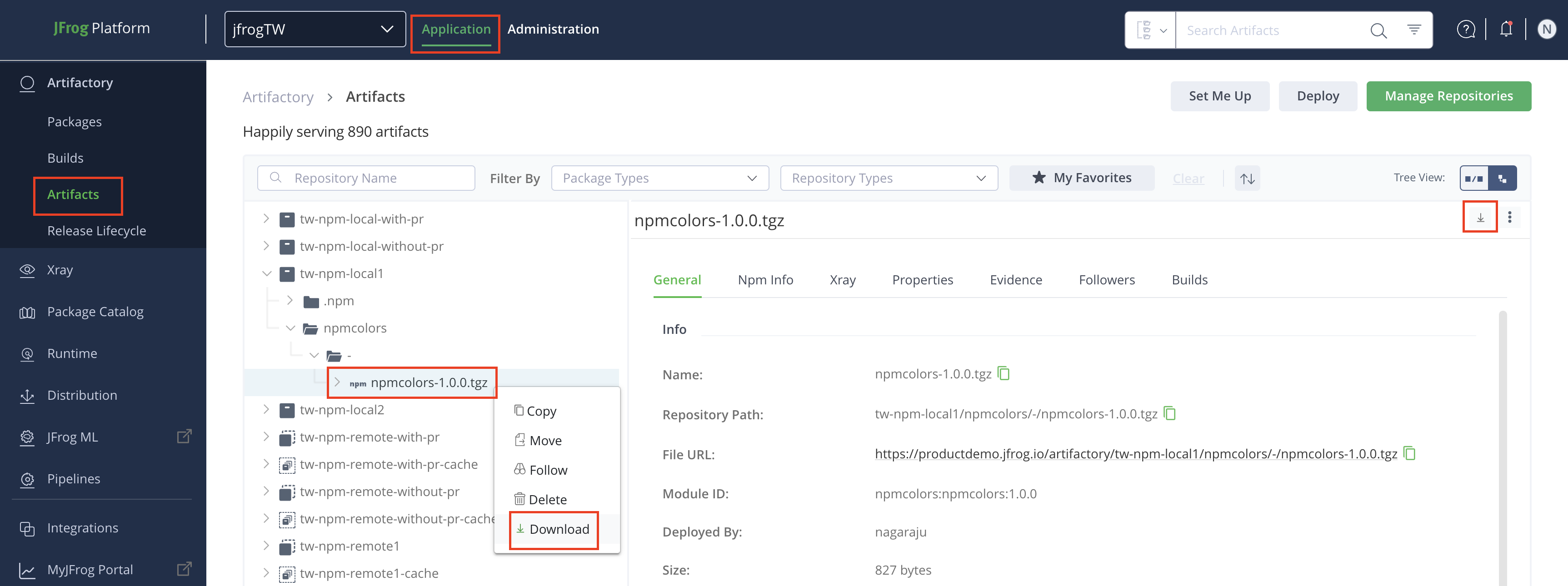
From the Application module, click Artifactory, and then click Artifacts.
-
Navigate to the desired repository and then locate the desired package version.
-
To download the package, do one of the following:
- Right-click the package version, and then click Download.
- Click the package, and then from the right corner click Download icon.
Related Information
- To download via JFrog CLI, refer to the Downloading Files .
Updated 8 months ago