

View Repositories
View configured Artifactory repositories and filter or act on them in the Repositories table.
Use the Repositories table in JFrog Artifactory to see the repositories configured on your system, including last activity and project assignment, and to run repository actions or filter the list.
- View Configured Repositories
- View Recently Viewed Repositories
- View Inactive Repositories
- Perform Actions on a Repository
- Filter the Repositories List According to Repository Type, Package Type, and Other Criteria
View Configured Repositories
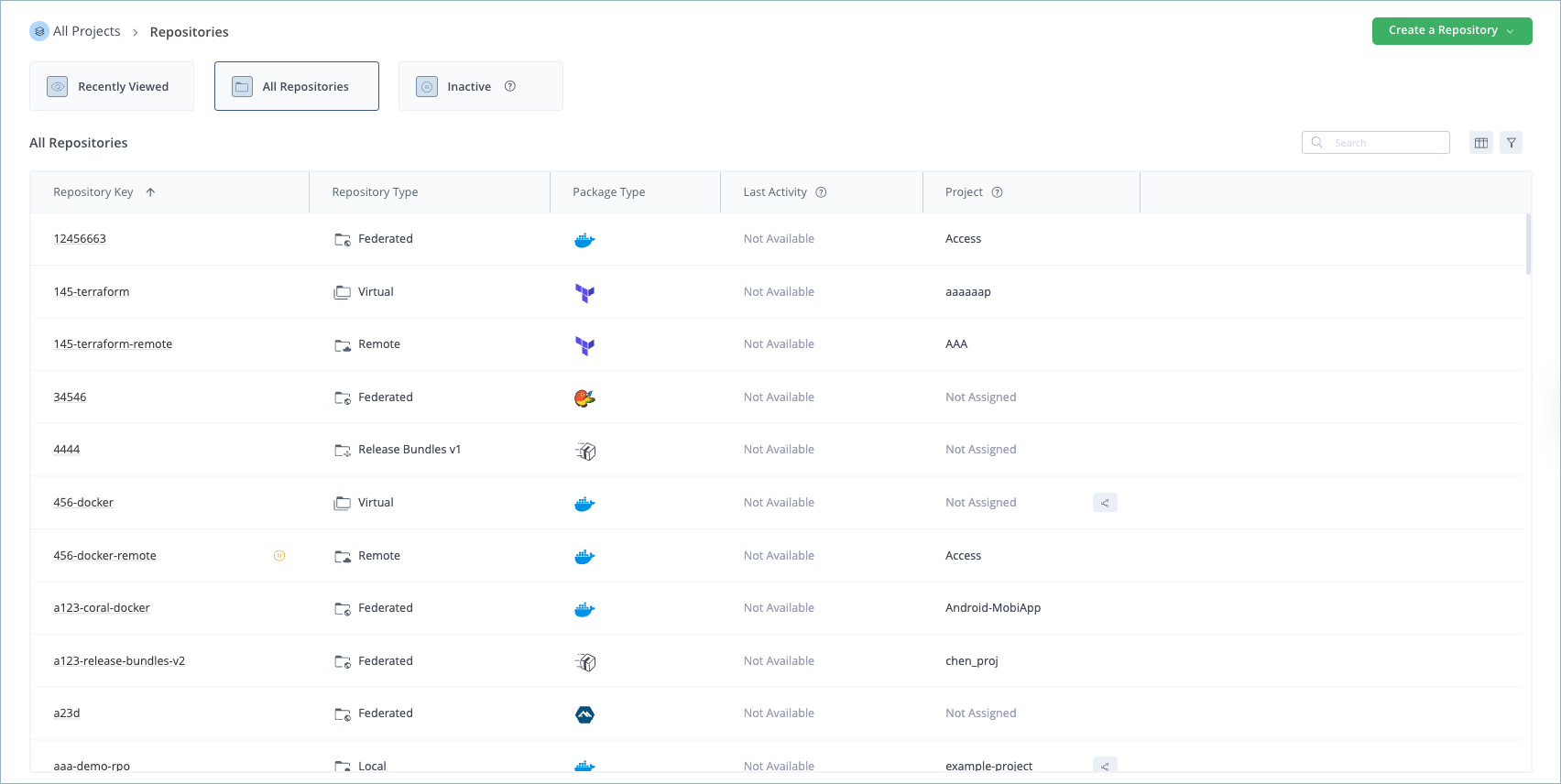
The Repositories table shows all the repositories on your system with relevant data. The Last Activity column indicates the most recent time when artifacts were either uploaded to or downloaded from the repository. The Project column indicates to which project the repository is assigned, and if it's shared by other projects.
To view the repositories currently configured on your system:
- Click Administration > Repositories. The Repositories table is displayed, showing all the repositories on your system with relevant data.
View Recently Viewed Repositories
A repository is considered recently viewed based on when it was created or when it was last viewed in editing mode, even if no changes were made to its configuration.
To view recently viewed repositories:
- Click the Recently Viewed tile in the Repositories table to view the 20 most recently viewed repositories.
View Inactive Repositories
The criteria for displaying inactive repositories are:
- For local repositories: Repositories where Disable Artifact Resolutions in Repository is true.
- For remote repositories: Repositories that are offline.
- For federated repositories: Federated repositories are in an unsynced configuration, so federation sync is paused.
To view inactive repositories:
- Click the Inactive tile in the Repositories table to view inactive repositories.
Perform Actions on a Repository
You can perform various important actions on a repository in the Repositories table.
To perform an action on a repository:
-
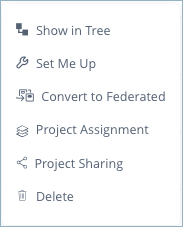
Hover over the right end of the repository row and click the 3 dots that appear. A pop-up list of actions appears, as shown below.
-
Choose from one of the following actions:
| Action | Description |
|---|---|
| Show in Artifacts Tree | Display the repository in the Artifacts Tree. |
| Set Me Up | Perform the Set Me Up wizard on the repository. For more information, see Use Artifactory Set Me Up for Configuring Package Manager Clients. |
| Recalculate Index (not supported on all repositories) | This action recalculates all the indices of the repository. This action isn't supported on all repositories and depends on the repository's package type. Note: This is a heavy operation and can affect system performance when performed on large repositories. |
| Project Assignment | Assign the repository to a project. |
| Project Sharing | Share the repository with one or more projects. Sharing a repository with other projects grants those projects read-only or read-write permissions to the repository. |
| Delete | Delete the repository. |
| For Local Repositories only | |
| Convert to Federated | Convert your local repository to a federated repository. |
| For Virtual Repositories only | |
| View Aggregated Repositories | View repositories that are aggregated by this virtual repository. |
| For Federated Repositories only | |
| Push Configuration | If two federated repositories are out of synchronization, this action pushes the configuration of the selected repository to the other federated member to re-establish synchronization. |
| Federation Status | View the federation status of this repository. For more information, see View a Selected Repository Federation. |
Filter the Repositories List According to Repository Type, Package Type, and Other Criteria
When you first open the Repositories list, it lists all repositories in the system. You can use the Repositories filter to refine the list and focus on the repositories that you want to work with, based on criteria such as repository type, package, remote repository URL, project, stage, and replication status.
To filter the Repositories list:
-
In the Repositories list, ensure that you are in the All Repositories view.
-
Click the Filter icon

in the Repositories table.
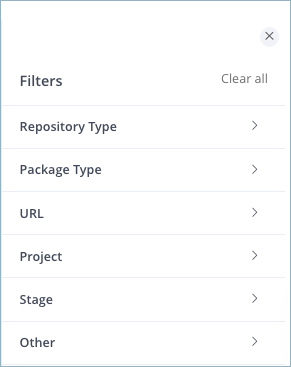
The Filter settings appear.
-
Filter the Repositories list according to the following filter settings.
| Setting | Description |
|---|---|
| Repository Type | Choose from local, remote, virtual, federated, or any combination of them. |
| Package Type | Display repositories of a specific package type supported by JFrog Artifactory, or a combination of package types. |
| URL | Display remote repositories according to the repository URL. This setting applies only to remote repositories. |
| Project | Display repositories that are assigned to a specific project, shared with a specific project, or both. You can also display all repositories that are unassigned and not shared. For more information, see Share Repositories Across Multiple Projects. |
| Stage | Display repositories according to the repository's assigned stages. |
| Other | Select the Replications checkbox to display repositories that have a replication. This setting applies only to local and remote repositories. |
- To remove the filter settings and return to the All Repositories view, click Clear All.
Frequently Asked Questions
This section provides answers to frequently asked questions.
FAQs
Q: How do I view the repositories configured in Artifactory?
A: Click Administration > Repositories. The Repositories table lists the repositories on your system with data such as last activity and project assignment. For more information, see View Configured Repositories.
Q: What happens if I recalculate the index on a large repository?
A: Recalculate Index is a heavy operation and can affect system performance when you run it on large repositories. The action isn't supported on all repositories and depends on the repository's package type. For more information, see Perform Actions on a Repository.
Q: What is the difference between Recently Viewed and Inactive repositories?
A: Recently Viewed shows the 20 repositories you created or last opened in editing mode, even if you made no configuration changes. Inactive uses type-specific criteria, such as disabled artifact resolution for local repositories, offline remote repositories, and unsynced federated repositories. See View Recently Viewed Repositories and View Inactive Repositories.
Q: What do I need before I can filter the Repositories list?
A: Open the Repositories list in the All Repositories view, then click the Filter icon. You can then refine the list by repository type, package type, remote URL, project, stage, or replication. For more information, see Filter the Repositories List According to Repository Type, Package Type, and Other Criteria.
Q: Can I run Set Me Up from the Repositories table?
A: Open the row actions menu and choose Set Me Up to run the Set Me Up wizard on that repository. For more information, see Use Artifactory Set Me Up for Configuring Package Manager Clients and Perform Actions on a Repository.
Related Topics
Updated 5 days ago