

RubyGems Repositories
RubyGems is the package manager for the Ruby programming language. The JFrog Artifactory integration with RubyGems allows you to manage RubyGems packages, or gems, in Artifactory. You can use RubyGems repositories in Artifactory to store, version, and manage RubyGems packages and dependencies throughout the software development lifecycle. For more information, see RubyGems documentation.
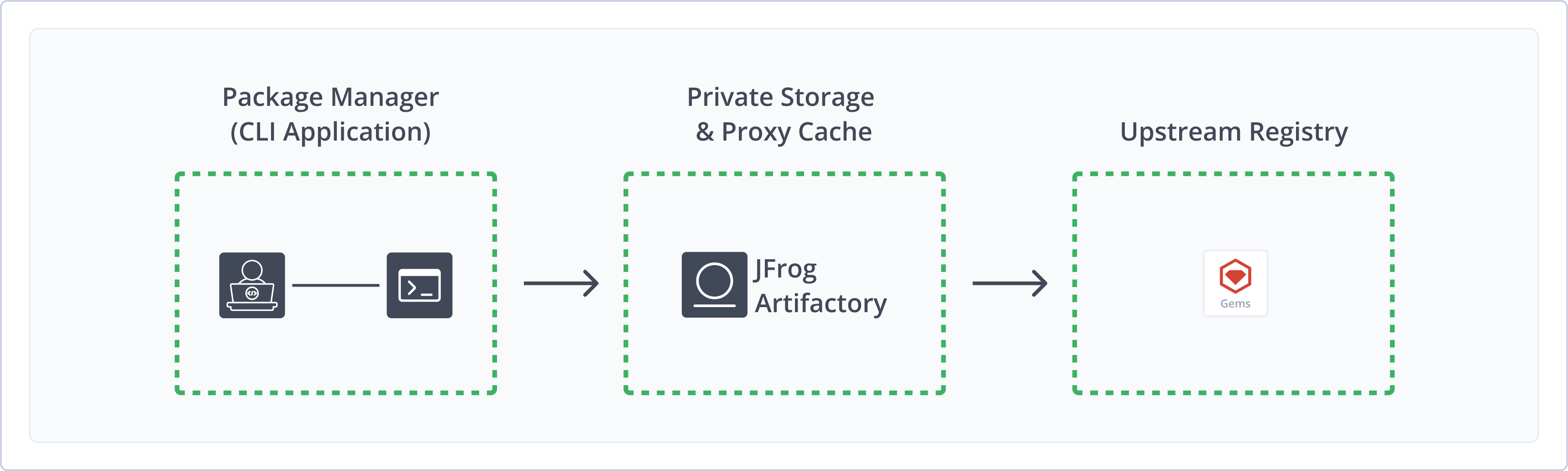
Artifactory fully supports RubyGems repositories, including the following features:
- Unified Repository Management: Consolidate all your RubyGems packages using Artifactory as a system of record. Set up secure local repositories, proxy and cache remote gem registries, and create a virtual repository as a single point of access to all your resources.
- Native Package Management: Manage gems in Artifactory repositories using the
gemcommand line tool. - RubyGems API Support: Support for RubyGems.org API Gem commands, including Info, Search, Dependencies, and Yank.
- Indexing and Metadata: Automatic indexing, with manual reindex and update operations available via REST API. Bundler Compact Index is also supported for resolving compatible gem versions.
Get Started with RubyGems Repository
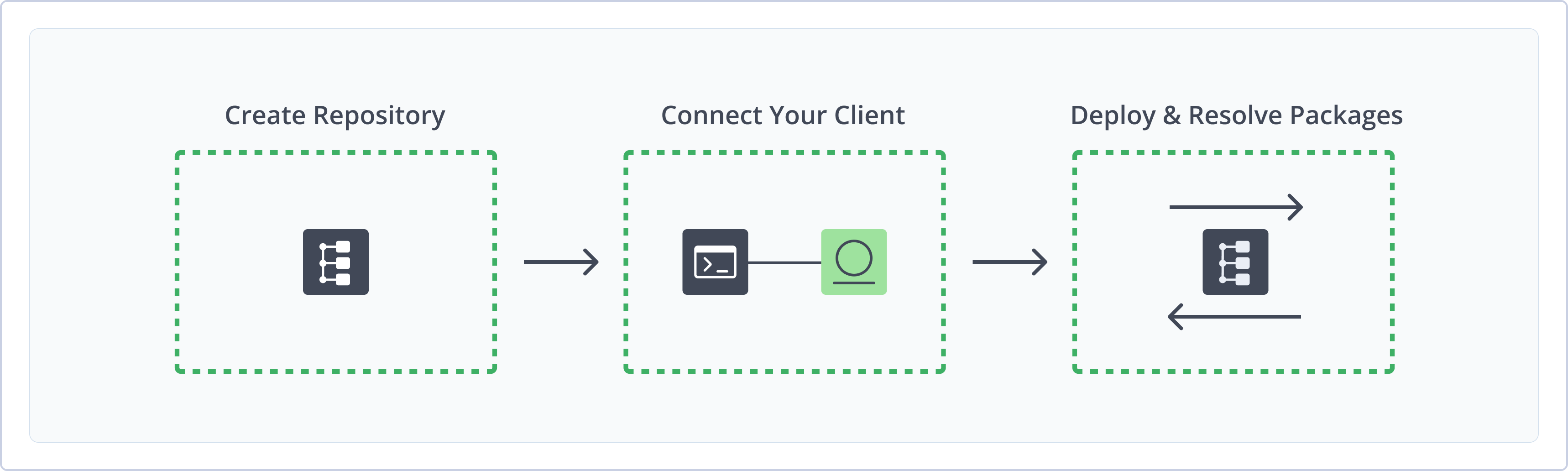
To get started working with RubyGems, complete the following main steps:
- Create a RubyGems Repository
- Connect RubyGems Client to Artifactory
- Deploy RubyGems Repositories
- Resolve RubyGems Packages
Create a RubyGems Repository
This topic describes how to create a RubyGems Repository. This is required before uploading and installing RubyGems packages. There are three primary types of repositories:
- Local repositories: Where you store and share 1st and 2nd party packages with your organization
- Remote repositories: Enable you to download from any remote location, including external package registries or other Artifactory instances
- Virtual repositories: Enable aggregating remote and local repositories, enabling your organization to scale by providing a single URL that allows access to multiple repositories and types
For more information on JFrog repositories, see Repository Management.
Prerequisite: You need Admin or Project Admin permissions to create a RubyGems repository. If you don't have Admin permissions, the option will not be available.
To create a RubyGems repository:
-
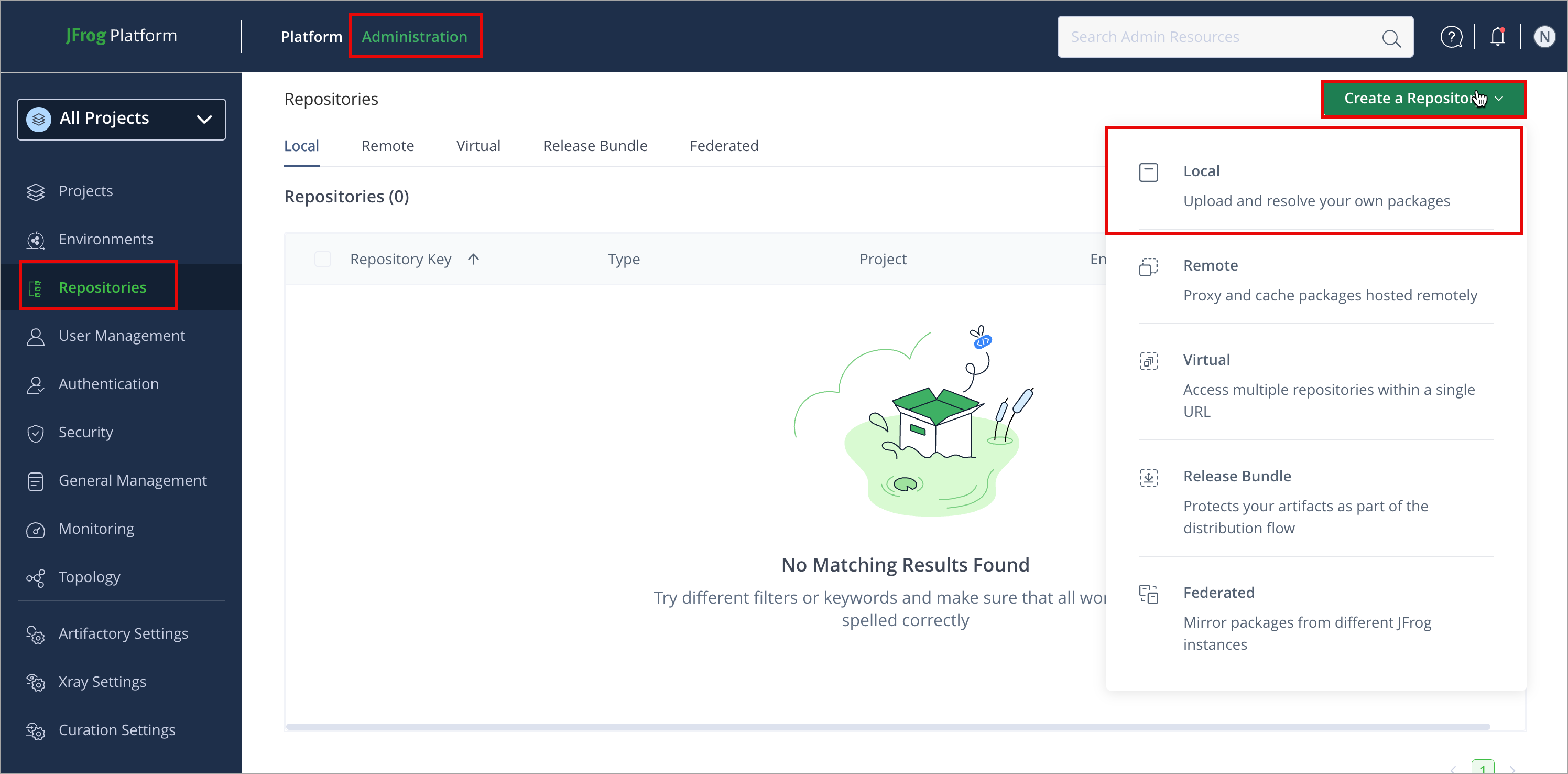
In the Administration tab, click Repositories | Create a Repository
-
Select the repository type you want to create and configure the required fields (described in the following list):
-
For Local Repositories, in the Repository Key field, type a meaningful name for the repository. For example,
rubygems-local-repository-1. For more information on local repositories and all their possible settings, see Local Repositories.Note
When a local repository is first created, it is populated with
rubygems-update-*.gemby default. To disable this behavior, configure the system propertyartifactory.gems.gemsAfterRepoInitHack=false. For more information, see Artifactory System Properties. -
For Remote Repositories, verify the Repository URL and update if needed. For more information on Remote Repositories and all their possible settings, see Remote Repositories.
-
For Virtual Repositories, select local and remote repositories to include in the virtual repository. For more information on virtual repositories and all their possible settings, see Virtual Repositories.
-
-
Click Create Repository.
Connect RubyGems Client to Artifactory
To configure RubyGems and Bundler with JFrog CLI, run native gem and bundle operations through Artifactory, and collect build-info, see Use RubyGems and Bundler with JFrog CLI.
To connect your RubyGems client to Artifactory, complete the following configurations:
Configure Sources
The ~/.gemrc file configures the source repositories where RubyGems resolves and installs packages from. You can add local, remote, and virtual Artifactory repositories as gem sources by manually modifying your ~/.gemrc file or using the gem source command.
All individual repositories you plan to resolve packages from must be added as gem sources. Packages are resolved from sources in the order the sources are specified.
The credentials included in the ~/.gemrc file are used for package resolution only. To configure credentials for deployment, see Configure Deployment Credentials.
To add Artifactory as a gem source:
-
Run this command:
gem source -a https://<USERNAME>:<TOKEN>@<HOSTNAME>/artifactory/api/gems/<REPO_NAME>/Where:
<USERNAME>: The URL of your JFrog Platform<TOKEN>: Your Artifactory identity token<HOSTNAME>: The hostname of your JFrog Platform<REPO_NAME>: The name of the target repository
For example:
gem source -a https://jeffry:[email protected]/artifactory/api/gems/rubygems-local/Tip
You may have to URI-encode the
@symbol to successfully embed credentials.
If Anonymous Access is enabled, you can omit credentials from the source URL and use the simplified format <JFrogPlatformURL>/artifactory/api/gems/<REPO_NAME>/.
Note
You can also use JFrog Set Me Up to copy the snippet populated with your token and environment. For more information, see Use Artifactory Set Me Up for Configuring Package Manager Clients.
Configure Deployment Credentials
While credentials for resolving RubyGems packages are embedded in the source URLs in the~/.gemrc file, you must separately configure credentials for push authentication.
Note
- To successfully configure credentials on Linux, you may need to change the permissions of the credentials file to 600 by running the command
chmod 600 credentialsfrom the~/.gemdirectory.- On Windows, the credentials file is located at
%USERPROFILE%/.gem/credentials.
To configure deployment credentials:
- Run one of the following commands, depending on your operating system:
- macOS and Linux:
Where:
curl -L -u <USERNAME>:<TOKEN> <JFrogPlatformURL>/artifactory/api/gems/<REPO_NAME>/api/v1/api_key.yaml > ~/.gem/credentials<USERNAME>: Your Artifactory username<TOKEN>: Your Artifactory identity token<JFrogPlatformURL>: The URL of your JFrog Platform<REPO_NAME>: The name of the target repository
For example:
curl -L -u jeffry:Random_TokenDh9872tfW4h784 https://company.jfrog.io/artifactory/api/gems/rubygems-local/api/vi/api_key.yaml > ~/.gem/credentials - Windows:
Where:
curl.exe -L -u <USERNAME>@<TOKEN> <JFrogPlatformURL>/artifactory/api/gems/<REPO_NAME>/api/v1/api_key.yaml | Out-File ~/.gem/credentials ~/.gem/credentials -Encoding "ASCII"<USERNAME>: The URL of your JFrog Platform<TOKEN>: Your Artifactory identity token<JFrogPlatformURL>: The URL of your JFrog Platform<REPO_NAME>: The name of the target repository
For example:
curl.exe -L -u jeffry:Random_TokenDh9872tfW4h784 https://company.jfrog.io/artifactory/api/gems/rubygems-local/api/vi/api_key.yaml | Out-File ~/.gem/credentials ~/.gem/credentials -Encoding "ASCII"
- macOS and Linux:
Note
You can also use JFrog Set Me Up to copy the snippet populated with your token and environment. For more information, see Use Artifactory Set Me Up for Configuring Package Manager Clients.
Deploy RubyGems Packages
Artifactory supports deploying RubyGems packages using the following methods:
Note
Packages must be deployed to a
gemsfolder for Artifactory to include them in indexing calculations.
Deploy RubyGems Package Using the UI
-
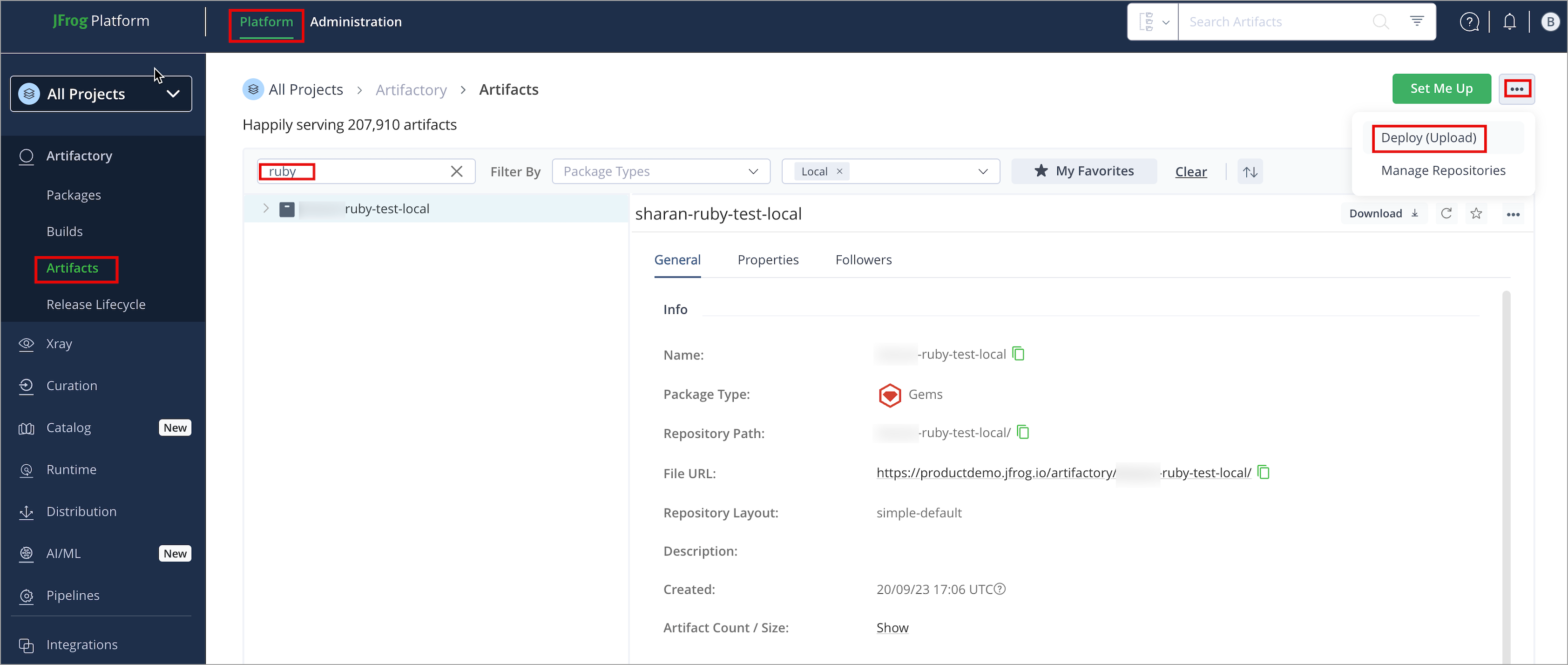
In the Platform tab, click Artifactory | Artifacts, then click ellipsis |Deploy(Upload). Deploy options are displayed.
-
Select your RubyGems repository as the Target Repository, and upload the file you want to deploy.
-
Produces: application/json
-
Verify the deploy options, then click Deploy. The package is deployed.
Deploy RubyGems Packages with gem
gemYou can use gem push to deploy packages to Artifactory. This command uses the $RUBYGEMS_HOST global variable to determine the deployment location, but you can also specify a repository directly in the gem push command using the --host flag.
To deploy RubyGems packages:
-
Configure the global variable
$RUBYGEMS_HOSTto point to the target repository:export RUBYGEMS_HOST=<JFrogPlatformURL>/artifactory/api/gems/<REPO_NAME>Where:
<JFrogPlatformURL>: The URL of your JFrog Platform<REPO_NAME>: The name of the target repository
For example:
export RUBYGEMS_HOST=https://company.jfrog.io/artifactory/api/gems/rubygems-local -
Run the following command to push the package:
gem push <PACKAGE>Where
<PACKAGE>is the package name. For example:gem push mygem-1.0.0.gemNote
Optionally, you can append the
--hostflag and specify a different repository than the one configured in$RUBYGEMS_HOST, and--keyto specify the relevant API key.Don't include a trailing slash when specifying a target repository in the
gem pushcommand.
Resolve RubyGems Packages
To resolve RubyGems packages:
Run the following command:
gem install <PACKAGE>The package will be resolved from the repository configured in your ~/.gemrc file. You can also specify a source with the following command:
gem install <PACKAGE> --source <JFrogPlatformURL>/artifactory/api/gems/<REPO_NAME>Where:
<PACKAGE>: The name of the package to install<JFrogPlatformURL>: The URL of your JFrog Platform<REPO_NAME>: The name of the target repository
For example:
gem install mygem --source https://company.jfrog.io/artifactory/api/gems/sharan-ruby-test-local Additional RubyGems Actions
The following additional actions are available with RubyGems repositories:
- Use the REST API for RubyGems
- Retrieve the Latest RubyGems Package Compatible With Your Ruby Versions
- Manage Sources
- Troubleshooting Unauthorized Status Failures
Use the REST API for RubyGems
The REST API provides access to the Gems Add-on through the repository key using the following URL:
http://localhost:8081/artifactory/api/gems/<repository key>/
In addition to the basic binary repository operations, such as download, deploy, delete, etc., the following RubyGems.org API Gem commands are supported:
| Gem Command | Curl Syntax Example |
|---|---|
| Info | curl http://localhost:8081/artifactory/api/gems/<repository key>/api/v1/gems/my_gem.(json|yaml) |
| Search | curl http://localhost:8081/artifactory/api/gems/<repository key>/api/v1/search.(json|yaml)?query=[query] |
| Dependencies | curl http://localhost:8081/artifactory/api/gems/<repository key>/api/v1/dependencies?gems=[gem1,...] |
| Yank | curl -X DELETE http://localhost:8081/artifactory/api/gems/<repository key>/api/v1/yank-d 'gem_name=gem_name' -d 'version=0.0.1' -d 'platform=ruby' |
Indexing is done automatically by Artifactory in the background, however if you still need to recreate or update the spec index files, the following REST API commands are also available:
| REST Command | Curl Syntax Example | Remarks |
|---|---|---|
| ReIndex | curl -X POST http://localhost:8081/artifactory/api/gems/<repository key>/reindex | Re-creates all spec index files. |
| Update index | curl -X POST http://localhost:8081/artifactory/api/gems/<repository key>/updateIndex | Updates all spec index files if needed. |
Retrieve the Latest RubyGems Package Compatible With Your Ruby Versions
The Bundler Compact Index feature allows you to retrieve the latest RubyGems version compatible with your installed Ruby version in the project applies to local, remote, and virtual repositories.
To apply this feature, set the artifactory.gems.compact.index.enabled=true value in the artifactory.system.properties file.
Manage Sources
You can use the following commands to manage sources and their order:
gem sources --list: List effective sources and their ordergem sources -r: Remove a gem source
Troubleshooting Unauthorized Status Failures
The following are troubleshooting tips for encountering the Unauthorized (401) status for some gem or bundler commands:
- Permission Target: Create a permission target that allows anonymous access to a specified repository.
- Confirm credentials: For Artifactory repositories that require authentication, make sure your credentials are included in
~/.gemrcfile as part of the source entry. You may need to URI-encode the@symbol to successfully embed the credentials. - Enable Anonymous User: Enable and configure Anonymous User permissions in the Anonymous Access security settings. For more information, see Allow Anonymous Access.
Limitations of RubyGems in Artifactory
Priority resolution is currently not supported for RubyGems virtual repositories following the deprecation of the /dependencies REST API (as the Artifactory default indexing is presently using a compact index).
Updated about 1 month ago