

Package and Repositories Use Cases
This section lists a couple of primary package and repository use cases.
Package Caching and Proxying Using Remote Repositories Use Case
A central feature of Artifactory is the ability to manage packages to ensure an efficient release lifecycle. This use case describes how remote repositories enable Artifactory users to address many of the key challenges of managing packages from remote public registries.
Challenges
Organizations face multiple challenges when managing access to remote packages on public registries, including:
- Public registries may be unavailable at times or suffer from latency issues
- Administrators lack an efficient method to moderate developer access to public registries without impacting productivity
- Particular package versions may become unavailable on the public registry
- Network overuse, which leads to reduced speed and increased cost
- Multiple users keep copies of the same files, which overloads the local storage system
- Inconsistent package versions among developers
The Artifactory Solution – Remote Repositories
To address these challenges, Artifactory offers remote repositories, which can cache and proxy packages from a remote public or private registry. Remote repositories provide multiple benefits to developers and DevOps engineers, including fast, convenient, and secure access to remote resources.
For more details about these benefits, see:
Benefits of Remote Repositories for Developers
Developers working in an integrated development environment (IDE) need to be able to call packages easily and insert them into their code. Packages must always be available to avoid delays or other issues when compiling a build.
Remote repositories offer the following benefits for developers:
- Builds become much faster because the required dependencies are cached and available for use
- Cached dependencies are available even when public registries are down or experiencing latency
Imagine the following scenario:
Anne is a developer and early riser who begins work early and starts running builds. When she requires a new dependency, Artifactory pulls it from a public registry and caches it for later use.
When other developers on the team begin work later that morning, they soon discover that their build times have improved greatly because the dependencies they require are cached and available in the remote repository.
Later that day, a sudden storm causes intermittent outages in the company’s connection to the outside world. However, the development team can continue their work without interruption secure in the knowledge that the dependencies they require are available for use in the remote repository.
Benefits of Remote Repositories for DevOps Engineers
DevOps engineers build the integrations that enable the rest of the organization to operate. They set up integrations between applications, build automation and pipelines, and keep things running.
Remote repositories enable DevOps engineers to ensure that the developers in their organization download from a particular public registry via the Artifactory remote repository. (Direct downloads from the public registry can be blocked at the network level.)
Remote repositories make downloads:
- Moderated (using include/exclude patterns, regular expressions, security filters, domain filters, and so on)
- Traceable
- Subject to security scans to ensure license compliance and block (or send alerts regarding) malicious software and other vulnerabilities
Additional benefits for DevOps engineers include:
- Improved performance thanks to caching
- Reduced storage costs due to storage optimization (thanks to checksum-based storage, only one instance of each binary is held, regardless of the number of requests from different developers)
- Reduced bandwidth and consumption
Imagine the following scenario:
Terry is a DevOps engineer who faces a situation where developers download software from public registries in an uncontrolled manner and without moderation. As a result, multiple versions of the same dependencies exist, and in some cases, security vulnerabilities are introduced into the organization’s software.
To correct this situation, Terry sets up a remote repository to serve as a proxy for the public registry. At the same time, he blocks direct developer access to the registry, ensuring that everyone must use the remote repository to download the software they require. Using a remote repository, the DevOps engineer can track what is being downloaded and by whom.
To keep the organization secure and compliant, he can also use JFrog Curation to limit which packages on remote registries can be accessed by developers. After permitted packages are brought into the remote repository, he can use JFrog Xray to scan all packages for possible vulnerabilities. These multiple layers of security help prevent vulnerabilities and possible malware from being introduced into the organization.
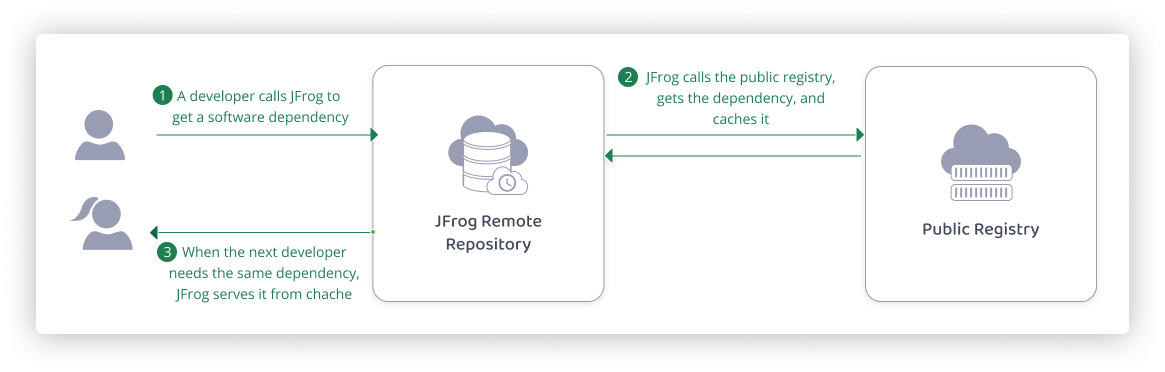
Remote repositories work as follows:
- A developer calls for a particular software dependency typically while working in an IDE.
- JFrog pulls the dependency from the relevant public registry (for example, Maven Central and Docker Hub) and caches it in a remote repository. When the next developer needs the same dependency, JFrog serves it directly from the cache.
Artifactory can perform authentication with remote registries using tokens and TLS certificates.
Use one of the following methods to create and configure a remote repository:
Use the Platform UI
-
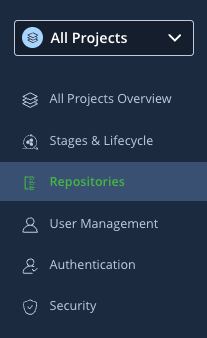
In the Administration module, select Repositories.
-
Click Create a Repository and select Remote.
-
Select the package type.
-
Configure basic and advanced repository settings.
For detailed instructions, see:
- Remote Repositories
- Basic Settings for Remote Repositories
- Advanced Settings for Remote Repositories
Use the REST API
Use the Create Repository API:
PUT /api/repositories/{repoKey}
For more details, see Repository Configuration JSON.
The following topics may be of interest for those who work with remote repositories.
Smart Remote Repositories
A special type of remote repository is a Smart Remote repository, which proxies a local, remote, or Federated repository from another Artifactory instance or Edge node. In addition to the benefits of remote repositories described above, Smart Remote repositories offer several additional benefits, including:
- Remote download statistics
- Synchronized properties
- Remote repository browsing
- Source absence detection
For more details, see Smart Remote Repositories.
Virtual Repositories
Another feature of Artifactory that benefits developers and DevOps engineers alike is virtual repositories. This is a collection of local and remote repositories (and even other virtual repositories) that are accessed through a single logical URL. For more information, see Virtual Repositories.
Additional Related Topics
- Remote Credentials for Remote Repositories
- Cache Settings for Remote Repositories
- Configure Xray
- Configure Curation
- JFrog Catalog
- Permissions
Managing Machine Learning Operations (MLOps) Use Case
Machine learning operations (MLOps) is a rapidly expanding area of development, and it is becoming crucial for many companies to create ML solutions. This use case describes how JFrog enables users to manage and secure MLOps resources, specifically using Hugging Face repositories, and solve many of their key challenges.
Challenges
Organizations face many challenges when managing machine learning assets, such as:
- Public models may become unavailable or suffer from latency issues
- Open-source models might contain security vulnerabilities or vulnerable dependencies
- Large model files might overload the local storage system
- Model versions do not have a consistent structure and are hard to monitor
- Models trained on private or proprietary data cannot be shared publicly
The Artifactory Solution – MLOps
To address these challenges, Artifactory offers an end-to-end MLOps solution for securely storing and managing machine learning artifacts. Artifactory is fully integrated with the Hugging Face Hub ML model and dataset registry and provides deployment and resolution of machine learning models and files using Hugging Face Repositories.
For more details about these benefits, see:
Benefits of MLOps in JFrog for Developers
MLOps offers numerous security and scalability benefits for developers.
Security
Developers can rely on JFrog to protect their entire workflow and ensure that they are not exposed to malicious models or unwanted licenses.
MLOps offers the following security benefits to developers:
- Private model hosting on local repositories, including fine-grained access control for trained models, datasets, and related files containing private or proprietary information
- Curation of models that prevents the download of models containing security vulnerabilities
- Continuous scanning identifying policy violations and unwanted license use
Scalability
Developers can use JFrog to scale their ML development performance up and avoid issues.
MLOps offers the following scalability benefits to developers:
- Caching proxies of public models for easy access and retrieval and for improved performance, and for avoiding the risk of models becoming unavailable
- Easy and intuitive version management
- Local repositories help developers avoid storing models on their local machines and make sharing easier
Imagine the following scenario:
Linh is a developer at a bank, working on an image recognition model to identify legitimate checks.
She wants to branch off a public model she has found on Hugging Face Hub, but she doesn’t want to expose her organization to potential security risks. Also, she cannot share the model publicly after training it on real images of checks from the bank’s customers and risk exposing sensitive information.
Using JFrog Xray, Linh can scan the model for security risks and verify that it is secure. Then, she can use a remote repository to cache the model - that way, even if it is removed from Hugging Face Hub, she can continue to work on it. Finally, she can deploy the trained and fine-tuned model to a private local repository and easily share it with her colleagues, without sharing it publicly.
Benefits of MLOps in JFrog for DevOps Engineers
MLOps offers numerous security and scalability benefits for DevOps engineers.
Security
JFrog MLOps tools allow DevOps engineers to sidestep many of the risks associated with developing in this emergent area.
MLOps offers the following security benefits to DevOps engineers:
- Curation can control which models are available to developers and avoid using vulnerable or malicious software
- Model scanning can determine which models are safe for use
Scalability
DevOps Engineers can use JFrog to create a traceable and scalable ML development workflow, with fine-grain access control.
MLOps offers the following scalability benefits to developers:
- Federation syncs model availability between different regions, allowing for seamless collaboration
- Storage optimization thanks to checksum storage, which ensures that a model or related artifact is only stored once
Imagine the following scenario:
Youssef is a DevOps manager at a large software company, in charge of infrastructure for hundreds of developers. He needs to manage dozens of ML developers and make sure that no part of the software development lifecycle exposes private information or exposes the company to cyber attacks.
Using JFrog, he can curate the public models that the developers at his company can use, and provision appropriate resources. He can optimize storage and performance by creating a repository structure according to development levels, thus allowing him to have full control over the ML development process.
How MLOps Works in Artifactory
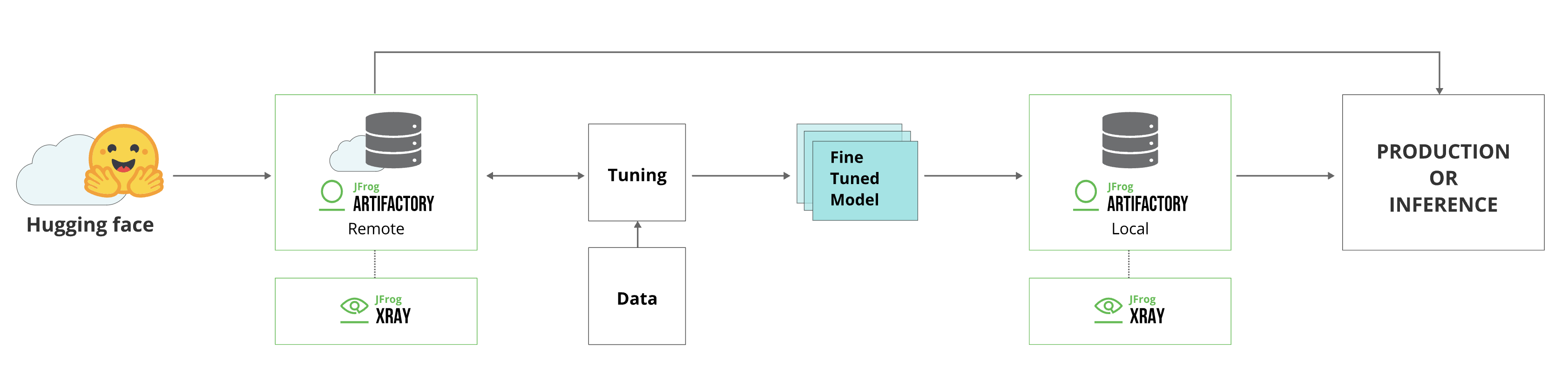
The integration of Hugging Face with Artifactory works as follows:
- A developer resolves a model or related artifact from Hugging Face Hub.
- Before starting to download the model, Curation compares it against the up-to-date catalog stored on the JFrog Platform. The catalog is always up to date with scan results of every Hugging Face model.
- If it is deemed safe, it is downloaded and cached in a remote repository.
- The model is continuously scanned using Xray, which will block the model if it finds any security issues.
- The developer tunes the model and trains it on data.
- When the tuning and training process is complete, the developer can deploy the model to a local repository. From there, it can be released for use in production or anywhere in the company.
MLOps Workflow
To create and configure the JFrog MLOps workflow, do the following:
1. Create Hugging Face local and remote repositories
Using the Platform UI
To create a local or remote Hugging Face repository:
-
From the Administration module, select Repositories | Local/ Remote.
-
Click New Local/Remote Repository and select Hugging Face from the Select Package Type dialog.
Remote Repositories only proxy Hugging Face Hub
Hugging Face remote repositories only support the following URL, populated by default: https://huggingface.co
- Set the Repository Key value.
Using the REST API
Use the Create Repository API:
PUT /api/repositories/{repoKey}For more details on repository creation via API, see Repository Configuration JSON.
For additional setup options and information, see Create Hugging Face Repositories.
2. Configure connection between Hugging Face client and Artifactory
To configure the Hugging Face SDK to work with Artifactory:
-
Go to the JFrog Platform Artifacts page, select your Hugging Face repository, and click Set Me Up.
-
To create a Hugging Face token, enter your JFrog Platform password, and click Generate Token & Create Instructions.
-
Connect your HuggingFaceML repository to the Hugging Face SDK in Artifactory using the following command:
export HF_HUB_ETAG_TIMEOUT=86400
export HF_HUB_DOWNLOAD_TIMEOUT=86400
export HF_ENDPOINT=https://<YOUR_JFROG_DOMAIN>/artifactory/api/huggingfaceml/<REPOSITORY_NAME>
For example:
export HF_HUB_ETAG_TIMEOUT=86400 export HF_HUB_DOWNLOAD_TIMEOUT=86400 export HF_ENDPOINT=https://john.jfrog.io/artifactory/api/huggingfaceml/john_HF_local -
Authenticate the Hugging Face client with Artifactory by running the following command:
export HF_TOKEN=<IDENTITY_TOKEN>For example:
export HF_TOKEN=ZdtdKiLgbgprmkLrUXyjD0uCGI!HN7ZywzZ55JCAwpHhTZsOr7Uv-L7oeCKZ3y
To use Hugging Face anonymously, see Allow Anonymous Access.
3. Scan models using Curation and Xray
To learn about scanning models, go to JFrog Xray.
To learn about Curation, go to JFrog Curation Overview.
4. Deploy models and additional artifacts
To deploy models to Artifactory using the huggingface_hub library, insert your folder name, model name, and model unique identifier into the following command and run it:
from huggingface_hub import HfApi
api = HfApi()
api.upload_folder(
    folder_path="<MODEL_SOURCE_FOLDER_NAME>",         # Enter the name of the folder on your local machine where your model resides.
    repo_id="<MODEL_NAME>",     # Enter the name of the model, following the Hugging Face repository naming structure 'organization/name'. (models--$<MODEL_NAME>)
    revision="<MODEL_UUID>",                 # Enter a unique identifier for your model. We recommend using a git commit revision ID. (snapshots/$<REVISION_NAME>/...files)
    repo_type="model"
)
For example:
from huggingface_hub import HfApi
api = HfApi()
api.upload_folder(
    folder_path="vit-base-patch16-224",         # Enter the name of the folder on your local machine where your model resides.folder to upload location on the FS
    repo_id="nsi319/legalpegasus",     # Enter the name of the model, following the Hugging Face repository naming structure 'organization/name'. (models--$<MODEL_NAME>)
    revision="54ef2872d33bbff28eb09544bdecbf6699f5b0b8",                 # Enter a unique identifier for your model. We recommend using a Git commit revision ID. (snapshots/$<REVISION_NAME>/...files)
    repo_type="model"
)
For additional setup options and information, see Deploy Hugging Face Models and Datasets
5. Resolve models and additional artifacts
To resolve a model from Artifactory, insert your model name, and model unique identifier into the following command and run it:
from huggingface_hub import snapshot_download
snapshot_download(
    repo_id="<MODEL_NAME>", revision="<MODEL_UUID>"
)
For example:
from huggingface_hub import snapshot_download
snapshot_download(
    repo_id="nsi319/legalpegasus", revision="54ef2872d33bbff28eb09544bdecbf6699f5b0b8"
)
For additional setup options and information, see Resolve Hugging Face Models and Datasets.
Updated about 1 month ago