

sbt Repositories
The Simple Build Tool (sbt) is an open-source build tool for Scala and Java projects. You can use sbt to compile, run, test, and package your applications. Define your tasks in Scala, and then execute the tasks in parallel from the sbt shell to speed up the development workflow. Artifactory supports sbt repositories as a central location to manage your project dependencies and build packages. For more information, see sbt documentation.
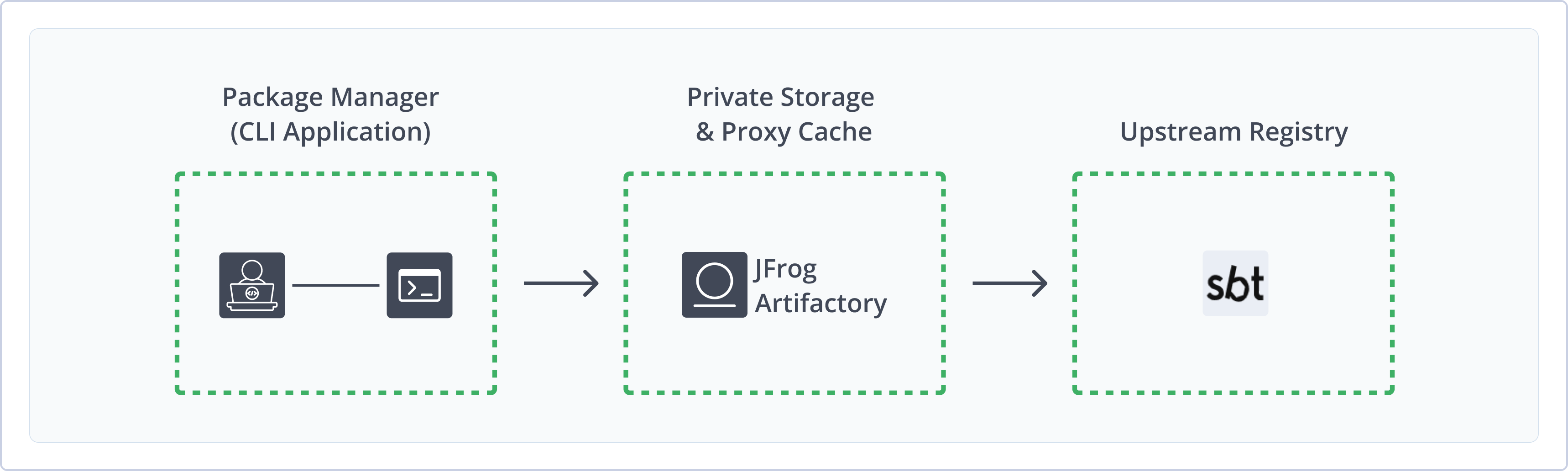
Artifactory supports the following capabilities for sbt repositories:
- Unified Repository Management: Consolidate all your sbt artifacts in Artifactory repositories as a single source of truth. Set up secure local repositories, access cached versions of remote registries, and create a single access point for all sources with virtual repositories.
- Robust Metadata Capabilities: Calculate metadata for artifacts hosted in Artifactory's local repositories.
- Secure Storage: Protect your proprietary information by deploying resources to Artifactory local repositories, giving you fine-grained control over access to your project dependencies and build packages.
- Centralized Storage and Management: Use Artifactory as your source of truth and single location for distributing and sharing sbt related artifacts.
Get Started with sbt
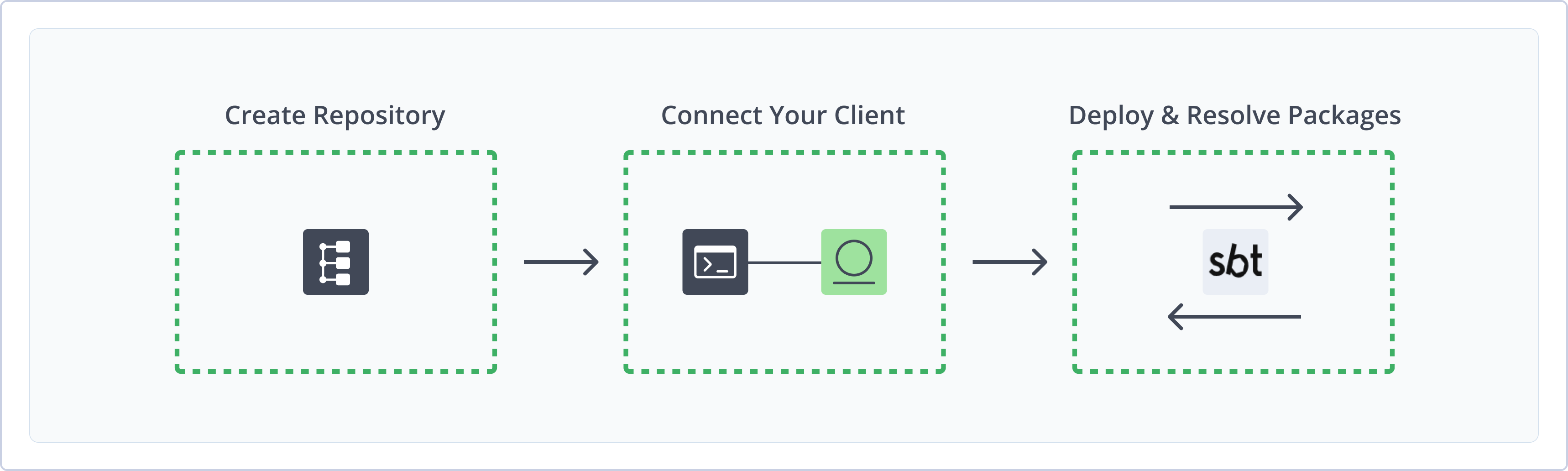
To get started working with sbt repositories in Artifactory, complete the following main steps:
- Create an sbt Repository
- Connect sbt to Artifactory
- Publish and resolve sbt artifacts
Create an sbt Repository
This topic describes how to create an sbt repository. This is required before deploying and resolving sbt artifacts. There are three main repository types:
- Local repositories: Store and share first- and second-party packages with your organization
- Remote repositories: Download packages from remote locations, including external package registries or other Artifactory instances
- Virtual repositories: Aggregate remote and local repositories, enabling your organization to scale by providing a single URL that provides access to multiple repositories and types
For more information on JFrog repositories, see Repository Management.
Prerequisite: You need Admin or Project Admin permissions in Artifactory to create a repository.
To create an sbt repository:
-
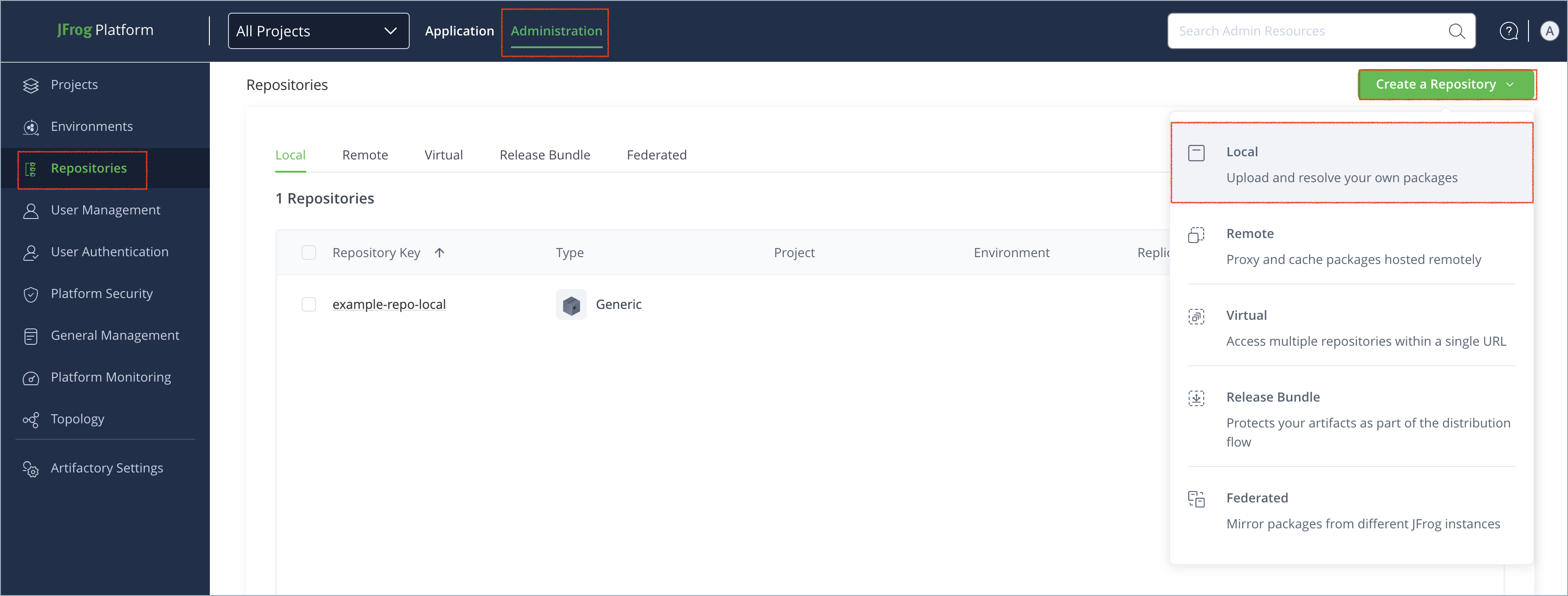
In the Administration tab, click Repositories | Create a Repository.
-
Select the type of repository you want to create: local, remote, or virtual.
-
Select the sbt package type.
-
Configure the required fields for the repository:
-
For local repositories, in the Repository Key field, type a meaningful name for the repository. For example,
sbt-maven-local. For more information on local repositories and their settings, see Local Repositories.Select an appropriate layout for the local repository, like Maven or Ivy, as the default sbt layout is not supported for cleanup and archiving. For more information, see sbt Repository Layouts.
-
For remote repositories, verify the Repository URL and update as needed. For more information on remote repositories and their settings, see Remote Repositories.
-
For virtual repositories, select one or more local or remote repository types to include in the virtual repository. For more information on virtual repositories and their settings, see Virtual Repositories.
-
-
Click Create Repository. The repository is created and the Repositories window is displayed.
Tip
To proxy Maven and Ivy, it is best practice to create remote or virtual repositories for each one and proxy them separately in sbt. Avoid proxying both in a single virtual repository. For more information, see Proxying Ivy Repositories in the sbt documentation.
Connect sbt to Artifactory
Prerequisite: Before connecting sbt to Artifactory, you must have an existing sbt repository in Artifactory. For more information, see Create an sbt Repository.
To connect sbt to Artifactory:
-
In the
~/.sbt/repositoriesfile, add the following text as relevant to configure your Artifactory repositories as proxies for sbt:[repositories] local my-ivy-proxy-releases: https://[JFrogPlatformURL]/artifactory/<REPO_NAME>/, [organization]/[module]/(scala_[scalaVersion]/) (sbt_[sbtVersion]/)[revision]/[type]s/[artifact](-[classifier]).[ext] my-maven-proxy-releases: https://[JFrogPlatformURL]/artifactory/<REPO_NAME>/Where:
[JFrogPlatformURL]: The URL of your JPD<REPO_NAME>: The name of the target repository
For example:
[repositories]
local
my-ivy-proxy-releases: https://company.jfrog.io/artifactory/sbt-ivy/, [organization]/[module]/(scala_[scalaVersion]/) (sbt_[sbtVersion]/)[revision]/[type]s/[artifact](-[classifier]).[ext]
my-maven-proxy-releases: https://company.jfrog.io/artifactory/sbt-maven/
Tip
It is best practice to proxy Ivy and Maven repositories separately. For more information, see Proxying Ivy Repositories in the sbt documentation.
-
To override resolvers in the sbt project and use the resolvers from the repositories configuration, add this configuration option to the sbt launcher script:
-Dsbt.override.build.repos=trueYou can also add this setting to your
/usr/local/etc/sbtopts.
Note
You can also use JFrog Set me up to copy the snippet populated with your token and environment. For more information, see Use Artifactory Set Me Up for Configuring Package Manager Clients.
Next steps:
Publish sbt Artifacts
You can publish two kinds of sbt artifacts:
Publish a Release
To configure sbt to publish a release to Artifactory, add this snippet to your build.sbt:
publishTo := Some("Artifactory Realm" at "https://[JFrogPlatformURL]/artifactory/<REPO_NAME>")
credentials += Credentials("Artifactory Realm", "[JFrogPlatformURL]", "<USERNAME>", "<AUTH>")
Where:
[JFrogPlatformURL]: The URL of your JPD. In thecredentialsfunction, provide only the hostname without protocol<REPO_NAME>: The name of the target repository<USERNAME>: Your Artifactory username<AUTH>: Your Artifactory identity token
For example:
publishTo := Some("Artifactory Realm" at "https://company.jfrog.io/artifactory/sbt-maven-local")
credentials += Credentials("Artifactory Realm", "company.jfrog.io", "jeffry", "51HnvD0A1g2q3n4b5F6g7H8j9K0l1m2N3o4P5q6R7s8T9u0V1w2X3y4")
After adding this configuration, sbt publish commands will publish to Artifactory.
Note
You can also use JFrog Set me up to copy the snippet populated with your token and environment. For more information, see Use Artifactory Set Me Up for Configuring Package Manager Clients.
Publish a Snapshot
To publish a snapshot, add this snippet to your build.sbt:
publishTo := Some("Artifactory Realm" at "https://[JFrogPlatformURL]/artifactory/<REPO_NAME>;build.timestamp=" + new java.util.Date().getTime)
credentials += Credentials("Artifactory Realm", "[JFrogPlatformURL]", "<USERNAME>", "<AUTH>")
Where:
[JFrogPlatformURL]: The URL of your JPD. In thecredentialsfunction, provide only the hostname without protocol<REPO_NAME>: The name of the target repository<USERNAME>: Your Artifactory username<AUTH>: Your Artifactory identity token
For example:
publishTo := Some("Artifactory Realm" at "https://company.jfrog.io/artifactory/sbt-maven-local;build.timestamp=" + new java.util.Date().getTime)
credentials += Credentials("Artifactory Realm", "company.jfrog.io", "jeffry", "51HnvD0A1g2q3n4b5F6g7H8j9K0l1m2N3o4P5q6R7s8T9u0V1w2X3y4")
After adding this configuration, sbt publish commands will publish to Artifactory.
Note
You can also use JFrog Set me up to copy the snippet populated with your token and environment. For more information, see Use Artifactory Set Me Up for Configuring Package Manager Clients.
Resolve sbt Artifacts
To configure sbt to resolve artifacts from Artifactory, add this snippet to your build.sbt file:
resolvers +=
"Artifactory" at "https://[JFrogPlatformURL]/artifactory/<REPO_NAME>/"
Where:
[JFrogPlatformURL]: The URL of your JPD<REPO_NAME>: The name of the target repository
For example:
resolvers +=
"Artifactory" at "https://company.jfrog.io/artifactory/sbt-virtual/"
After adding this configuration, commands like sbt compile and sbt update will resolve artifacts from Artifactory.
Note
You can also use JFrog Set me up to copy the snippet populated with your token and environment. For more information, see Use Artifactory Set Me Up for Configuring Package Manager Clients.
Additional sbt Information
The following pages provide additional information about using sbt repositories in Artifactory:
Fork Sample sbt Project
A sample sbt project that uses Artifactory is available on GitHub and can be freely forked.
sbt Repository Layouts
When setting up a repository in JFrog Artifactory for sbt packages, the sbt-default layout is automatically selected if no other layout is specified. Specify one of the following layouts for the best effective dependency management, archive and cleanup processes:
-
Maven
- Layout Name:
maven-2-default - Description: Designed for Maven projects.
- Recommended Action: Choose this layout when working with Maven to ensure proper handling of artifacts, seamless dependency resolution and resolving artifacts during cleanup/archive activities.
- Layout Name:
-
Ivy
- Layout Name:
sbt-ivy-default - Description: Designed for Ivy projects.
- Recommended Action: Choose this layout when working with Ivy to ensure proper handling of artifacts, seamless dependency resolution and resolving artifacts during cleanup/archive activities.
- Layout Name:
The default sbt layout is as follows:
- Layout Name:
sbt-default - Description: This layout is automatically applied when creating a repository without specifying a layout.
- Limitations: Not supported for cleanup and archiving. The
sbt-defaultlayout is not suitable for resolving artifacts during cleanup/archive activities. - Recommendation: Avoid using this layout. Instead, opt for alternative layouts that are designed for better artifact management.
Note
If you have configured repositories with the
sbt-defaultlayout, it is recommended to edit these repositories and apply one of the recommended layouts.Recalculate Index: After changing the layout of a repository, recalculate the index. This step is crucial for indexing artifacts and calculating metadata for all uploaded packages, which in turn optimizes performance during artifact resolution and enhances cleanup and archiving processes.
Updated 9 months ago