

Ansible Repositories
The JFrog Artifactory integration with Ansible allows you to manage Ansible collections in Artifactory. Ansible is an open-source platform that enables you to automate IT processes such as provisioning, application deployment, orchestration, and more. Ansible Galaxy is the public registry for Ansible roles and collections. For more information, see Ansible documentation.
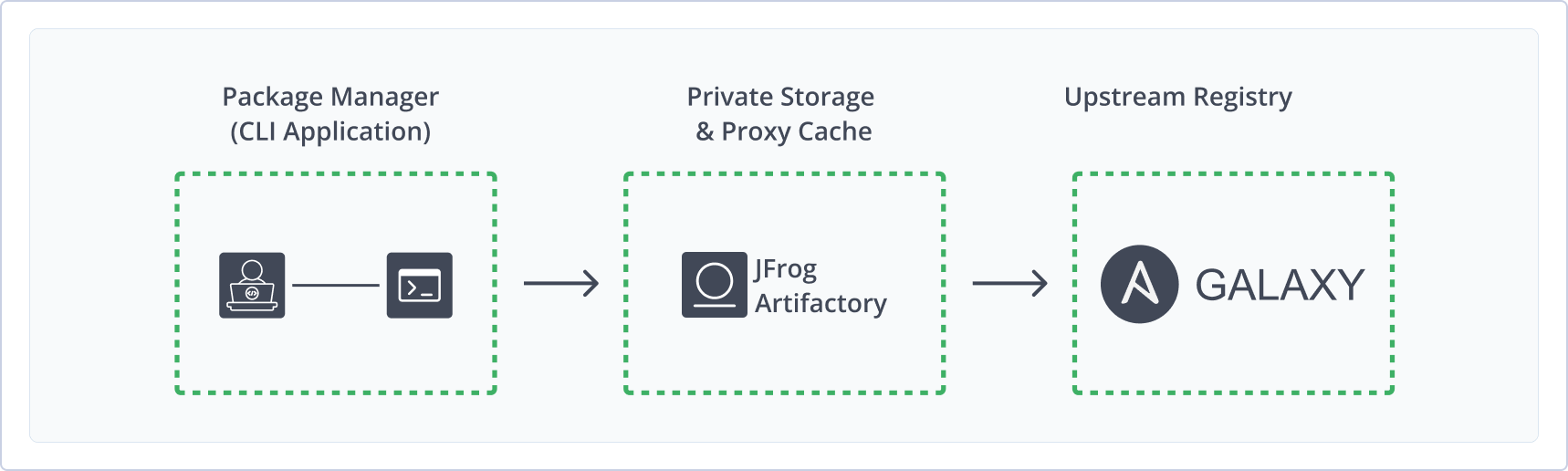
Using Ansible with Artifactory provides the following benefits:
- Host your own Ansible Collections and Roles in local repositories
- Proxy public Collections from Ansible Galaxy in a remote repository to create a reliable local cache
- Secure your Ansible assets with fine-grained access control
- Calculate metadata for Ansible Collections to to enable artifact management and search
- Distribute and share Ansible Collections within your organization from a single, centralized source
- Integrate with the
ansible-galaxyclient to resolve and upload Ansible Collections and Roles
Get Started with Ansible
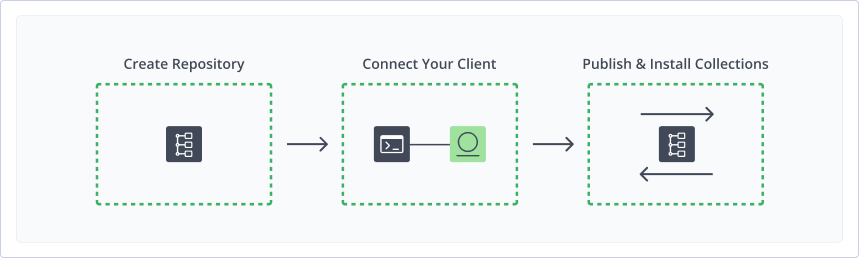
To get started working with Ansible, complete the following main steps:
- Create an Ansible Repository
- Connect your Ansible Client to Artifactory
- Publish and Install Ansible Collections and Roles
Create an Ansible Repository
This topic describes how to create an Ansible Repository. This is required before publishing and installing Ansible packages. There are three primary types of repositories:
- Local repositories: Where you store and share 1st and 2nd party packages with your organization
- Remote repositories: Enable you to download from any remote location including external package registries or other Artifactory instances
- Virtual repositories: Enable aggregating remote and local repositories enabling your organization to scale by providing a single URL that provides access to multiple repositories and types
For more information on JFrog repositories, see Repository Management.
Prerequisite: You need Admin or Project Admin permissions to create an Ansible repository. If you don't have Admin permissions, the option will not be available.
To create an Ansible repository:
-
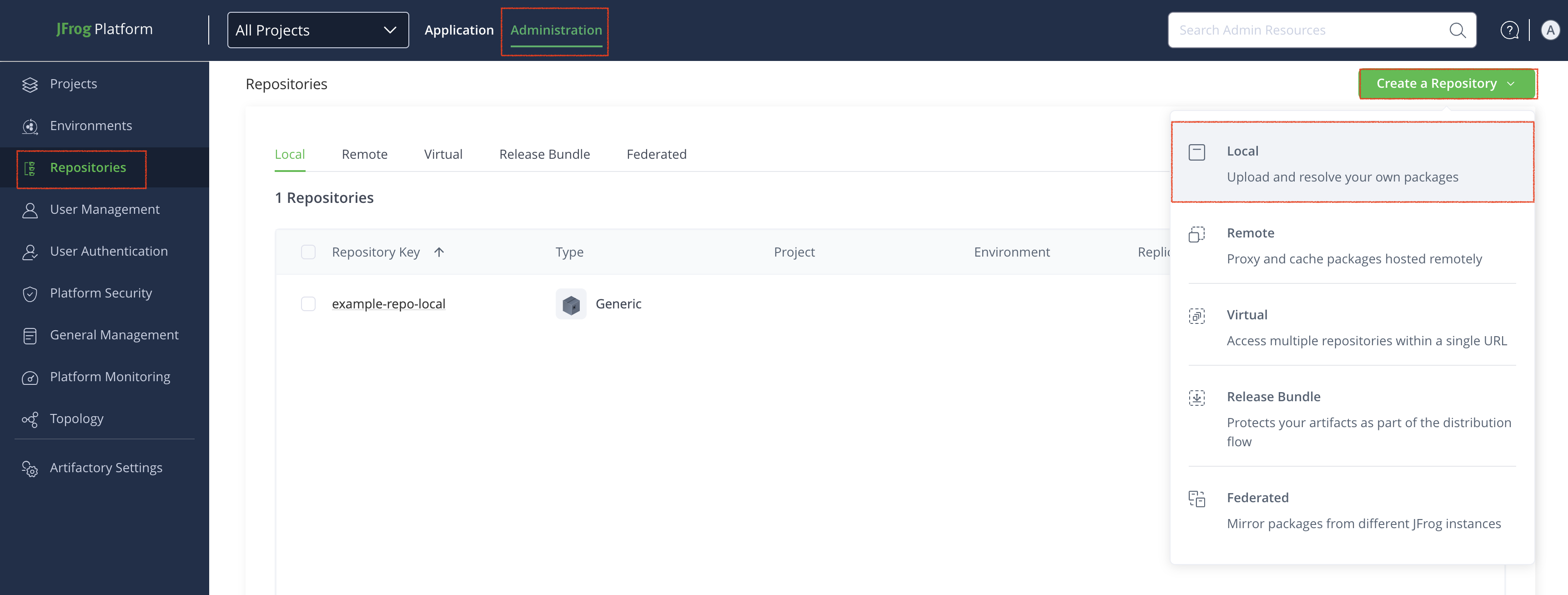
In the Administration module, click Repositories > Create a Repository.
-
Select the type of repository you want to create: local, remote, or virtual.
-
Select the Ansible package type.
-
Configure the requires fields for the repository:
-
For Local Repositories, In the Repository Key field type a meaningful name for the repository. For example,
ansible-local-repository-1. For more information on local repositories and all its possible settings, see Local Repositories. -
For Remote Repositories, additionally verify the Repository URL and update if needed. For more information on Remote Repositories and all its possible settings, see Remote Repositories.
For information about how to configure a remote repository to proxy Red Hat Ansible Automation Hub, see Proxying Red Hat Ansible Automation Hub.
-
For Virtual Repositories, additionally select one or more local or remote repository types to include in the virtual repository. For more information on virtual repositories and all its possible settings, see Virtual Repositories.
-
-
Click Create Repository. The repository is created and the Repositories window is displayed.
Connect your Ansible Client to Artifactory
This topic provides details on configuring Ansible to work with Artifactory.
Pre-requisite: Before connecting your Ansible client to Artifactory, you must have an existing Ansible repository in Artifactory. For more information, see Create an Ansible Repository.
Supported Ansible Clients
- Ansible Core version 2.17 or above
- Ansible community package release v10.x or above
Logged in vs. Anonymous User: You can work with Artifactory as either a logged in user or as an anonymous user. To work with Artifactory using Anonymous Access. you need to configure that access under Admin | Security | General. For details, refer to Allow Anonymous Access.
Configure the Ansible Client to work with Collections
Once your Ansible client is configured to work with Artifactory, your Artifactory instance will proxy all requests to Ansible.
To configure the Ansible client to work with Collections:
Update the ansible.cfg file with the following snippet:
[galaxy]
server_list = <REPOSITORY_NAME>

[galaxy_server.<REPOSITORY_NAME>]
url=https://[JFrogPlatformURL]/artifactory/api/ansible/<REPOSITORY_NAME>
token=<TOKEN>
Where:
<REPOSITORY_NAME>: The name of the repository.
Tip
For the
server_listparameter, you can list multiple repository names separated by a comma. For example,server_list = ansible-virtual, ansible-local.
<url>``[JFrogPlatformURL]: The URL of your JPD<TOKEN>: Your JPD access token
For example:
[galaxy]
server_list = ansible-virtual

[galaxy_server.ansible-virtual]
url=https://company.jfrog.io/artifactory/api/ansible/ansible-virtual
token=w8RvZ3tGkP7sVbNfHjMqYxAcX2pLdE9jU1oI5uC6yFzTmK4rB0eSgWlQhOaD
Alternatively, you can choose to use the Artifactory <URL> and <Token> explicitly in your publish and install commands.
Note
You can also use JFrog Set me up to copy the snippet populated with your token and environment. For more information, see Use Artifactory Set Me Up for Configuring Package Manager Clients.
Next Steps:
Configure Ansible Client to work with Roles
Ansible roles are used to manage tasks, templates, files, and variables related to Ansible operation. You can configure your Ansible client to resolve roles by configuring Ansible registry credentials in the .netrc file. The .netrc file contains information used by the automatic login feature of the rexec and ftp commands. Artifactory supports the resolving of roles through remote repositories.
Prerequisites: Configure your ansible.cfg file to connect to Artifactory. For more information, see Configure the Ansible Client to work with Collections.
To configure the Ansible client to work with roles:
-
Navigate to the
.netrcdirectory. -
Run the following command to change the permissions of the credentials file to 600:
chmod 600 .netrc -
Open the
.netrcfile in a text editor. -
Add the following snippet:
machine [JFrogPlatformURL] login <YOUR_JFROG_USERNAME> <AUTH-METHOD> <AUTH>Where:
[JFrogPlatformURL]: URL of your JPD<YOUR_JFROG_USERNAME>: Your Artifactory username<AUTH-METHOD>: Your chosen authentication method, eitherpasswordoridentity-token<AUTH>: Your JPD password or Identity Token
For example:
machine company.jfrog.io login admin password cmVmdGtuOjAxOjE3NTA0jfauruYYt3u73totu1JqRVNSMWhUS1htQXlzb2lTcnVH -
Save the changes.
Note
You can also use JFrog Set me up to copy the snippet populated with your token and environment. For more information, see Use Artifactory Set Me Up for Configuring Package Manager Clients.
Next Steps:
Publish Ansible Collections
Publishing Ansible collections make Ansible playbooks, roles, modules, and plugins available to other users. The following options are available for publishing Ansible collections:
- Publish Ansible Collections using the ansible.cfg File
- Publish Ansible Collections to a Specific Repository (Server Explicit)
- Publish Ansible Collections via the UI
- Publish Ansible Collections via API
Publish Ansible Collections using the ansible.cfg File
Prerequisite: Configure your ansible.cfg file in your workspace to use Server in ansible.cfg file . For more information, see Configure the Ansible Client to work with Collections.
To publish Ansible collections via the Ansible CLI:
Run the following command:
ansible-galaxy collection publish <NAMESPACE.COLLECTION_NAME>Where:
<NAMESPACE.COLLECTION_NAME>: The path to the collection archive
For example:
ansible-galaxy collection publish geerlingguy.k8s.tar.gzNote
You can also use JFrog Set me up to copy the snippet populated with your token and environment. For more information, see Use Artifactory Set Me Up for Configuring Package Manager Clients.
Publish Ansible Collections to a Specific Repository (Server Explicit)
Publishing an Ansible collection using Ansible client CLI bypasses what is configured in the ansible.cfg file. This method is known as being Server Explicit. You may want to use this method for publishing Ansible collections to a repository other than that configured in the ansible.cfg file.
Note
Using a server explicit command overrides the registry URL your ansible.cfg.
To publish Ansible collections via the Ansible CLI:
Run the following command:
ansible-galaxy collection publish <NAMESPACE.COLLECTION_NAME> -s https://[JFrogPlatformURL]/artifactory/api/ansible/<REPOSITORY_NAME> --token=<TOKEN>Where:
<NAMESPACE.COLLECTION_NAME>: The namespace and collection name you want to publish[JFrogPlatformURL]: The URL of your JPD<REPOSITORY_NAME>: The name of the target repository<TOKEN>: Your Artifactory identity token
For example:
ansible-galaxy collection publish geerlingguy.k8s.tar.gz -s https://company.jfrog.io/artifactory/api/ansible/ansible-virtual --token=w8RvZ3tGkP7sVbNfHjMqYxAcX2pLdE9jU1oI5uC6yFzTmK4rB0eSgWlQhOaDNote
You can also use JFrog Set me up to copy the snippet populated with your token and environment. For more information, see Use Artifactory Set Me Up for Configuring Package Manager Clients.
Publish Ansible Collections via the UI
To publish an Ansible collection via Artifactory UI:
-
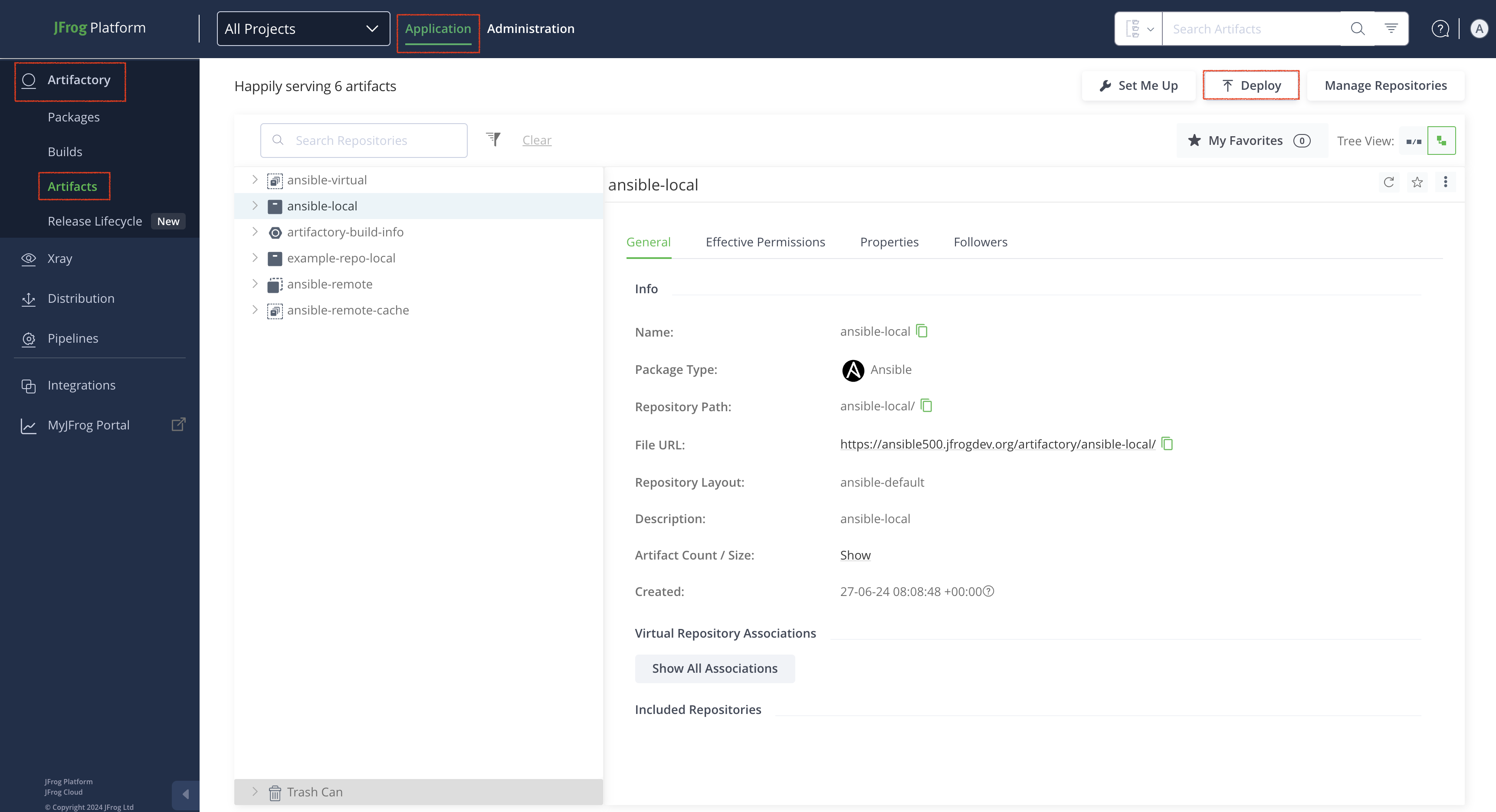
In the Applications tab, click Artifactory | Artifacts, then click Deploy. Deploy options are displayed.
-
Verify the deploy options, then click Deploy.
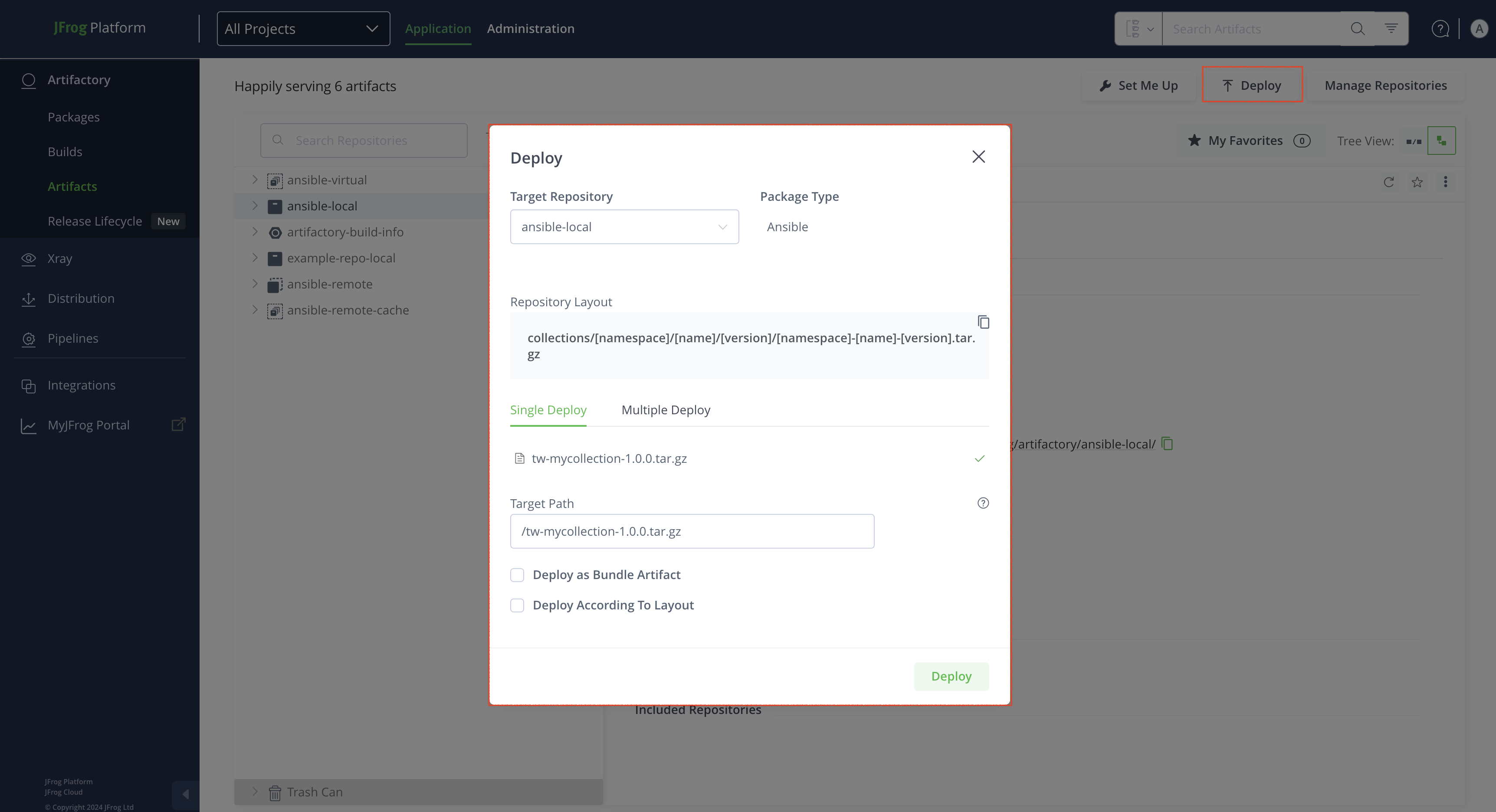
The collection is deployed.
Publish Ansible Collections via API
You can publish collections via the REST API. When using this method you can deploy by checksum or from an archive.
For example, to publish an Ansible collection to a repository called ansible-local, you could use the following:
curl -u<USERNAME>:<PASSWORD> -XPUT https://[JFrogPlatformURL]/artifactory/ansible-local/<PATH_TO_METADATA_ROOT> -T <TARGET_FILE_PATH>Where:
<USERNAME>: Your Artifactory username<PASSWORD>: Your Artifactory password[JFrogPlatformURL]: The URL of your JPD<PATH_TO_METADATA_ROOT>: The path from the repository root to the deploy folder<TARGET_FILE_PATH>: The file path for the collection you want to publish
Install Ansible Packages
The process of downloading a Collection or Role from Ansible is referred to as installing. You can install either Collections or Roles.
Install Ansible Collections
Artifactory supports installing an Ansible Collection using one of two methods:
- Via the ansible.cfg file: This method involves updating the ansible.cfg file. You may want to use this method if you have an already configured ansible.cfg file
- Server explicit: This methods uses the CLI to directly install an Ansible Collection bypassing the ansible.cfg file. You may use this method if you want to bypass the configuration of the ansible.cfg file, for example, if it is pointing to a different remote registry from where you need to install the package.
Install Ansible Collections via the ansible.cfg File
This topic describes how to install Ansible collections using the ansible.cfg file.
To install Ansible collections using the ansible.cfg file:
Run the following command:
ansible-galaxy collection install <NAMESPACE.COLLECTION_NAME>.tar.gzWhere:
<NAMESPACE.COLLECTION_NAME>: The namespace and collection name
For example:
ansible-galaxy collection install geerlingguy.k8s.tar.gzNote
You can also use JFrog Set Me Up to copy the snippet populated with your token and environment. For more information, see Use Artifactory Set Me Up for Configuring Package Manager Clients.
Install Ansible Collections via the CLI (Server Explicit)
This topic describes how to install Ansible collections using the Ansible client CLI. This bypasses the ansible.cfg file and allows you to connect to any Ansible repository.
To install Collections via CLI using the Server Explicit method:
Run the following command:
ansible-galaxy collection install <NAMESPACE.COLLECTION_NAME>.tar.gz -s https://[JFrogPlatformURL]/artifactory/api/ansible/<REPOSITORY_NAME> --token=<TOKEN>Where:
<NAMESPACE.COLLECTION_NAME>: The namespace and collection name[JFrogPlatformURL]: The URL of your JPD<REPOSITORY_NAME>: The name of the target repository<TOKEN>: Your Artifactory identity token
For example:
ansible-galaxy collection install geerlingguy.k8s.tar.gz -s https://company.jfrog.io/artifactory/api/ansible/ansible-virtual --token=w8RvZ3tGkP7sVbNfHjMqYxAcX2pLdE9jU1oI5uC6yFzTmK4rB0eSgWlQhOaDNote
You can also use JFrog Set Me Up to copy the snippet populated with your token and environment. For more information, see Use Artifactory Set Me Up for Configuring Package Manager Clients.
Install Ansible Roles
Ansible Roles is a legacy package type previously offered by Ansible and supported by Artifactory. Artifactory supports installing Ansible Roles via the CLI using one of two methods:
- Install Ansible Roles via .netrc File
- Install Ansible Roles without the .netrc File using Server Explict
Install Ansible Roles via .netrc File
This topic describes how to install Ansible roles using the Ansible client CLI using the .netrc file. The Ansible .netrc file stores credentials needed to login and access data stored in the Ansible LabKey server.
To install roles via CLI using the .netrc file:
Run the following command:
ansible-galaxy role install <NAMESPACE.ROLE_NAME>.tar.gzWhere:
<NAMESPACE.ROLE_NAME>: The namespace and role name
For example:
ansible-galaxy role install geerlingguy.k8s.tar.gzNote
You can also use JFrog Set Me Up to copy the snippet populated with your token and environment. For more information, see Use Artifactory Set Me Up for Configuring Package Manager Clients.
Install Ansible Roles without the .netrc File using Server Explict
This topic describes how to install Ansible roles without .netrc file using Ansible client CLI by connecting directly to a Galaxy server by including a token when connecting to the Ansible LabKey server.
To install roles via CLI without using the .netrc file:
Run the following command:
ansible-galaxy role install <NAMESPACE.ROLE_NAME>.tar.gz -s https://[JFrogPlatformURL]/artifactory/api/ansible/<REPOSITORY_NAME> --token=<TOKEN>Where:
<NAMESPACE.ROLE_NAME>: The namespace and role name[JFrogPlatformURL]: The URL of your JPD<REPOSITORY_NAME>: The name of the target repository<TOKEN>: Your Artifactory identity token
For example:
ansible-galaxy role install geerlingguy.k8s.tar.gz -s https://company.jfrog.io/artifactory/api/ansible/ansible-virtual --token=w8RvZ3tGkP7sVbNfHjMqYxAcX2pLdE9jU1oI5uC6yFzTmK4rB0eSgWlQhOaDNote
You can also use JFrog Set Me Up to copy the snippet populated with your token and environment. For more information, see Use Artifactory Set Me Up for Configuring Package Manager Clients.
Additional Ansible Actions
The following additional actions are available with Ansible repositories:
- Proxying Red Hat Ansible Automation Hub
- Recalculate Index of a Local Ansible Repository
- Using the Ansible Galaxy V3 API
Proxying Red Hat Ansible Automation Hub
As of Artifactory SaaS version 7.146.0 and Self-Managed version 7.146.7, you can use remote Ansible repositories in Artifactory to proxy Red Hat Ansible Automation Hub. With this setup, you can cache and serve certified and validated Ansible content collections from Automation Hub through Artifactory, and apply your own access controls and governance policies.
Requirements
- An active Red Hat account with access to Ansible Automation Hub.
- An offline token generated from the Red Hat API Tokens page.
- A remote Ansible repository. For more information, see Create an Ansible Repository.
The following table shows the required settings for proxying Red Hat Ansible Automation Hub. You can configure these settings in the Basic tab when creating or editing a repository.
| Setting | Configuration |
|---|---|
| URL | https://console.redhat.com/api/automation-hub/ |
| Password/Access Token | The offline token generated from your Red Hat account. The offline token is a long-lived JWT issued by Red Hat SSO. Artifactory uses it to automatically obtain and refresh short-lived access tokens when communicating with Automation Hub. Keep this value secure. |
| Enable Token Authentication | Enabled. This option instructs Artifactory to use token-based authentication when forwarding requests to the remote registry, instead of standard basic authentication. |
| Auth URL | https://sso.redhat.com/auth/realms/redhat-external/protocol/openid-connect/token |
Recalculate Index of a Local Ansible Repository
The section describes how to recalculate the index of a an Ansible repository. You may want to recalculate an Ansible repository. To configure this functionality you require Admin permissions.
In Administration, click Repositories | Local. Select the repository for recalculation.
Click the three dots next to the repository, then click Recalculate Index.
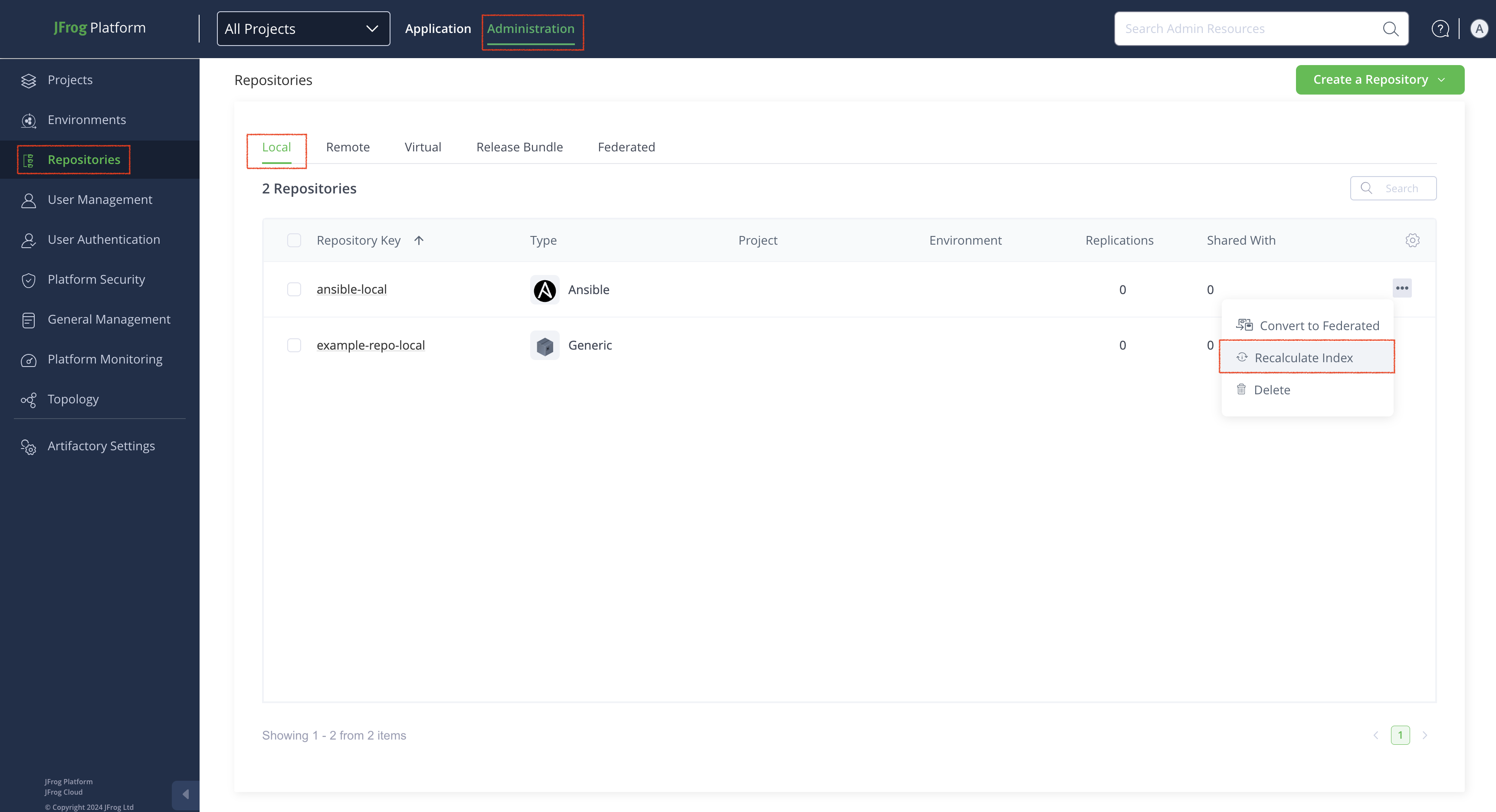
Using the Ansible Galaxy V3 API
JFrog Artifactory exposes a subset of Ansible Galaxy V3 API endpoints under each Ansible repository. Clients such as ansible-galaxy call these endpoints relative to the following base URL:
https://<JFrogPlatformURL>/artifactory/api/ansible/<REPOSITORY_NAME>/The following table lists Ansible Galaxy V3 API endpoints supported in Artifactory. Optional query parameters, like pagination or namespace filters, follow the Galaxy V3 behavior described in the Galaxy V3 API documentation.
| Endpoint | Description | Method | Path |
|---|---|---|---|
| Get collection index | Returns metadata for one collection. | GET | api/v3/collections/<NAMESPACE>/<COLLECTION_NAME> |
| List versions for a collection | Returns a paginated list of versions for a single collection. | GET | api/v3/collections/<NAMESPACE>/<COLLECTION_NAME>/versions |
| Get collection version metadata | Returns metadata for a specific version, including download-related fields. | GET | api/v3/collections/<NAMESPACE>/<COLLECTION_NAME>/versions/<VERSION> |
Get Collection Index
curl -sS -u "<USERNAME>:<AUTH>" \
  "https://<JFrogPlatformURL>/artifactory/api/ansible/<REPOSITORY_NAME>/api/v3/collections/<NAMESPACE>/<COLLECTION_NAME>"
Where:
<USERNAME>: Your Artifactory username<AUTH>: Your Artifactory identity token<JFrogPlatformURL>: The URL of your JFrog Platform<REPOSITORY_NAME>: The name of your Ansible repository<NAMESPACE>: The namespace<COLLECTION_NAME>: The name of the collection
For example:
curl -sS -u "[email protected]:eyJhbGciOiJIUzI1NiJ9..." \
  "https://company.jfrog.io/artifactory/api/ansible/ansible-local/api/v3/collections/acme/my_collection"
List Versions for a Collection
curl -sS -u "<USERNAME>:<AUTH>" \
  "https://<JFrogPlatformURL>/artifactory/api/ansible/<REPOSITORY_NAME>/api/v3/collections/<NAMESPACE>/<COLLECTION_NAME>/versions?limit=100&offset=0"
Where:
<USERNAME>: Your Artifactory username<AUTH>: Your Artifactory identity token<JFrogPlatformURL>: The URL of your JFrog Platform<REPOSITORY_NAME>: The name of your Ansible repository<NAMESPACE>: The namespace<COLLECTION_NAME>: The name of the collection
For example:
curl -sS -u "[email protected]:eyJhbGciOiJIUzI1NiJ9..." \
"https://company.jfrog.io/artifactory/api/ansible/ansible-local/api/v3/collections/acme/my_collection/versions?limit=100&offset=0"Note
Trailing slashes are often accepted by HTTP clients and Galaxy-compatible servers. If a client fails, try the same path with or without a trailing
/.
Get Collection Version Metadata
curl -sS -u "<USERNAME>:<AUTH>" \
  "https://<JFrogPlatformURL>/artifactory/api/ansible/<REPOSITORY_NAME>/api/v3/collections/<NAMESPACE>/<COLLECTION_NAME>/versions/<VERSION>"
Where:
<USERNAME>: Your Artifactory username<AUTH>: Your Artifactory identity token<JFrogPlatformURL>: The URL of your JFrog Platform<REPOSITORY_NAME>: The name of your Ansible repository<NAMESPACE>: The namespace<COLLECTION_NAME>: The name of the collection<VERSION>: The semantic version string
For example:
curl -sS -u "[email protected]:eyJhbGciOiJIUzI1NiJ9..." \
  "https://company.jfrog.io/artifactory/api/ansible/ansible-local/api/v3/collections/acme/my_collection/versions/1.0.0"
Ansible Limitations in Artifactory
The following are the limitations of Ansible in Artifactory:
- Remote Role Installing: Artifactory does not support installing roles from any Git repository via remote repositories.
- Local Role Publishing: Artifactory does not support publishing roles into local repositories. Instead, roles must be wrapped in collections. For instructions on how to do this, please see Migrating roles to collections.
- Repository Browsing: Artifactory does not support browsing Ansible remote registries. The artifact tree only shows packages explicitly pulled into Artifactory, not the contents of the remote registry.
Updated 5 months ago