

Understanding Artifacts and Packages
Learn about different object types in Artifactory and the difference between artifacts and packages.
JFrog Artifactory manages different objects including artifacts, packages, builds, and Release Bundles. Understanding these object types and how Artifactory handles each is crucial to using search and finding objects.
Artifactory works with the following primary object types:
- Artifact: Any standalone file in Artifactory identified by a unique checksum. When you search for an artifact, you can review additional details. For more information, see Understanding how to Search for Artifacts and Packages.
- Package: The name as defined in package metadata, such as the
package.jsonfile for npm or themanifest.jsonfile for Docker. When you search for a package, you can review additional details. For more information, see Understanding how to Search for Artifacts and Packages. - Build: An output that represents the build step of the CI. It includes details about the method and the dependencies involved in building the package.
- Release Bundle: An immutable collection of files and packages that comprise a release candidate. Release Bundle v2 is an object that is promoted and distributed via Release Lifecycle Management. Release Bundle v1 is an older concept and is used for distribution only.
- Xray: A resource scanned by JFrog Xray. This includes packages, builds, Release Bundles, and artifacts that have been scanned for vulnerabilities by Xray. For more information, see Searching for Scanned Resources.
Relationship Between Artifacts and Packages
A package can contain a single artifact or multiple artifacts. It's important to keep this in mind when working with packages, particularly in the repository tree. Artifactory tracks artifacts that are part of multi-artifact packages. Manually dragging and dropping an artifact from a multi-artifact package can remove the context of the greater package and cause problems working with that package in Artifactory.
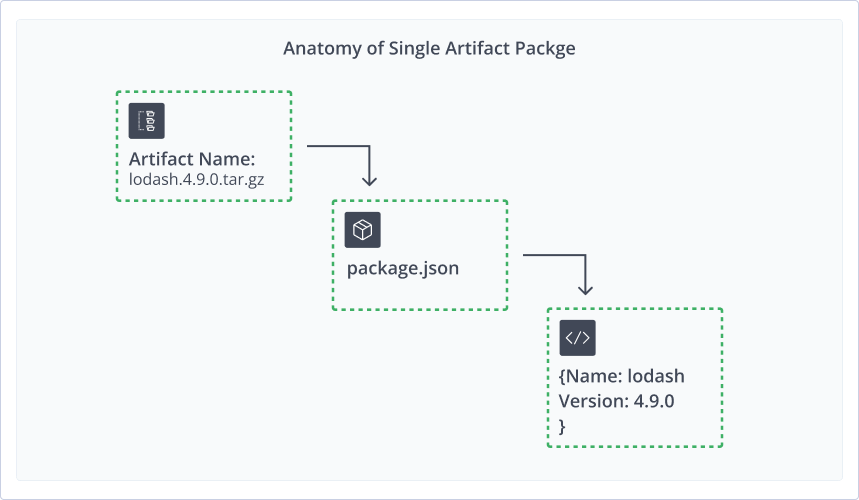
Anatomy of a Single Artifact Package
This example is of an npm package which shows a single artifact file. It contains the artifact metadata in the package.json file that lists the package name and its details. Artifactory parses its content listing including the package name and other details from the information in the package.json metadata file.
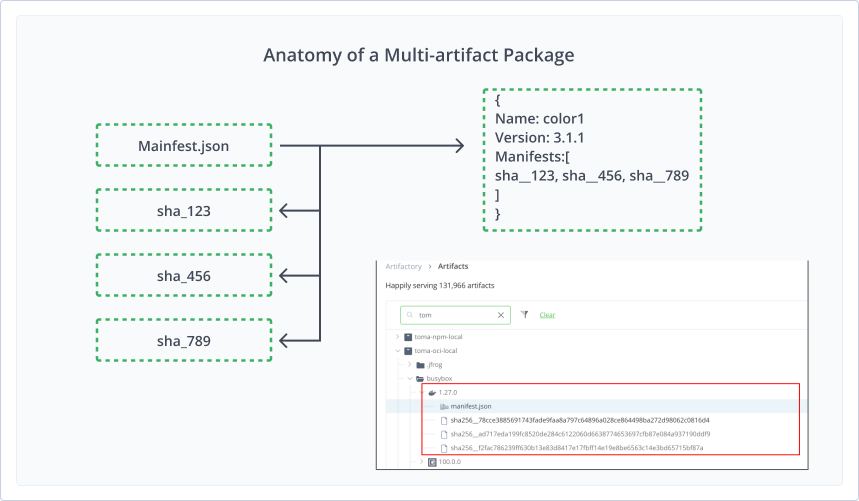
Anatomy of a Multi-Artifact Package
The following example shows a multi-artifact package, in this case, a Docker image. The package metadata in the manifest.json file lists all the layers in the package. Artifactory then parses each layer as a separate artifact.
Related Topics
Updated 19 days ago