

Bower Repositories
Bower is a package manager for the web that manages components like HTML, CSS, and JavaScript. Bower is optimized for frontend development, allowing you to easily manage dependencies and package your own components. Artifactory offers comprehensive support for Bower with centralized package storage and management, and integration with the Bower CLI. Use Bower repositories in Artifactory as a central, reliable source for all your frontend packages. You can also use Artifactory to proxy the public Bower registry and host your internal packages, providing consistent and secure access to your dependencies. For more information, see Bower documentation.
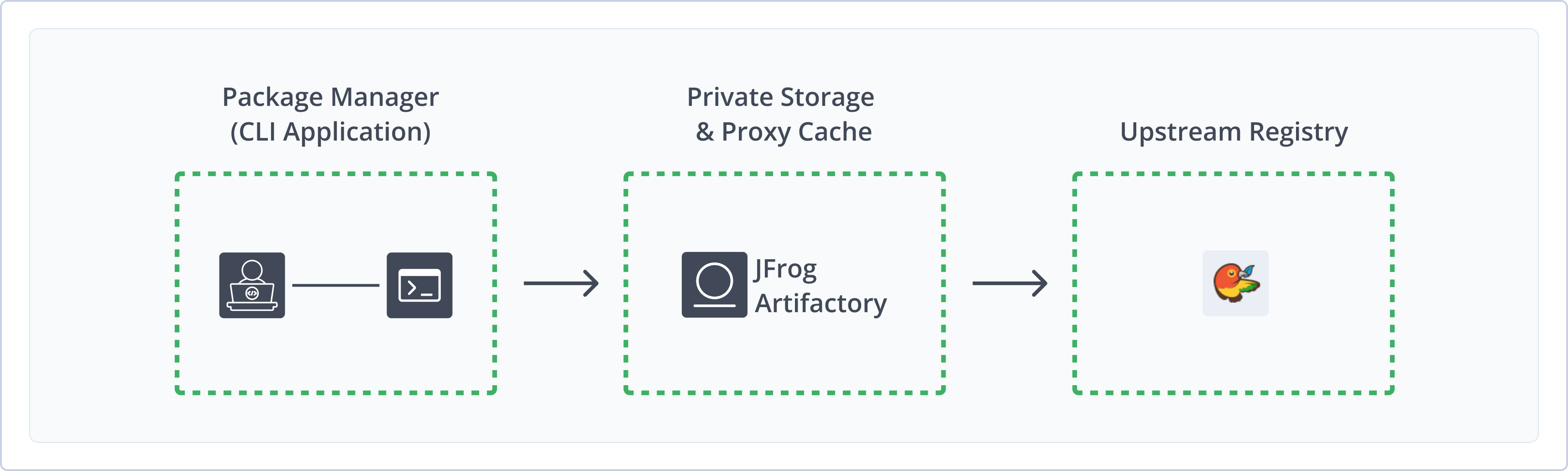
Artifactory fully supports Bower repositories, including the following capabilities:
- Robust Metadata Capabilities: Calculate metadata for Bower packages hosted in Artifactory's local repositories.
- Unified Repository Management: Consolidate all your Bower repositories in Artifactory as a single source of truth. Set up secure local repositories, access cached versions of remote registries like
https://registry.bower.io, and create a single access point for all sources with virtual repositories. - Support for Bower CLI: Natively use the Bower command line tool to deploy, remove, and manage packages in Artifactory.
- Fine-Grained Access Control: Manage user and group permissions for your Bower repositories, giving access based on projects or development teams.
Get Started with Bower
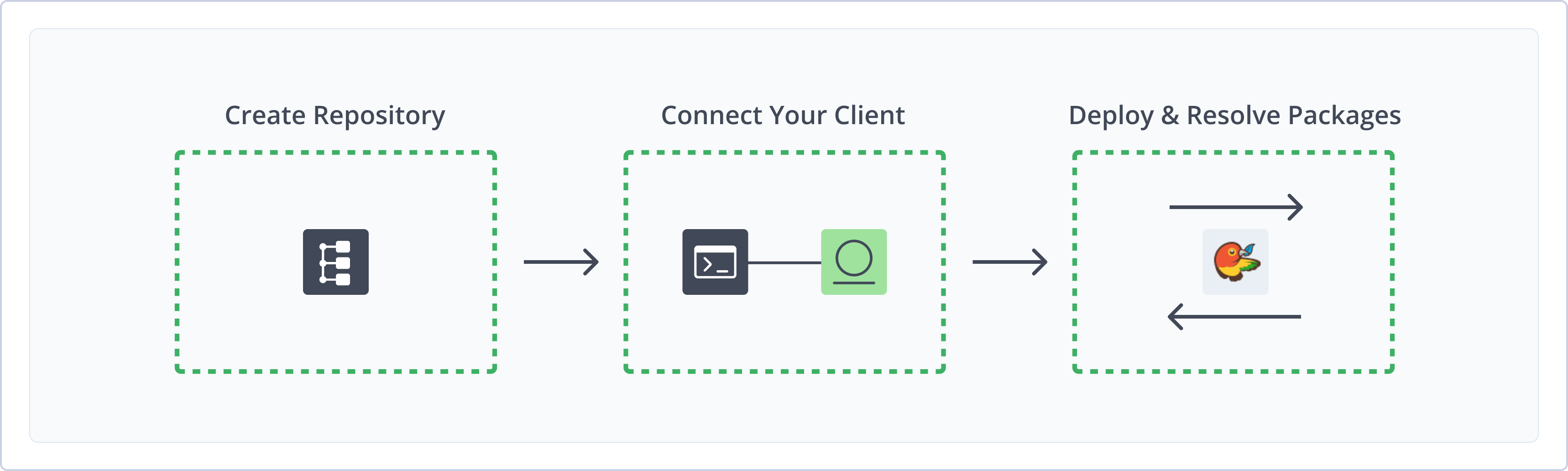
To get started working with Bower, complete the following main steps:
- Create a Bower Repository
- Connect Bower to Artifactory
- Deploy and resolve Bower packages
Create a Bower Repository
This topic describes how to create a Bower repository. This is required before publishing and installing Bower packages. There are three primary types of repositories:
-
Local repositories: Store and share first- and second-party packages with your organization
-
Remote repositories: Download packages from any remote location, including external package registries or other Artifactory instances
Note
The official public Bower registry at
https://registry.bower.io/is a key-value store of Bower packages that are hosted on Git servers.
- Virtual repositories: Aggregate remote and local repositories, enabling your organization to scale by providing a single URL that provides access to multiple repositories and types
For more information on JFrog repositories, see Repository Management.
Prerequisite: You need Admin or Project Admin permissions in Artifactory to create a repository.
To create a Bower repository:
-
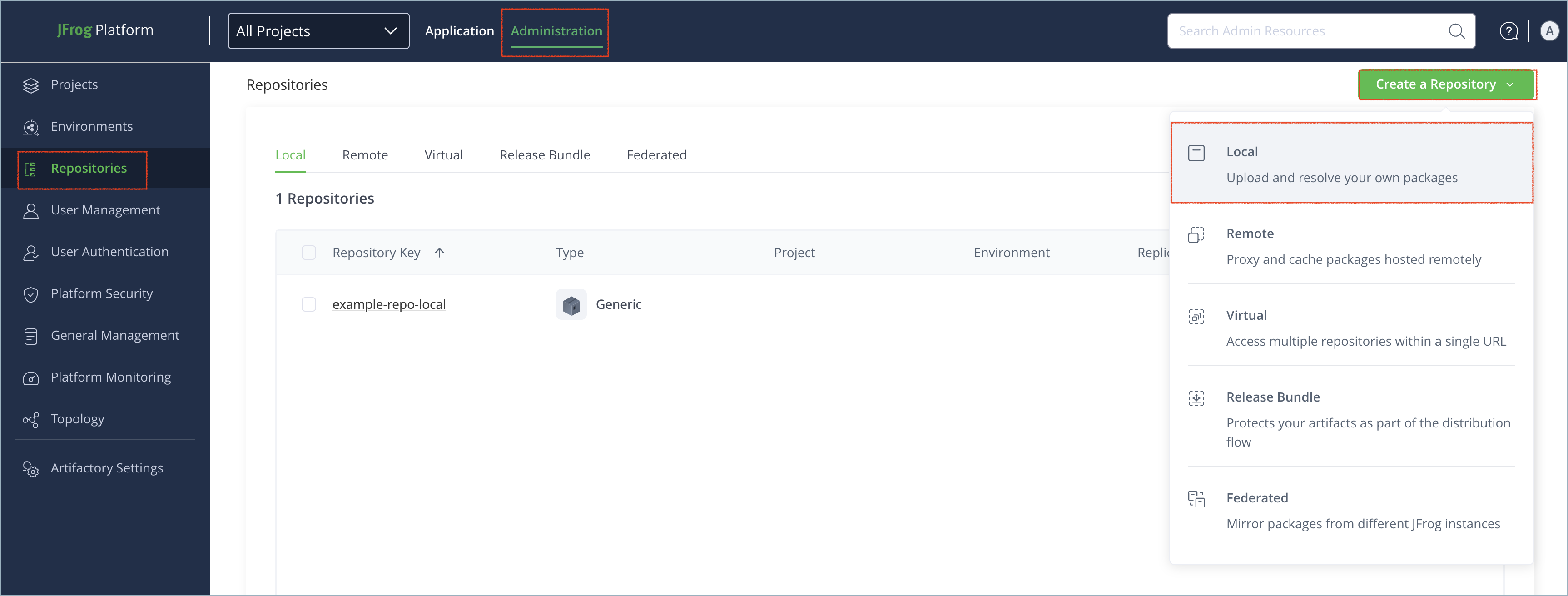
In the Administration tab, click Repositories | Create a Repository.
-
Select the type of repository you want to create: local, remote, or virtual.
-
Select the Bower package type.
-
Configure the required fields for the repository:
-
For local repositories, in the Repository Key field, type a meaningful name for the repository. For example,
bower-local. For more information on local repositories and their settings, see Local Repositories. -
For remote repositories, verify the Repository URL and update as needed. For more information on remote repositories and their settings, see Remote Repositories.
The Bower repository at
https://registry.bower.io/is a key-value store pointing to binary packages in GitHub. You may also want to create remote repositories to proxy registries like GitHub or Bitbucket. -
For virtual repositories, select one or more local or remote repository types to include in the virtual repository. For more information on virtual repositories and their settings, see Virtual Repositories.
-
-
Click Create Repository. The repository is created and the Repositories window is displayed.
Tip
For advanced configuration options, see Bower Repositories Advanced Configuration.
Connect Bower to Artifactory
Note
This information is for Bower version 1.5 or higher. For information about working with older versions of Bower, see Use CLI with Bower Below Version 1.5.
Prerequisite: Before connecting your Bower client to Artifactory, you must have an existing Bower repository in Artifactory. For more information, see Create a Bower Repository.
Logged in vs. Anonymous User: You can work with Bower and Artifactory as a logged-in user or anonymously. To work with Artifactory using Anonymous Access, configure that access under Admin | Security | General. For details, refer to Allow Anonymous Access.
To connect the Bower client to Artifactory:
-
Install
bower-art-resolver, the custom Bower resolver dedicated to integrate with Artifactory:npm install -g bower-art-resolver -
Add
bower-art-resolverto your.bowerrcfile:{ "resolvers" : [ "bower-art-resolver" ] } -
Replace the default Bower registry in your
.bowerrcfile with one of the following:-
For anonymous access:
{
	"registry" : "https://[JFrogPlatformURL]/artifactory/api/bower/<REPO_NAME>",
	"resolvers" : [
		"bower-art-resolver"
	]
}
Where:
[JFrogPlatformURL]: The URL of your JPD<REPO_NAME>: The name of the target repository
For example:
{ "registry" : "https://company.jfrog.io/artifactory/api/bower/bower-local", "resolvers" : [ "bower-art-resolver" ] } -
For authenticated access:
{
	"registry" : "https://<USERNAME>:<AUTH>@[JFrogPlatformURL]/artifactory/api/bower/<REPO_NAME>",
	"resolvers" : [
		"bower-art-resolver"
	]
}
Where:
<USERNAME>: Your Artifactory username<AUTH>: Your Artifactory identity token[JFrogPlatformURL]: The URL of your JPD<REPO_NAME>: The name of the target repository
For example:
{
	"registry" : "https://jeffry:51HnvD0A1g2q3n4b5F6g7H8j9K0l1m2N3o4P5q6R7s8T9u0V1w2X3y4@company.jfrog.io/artifactory/api/bower/bower-local",
	"resolvers" : [
		"bower-art-resolver"
	]
}
-
Note
You can also use JFrog Set me up to copy the snippet populated with your token and environment. For more information, see Use Artifactory Set Me Up for Configuring Package Manager Clients.
Next steps:
Deploy Bower Packages
The Bower client does not have a specific command to deploy packages. To deploy a Bower package to Artifactory, use the Artifactory web UI or REST API.
Bower Versioning
Make sure to include a
versionproperty in yourbower.jsonfile and update it as needed. Add the property manually or by using thebower versioncommand.
To deploy a package using the Artifactory REST API:
Run this command:
curl -L -u<USERNAME>:<AUTH> -XPUT https://[JFrogPlatformURL]/artifactory/<REPO_NAME>/<TARGET_FILE_PATH> -T <PATH_TO_FILE>Where:
<USERNAME>: Your Artifactory username<AUTH>: Your Artifactory identity token[JFrogPlatformURL]: The URL of your JPD<REPO_NAME>: The name of the target repository<TARGET_FILE_PATH>: The destination path in your Artifactory repository<PATH_TO_FILE>: The source path of the file on your local machine
For example:
curl -L -ujeffry:51HnvD0A1g2q3n4b5F6g7H8j9K0l1m2N3o4P5q6R7s8T9u0V1w2X3y4 -XPUT https://company.jfrog.io/artifactory/bower-local/jquery/1.9.1/jquery.min.js -T /Users/jeffry/downloads/jquery.min.jsNote
You can also use JFrog Set me up to copy the snippet populated with your token and environment. For more information, see Use Artifactory Set Me Up for Configuring Package Manager Clients.
Resolve Bower Packages
Run this command:
bower install <PACKAGE>Where <PACKAGE> is the name of the package you want to install. For example:
bower install my-appAdditional Bower Information
The following pages provide additional information about using Bower with Artifactory:
- Automatically Rewrite External Dependencies
- Bower Repositories Advanced Configuration
- Register Bower Packages
- Use CLI with Bower Below Version 1.5
Automatically Rewrite External Dependencies
Packages requested by the Bower client frequently use external dependencies as defined in the packages' bower.json file. These dependencies may, in turn, need additional dependencies. Therefore, when downloading a Bower package, you may not have full visibility into the full set of dependencies that your original package needs (whether directly or transitively). As a result, you are at risk of downloading malicious dependencies from unknown external resources. To manage this risk, and maintain the best practice of consuming external packages through Artifactory, you may specify a "safe" whitelist from which dependencies may be downloaded, cached in Artifactory and configure to rewrite the dependencies so that the Bower client accesses dependencies through a virtual repository as follows:
-
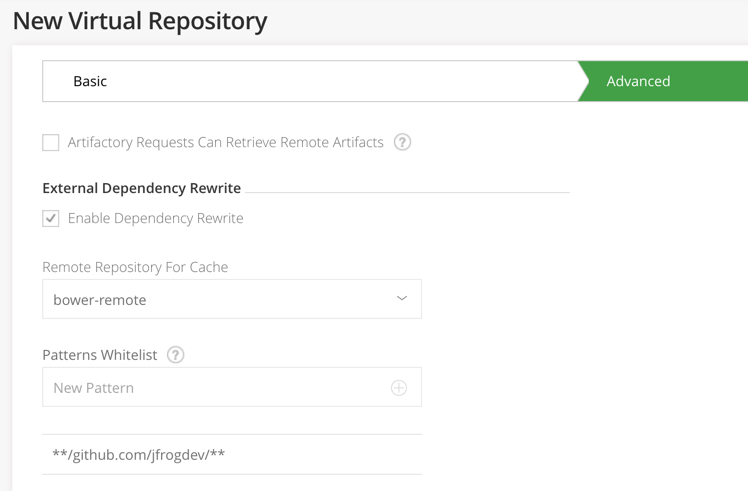
Check Enable Dependency Rewrite in the Bower virtual repository advanced configuration.
-
Specify a whitelist patterns of external resources from which dependencies may be downloaded.
-
Specify the remote repository in which those dependencies should be cached.
It is preferable to configure a dedicated remote repository for that purpose so it is easier to maintain.
In the example below the external dependencies will be cached in "bower" remote repository and only package from https://github.com/jfrogdev are allowed to be cached.
Rewriting Workflow
-
When downloading a Bower package, Artifactory analyzes the list of dependencies needed by the package.
-
If any of the dependencies are hosted on external resources (e.g. on
github.com), and those resources are specified in the white list,- Artifactory will download the dependency from the external resource.
- Artifactory will cache the dependency in the remote repository configured to cache the external dependency.
- Artifactory will then modify the dependency's entry in the package's
bower.jsonfile indicating its new location in the Artifactory remote repository cache before returning it to the Bower client.
-
Consequently, every time the Bower client needs to access the dependency, it will be provisioned from its new location in the Artifactory remote repository cache.
Using the Bower Shorthand Resolver
When running bower install on a bower.json file that is hosted on your local machine, you need to define a custom template in .bowerrc file by adding the following line.
shorthand-resolver": "art://{{owner}}/{{package}}"From version v4.11, for bower packages downloaded from remote repositories, Artifactory supports resolving dependencies that are specified using the Bower shorthand resolver for dependencies hosted on GitHub. Use of the shorthand resolver is reflected in the Bower install output, in the shorthand resolver dependencies, which are prefixed with $$$art-shorthand-resolver$$$. For example:
bower mypackagetest#$$$art-shorthand-resolver$$$-<username>-mypackagetest-master.tar.gz       not-cachedart://<username>/mypackagetest#$$$art-shorthand-resolver$$$-<username>-mypackagetest-master.tar.gz
bower mypackagetest#$$$art-shorthand-resolver$$$-<username>-mypackagetest-master.tar.gz       resolveart://<username>/mypackagetest#$$$art-shorthand-resolver$$$-<username>-mypackagetest-master.tar.gz
bower mypackagetest#$$$art-shorthand-resolver$$$-<username>-mypackagetest-master.tar.gz       resolvedart://<username>/mypackagetest#$$$art-shorthand-resolver$$$-<username>-mypackagetest-master.tar.gz
Bower Repositories Advanced Configuration
The fields under External Dependency Rewrite are connected to automatically rewriting external dependencies for Bower packages that need them.
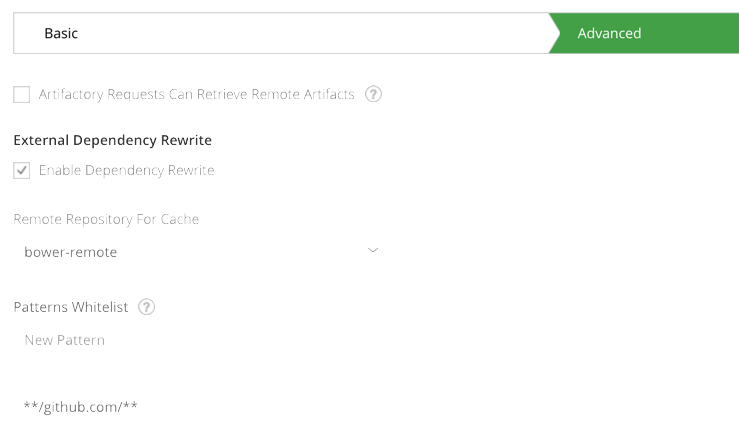
| Field | Description |
|---|---|
| Enable Dependency Rewrite | When checked, automatically rewriting external dependencies is enabled. |
| Remote Repository For Cache | The remote repository aggregated by this virtual repository in which the external dependency will be cached. |
| Patterns Allow List | An Allow List of Ant-style path expressions that specify where external dependencies may be downloaded from. By default, this is set to **** which means that dependencies may be downloaded from any external source. For example, if you wish to limit external dependencies to only be downloaded from |
Register Bower Packages
From version 4.6, Artifactory is a Bower registry and lets you register bower packages through remote and virtual repositories. This means you can retrieve bower packages directly from your private Git repositories.
When creating private remote repositories, the Registry URL is redundant and can be left as is.
For example, a private Stash server hosted at http://stash.mycompany.com:7990 with a project named "artifactory" will be registered as follows:
bower register artifactory ssh://[email protected]:7999/artifactory/artifactory.gitOnce the server is registered, to download a Bower package from the stash server and cache it in the remote Bower repository in Artifactory (ready for access by users) you can simply run
bower install artifactoryUse CLI with Bower Below Version 1.5
Version support
Older versions of Bower are only supported by Artifactory up to version 4.2.0.
In order to use Bower below version 1.5 with Artifactory you need 2 components (npm packages):
- bower-art-resolver - A custom Bower resolver dedicated to integrate with Artifactory.
- bower-art - A temporary custom Bower CLI with the pluggable resolvers mechanism currently in pending pull request.
The bower-art package is a peer dependency of bower-art-resolver. Therefore, both can be easily installed with:
npm install -g bower-art-resolverUse bower-art instead of bower
While Artifactory support for Bower is in Beta, after installing the required components, you need to execute
bower-artinstead of eachbowercommand.For example, use
bower-art install <pkg>instead ofbower install <pkg>
Updating Resolver
In order to update Artifactory resolver, please uninstall the "bower-art" npm package first, and then install the resolver. This step is necessary because npm versions earlier than v7 doesn't update peer dependencies.
Once bower-art is installed, replace the default registry with a URL pointing to a Bower repository in Artifactory by editing your ~/.bowerrc configuration file (the example below uses a repository with the key bower-repo ):
{
  "registry": "http://localhost:8081/artifactory/api/bower/bower-repo"
}.bowerrc file location
Windows:
%userprofile%\.bowerrcLinux:
~/.bowerrc
Tip
We recommend referencing a Virtual Repositories URL as a registry. This gives you the flexibility to reconfigure and aggregate other external sources and local repositories of Bower packages you deployed.
Once the Bower command line tool is configured, every bower-art install command will fetch packages from the bower repository specified above. For example:
$ bower install bootstrap
bower bootstrap#*           not-cached art://twbs/bootstrap#*
bower bootstrap#*           resolve art://twbs/bootstrap#*
bower bootstrap#*           extract archive.tar.gz
bower bootstrap#*           resolved art://twbs/bootstrap#e-tag:0b9cb774e1
Bower Limitations in Artifactory
The following are the limitations of Bower in Artifactory:
- Repository URL Formatting: When accessing a Bower repository through Artifactory, the repository URL must be prefixed with
api/bowerin the path. This applies to all Bower commands includingbower installandbower info.
Updated 9 months ago