

Conda Repositories
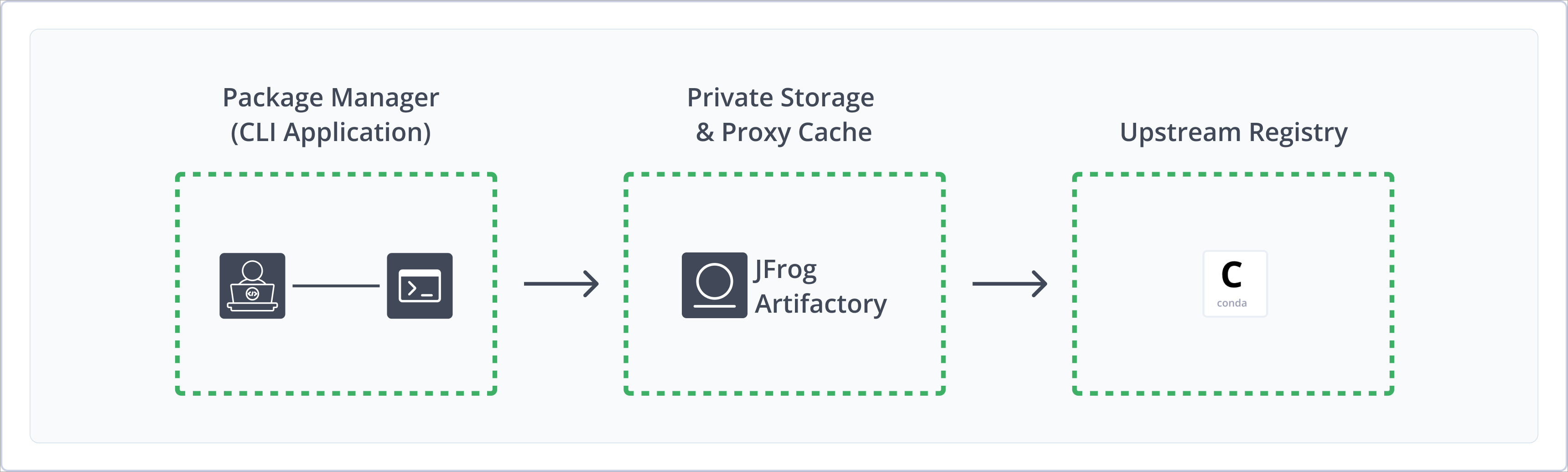
JFrog Artifactory natively supports Conda repositories for Python, R, Ruby, Lua, Scala, Java, JavaScript, C/C++, FORTRAN, and additional programming languages, giving you full control of your deployment and resolution process of Conda packages. Artifactory supports Conda client version 4.12.0 and above, and using the latest version of the client is recommended.
Conda repositories streamline package management by offering secure local hosting with fine-grained access control, proxying and caching remote packages for network independence, and aggregating all resources under a single virtual URL with built-in metadata calculation and version management.
For more information, see the Conda documentation.
Get Started with Conda
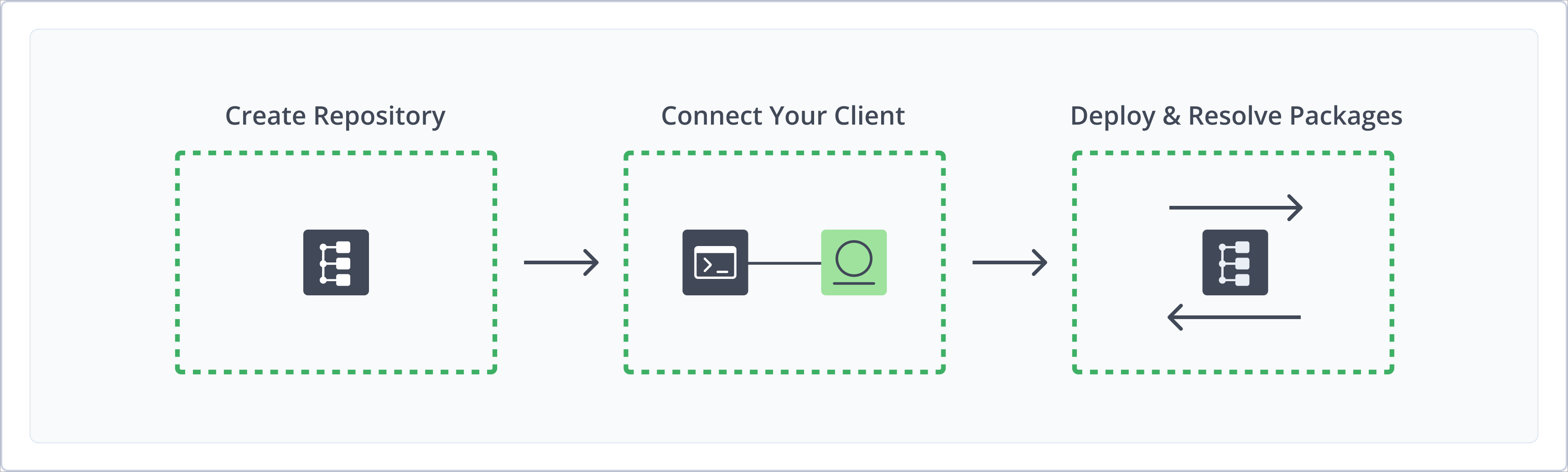
To get started working with Conda, complete the following main steps:
- Create a Conda Repository
- Connect Conda to Artifactory
- Deploy and Resolve Conda Packages
Create a Conda Repository
Create a Conda repository before you publish or install Conda packages. The primary repository types are:
- Local repositories: Where you store and share 1st and 2nd party packages with your organization
- Remote repositories: Enable you to download from any remote location, including external package registries or other Artifactory instances
- Virtual repositories: Enable aggregating remote and local repositories, enabling your organization to scale by providing a single URL that provides access to multiple repositories and types
For more information, see Repository Management.
Prerequisite: You need Admin or Project Admin permissions to create a Conda repository. If you don't have Admin permissions, the option will not be available.
To create a Conda repository:
-
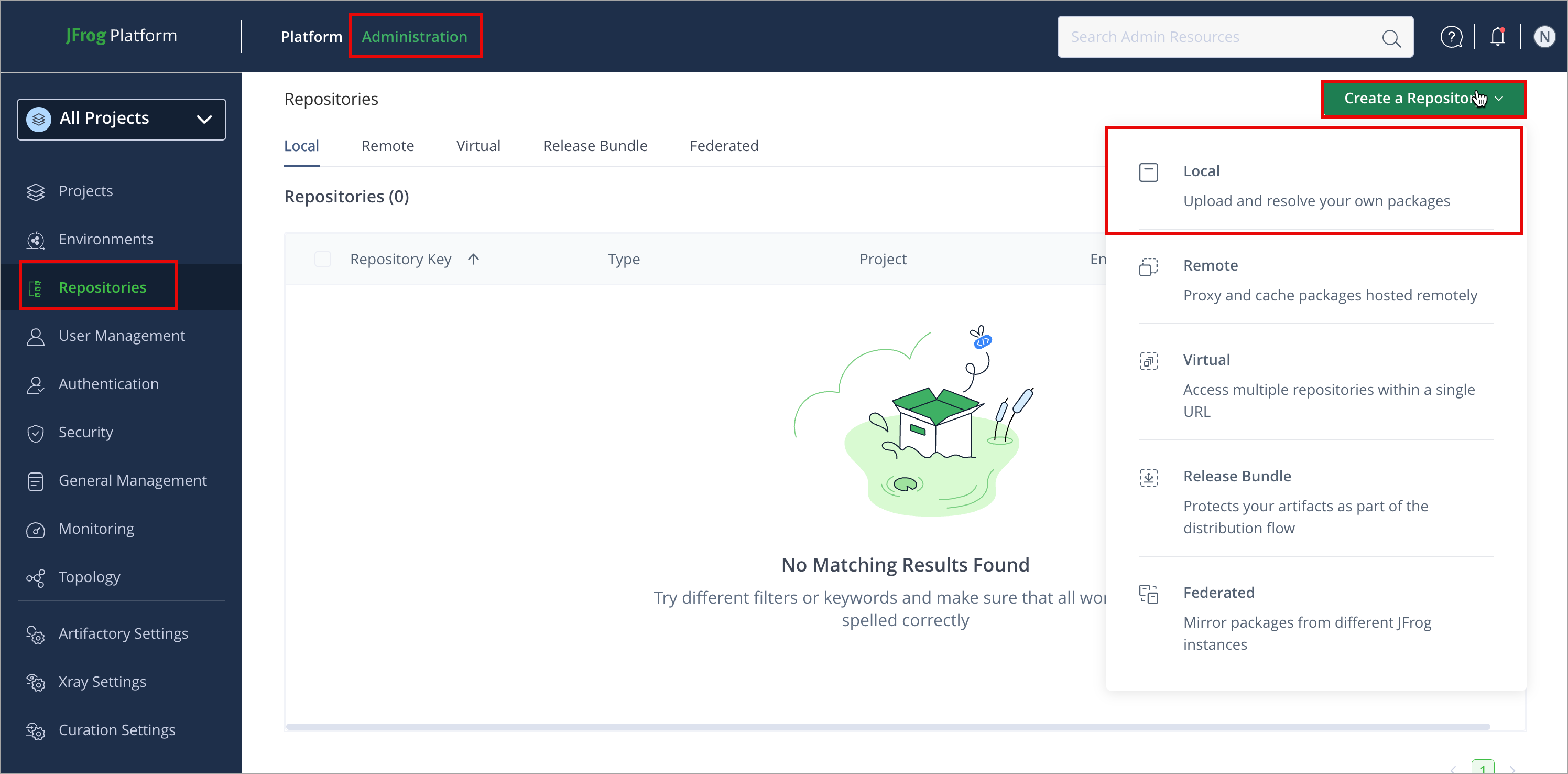
In the Administration module, click Repositories > Create a Repository.
-
Select the repository type you want to create.
-
Select the Conda package type.
-
Configure the required fields:
-
For Local Repositories, in the Repository Key field, type a meaningful name for the repository. For example,
conda-local-repository-1. For more information, see Local Repositories. -
For Remote Repositories, verify the Repository URL and update if needed. For more information, see Remote Repositories.
-
Note
The index files for remote Conda repositories are stored and renewed according to the Retrieval Cache Period setting on your remote repository.
- For Virtual Repositories, select one or more local or remote repositories to include in the virtual repository. For more information, see Virtual Repositories.
Note
Artifactory maintains your aggregated virtual repository metadata to keep your metadata up-to-date by reflecting changes in the aggregated local repositories in real-time. For aggregated remote repositories, the virtual repository metadata is renewed on demand, in minimal intervals of 10 minutes by default. The renewal period is controlled using the Retrieval Cache Period parameter of your virtual repository.
- Click Create Repository. The repository is created, and the Repositories page is displayed.
Connect Conda to Artifactory
To resolve Conda packages from Artifactory, configure your .condarc file to connect the Conda client to Artifactory.
Prerequisite: Before connecting your Conda client to Artifactory, you must have an existing Conda repository in Artifactory. For more information, see Create a Conda Repository.
To connect the Conda client to Artifactory:
-
Open your
.condarcfile in a text editor. If the file does not exist, create it in your home directory. -
Add the following snippet to configure Artifactory as your Conda repository:
channel_alias: https://<URL_ENCODED_USERNAME>:<AUTH>@<JFrogPlatformURL>/artifactory/api/conda/<REPO_NAME>
channels:
  - https://<URL_ENCODED_USERNAME>:<AUTH>@<JFrogPlatformURL>/artifactory/api/conda/<REPO_NAME>
default_channels:
  - https://<URL_ENCODED_USERNAME>:<AUTH>@<JFrogPlatformURL>/artifactory/api/conda/<REPO_NAME>
Where:
<URL_ENCODED_USERNAME>: Your Artifactory username, with@encoded as%40if present<AUTH>: Your Artifactory identity token<JFrogPlatformURL>: Your JFrog Platform URL<REPO_NAME>: The name of the target repository
For example:
channel_alias: https://jeffry:[email protected]/artifactory/api/conda/conda-local channels: - https://jeffry:[email protected]/artifactory/api/conda/conda-local default_channels: - https://jeffry:[email protected]/artifactory/api/conda/conda-local -
(Optional) To disable Conda client SSL validation, add the following directive to your
.condarcfile:ssl_verify: false
Note
You can also use JFrog Set Me Up to copy the snippet populated with your token and environment. For more information, see Use Artifactory Set Me Up for Configuring Package Manager Clients.
Next steps:
Deploy Conda Packages
Deploying Conda packages makes them available to other users.
The following options are available for publishing Conda packages:
Deploy Conda Packages Using the UI
Upload Conda packages through the Artifactory web UI when you prefer a graphical workflow.
To deploy a Conda package using the UI:
-
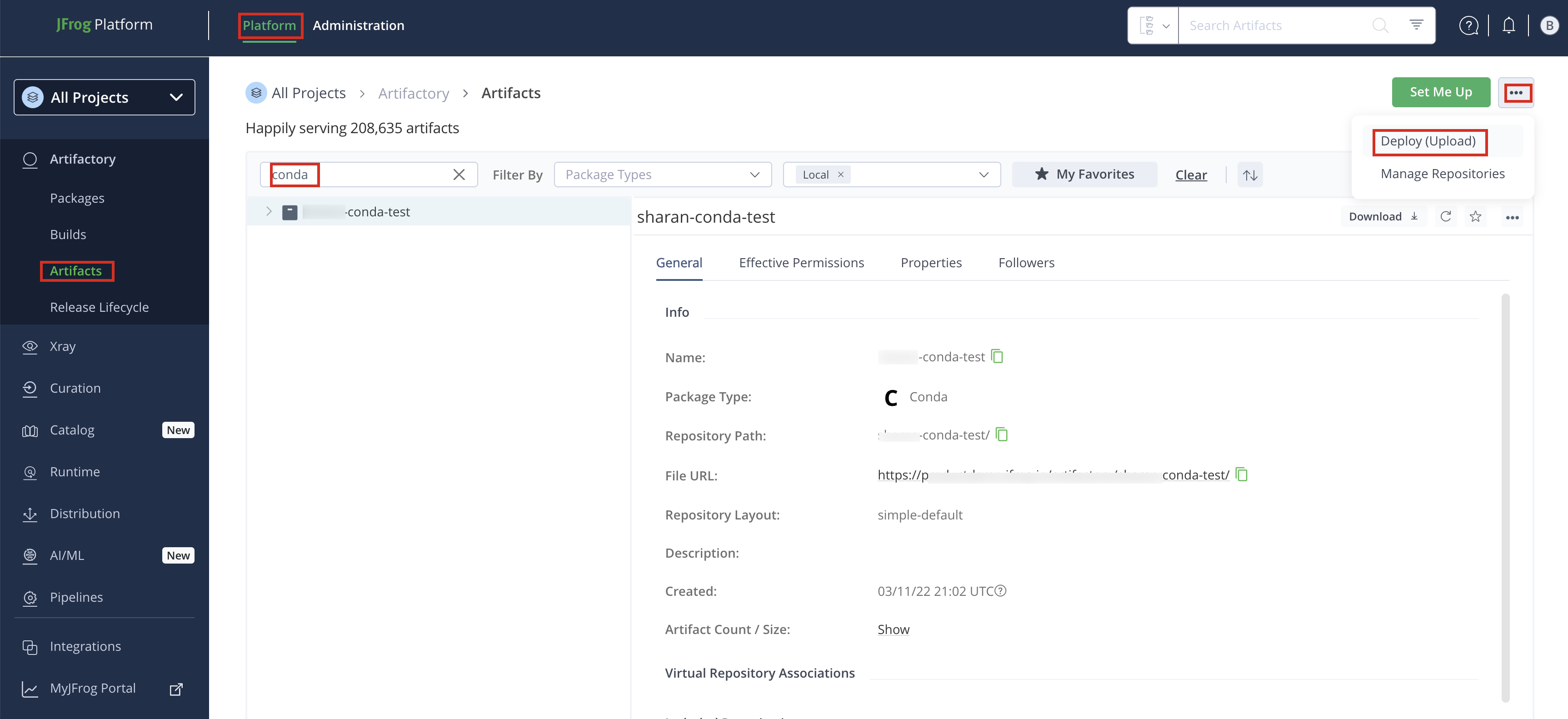
In the Platform module, click Artifactory > Artifacts. The Artifacts page opens.
-
Click the actions button and select Deploy (Upload). Deploy options are displayed.
-
Select your Conda repository as the Target Repository, and upload the file you want to deploy.
-
Select the Deploy as Conda Artifact checkbox. When deploying, ensure you upload the package to the correct Target Path that reflects its subdirectory, for example,
your-repository/linux-64/package-name.tar.bz2. Artifactory uses this path to correctly index the package. -
Verify the deploy options, then click Deploy. The package is deployed.
Note
The Conda metadata is automatically calculated and updated when adding, removing, copying, or moving Conda packages. The calculation is only invoked after a package-related action is completed. It may sometimes take up to 30 seconds to complete, as the process is asynchronous and its performance depends on the overall system load. Although rarely required, you may wish to invoke metadata calculation on the entire repository. You can do this using the Recalculate Index option after you right-click the repository in the repository tree, or by using the REST API.
Note
When deploying sources, the Target Path is automatically displayed. Do not change this path. Changing the
src/contribpath prevents Artifactory from identifying the package as a Conda package because Artifactory cannot index it.
Deploy Conda Packages Using cURL
You can deploy a Conda package using cURL by uploading the package file to the correct path in your repository.
To deploy a Conda package using cURL:
-
Run the following command to upload the package to your Artifactory repository:
curl -L -u <USERNAME>:<PASSWORD> -T <PATH_TO_FILE> "https://<JFrogPlatformURL>/artifactory/<REPO_NAME>/<TARGET_FILE_PATH>"Where:
<USERNAME>: Your Artifactory username<PASSWORD>: Your Artifactory password or identity token<PATH_TO_FILE>: Local path to your package file<JFrogPlatformURL>: Your JFrog Platform URL<REPO_NAME>: The name of the target repository<TARGET_FILE_PATH>: Remote path in the repository. Use<SUBDIR>/<PACKAGE_FILE_NAME>(for example,linux-64/sample-1.0.0-py38_0.tar.bz2). To deploy to a Conda sub-channel, prefix the path with the channel name (for example,main/linux-64/sample-1.0.0-py38_0.tar.bz2).
For example, to deploy a package to the
mainsub-channel:curl -L -ujeffry:RandomToken!_51HnvD0A1g2q3n4b5F6g -T ./linux-64/sample-1.0.0-py38_0.tar.bz2 \ "https://company.jfrog.io/artifactory/conda-local/main/linux-64/sample-1.0.0-py38_0.tar.bz2"
Resolve Conda Packages
You can resolve Conda packages from local, remote, and virtual Conda repositories after you connect the Conda client to Artifactory.
To resolve Conda packages from Artifactory:
-
Run the following command to install a package from Artifactory:
conda install <PACKAGE_NAME>Where:
<PACKAGE_NAME>: The name of the Conda package to install
For example:
conda install numpy -
To install a package from a specific Conda sub-channel, run the following command with the
-cflag:conda install -c <CHANNEL_NAME> <PACKAGE_NAME>Where:
<CHANNEL_NAME>: The Conda sub-channel URL or name<PACKAGE_NAME>: The name of the Conda package to install
For example:
conda install -c https://company.jfrog.io/artifactory/api/conda/conda-virtual pandas
Additional Conda Actions
The following additional actions are available with Conda repositories:
- Reindex a Conda Repository
- Tune Conda Metadata Worker Threads
- View Individual Conda Package Information
- Enable Conda Metadata Sharding
Reindex a Conda Repository
You can trigger asynchronous reindexing of a local Conda repository either through the UI or using the REST API.
To reindex a Conda repository:
- In the Platform module, go to Artifactory > Artifacts.
- Find your repository in the repository tree, right-click it, and select Recalculate Index.
For more information, see Calculate Conda Repository Metadata API.
Note
Reindexing Conda repositories is not instantaneous and may take up to a few hours. Reindexing time varies based on the number and size of packages in the repository.
Tune Conda Metadata Worker Threads
Conda calculates metadata asynchronously based on repository storage events. The number of total worker threads that handle metadata calculation in parallel (specifically for Conda tasks) defaults to 5. At larger scales, you may modify this parameter in the Artifactory system properties file.
To tune Conda metadata worker threads:
-
Edit
$JFROG_HOME/artifactory/var/etc/artifactory/artifactory.system.propertiesand add the following parameter:artifactory.conda.metadata.calculation.workers=<NUMBER_OF_WORKERS>Where:
<NUMBER_OF_WORKERS>: The number of parallel worker threads for Conda metadata calculation
For example:
artifactory.conda.metadata.calculation.workers=10
View Individual Conda Package Information
Artifactory supports viewing selected Conda package metadata directly from the UI.
To view individual Conda package information:
- In the Platform module, go to Artifactory > Artifacts, expand the repository in the repository tree, and select the package file you want to inspect.
Enable Conda Metadata Sharding
Note
Conda metadata sharding is available as of Artifactory self-managed version 7.161.15. SaaS support is scheduled for a future release.
Conda metadata sharding is an alternative to the standard repodata.json and current_repodata.json formats defined in Conda Enhancement Proposal 16 (CEP-16). When enabled, Artifactory serves a shard index at {subdir}/repodata_shards.msgpack.zst and content-addressed package shards at {subdir}/{sha256}.msgpack.zst for local, remote, and virtual Conda repositories.
- Local repositories: Artifactory generates package shards from package metadata when packages are deployed or removed, and updates the shard index incrementally.
- Remote repositories: Artifactory fetches and caches the upstream shard index and package shards under
.jfrog/shards/paths in the remote cache. - Virtual repositories: Artifactory merges the shard indexes from all member repositories.
When sharding is disabled, shard index and package shard endpoints return 404. Legacy repodata.json and current_repodata.json endpoints remain available regardless of the sharding setting.
Conda metadata sharding is disabled by default.
To enable Conda metadata sharding:
-
In the
$JFROG_HOME/artifactory/var/etc/artifactory/artifactory.system.propertiesfile, add the following properties:artifactory.conda.shards.enabled=true: Enables metadata shardingartifactory.packages.conda.shards.enabled=true: Displays metadata sharding configuration instructions in Set Me Up For more information, see Artifactory System Properties.
-
Add the following to your
.condarcfile to override the classic Conda solver, which ignores shards:repodata_use_shards: true solver: libmamba -
For local repositories, reindex the repository.
Related Topics
Updated about 2 months ago