

Swift Repositories
Configure Swift repositories in JFrog Artifactory to deploy and resolve packages with SPM.
Swift is a general-purpose programming language built using a modern approach to safety, performance, and software design patterns. The Swift Package Manager is a tool for managing the distribution of Swift code. It’s integrated with the Swift build system to automate the process of downloading, compiling, and linking dependencies. The tool compiles and links Swift packages, managing dependencies, versioning, and supporting flexible distribution and collaboration models. For more information, see Swift Package Manager documentation.
Note
Artifactory supports the public Tuist Swift Package Registry at
https://tuist.dev/api/registry/swiftas a remote upstream. Tuist implements the Swift registry protocol. The URL https://swiftpackageregistry.com/ is not a Swift registry. It is an HTML catalog of Swift packages that are hosted on Git servers.
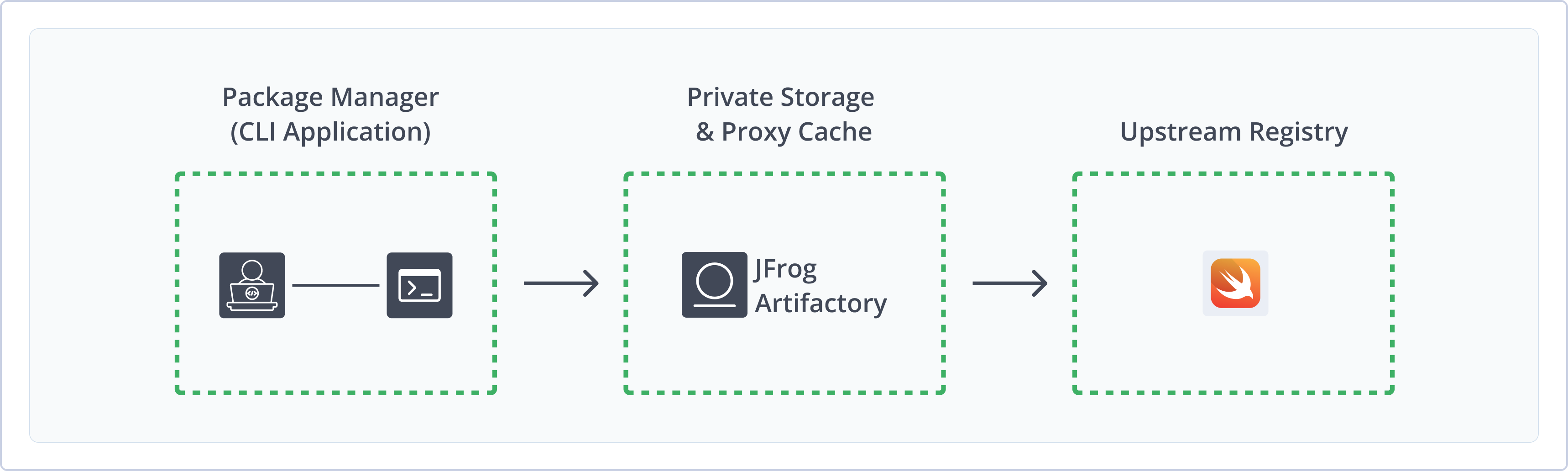
Artifactory fully supports Swift repositories, including the following capabilities:
- Robust Metadata Capabilities: Calculate metadata for Swift packages hosted in Artifactory's local repositories, and validate remote Swift repository metadata.
- Unified Repository Management: Consolidate all your Swift repositories in Artifactory as a single source of truth. Set up secure local repositories, access cached versions of remote registries including the public Tuist Swift Package Registry, and create a single access point for all sources with virtual repositories.
- Support for Swift Package Manager: Natively use the Swift command line tool to deploy, remove, and manage packages in Artifactory.
Get Started with Swift
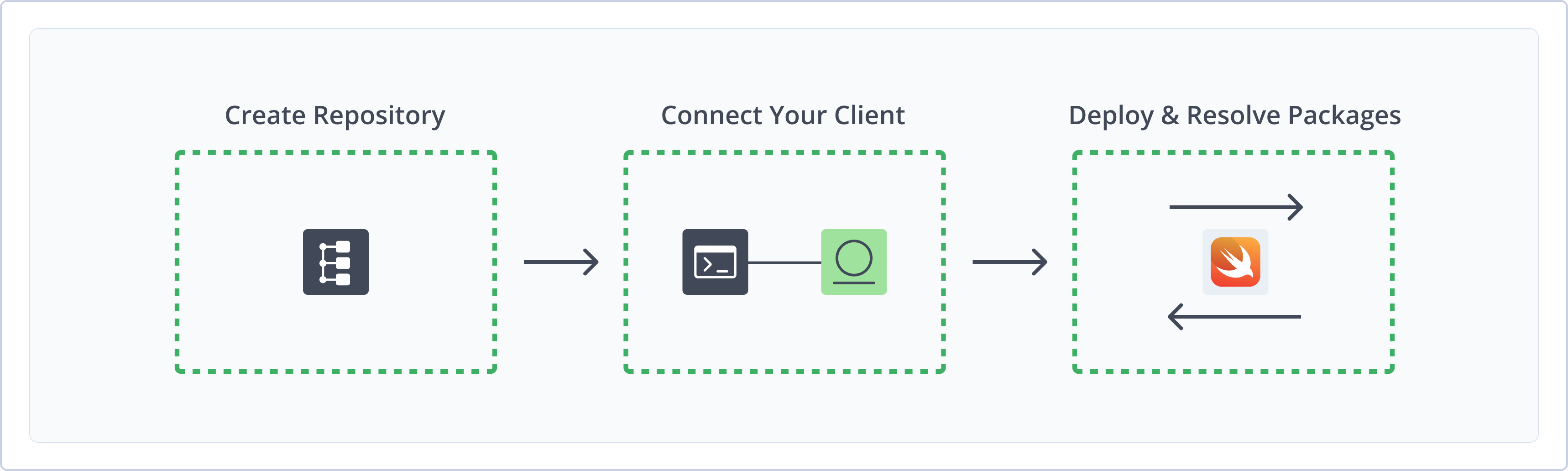
To get started working with Swift, complete the following main steps:
- Create a Swift Repository
- Connect Swift to Artifactory
- Deploy and Resolve Swift packages
Create a Swift Repository
This topic describes how to create a Swift repository. This is required before publishing and installing Swift packages. There are three primary types of repositories:
-
Local repositories: Store and share first- and second-party packages with your organization
-
Remote repositories: Download packages from any remote location, including external package registries or other Artifactory instances
Note
Swift remote repositories support private Swift registries, including Smart Remote repositories, and the public Tuist Swift Package Registry at
https://tuist.dev/api/registry/swift.
- Virtual repositories: Aggregate remote and local repositories, enabling your organization to scale by providing a single URL that provides access to multiple repositories and types
For more information on JFrog repositories, see Repository Management.
Prerequisite: You need Admin or Project Admin permissions in Artifactory to create a repository. If you don't have Admin permissions, the option will not be available.
To create a Swift repository:
-
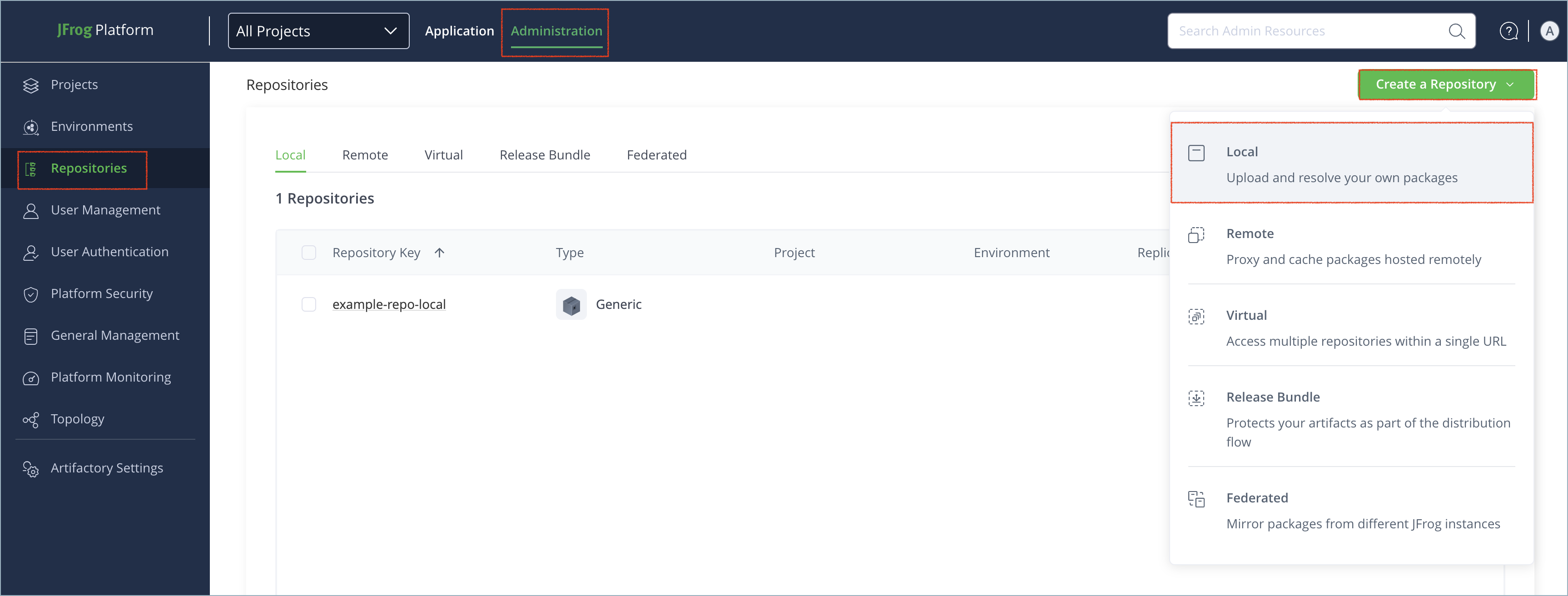
In the Administration tab, click Repositories > Create a Repository.
-
Select the type of repository you want to create: local, remote, or virtual.
-
Select the Swift package type.
-
Configure the required fields for the repository:
-
For local repositories, in the Repository Key field, enter a meaningful name for the repository. For example,
swift-local. For more information on local repositories and their settings, see Local Repositories. -
For remote repositories, verify the Repository URL and update as needed. For more information on remote repositories and their settings, see Remote Repositories.
Swift remote repositories connect to registries that use the Swift registry protocol, including the public Tuist Swift Package Registry at
https://tuist.dev/api/registry/swift. URLs like https://swiftpackageregistry.com are HTML catalogs that do not host any packages, but point to GitHub repositories that host packages. -
For virtual repositories, select one or more local or remote repository types to include in the virtual repository. For more information on virtual repositories and their settings, see Virtual Repositories.
-
-
Click Create Repository. The repository is created and the Repositories page is displayed.
Connect Swift to Artifactory
Configure your Swift client to connect to your Artifactory repositories. You can configure repositories per Swift project or globally.
Swift uses HTTPS by default. If you need to connect using HTTP, open the .swiftpm/configuration/registries.json file and update the scheme in the "url" field to http.
Prerequisite: Before connecting your Swift client to Artifactory, you must have an existing Swift repository in Artifactory. For more information, see Create a Swift Repository.
To connect the Swift client to Artifactory:
-
From your Swift project directory, run the following command to add the Artifactory repository to your Swift configuration:
swift package-registry set "https://<JFROG_PLATFORM_URL>/artifactory/api/swift/<REPO_NAME>"Tip
To configure the registry for all Swift projects, add the
--globalflag before the registry URL. You can run the--globalcommand from any directory.Where:
<JFROG_PLATFORM_URL>: The URL of your JFrog Platform<REPO_NAME>: The name of the target repository in Artifactory
For example:
swift package-registry set "https://company.jfrog.io/artifactory/api/swift/swift-virtual"The
.swiftpm/configuration/registries.jsonfile is created. -
Add the following snippet with your Artifactory authentication information to your
~/.netrcfile:machine <JFROG_PLATFORM_URL> login <USERNAME> password <AUTH_TOKEN>Where:
<JFROG_PLATFORM_URL>: The base URL of your JFrog Platform<USERNAME>: Your Artifactory username<AUTH_TOKEN>: Your Artifactory identity token
For example:
machine company.jfrog.io login jeffry password B7r9P2tLqGvXzWcM5jN3yHkF6sD8aA1vS4uK0eI2oZp7xTqWcE5rVbN1mKjHgFNote
You can also use JFrog Set Me Up to copy the snippet populated with your token and environment. For more information, see Use Artifactory Set Me Up for Configuring Package Manager Clients.
Next steps:
Connect to a Specific Swift Repository
Connect directly to a specific Swift repository in Artifactory and bypass any project-specific or global configurations.
To connect to a specific Swift repository:
-
Run the following command:
swift package-registry login https://<JFROG_PLATFORM_URL>/artifactory/api/swift/<REPO_NAME> \
    --username <USERNAME> \
    --password <AUTH>
Where:
<JFROG_PLATFORM_URL>: The URL of your JFrog Platform<REPO_NAME>: The name of the target Artifactory repository<USERNAME>: Your Artifactory username<AUTH>: Your Artifactory identity token or password. For more information about using a password securely, see Centrally Secure Passwords
For example:
swift package-registry login https://company.jfrog.io/artifactory/api/swift/swift-virtual \
    --username jeffry \
    --password B7r9P2tLqGvXzWcM5jN3yHkF6sD8aA1vS4uK0eI2oZp7xTqWcE5rVbN1mKjHgF
Deploy Swift Packages
Deploy Swift packages to an Artifactory Swift repository after you connect your client.
Note
Swift packages must be deployed according to the following structure, or they won't be indexed:
<SCOPE>/<NAME>/<NAME>-<VERSION>.zip<SCOPE>/<NAME>/<VERSION>
To deploy Swift packages:
-
From the root directory of the package, run this command to create a source archive for the working tree:
swift package archive-source -
Publish the archive using one of the following commands, based on your version of the Swift client:
-
Version 5.9 or later:
swift package-registry publish <SCOPE>.<NAME> <VERSION>Where:
<SCOPE>: The owner or namespace of the package, usually the scope of the source code repository URL<NAME>: The name of the project as defined in thePackage.swiftfile<VERSION>: The version of the package, usually corresponding with a tag in the source code repository
For example:
swift package-registry publish aurora-fi.aurora-auth-ios 2.1.4 -
Version 5.8 or earlier:
curl -X PUT -u<USERNAME>:<AUTH> \
-H "Accept: application/vnd.swift.registry.v1+json" \
-F source-archive="@<SOURCE_ARCHIVE_PATH>" \
https://<JFROG_PLATFORM_URL>/artifactory/api/swift/<REPO_NAME>/<SCOPE>/<NAME>/<VERSION>
Where:
<USERNAME>: Your Artifactory username<AUTH>: Your Artifactory identity token or secure password<SOURCE_ARCHIVE_PATH>: The local file path to the source archive for the package<JFROG_PLATFORM_URL>: The URL of your JFrog Platform<REPO_NAME>: The name of the target repository in Artifactory<SCOPE>: The owner or namespace of the package, usually the scope of the source code repository URL<NAME>: The name of the project as defined in thePackage.swiftfile<VERSION>: The version of the package, usually corresponding with a tag in the source code repository
For example:
curl -X PUT -ujeffry:B7r9P2tLqGvXzWcM5jN3yHkF6sD8aA1vS4uK0eI2oZp7xTqWcE5rVbN1mKjHgF \
-H "Accept: application/vnd.swift.registry.v1+json" \
-F source-archive="@/opt/build/agent/work/aurora-auth-ios-2.1.4.zip" \
https://company.jfrog.io/artifactory/api/swift/swift-releases/aurora-fi/aurora-auth-ios/2.1.4
-
Note
You can also use JFrog Set Me Up to copy the snippet populated with your token and environment. For more information, see Use Artifactory Set Me Up for Configuring Package Manager Clients.
Resolve Swift Packages
Resolve Swift package dependencies from an Artifactory Swift repository using the Swift Package Manager client.
To resolve Swift packages:
-
List all dependencies in the
Package.swiftfile for the package you want to resolve:dependencies: [ .package(id: "<SCOPE>.<NAME>", from:"<VERSION>") ]Where:
<SCOPE>: The owner or namespace of the package, usually the scope of the source code repository URL<NAME>: The name of the project as defined in thePackage.swiftfile<VERSION>: The version of the package, usually corresponding with a tag in the source code repository
For example:
dependencies: [ .package(id: "apple.swift-nio", from: "2.65.0"), .package(id: "vapor.fluent", from: "4.8.0"), .package(id: "pointfreeco.swift-composable-architecture", from: "1.10.0"), .package(id: "google.swift-protobuf", from: "1.27.0") ] -
Run one of the following commands based on the repository type you configured in Connect Swift to Artifactory:
-
Local repositories:
swift package resolve -
Remote and virtual repositories:
swift package --replace-scm-with-registry resolveStarting with Swift 5.9, Swift Package Manager defaults to resolving package dependencies from Git. The
--replace-scm-with-registryflag directs Swift Package Manager to resolve dependencies from the configured registry instead of Git. This flag is required when resolving packages from remote or virtual repositories that proxy a Swift registry, such as the Tuist registry.
Note
Xcode does not automatically replace source control packages with their registry equivalents. Direct registry dependencies declared with
.package(id:from:)resolve through the registry, but transitive dependencies declared asurl:are still resolved from Git. To resolve through Artifactory, manually remove the source control dependency and add the equivalent registry dependency inPackage.swift. The--replace-scm-with-registryflag applies to the SwiftPM CLI only, not to Xcode. -
Note
You can also use JFrog Set Me Up to copy the snippet populated with your token and environment. For more information, see Use Artifactory Set Me Up for Configuring Package Manager Clients.
Additional Swift Information
The following pages provide additional information about using Swift with Artifactory:
Re-Index a Swift Repository
You can trigger an asynchronous re-indexing of a local Swift repository either through the UI or using the REST API.
This reindexes the git index and, as a result, will also index the remote repositories.
Prerequisite: You need Admin or Project Admin permissions in Artifactory to re-index a repository.
To re-index a Swift repository through the UI:
- In the Platform module, go to Artifactory > Artifacts.
- Find your repository in the repository tree. For more information, see Search for Artifacts on SaaS.
- Right-click the repository and select Recalculate Index.
Re-index a Swift repository through the REST API:
You can also reindex Swift repositories using the Calculate Swift Index REST API.
Swift Repository Structure
The Swift package structure is as follows.
`├── Package.swift ├── README.md ├── Sources`

`│ └─ Hello`  `│ └── hello.swift └── Tests`  `└─ HelloTests └── helloTests.swift └─ LinuxMain.swift`
Swift Deployment Structure
All deployments of Swift packages into Artifactory can be deployed under the following structures:
<SCOPE>/<NAME>/<NAME>-<VERSION>.zipstructure.<SCOPE>/<NAME>/<VERSION>: Based on the following Swift Publish API.
Packages must be deployed according to this structure, or they won't be included in the index file.
Swift Limitations in Artifactory
The following are the limitations of Swift in Artifactory:
-
Supported versions: Using Swift with JFrog Artifactory requires Swift version 5.7 and above, and JFrog Artifactory 7.41.4 and above.
-
Authentication support: Swift 5.8 and above requires at least JFrog Artifactory 7.55.1 for proper authentication support.
-
Xcode registry resolution: Xcode does not automatically replace source control (
url:) package dependencies with registry (id:) equivalents. You must manually update dependencies inPackage.swiftto use registry IDs where you want Artifactory resolution. -
Deployment structure: Swift packages must be deployed in the following structure to be indexed properly in Artifactory:
<SCOPE>/<NAME>/<NAME>-<VERSION>.zip<SCOPE>/<NAME>/<VERSION>
Frequently Asked Questions
This section provides answers to frequently asked questions about using Swift repositories with JFrog Artifactory.
FAQs
Q: How do I connect Swift Package Manager to JFrog Artifactory?
A: Run swift package-registry set with your Artifactory Swift registry URL, then add your credentials to ~/.netrc. See Connect Swift to Artifactory.
Q: Which resolve command do I use for local versus remote Swift repositories?
A: Use swift package resolve for local repositories. For remote or virtual repositories, use swift package --replace-scm-with-registry resolve. See Resolve Swift Packages.
Q: Why do packages still resolve from Git in Xcode after I configure the registry?
A: Xcode does not automatically replace source control (url:) dependencies with registry (id:) equivalents. Update Package.swift to use registry IDs for dependencies you want to resolve through Artifactory. The --replace-scm-with-registry flag applies to the SwiftPM CLI only. See Resolve Swift Packages.
Q: Does JFrog Artifactory support the Tuist Swift Package Registry?
A: Yes. Create a Swift remote repository and set the registry URL to https://tuist.dev/api/registry/swift. See Create a Swift Repository.
Q: What Swift and Artifactory versions are required?
A: JFrog Artifactory requires Swift 5.7 or later and Artifactory 7.41.4 or later. Swift 5.8 authentication requires Artifactory 7.55.1 or later. See Swift Limitations in Artifactory.
Q: Why must Swift packages follow a specific folder structure when deploying?
A: Artifactory indexes packages only when they are deployed under <SCOPE>/<NAME>/<NAME>-<VERSION>.zip or <SCOPE>/<NAME>/<VERSION>. See Deploy Swift Packages.
Related Topics
Updated about 1 month ago