

Nix Repositories
Configure Nix repositories in JFrog Artifactory for private binary caching, channel publishing, and Ed25519 signing for trusted reproducible builds.
Nix is a package manager designed to help you create reproducible and isolated builds. JFrog Artifactory supports Nix repositories, enabling you to manage Nix packages and channels in a centralized location. By integrating with Nix, Artifactory acts as a high-performance binary cache (substituter), ensuring reliable, reproducible, and fast builds for your applications.
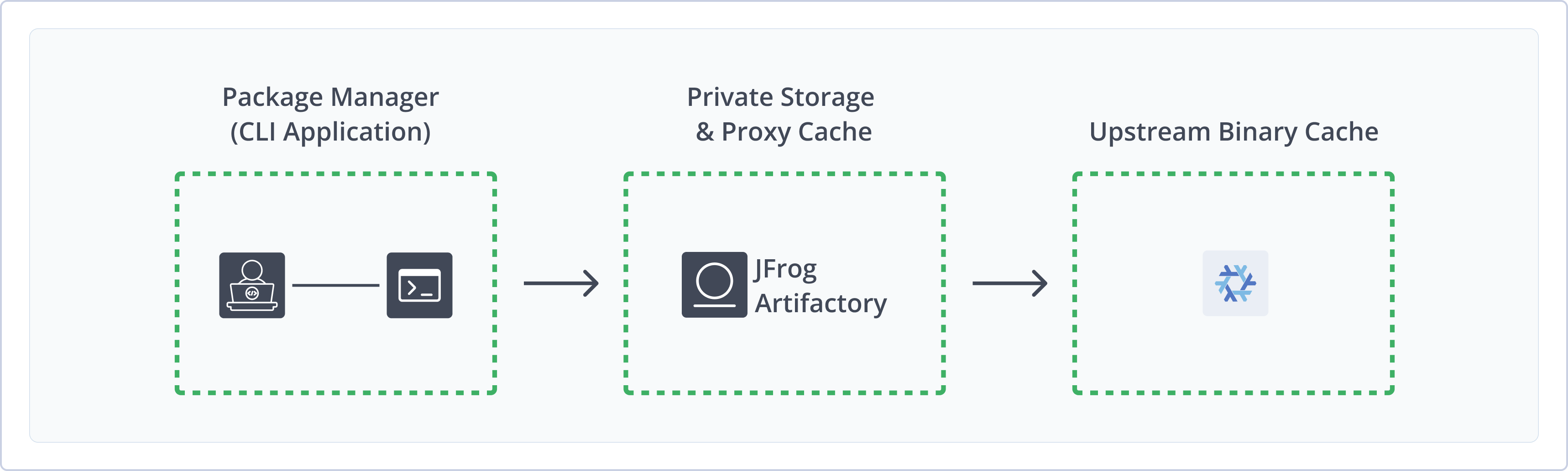
Artifactory fully supports Nix repositories and enhances the Nix ecosystem with the following capabilities:
- Private Binary Storage: Host and share your own Nix builds internally in local repositories.
- Smart Proxying: Proxy and cache the official Nix registry search.nixos.org with a remote repository to save bandwidth and ensure offline availability.
- Unified Access: Aggregate multiple repositories into a single virtual repository for simplified client configuration.
- Global Distribution: Use Federated repositories to synchronize Nix artifacts across different geographic locations.
- Metadata Calculation: Calculate metadata for Nix packages to enable artifact management and search in Artifactory.
- Cryptographic Signing: Sign packages in your private binary cache so Nix clients can verify they came from Artifactory and weren't tampered with.
Get Started with Nix
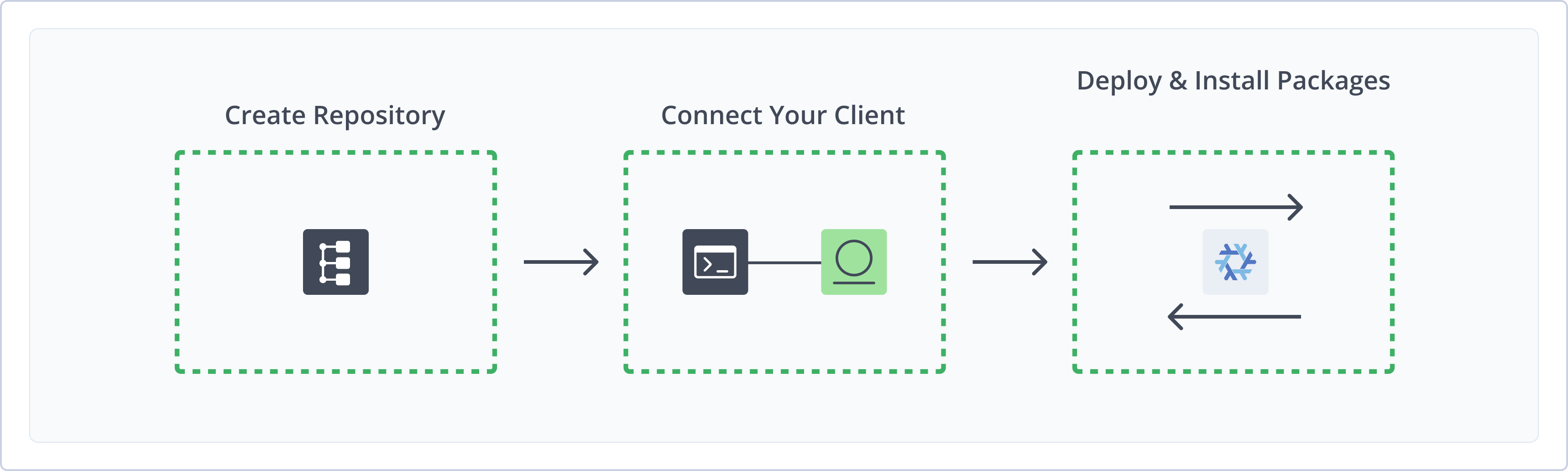
To get started working with Nix, complete the following main steps:
- Create a Nix repository
- Connect Nix to Artifactory
- Deploy and install Nix binaries and channels
Create a Nix Repository
This topic describes how to create a Nix repository. This is required before publishing and installing Nix packages and channels. There are three primary types of repositories:
-
Local repositories: Store and share first- and second-party packages with your organization
-
Remote repositories: Download packages from search.nixos.org location and other Artifactory instances
-
Virtual repositories: Aggregate remote and local repositories, enabling your organization to scale by providing a single URL that provides access to multiple repositories and types
For more information on JFrog repositories, see Repository Management.
Prerequisite: You need Admin or Project Admin permissions in Artifactory to create a repository. If you don't have Admin permissions, the option will not be available.
To create a Nix repository:
-
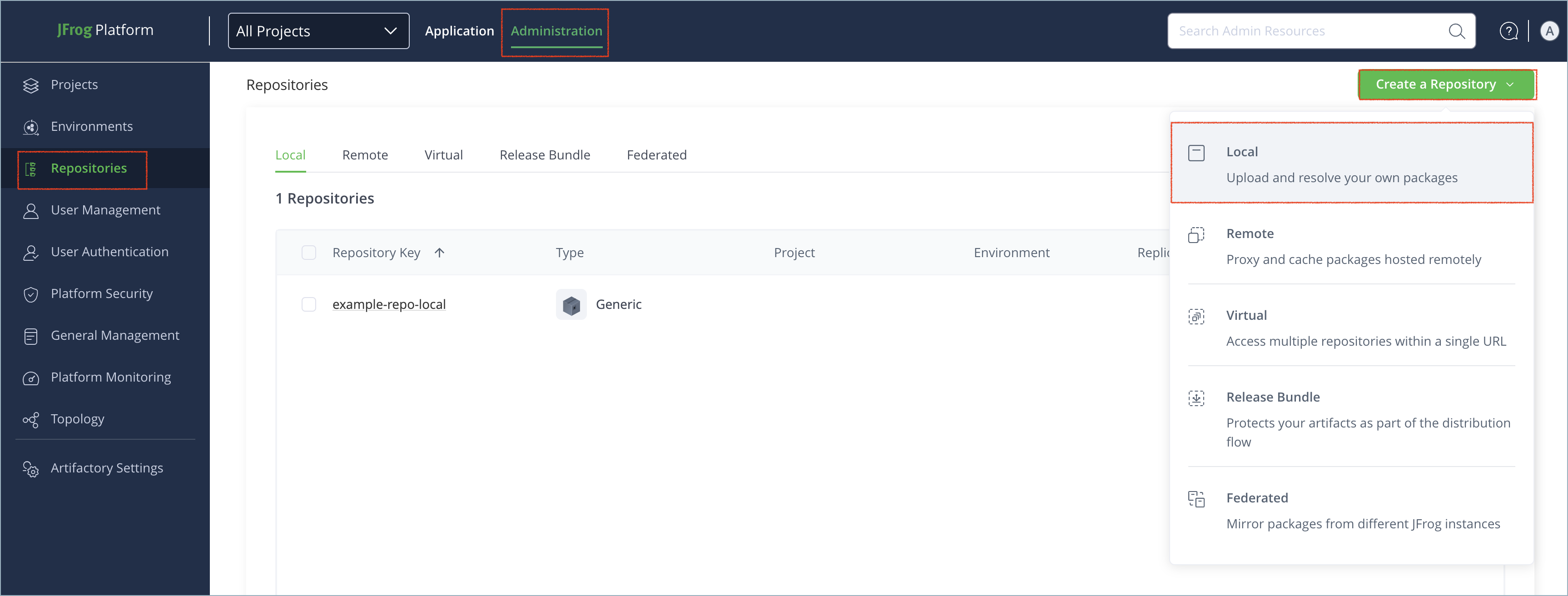
In the Administration tab, click Repositories > Create a Repository.
-
Select the type of repository you want to create.
Note
Artifactory supports federated Nix repositories.
-
Select the Nix package type.
-
Configure the required fields for the repository:
- For local repositories, in the Repository Key field, type a meaningful name for the repository. For example,
nix-local. For more information on local repositories and their settings, see Local Repositories. - For remote repositories, verify the Repository URL and update as needed. For more information on remote repositories and their settings, see Remote Repositories.
- For virtual repositories, select one or more local or remote repository types to include in the virtual repository. For more information on virtual repositories and their settings, see Virtual Repositories.
- For local repositories, in the Repository Key field, type a meaningful name for the repository. For example,
-
Click Create Repository. The repository is created and the Repositories window is displayed.
Connect Nix to Artifactory
To use Nix with Artifactory, complete the following configurations as needed:
Prerequisites:
- Nix package manager installed on your local machine or build agent.
- A Nix repository. For more information, see Create a Nix repository.
Configure Binary Cache
To use Artifactory as a binary cache instead of building from source, add it as a substituter in your nix.conf file.
To add Artifactory as a substituter:
-
Open the
nix.conffile in a text editor from one of the following locations:-
For user-specific configuration:
~/.config/nix/nix.conf -
For system-wide configuration:
/etc/nix/nix.confNote
Editing system-wide configurations requires
rootorsudoadmin privileges.
-
-
Add the following line to the
nix.conffile:substituters = https://<USERNAME>:<AUTH>@<JFrogPlatformURL>/artifactory/api/nix/<REPO_NAME>?priority=<PRIORITY_VALUE> extra-trusted-public-keys = <KEY_ALIAS>:<BASE64_PUBLIC_KEY> require-sigs = trueWhere:
-
<USERNAME>: Your Artifactory username -
<AUTH>: Your Artifactory identity token -
<JFrogPlatformURL>: Your JFrog Platform URL -
<REPO_NAME>: The name of the target repository -
<PRIORITY_VALUE>: The query priority valueNote
Nix resolves dependencies based on priority. A lower value means a higher priority. The public cache cache.nixos.org has a default priority of
40. Set the Artifactory priority a value lower than40to make sure Artifactory is queried first. -
<KEY_ALIAS>:<BASE64_PUBLIC_KEY>: If cryptographic signing is enabled on the repository, the alias of the Ed25519 key pair assigned to your Nix repository and its public key value
For example:
substituters = https://jeffry:[email protected]/artifactory/api/nix/nix-local?priority=20 extra-trusted-public-keys = my-nix-cache-1:cNpfNfHQEZ+rzOkvB985IKlWFT4nxl+G3HwxV6t92EY= require-sigs = true -
-
To enable modern CLI functionality, including the
nix copycommand to deploying packages, add the following snippet to thenix.conffile:experimental-features = nix-command -
Save the changes to the file.
-
Reload the Nix daemon to apply the changes:
sudo launchctl kickstart -k system/org.nixos.nix-daemon
Note
You can also use JFrog Set Me Up to copy the snippet populated with your token and environment. For more information, see Use Artifactory Set Me Up for Configuring Package Manager Clients.
Configure Channels
You can configure Nix repositories in Artifactory to proxy nixos channels or publish custom channels.
Publishing and caching channels in Artifactory provides a stable, versioned snapshot of the Nixpkgs ecosystem. The snapshots ensure that developers in your organization resolve dependencies against the same verified set of package expressions.
Using Artifactory to proxy and publish Nix channels safeguards build reproducibility and allows you to roll back or pin environments to specific channel releases even if upstream sources change or become unavailable.
To configure channels to resolve from Artifactory:
- Run the following command:
Where:
nix-channel --add https://<USERNAME>:<AUTH>@<JFrogPlatformURL>/artifactory/api/nix/<REPO_NAME>/channels/<CHANNEL_NAME> <CHANNEL_ALIAS>-
<USERNAME>: Your Artifactory username -
<AUTH>: Your Artifactory identity token -
<JFrogPlatformURL>: Your JFrog Platform URL -
<REPO_NAME>: The name of the target repository -
<CHANNEL_NAME>: The name of the Nix channelNote
When working with a remote repository, the
<CHANNEL_NAME>value must be an exact match for an official name in the NixOS Channel Registry.
nix-channel --add https://jeffry:[email protected]/artifactory/api/nix/nix-remote/channels/nixpkgs-25.11-darwin 25.11-darwin -
- Run this command to update the Nix client:
nix-channel --update
Note
You can also use JFrog Set Me Up to copy the snippet populated with your token and environment. For more information, see Use Artifactory Set Me Up for Configuring Package Manager Clients.
Next steps:
Deploy Nix Packages
You can perform two kinds of Nix deployments:
- Deploy Nix packages
- Deploy channel expressions
You can also configure cryptographic signing for local Nix repositories.
Deploy Nix Packages
Use the nix copy command to push packages from your local store to Artifactory.
To deploy Nix packages:
-
Run this command from the location in the directory that includes the
.nixfile:nix copy --to "https://<USERNAME>:<AUTH>@<JFrogPlatformURL>/artifactory/api/nix/<REPO_NAME>/" --file <PATH_TO_FILE>.nixWhere:
<USERNAME>: Your Artifactory username<AUTH>: Your Artifactory identity token<JFrogPlatformURL>: Your JFrog Platform URL<REPO_NAME>: The name of the target repository<PATH_TO_FILE>: The path to the Nix package file on your local machine
For example:
nix copy --to "https://jeffry:[email protected]/artifactory/api/nix/nix-local/" nix-package/default.nix
Note
You can also use JFrog Set Me Up to copy the snippet populated with your token and environment. For more information, see Use Artifactory Set Me Up for Configuring Package Manager Clients.
Deploy Channel Expressions
You can deploy a channel expression to Artifactory by using a curl PUT request.
Note
The source file name must be named
nixexprs.tar.xz. This name is mandatory and enforced. The Nix client specifically looks for this filename to resolve the channel expressions.
To deploy a channel expression:
-
Run this command:
curl -X PUT -u <USERNAME>:<AUTH> -T nixexprs.tar.xz https://<JFrogPlatformURL>/artifactory/api/nix/<REPO_NAME>/channels/<CHANNEL_NAME>/<NIX_FLAVOR>/<SNAPSHOT_IDENTIFIER>Where:
<USERNAME>: Your Artifactory username<AUTH>: Your Artifactory identity token<JFrogPlatformURL>: Your JFrog Platform URL<REPO_NAME>: The name of the target repository<CHANNEL_NAME>: The name of the channel<NIX_FLAVOR>: The distribution or flavor of Nix. Potential values are:nixpkgsnixos
<SNAPSHOT_IDENTIFIER>: The snapshot identifier
For example:
curl -X PUT -u jeffry:Random_Token218fwFughbreREAI5847fnf -T nixexprs.tar.xz https://company.jfrog.io/artifactory/api/nix/nix-local/channels/nixpkgs-25.11/nixpkgs/nixpkgs-25.11pre893393
Note
You can also use JFrog Set Me Up to copy the snippet populated with your token and environment. For more information, see Use Artifactory Set Me Up for Configuring Package Manager Clients.
Install Nix Packages
You can install Nix packages from Artifactory using one of the following supported methods:
Install Nix Packages with nix-env
To install Nix packages with nix-env:
- Run the following command:
Where
nix-env -iA nixpkgs.<PACKAGE_NAME><PACKAGE_NAME>is the name of the Nix package. For example:nix-env -iA nixpkgs.neovim
Install Nix Packages with nix-shell
To install Nix packages with nix-shell:
- Run the following command:
Where
nix-shell -p <PACKAGE_NAME><PACKAGE_NAME>is the name of the Nix package. For example:nix-shell -p neovim
Install Nix packages with NixOS Configuration
To install Nix packages with NixOS Configuration:
-
Open the
/etc/nixos/configuration.nixfile in a text editor. -
Add the following snippet to the file:
environment.systemPackages = [
    pkgs.<PACKAGE_NAME>
];
Where
<PACKAGE_NAME>is the name of the Nix package. For example:environment.systemPackages = [ pkgs.neovim ]; -
Save the changes to the file.
Additional Nix Information
The following topics provide additional information about working with Nix repositories in Artifactory.
- Configure Cryptographic Signing for Nix Binary Caches
- Nix Package Identification
- Best Practices for Nix Naming and Versioning
- Nix Authentication
Configure Cryptographic Signing for Nix Binary Caches
Version Support
Cryptographic signing is supported from Artifactory SaaS version 7.160.0.
When you use Artifactory as a private Nix binary cache, cryptographic signing helps your build agents and developers trust the packages they download. Nix verifies each package against a public key you configure on the client, so substitutes are accepted only when they match what your organization signed.
Once you assign a signing key to a local Nix repository, Artifactory signs packages automatically when they're deployed or downloaded. You don't need a separate publish command or extra flags.
Prerequisites:
- Admin or Project Admin permissions to manage keys and repository settings. For more information, see Manage Signing Keys.
- Artifactory SaaS version 7.160.0 or higher.
To enable signed binary caches:
Configure Ed25519 Signing in Artifactory
Create an Ed25519 key pair and add it to your Nix repository for use with package signing.
To configure Ed25519 signing for a Nix local repository:
-
Generate an Ed25519 key pair on your machine:
openssl genpkey -algorithm Ed25519 -out ed25519-private.pem openssl pkey -in ed25519-private.pem -pubout -out ed25519-public.pem -
In the Administration module, go to Security > Keys Management.
-
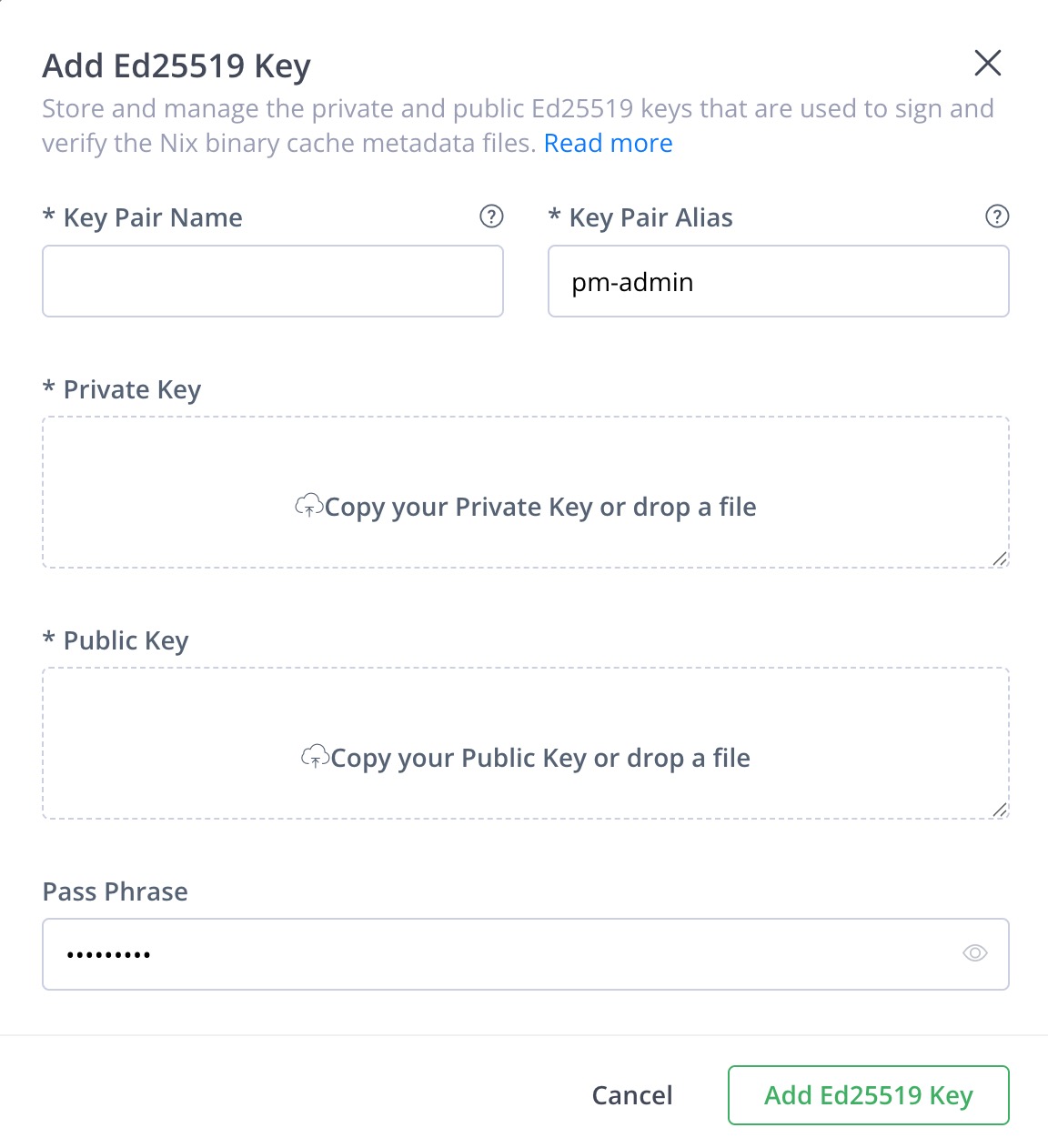
Click Add Keys, and select Ed25519 Keys from the dropdown list.
-
Enter a name and alias for the key pair, and upload the public and private key files.
-
Click Add Ed25519 Key.
-
In the Administration module, go to Repositories and select your local Nix repository.
-
In the Basic tab of the repository settings, under Ed25519 Key Pair, select the key you created from the Primary Key Name list.
-
Click Save.
Note
Use the same alias on the key pair and in your Nix client
extra-trusted-public-keysconfiguration.
Deploy packages with the standard nix copy workflow. Artifactory handles signing for you.
Configure Nix Client Trusted Public Keys
Nix only accepts signed substitutes from caches whose public keys you trust. Add your Artifactory signing key to nix.conf so builds can use your private binary cache.
Note
The configuration block for trusted public keys also appears in the Set Me Up dialog. For more information, see Configure Binary Cache.
To configure the Nix client to verify Artifactory signatures:
-
Open the
nix.conffile from one of the following locations:- For user-specific configuration:
~/.config/nix/nix.conf - For system-wide configuration:
/etc/nix/nix.conf
- For user-specific configuration:
-
Add the following settings to the
nix.conffile:extra-trusted-public-keys = <KEY_ALIAS>:<BASE64_PUBLIC_KEY> require-sigs = trueWhere:
<KEY_ALIAS>: The alias of the Ed25519 key pair assigned to your Nix repository<BASE64_PUBLIC_KEY>: The public key value for that alias
For example:
extra-trusted-public-keys = my-nix-cache-1:cNpfNfHQEZ+rzOkvB985IKlWFT4nxl+G3HwxV6t92EY= require-sigs = true -
Save the changes to the file.
-
Reload the Nix daemon to apply the changes:
sudo launchctl kickstart -k system/org.nixos.nix-daemon
Nix Package Identification
This section provides information on how Artifactory identifies and presents Nix package information. Artifactory provides native support for caching and aggregating Nix packages.
Artifactory follows a best-effort aggregation model when presenting packages and versions in the UI and APIs. This means that instead of exposing every build artifact as a separate package, Artifactory groups related artifacts together to provide a more natural browsing and discovery experience. This approach balances typical package searching workflows with Nix system compatibility.
How Artifactory Identifies Nix Packages
To identify and group packages, Artifactory extracts the following package metadata from the Nix narInfo metadata:
- The Nix store path (
storePath) - The name and version encoded in that path
This information populates the Packages view, where you can browse packages by name, see how many versions are available, and identify the latest available version. For more information, see Viewing Packages.
Note
The Packages page is designed for browsing available packages, understanding what software exists in a repository, identifying commonly used versions, and high-level visibility across repositories.
It is not intended to replace Nix's native mechanisms for reproducible builds, dependency planning, or cryptographic identity guarantees.
Why Store Hash Isn't the Primary Package Identity
Nix packages are fundamentally content-addressed. Each build output has a unique store path hash derived from all of its inputs. While this guarantees correctness and reproducibility, using the store hash as the primary identity would have significant drawbacks for aggregation in Artifactory:
- Every rebuild, even with minimal changes, would appear as a new package
- The number of visible packages would grow exponentially
- Significant negative impacts on discoverability
- Browsing by “logical package” (for example, Firefox) would be impractical
Because of these implications, Artifactory does not treat each store hash as a separate package entry. Instead, the system groups artifacts using the extracted name and version information to provide a usable catalog.
Best Practices for Nix Naming and Versioning
The following are best practices when publishing Nix packages with full control over naming and versioning:
- Use a stable and explicit package name.
- Avoid toolchain or runtime identifiers in the name.
- Use clean and predictable version string.
- Where possible, use semantic versioning.
- Avoid embedding branch names, dates, or commit hashes directly in the version.
- Encode build or revision metadata separately.
- Maintain consistent naming across releases.
These practices are recommended to improve aggregation accuracy and discoverability in Artifactory.
Nix Authentication
The Nix client does not provide interactive authentication prompts. To authenticate with Artifactory, you must provide credentials using one of the following methods:
- Credentials in URL (Recommended): Embed credentials directly in the repository URL using the format
https://<USERNAME>:<AUTH>@<JFrogPlatformURL>/<REPO_NAME>. .netrcFile: Add your Artifactory credentials to~/.netrcto authenticate to Artifactory as a binary cache.access-tokens: Pass authentication against APIs when performing fetch operations likefetchTarballorfetchurlfrom a.nixfile.-
CLI:
nix build . --option access-tokens "github.com=$<GITHUB_TOKEN>" -
In
nix.conf:access-tokens = github.com=ghp_<TOKEN> gitlab.com=glpat_<TOKEN>
.netrcmethod.-
Nix Limitations in Artifactory
The following are the limitations of Nix repositories in Artifactory:
- Registry Browsing: Artifactory doesn't support browsing the contents of remote Nix registries via UI. Only artifacts that have been explicitly pulled or deployed will appear in the artifact tree.
- Authentication: The Nix client does not provide interactive authentication prompts. For more information about authentication options, see Nix Authentication.
- Version extraction: The following are limitations related to Nix package version extraction.
-
Free-form version strings: Nix does not enforce a strict versioning standard. Version strings may include numbers, dates, channel or branch identifiers, or Git-derived identifiers. Free-form versioning has the following impact on Nix packages in Artifactory:
- Versions may not follow semantic versioning
- Version ordering may not reflect chronological or functional precedence
- The "latest version” is best-effort metadata, not an authoritative identifier
-
Duplicate or ambiguous versions: In cases of duplicate or ambiguous versions, Artifactory aggregates packages based on the extracted version value and does not attempt to differentiate further at the package level.
Examples of duplicate or ambiguous versions are the same version string appearing multiple times, different builds with the same extracted version, or patch-level changes that are indistinguishable at the version string level.
-
- Name extraction: The displayed package name may not match the name used with
nix installfor the following reasons.- Toolchain and runtime prefixes: The extracted package name may include store path prefixes from language-based or toolchain-based build tools.
- Package name overrides: Some Nix derivations explicitly override the package name (
pname) value during evaluation, and the store path may still reflect intermediate or contextual naming.
Updated about 2 months ago