

Get Started with Repositories
Create and manage Artifactory repositories with Quick Setup and naming rules.
This page explains the main tasks required to get you started working with repositories. Administrators can create repositories for a selected package type and assign them to a particular environment. After you define other basic and advanced settings, as required, you can optionally set up replication with a target repository.
Best Practices for Managing Repositories
JFrog recommends the following best practices for repository management:
- URL Considerations: Repository names should use lowercase characters and hyphens, and should avoid underscores or special characters that can cause issues with URL encoding in reverse proxies and load balancers.
- Performance vs. Manageability: While fewer and larger repositories are easier for admins, JFrog recommends using smaller repositories for better performance and to prevent cross-team interference.
Quick Setup Wizard
You can also use the Quick Setup wizard, which lets you create repositories for your selected package types in one go. You can create local, remote, and virtual repositories for each package type of your choosing. For more information, see Quick Repository Setup.
Uploading Non-Conformant Content
Repositories of each package type have built-in logic for parsing metadata, creating index files, and optimizing performance for packages of that specific type. Uploading non-conformant content, such as images, text files, and other resources that are not wrapped in the proper package format can impact indexing and reduce performance. Therefore, it is strongly recommended to upload generic content to a Generic repository.
Quick Repository Setup
Use Quick Setup to easily create local, remote, and virtual repositories for your selected package types.
To create repositories using Quick Setup:
-
In the user menu, select Quick Repository Creation.
-
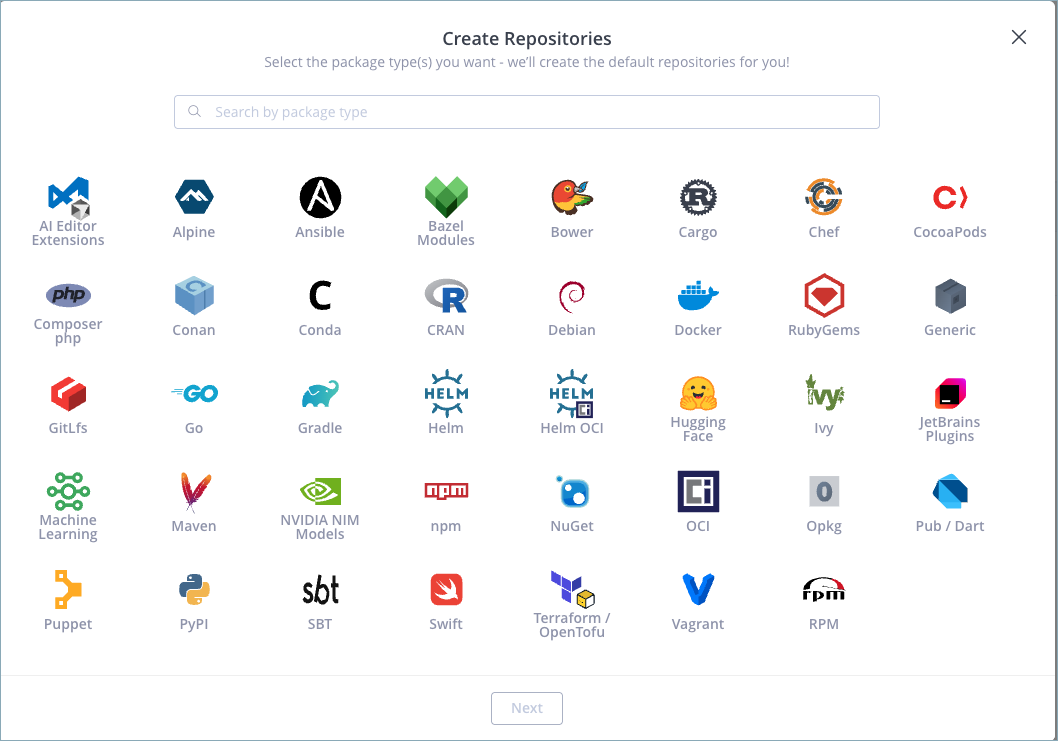
Select one or more package types for which you want to create repositories.
-
Click Next.
-
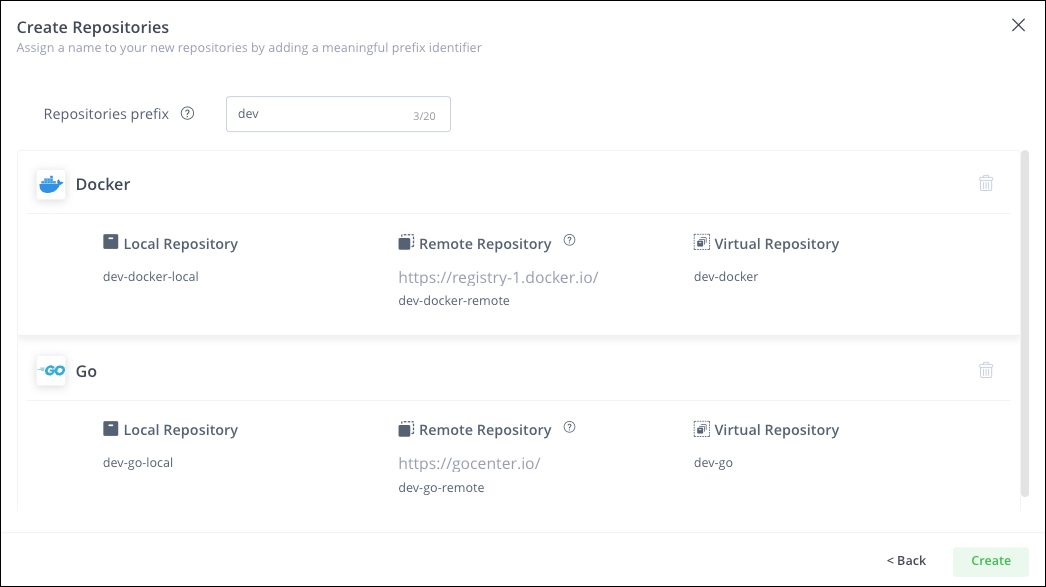
Enter a prefix that will be added to the name of each repository. The maximum length is 20 characters.
-
Click Create.
You have finished creating your repositories. You can continue to configure your clients and deploy artifacts. For more information, see Work with Package Management.
Learn More
One Package Type Per Repository
When you create a repository, you must select a specific package type. This is a fundamental characteristic of the repository that cannot be changed later. Once the repository type is set, JFrog Artifactory indexes artifacts and calculates the corresponding metadata for every package uploaded, which optimizes performance when resolving artifacts. Virtual repositories can only include repositories of the same type.
Uploading an Incorrect Package Type
While Artifactory does not prevent you from uploading a package of the wrong type to a repository, JFrog strongly recommends maintaining consistency between the repository type and the packages you upload. If you upload packages of the wrong type to a repository, Artifactory will not index the package or update the metadata for the repository.
Repository Naming Rules and Limitations
You must adhere to the following rules and limitations when naming repositories:
- The name (Repository Key) cannot be empty.
- The Repository Key cannot be identical to another Repository Key in your Artifactory instance.
The following table lists the maximum number of characters for each repository type.
| Repository Type | Maximum Characters |
|---|---|
| Local, Federated, and virtual | 64 |
| Remote | 58 |
| Docker, OCI, and Helm OCI local and Federated | 63 |
Important
The limit for Docker, OCI, and Helm OCI local and federated repositories is 63 characters. For more details about the limitations of these package types on SaaS platforms, see Docker Limitations in Artifactory.
- The repository key cannot contain the following characters:
/, \\, :, |, ?, *, ", <, >.
Important
In addition, the names of Docker, OCI, and Helm OCI repositories cannot contain uppercase letters or an underscore (
_).
-
The repository key cannot consist of the following:
...&Jfrog-usage-logsJfrog-billing-logsJfrog-logsartifactory-build-infoartifactory-pipe-infoAuto-trashcanjfrog-support-bundle_intransitArtifactory-edge-uploadsrelease-bundles
-
The repository key cannot start with the following:
Jfrog-system-reservedJfrog-artifactory-system
-
The repository key cannot end with the following:
-cache
For more information, see the whitepaper Best practices for structuring and naming Artifactory repositories.
Generic Repositories
You can define a repository as Generic, where you can upload packages of any type. Generic repositories are useful when you want to proxy unsupported package types, or store installers, navigation files, audio files, and other file types.
Since they are not specific to a particular package type, Generic repositories do not maintain separate package indexes. To use a client associated with a specific package type (e.g. yum, gem), you should create a matching repository.
General Resolution Order
You can set the order in which local, remote, and virtual repositories are searched and resolved by ordering them in the corresponding section of the Configure Repositories page. To set the order, add the repositories to the list of selected repositories in the order in which they should be searched to resolve artifacts.
Note
The order in which repositories are searched is also affected by additional factors such as security privileges, include and exclude patterns, and policies for handling snapshots and releases.
Frequently Asked Questions
This section provides answers to frequently asked questions.
FAQs
Q: How do I create repositories with Quick Setup?
A: In the user menu, select Quick Repository Creation, choose package types, enter a prefix of up to 20 characters, and click Create. For the full sequence, see Quick Repository Setup.
Q: What happens if I upload the wrong package type to a repository?
A: JFrog Artifactory does not block the upload, but it does not index the package or update repository metadata. Keep the packages you upload consistent with the repository type. For more information, see Uploading an Incorrect Package Type.
Q: What is the difference between a package-specific repository and a Generic repository?
A: A package-specific repository indexes artifacts and metadata for one package type that you cannot change later. A Generic repository can store mixed or unsupported formats and does not maintain a separate package index.
Q: What do I need before I create a repository in Artifactory?
A: You need access to Administration > Repositories, and you must choose a package type when you create the repository. Administrators can also assign the repository to an environment and optionally configure replication.
Q: Can I also control the order Artifactory uses to resolve artifacts?
A: Yes. Order local, remote, and virtual repositories in the Configure Repositories page so Artifactory searches them in the sequence you want. Additional factors such as privileges and include and exclude patterns also affect search order. For more information, see General Resolution Order.
Related Topics
Updated about 1 month ago