

View Triggered Issues
When an evaluation of a policy results in a Fail or Warning decision, AppTrust provides information about the issue(s) that led to that decision. You can view this information in the Triggered Issues table, which lists all individual violations that caused evaluation failures or warnings.
To view issues triggered:
- In the JFrog Platform, go to AppTrust > Applications and choose an application.
- In the application sidebar, click Evaluations. In the Evaluation Events table, click an event and the Triggered Issues tab. The table of Triggered Issues appears.
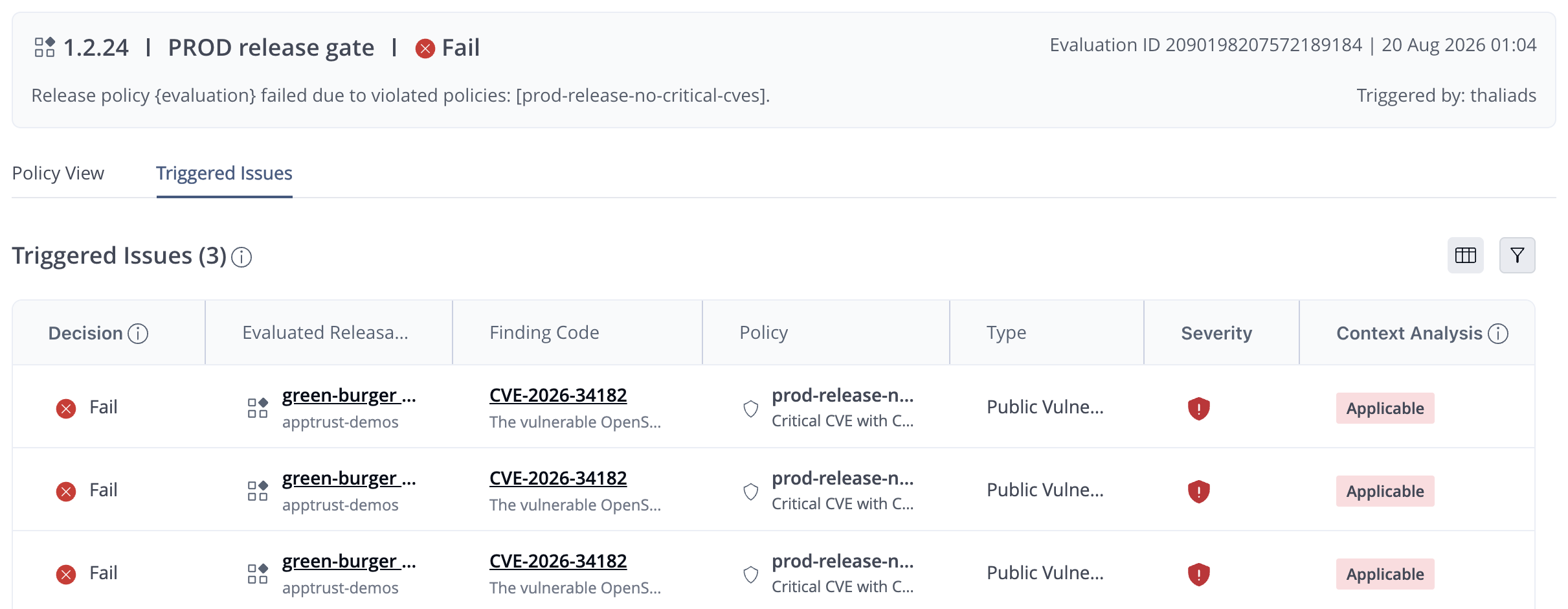
The Triggered Issues table lists the specific violations related to the failure or warning and includes the following information:
- Decision: The result for the releasable on this issue.
- Evaluated Releasable: The version or resource affected.
- Finding Code: An identifier, for example, CVE-2018-1160 or Plaintext API keys.
- Policy: The policy that was evaluated.
- Type: The category of finding (Public vulnerability, Secrets, Malicious packages).
- Severity: The severity level for vulnerabilities (low, medium, high, critical).
- Contextual Analysis: Additional assessment (Applicable, Not Applicable, Undetermined).
Triggered Issues Filter
You can filter the table by:
- Decision (Pass, Fail, Warning)
- Policy name
- Evaluated releasable
- Finding type
- Severity (low, medium, high, critical)
Triggered Issues Details
To view more information about an issue, click the issue in the table. A panel opens and displays vulnerability or evidence information, remediation guidance, fix versions, and contextual analysis.
Updated 27 days ago
Did this page help you?