

Delete a Rule
You can delete a rule only when it is not linked to any policies. Before you delete a rule that is linked to policies, review the relevant policies and unlink them from the rule.
You can delete a rule only when it is not linked to any policies. Before you delete a rule that is linked to policies, review the relevant policies and unlink them from the rule. To unlink a rule from a policy, go to the policy and choose a different rule for that policy.
Tip: You cannot delete the AppTrust out-of-the-box rules.
To delete a rule:
-
In the JFrog Platform, go to AppTrust > Policies > Rules. The list of rules appears.
-
In the list of rules, find the rule you want to delete. If you don’t see it right away, try scrolling down, using the Search, or using the filters.
-
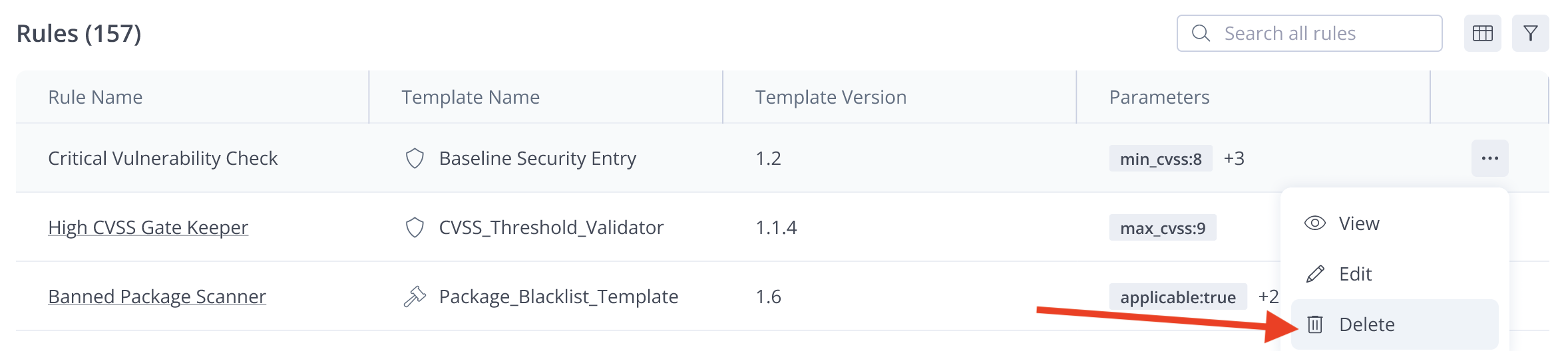
On the right side of the rule, click the More icon (...) and click Delete.
- After viewing the rule details, you can Delete the rule, or Close the panel without making changes. If you choose to Delete the rule, you first need to unlink the rule from the policies listed.
Updated about 1 month ago