

View Repository Policy Evaluations
Each time you move or copy a repository, AppTrust evaluates each policy that has that repository in its scope.
Each time you move or copy a repository, AppTrust evaluates each policy that has that repository in its scope. According to the evaluation result, an action such as Pass, Fail, Warning, or Error will be taken. You can view all the evaluations in the Evaluations page.
To view repository policy evaluations:
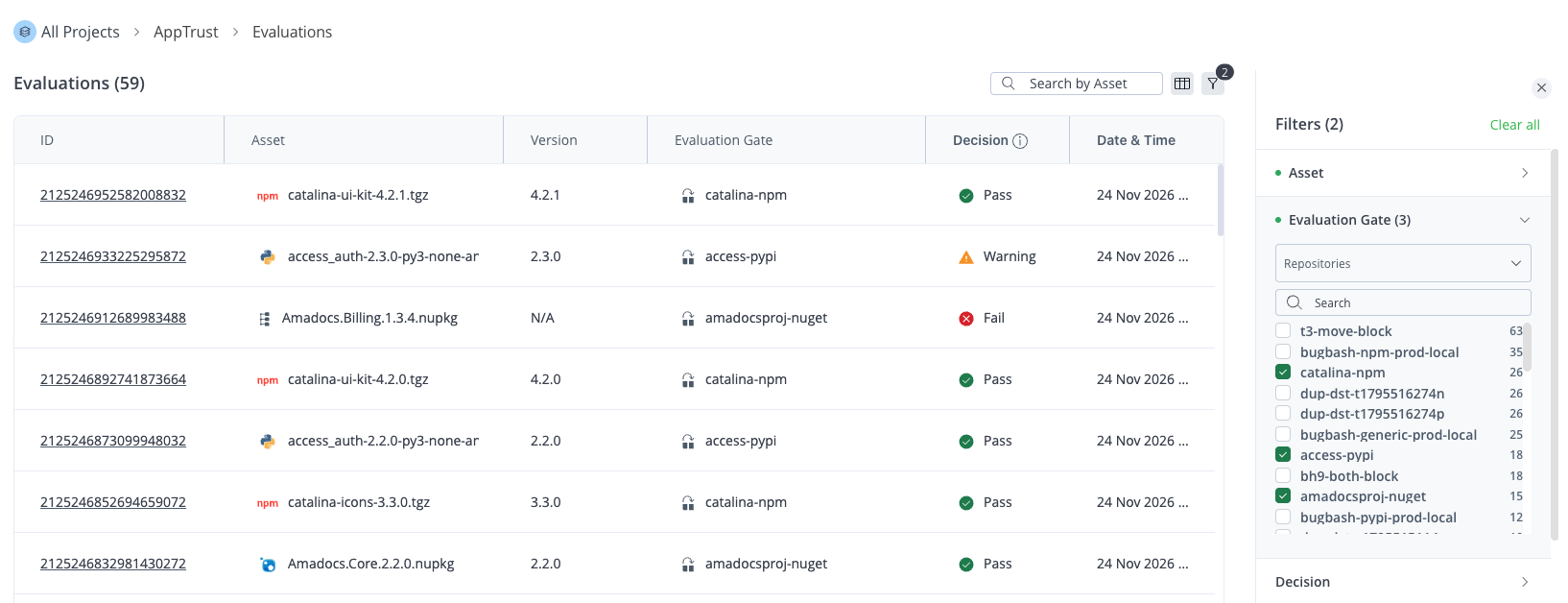
- In the JFrog Platform, go to AppTrust > Evaluations. The general Evaluations page opens.
- Click the Filter icon in the upper right to open the filter.
- In the filter, choose Evaluation Gate > Repositories. The Evaluations table now displays evaluations only for repositories. You can further refine the display by choosing specific repositories from the list and adding additional filter criteria such as Asset, Decision, etc.
What’s Next?
To learn more about the Evaluations table, see View All Evaluations.
Updated 30 minutes ago
Did this page help you?