

Add and Remove Federation Members
Add repositories to or remove members from a Federation in JFrog Artifactory.
Add new repositories to an existing Federation or remove members from it. Admins of any Federation member can remove themselves and other members from the Federation.
Who can perform this task: Platform Administrators
This topic covers the following tasks:
Add Members to a Federation
Add a new repository to an existing Federation as a member.
To add members to an existing Federated repository:
- In the Administration module, click Repositories.
- Use the Repositories filter to display Federated repositories.
- Select the Federated repository from the list and click the Federation tab.
- Click Add Repository.
- In the Add Federated Repositories dialog, add members using one of these tabs:
-
Deployments (recommended): If you have JFrog Mission Control installed, select an existing repository on a connected remote JPD. If a repository with the same key doesn't exist on the remote JPD, click Create new to create and add it.
-
URL: If the remote JPD isn't available on the Deployments tab, manually add the full repository URL using the syntax:
<BASE_URL>/artifactory/<repository_name>. If the repository doesn't exist on the remote JPD, it is created automatically.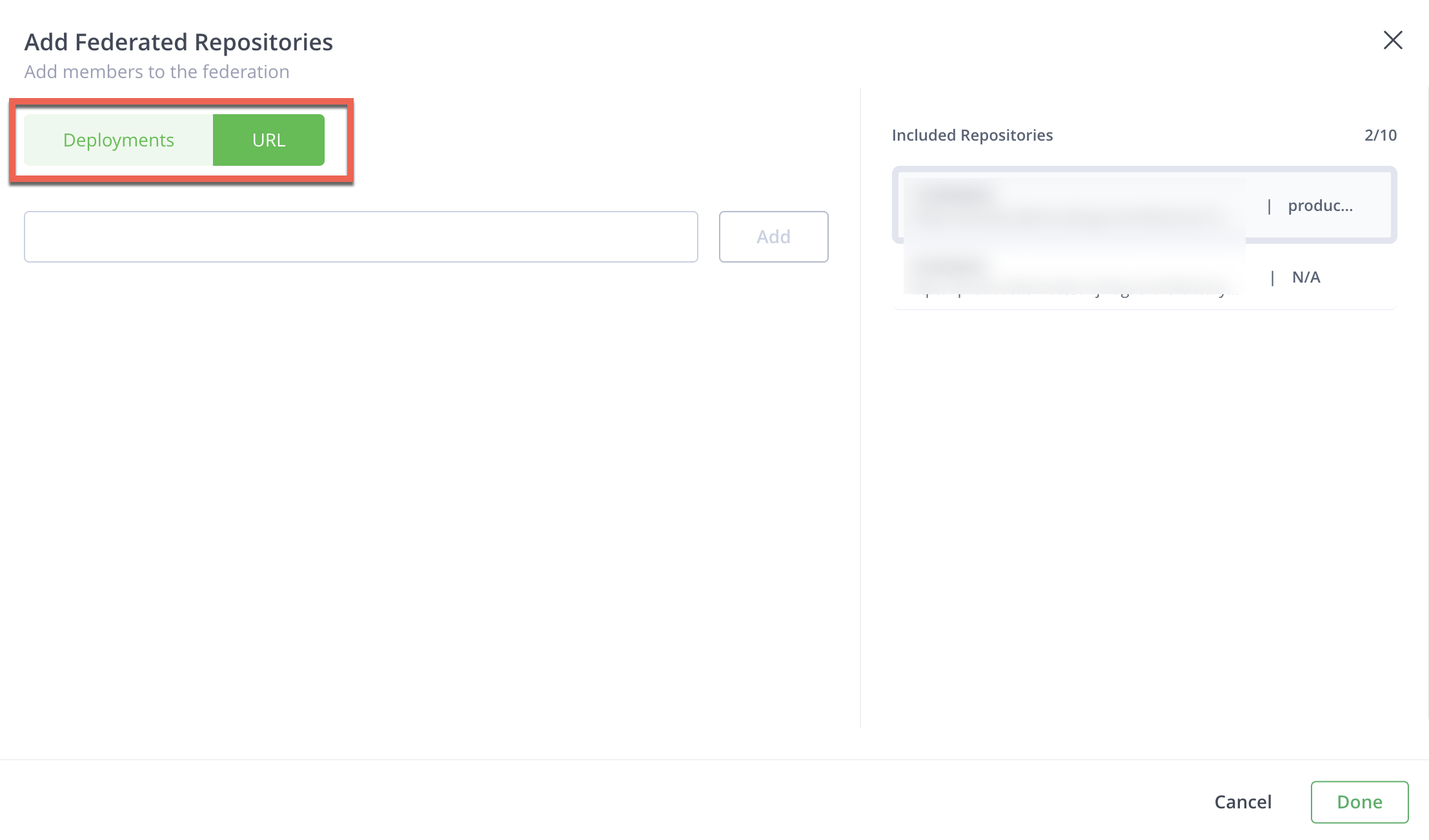
-
- Click Done, then click Save.
To restrict a newly added member to one-way sync instead of full bidirectional Federation, see Configure Receiving-Only Mode.
Remove Members from the Federation
You can remove the initial repository and the Federation continues to function between the remaining Federation members. If the change might only be temporary, consider pausing synchronization on that member instead of removing it.
To remove a member:
-
In the Administration module, click Repositories and use the Repositories filter to display Federated repositories.
-
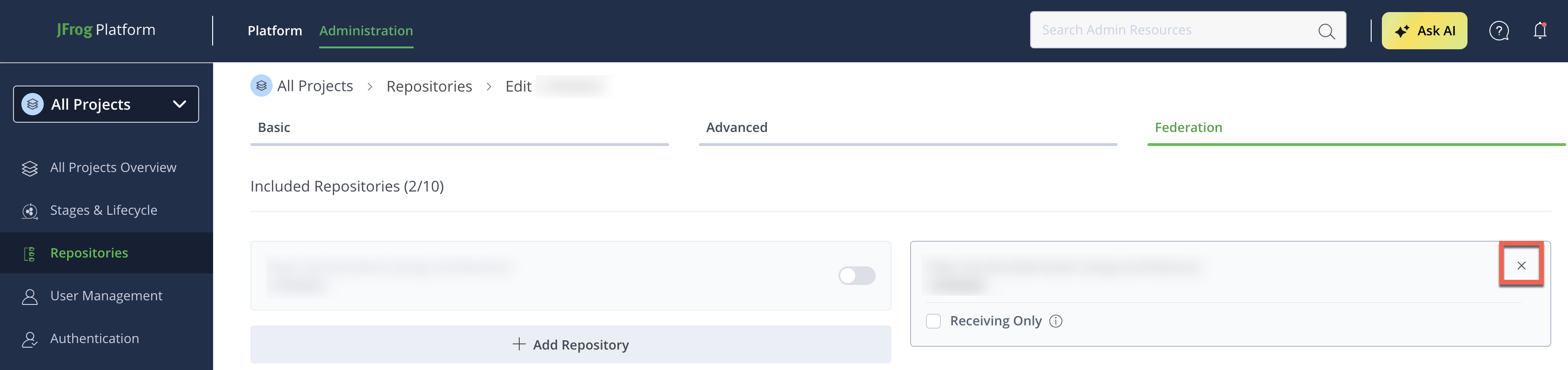
Select the Federation repository from the list and click the Federation tab.
-
Click the x located on the top right of the repository to be removed.
-
Click Save.
Removal Behavior: Legacy Service versus RTFS
There is an important difference in removal behavior when a different member of the same Federation is offline:
| Service | Behavior when a member is offline |
|---|---|
| Legacy service | If member A tries to delete member B, the system allows the removal even though member C is offline. When member C comes back online, it is not aware of the removal of member B. Manual changes are required on the target JPD. |
| Artifactory Federation Service (RTFS) | You cannot remove a member from the Federation if any other members are offline. You must first remove the offline members. |
Frequently Asked Questions
This section provides answers to frequently asked questions.
FAQs
Q: Can I remove the repository I originally created the Federation from?
A: Yes. You can remove the initial repository, and the Federation continues to function between the remaining members.
Q: What happens if I remove a member while another member is offline?
A: It depends on the service. With the legacy service, the removal succeeds and the offline member later comes back unaware of it, requiring manual cleanup. With RTFS, you can't remove any member until all offline members are removed first. See Removal Behavior.
Q: How do I add a member repository that doesn't exist yet on the remote JPD?
A: Use the Deployments tab when the remote JPD is available, and click Create new to create and add a repository with the same key. If the remote JPD isn't available on the Deployments tab, use the URL tab and enter the full repository URL. The repository is created automatically if it doesn't exist.
Q: Who can remove a member from the Federation?
A: Admins of any Federation member can remove themselves or other members from the Federation, not just the administrator of the repository where the Federation was created.
Related Topics
Updated 3 months ago