

Configure Receiving-Only Mode
Set a Federation member to receiving-only mode in JFrog Artifactory for unidirectional sync.
Configure a Federation member to operate in receiving-only (unidirectional sync) mode. When selected, the repository receives events and binaries from other Federation members but cannot send. This option maintains a central source of truth while enabling access to artifacts in distributed environments. It serves as a more reliable, highly scalable replacement for legacy Push Replication by enforcing strict hub-and-spoke architectures with clear ownership, minimizing storage costs and network traffic by preventing unwanted artifact replication from remote spokes back to the central hub.
Note
Receiving-only mode is not equivalent to legacy push replication and doesn't provide a write-isolated copy of artifacts on the spoke. Push replication allows local uploads on the target while preventing changes from replicating back to the source. Receiving-only federation stops outbound Federation events from the receiving-only member, but it doesn't block local writes on that member. Local changes aren't synchronized anywhere, so JFrog recommends treating the receiving-only member as read-only. For more information, see Best Practice: Keep Receiving-Only Members Read-Only. If you need local writes on a spoke JPD, use bidirectional federation members and control write access through permissions and repository layout instead of receiving-only mode.
Primary Benefits
- Governance and compliance: Keep satellite or third-party sites in a receive-only posture.
- Operational simplicity: Use federation's streaming, auto-healing, and observability instead of the job-scheduling overhead of replication.
- Deterministic hub-and-spoke: Enforce source-to-target flows with clear ownership, minimizing storage costs and network traffic by preventing unwanted artifact replication from remote spokes back to the central hub.
How Transmission Mode Works
bidirectional(default): members send and receive. See Mirror Modes for more on bidirectional and receiver behavior.receiver: the member is receive-only within that repository's federation. Outbound federation processing and Full Sync initiation are skipped for the receiver, and Federation configuration changes are rejected on that member. Local artifact writes aren't blocked, but they aren't synchronized to other members either, so treat the repository as read-only. Monitoring (Federation Status, connection states) reflects Receiving Only semantics for that member.
Who can perform this task: Platform Administrators
Prerequisites:
- The Artifactory Federation Service (RTFS) is installed and connected on the source and target JPDs
- Both JPDs are on supported versions with network reachability for API and binaries
- Admin permissions on the source and minimal required permissions on the target
- A trust or token option chosen. See Trust and Token Options.
Trust and Token Options
- Option A (recommended): Service Trust Pairing used to issue a receiving-only master token for enforcement. This is recommended when the target site must not be capable of pushing content to the source for governance or compliance reasons. Because the master token itself is receiving-only, it enforces restrictions across the entire site for the pairing. The target JPD's admin can't build federations that push content back to the source, and all federations built from source to target using this pairing are receiving-only on the target side.
- Option B: A regular master token with full permissions works functionally but doesn't enforce receiving-only posture at the trust boundary. This is typically used when you want the flexibility to establish both bidirectional and unidirectional federations between the same two JPDs, selecting unidirectional per repository (by setting the member mode to receiver). There's no site-level enforcement in this case. Enforcement relies entirely on the repository configuration.
This topic covers the following tasks:
- Create a New Federated Repository with Receiver Members
- Update an Existing Federated Repository to Receiver Mode
- Set Up Unidirectional Sync Using the REST API
Create a New Federated Repository with Receiver Members
For general repository creation steps not specific to receiver members, see Create a Federated Repository.
To create a Federated repository with receiving-only members:
-
In the Administration module, click Repositories > Create a Repository > Federated.
-
Fill in the Basic tab with the required fields (Repository Key, Package Type).
-
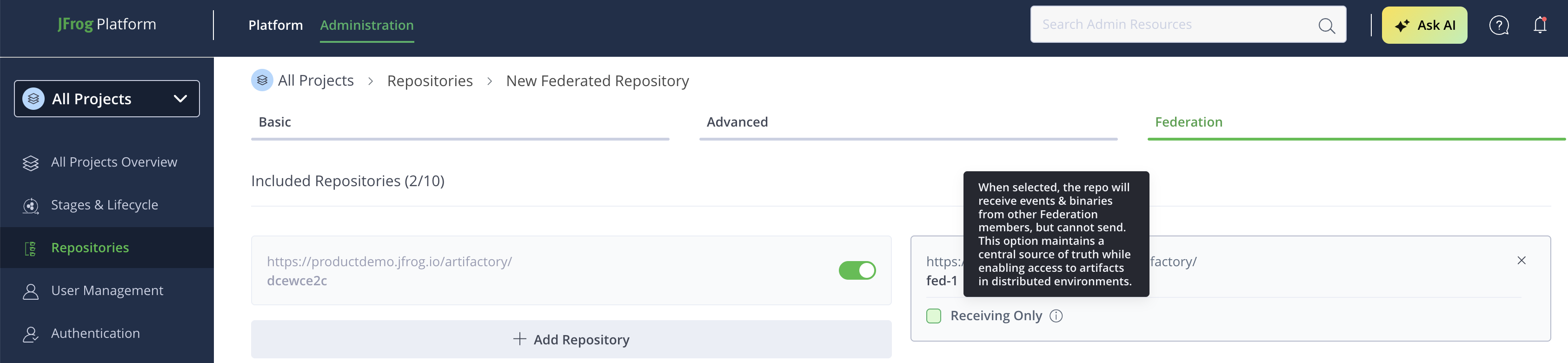
In the Federation tab, the current repository (local) is displayed.
-
Click Add Repository to add Federation members.
-
In the Add Federated Repositories dialog, enter the target member URL in the format:
<PLATFORM_URL>/artifactory/<REPO_KEY>. -
Click Done to add the member.
-
For each added member, a Receiving Only checkbox appears. Check this box to set the member to receiver mode (unidirectional sync).
-
Click Create Federated Repository to save the repository.
Update an Existing Federated Repository to Receiver Mode
To add or remove members from the Federation first, see Add and Remove Federation Members.
To set an existing Federation member to receiving-only mode:
- In the Administration module, click Repositories.
- Find and click on the Federated repository you want to modify.
- Scroll to the Federation tab.
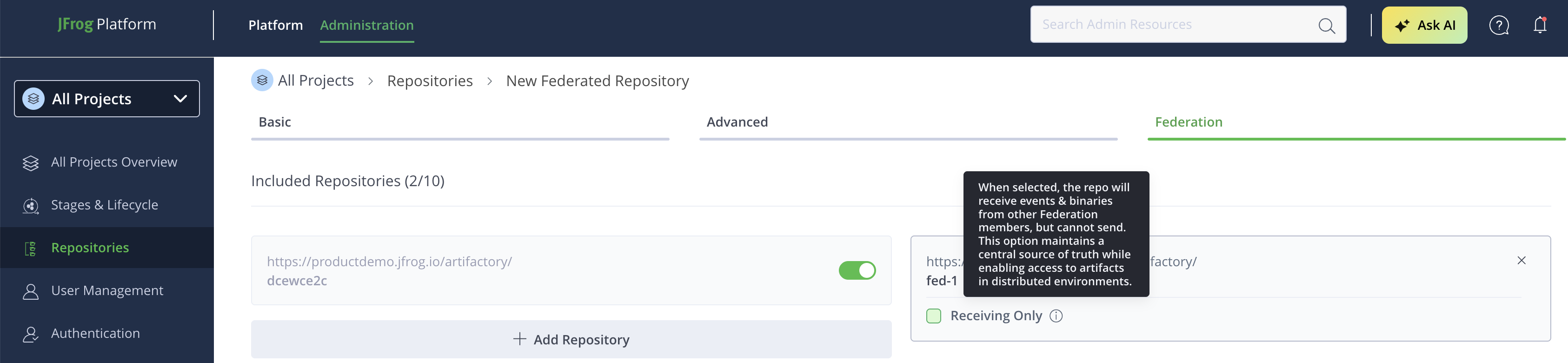
- For each linked member (non-current repository), locate the Receiving Only checkbox:
-
Check the checkbox to set the member to receiver mode.
-
Uncheck to revert to bidirectional mode.
-
- Click Save to apply changes.
Note
A tooltip on the Receiving Only checkbox explains: "When selected, the repo will receive events & binaries from other Federation members, but cannot send. This option maintains a central source of truth while enabling access to artifacts in distributed environments." Treat the federated repository on that JPD as read-only. See Best Practice: Keep Receiving-Only Members Read-Only.
Set Up Unidirectional Sync Using the REST API
Warning
Unidirectional Federation setup requires completing Steps 1 through 3 in sequence. Each step builds on the previous one. Do not stop after Step 1. Federation will not function correctly until you complete the health check in Step 3B.
| Step | Action | Outcome |
|---|---|---|
| 1 | Establish Trust | Receiving-only master token created |
| 2 | Create/Update Repository | Federated repository with receiver member configured |
| 3A | Initial Sync | Artifacts synchronized from source to target |
| 3B | Validate Health | Confirm federation is operational |
Step 1: Establish Receiving-Only Trust with Service Trust Pairing
Skip to Step 2 only if you've chosen Option B (regular master token with full permissions). For governance and compliance use cases, complete this step using Option A.
1A. Generate a read-permission pairing token on the source JPD:
POST <JPD_URL>/artifactory/api/v1/service_trust/pairing/federated-repo/r
Authorization: Bearer <ADMIN_OR_SCOPED_TOKEN>
Response (example):
{ "pairing_token": "<PAIRING_TOKEN>", "expires_in": 300 }1B. Exchange the pairing token on the target JPD to obtain a receiving-only master token:
PUT <JPD_URL>/artifactory/api/v1/service_trust/pairing/federated-repo/r
Authorization: Bearer <ADMIN_OR_SCOPED_TOKEN>
Content-Type: application/json

{ "pairing_token": "<PAIRING_TOKEN>" }
Where:
<JPD_URL>: The base URL of the source or target JPD for the request<ADMIN_OR_SCOPED_TOKEN>: An admin or scoped access token for the JPD you're calling<PAIRING_TOKEN>: The short-lived pairing token generated in Step 1A
Note
If the pairing token was created against
/federated-repo/*instead of/federated-repo/r, you can alternatively exchange it withPUT <JPD_URL>/artifactory/api/v1/service_trust/pairing/federated-repo/*. The two are equivalent, just matched to how the token was generated in Step 1A.
The target now holds a receiving-only master token suitable for creating receiver-restricted membership with the source.
Step 2: Create or Update the Federated Repository on the Source
2A. Create a federated repository with the target as receiver:
PUT <JPD_URL>/artifactory/api/repositories/<SOURCE_REPO_NAME>
Content-Type: application/json
Authorization: Bearer <ADMIN_OR_SCOPED_TOKEN>

{
  "rclass": "federated",
  "packageType": "generic",
  "members": [
    {
      "url": "<MEMBER_URL>/artifactory/<TARGET_REPO_NAME>",
      "mode": "receiver"
    }
  ]
}
For example:
{
  "rclass": "federated",
  "packageType": "generic",
  "members": [
    {
      "url": "https://target-jpd.example.com/artifactory/libs-release-federated",
      "mode": "receiver"
    }
  ]
}
2B. Update an existing federated repository to set receiver mode:
POST <JPD_URL>/artifactory/api/repositories/<SOURCE_REPO_NAME>
Content-Type: application/json
Authorization: Bearer <ADMIN_OR_SCOPED_TOKEN>

{
  "members": [
    {
      "url": "<MEMBER_URL>/artifactory/<TARGET_REPO_NAME>",
      "mode": "receiver"
    }
  ]
}
Where:
<JPD_URL>: The base URL of the source JPD where you run the request<SOURCE_REPO_NAME>: The key of the Federated repository on the source JPD<ADMIN_OR_SCOPED_TOKEN>: An admin or scoped access token for the source JPD<MEMBER_URL>: The base URL of the target JPD<TARGET_REPO_NAME>: The key of the repository on the target JPD
Step 3: Initial Synchronization and Verification
3A. Automatic Full Sync on create/update: On repository create/update, Artifactory triggers a Full Sync automatically from the source to the target (receiver). No manual Full Sync call is required for initial synchronization. The reverse direction (target → source) is not possible in receiver mode.
3B. Validate health (required): This step confirms your Unidirectional Federation is fully operational. Don't consider setup complete until you verify these health checks pass.
Check repository connection state:
GET <JPD_URL>/artifactory/api/federation/status/connectionStates/<SOURCE_REPO_NAME>Check JPD-wide federation summary on the Federation Dashboard or with the same API family:
GET <JPD_URL>/artifactory/api/federation/status/stateSummaryWhere:
<JPD_URL>: The base URL of the JPD you're checking<SOURCE_REPO_NAME>: The key of the Federated repository to check
Expected results:
| Check | Expected value |
|---|---|
| Target member mode | Receiving_Only |
| Connection status | HEALTHY |
| Outbound processing | Skipped (as expected for receiver) |
If any checks fail, see Receiving-Only Troubleshooting.
Best Practice: Keep Receiving-Only Members Read-Only
Treat the federated repository on a receiving-only member as a read-only copy of the source. Let content arrive only through Federation from the sending member, and perform all artifact changes on the sending (bidirectional) member.
Recommended, not enforced
Artifactory doesn't block local artifact changes on a receiving-only member. Uploads, deletions, and other local write operations can succeed on that JPD. Because they succeed silently, follow this best practice to avoid content drift between members.
Why This Is the Recommended Practice
Receiving-only members send nothing back to the Federation. Any artifact you upload, delete, or modify locally on a receiving-only member stays only on that JPD and is never synchronized to the other members.
Local changes on a receiving-only member lead to the following problems:
- The target stops matching the source. The whole purpose of unidirectional sync is a target that's a faithful copy of the source. Local changes break that guarantee.
- Artifact and binary mismatch. The receiving-only member can hold artifacts that don't exist on the sender, or versions of artifacts that differ from the sender.
- Confusing sync state. Federation monitoring reports the member as synchronized because Federation events are flowing normally, even though local content differs from the source.
- Changes can disappear. A locally uploaded or deleted artifact isn't protected by Federation. A subsequent Full Sync reconciles the member against the source, so locally added artifacts may be removed and locally deleted artifacts may be restored.
Operations to Avoid on a Receiving-Only Member
Avoid the following operations on the federated repository of a receiving-only member:
- Uploading (deploying) artifacts
- Deleting artifacts
- Copying or moving artifacts into the repository
- Changing artifact properties
- Promotions or any other workflow that writes into the repository
Reading from a receiving-only member is always safe. Downloading artifacts, resolving dependencies, and copying artifacts out of the repository to a local or bidirectional repository don't affect Federation consistency.
If You Need Local Writes on a Spoke
If a spoke JPD must accept local uploads, don't use receiving-only mode for that repository. Instead, use one of the following options:
- Use bidirectional Federation members and control who can write through permissions and repository layout.
- Keep a separate local (non-federated) repository on the spoke for locally produced artifacts, and use the federated repository only for content that comes from the source.
To prevent local writes technically rather than by convention, restrict write permissions on the receiving-only federated repository so that only the Federation itself introduces changes. For more information, see Federation Permissions.
Changes That Are Still Restricted
The read-only recommendation applies to repository content. The following restrictions remain enforced on a member that's configured as receiving-only:
| Action on the receiving-only member | Behavior |
|---|---|
| Sending Federation events to other members | Skipped. The member only receives. |
| Changing Federation configuration, such as adding, removing, or updating members | Rejected with 409 Conflict and the message Can't perform changes when local member is in receiver mode. |
| Initiating a Full Sync | Rejected. Full Sync is initiated from the sending member. |
| Running configuration sync | Skipped. Configuration is driven by the sending member. |
Manage the Federation, including membership and repository configuration, from the source (sending) JPD.
Docker and OCI Repositories on Receiving-Only Members
When a Docker or OCI tag is overwritten (for example, when latest is re-pushed on the hub and replicated to a spoke), Artifactory schedules an automatic orphan-layer cleanup job on each member where the manifest changes. Orphan layers are blobs that belonged to a previous manifest and are no longer referenced by the current tag.
Because local deletion isn't blocked on a receiving-only member, this cleanup job removes unreferenced layers on the spoke as it does on any other member. No action is required.
Plan tag overwrites and other write operations on the bidirectional (sender) member. Receiving-only spokes consume the replicated result, and each member cleans up its own orphan layers.
Log messages in earlier versions: In Artifactory versions that blocked local deletions on receiving-only members, the orphan-layer cleanup job logged repeated failures similar to the following:
Failed in beforeDelete due to exception
Direct delete on federated repository '<REPO_KEY>' is blocked: local member is in receiver mode
These entries typically appeared with activity group DOCKER_TAG_ORPHAN_LAYER_CLEANUP or in Federation mirror sync logs (Error while handling mirror sync response). They indicated the delete block, not a broken Federation pairing or a permission problem. Because the block was removed, these messages no longer appear. If you still see them, upgrade to a version that includes the change.
For more information about Docker orphan-layer cleanup, see Deletion and Cleanup of Docker Tags and Repositories.
Frequently Asked Questions
This section provides answers to frequently asked questions.
FAQs
Q: Does receiving-only mode make the repository read-only on the member JPD?
A: No, not technically. Artifactory doesn't block uploads, deletions, or other local writes on a receiving-only member. JFrog recommends that you treat the repository as read-only, because local changes are never synchronized to the other members and cause the target to drift from the source.
Q: What happens if I upload an artifact directly to a receiving-only member?
A: The upload succeeds on that JPD, but nothing is sent to the other Federation members. The artifact exists only on that member, Federation still reports the member as synchronized, and a later Full Sync may remove the artifact when it reconciles the member against the source.
Q: What happens if I delete an artifact directly on a receiving-only member?
A: The delete succeeds locally and isn't propagated to the other members. The source still holds the artifact, so the member is now missing content that the source has, and a later Full Sync may restore it.
Q: How do I prevent users from writing to a receiving-only member?
A: Restrict write permissions on the federated repository on that JPD so that only Federation introduces changes. Receiving-only mode alone doesn't prevent writes. For more information, see Federation Permissions.
Q: Can I mix bidirectional and receiving-only members in the same federation?
A: Yes. You can configure some members as bidirectional and others as receiving-only in the same federated repository. Apply the read-only best practice to each member configured as receiving-only, regardless of how other members are configured.
Q: Can I copy or download artifacts from a receiving-only federated repository?
A: Yes. Read operations are always safe. You can download artifacts and copy them out to a local repository or a bidirectional federated repository without affecting Federation consistency. Avoid a move, because a move deletes the artifact from the receiving-only member.
Q: Can I perform promotions or other write operations on a receiving-only federated repository?
A: They aren't blocked, but avoid them. A promotion that writes into the receiving-only federated repository isn't replicated to the other members. Target promotions at bidirectional Federation members or at local repositories instead.
Q: What is still blocked on a receiving-only member?
A: Sending Federation events, initiating a Full Sync, and changing Federation configuration such as adding, removing, or updating members. Configuration changes are rejected with Can't perform changes when local member is in receiver mode. Manage the Federation from the source JPD.
Q: How is receiving-only federation different from legacy push replication?
A: Push replication allows local writes on the target and keeps those changes isolated from the source as a supported behavior. Receiving-only federation only stops outbound Federation events. Local writes are possible but unsupported in practice, because Full Sync reconciles the member against the source. Use bidirectional federation with permissions if you need local writes on a spoke that don't replicate to the hub.
Q: Why do I see Direct delete on federated repository ... is blocked: local member is in receiver mode in logs?
Direct delete on federated repository ... is blocked: local member is in receiver mode in logs?A: This message came from the delete block that applied to receiving-only members in earlier versions, most often triggered by Docker or OCI orphan-layer cleanup. The block was removed, so the message no longer appears. If you still see it, upgrade to a version that includes the change. See Docker and OCI cleanup behavior.
Related Topics
Updated about 2 months ago