

Monitoring Connection States
Inspect per-connection synchronization health between Federation members in real time.
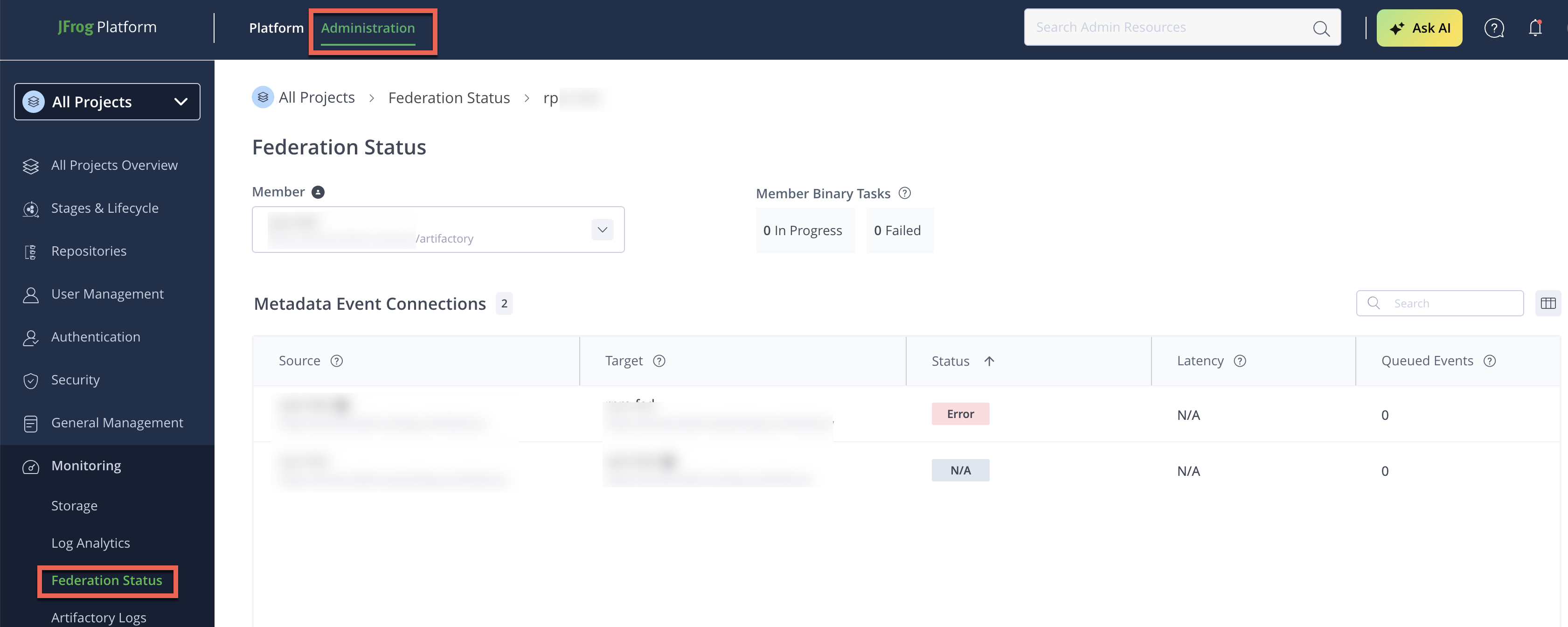
The Connection States view shows synchronization health for each member-to-member connection in a Federated repository.
Access Connection States
To access Connection States:
- Go to Federation Dashboard.
- Click a repository row in the Federations table.
- Review member-level and connection-level status.
Connection States Layout
Members List
The following table lists the columns in the Members List.
| Column | Description |
|---|---|
| Member | Member URL or JPD identifier |
| Status | Most severe outgoing connection status from that member |
Connection Details
The following table lists the columns in the Connection Details table.
| Column | Description |
|---|---|
| Source | Source member |
| Target | Target member |
| Latency | Current synchronization latency |
| Queued Events | Number of pending events |
Interpreting States
Healthy
- Low latency.
- Queue depth near zero.
- Events process continuously.
Delayed
- Queue accumulation
- Latency increasing
- Usually transient under load
Error
- Connection failure between source and target.
- Common causes: network failures, unavailable target member, authentication and token issues.
- Recovery may require auto-healing, manual recovery, or Full Sync.
Pending Full Sync
- Connection requires Full Sync reconciliation before normal processing.
- A Full Sync is performed during initialization when a Federation is created, or to restore synchronization when regular sync and auto-healing are insufficient (for example, purged events that are no longer available).
Full Sync Running
- The connection between the source and target is currently undergoing the Full Sync procedure.
Disabled
- The target member is disabled. No events are sent to it.
- This is expected after a member has been removed from the Federation.
Unsupported
- The target is running a version of Artifactory that does not support Federation Status.
- Upgrade the target member to a supported version to restore status reporting.
Receiving Only
- The member is configured in receiver mirror mode. It receives events but does not send any. Local writes aren't blocked, but they aren't synchronized to other members, so treat the repository as read-only.
- This is expected behavior for a receiving-only member, not an error condition.
- See Configure Receiving-Only Mode.
N/A
- Status cannot be determined because the source or target is unreachable.
- Verify network connectivity and that the member's Artifactory instance is running.
Note
These labels are simplified dashboard-level statuses. For the exact mapping to underlying RTFS member states (
HEALTHY,ERROR_GENERIC,ERROR_INACTIVE,ERROR_OUT_OF_SYNC,PENDING_FS,FULL_SYNC_PREPARING,FULL_SYNC_RUNNING,READ_ONLY), see Dashboard Status Mapping in the Member State Reference.
APIs
The following table lists API endpoints for connection states.
| Endpoint | Description |
|---|---|
ui/federation/status/connectionStates/{repoKey} | Connection states for a repository |
ui/federation/status/stateList | Full state list |
ui/federation/status/stateSummary | State summary tiles |
Frequently Asked Questions
This section provides answers to frequently asked questions about Connection States.
FAQs
Q: How do I access the Connection States view?
A: Go to the Federation Dashboard, click a repository row in the Federations table, then review the member-level and connection-level status. See Access Connection States for details.
Q: What is the difference between a Delayed and an Error connection state?
A: Delayed means the queue is accumulating and latency is increasing, usually transient under load. Error means the connection has failed and may require auto-healing, manual recovery, or a Full Sync.
Q: Why does a connection show a Disabled state?
A: Disabled means the target member is disabled and no events are being sent to it. This is expected after a member has been removed from the Federation.
Q: What does a Receiving Only connection state mean?
A: Receiving Only means the member is configured in receiver mirror mode: it receives events but doesn't send any. This is expected behavior, not an error. Local writes on that member aren't blocked, but they're never synchronized to the other members, so JFrog recommends keeping the repository read-only. See Best Practice: Keep Receiving-Only Members Read-Only.
Q: How do dashboard connection states map to RTFS member states?
A: Dashboard labels are simplified statuses. See Dashboard Status Mapping in the Member State Reference for the exact mapping to states like HEALTHY and ERROR_GENERIC.
Related Topics
Updated about 2 months ago