

LuaRocks Repositories
Configure LuaRocks repositories in JFrog Artifactory to upload and install Lua packages.
LuaRocks is the package manager for the Lua programming language. It manages Lua modules as rocks and rockspecs, installs them into local rocks trees, and resolves dependencies from remote rocks servers. JFrog Artifactory supports LuaRocks repositories as a central location to host, proxy, and resolve LuaRocks packages for your organization. For more information, see LuaRocks documentation.
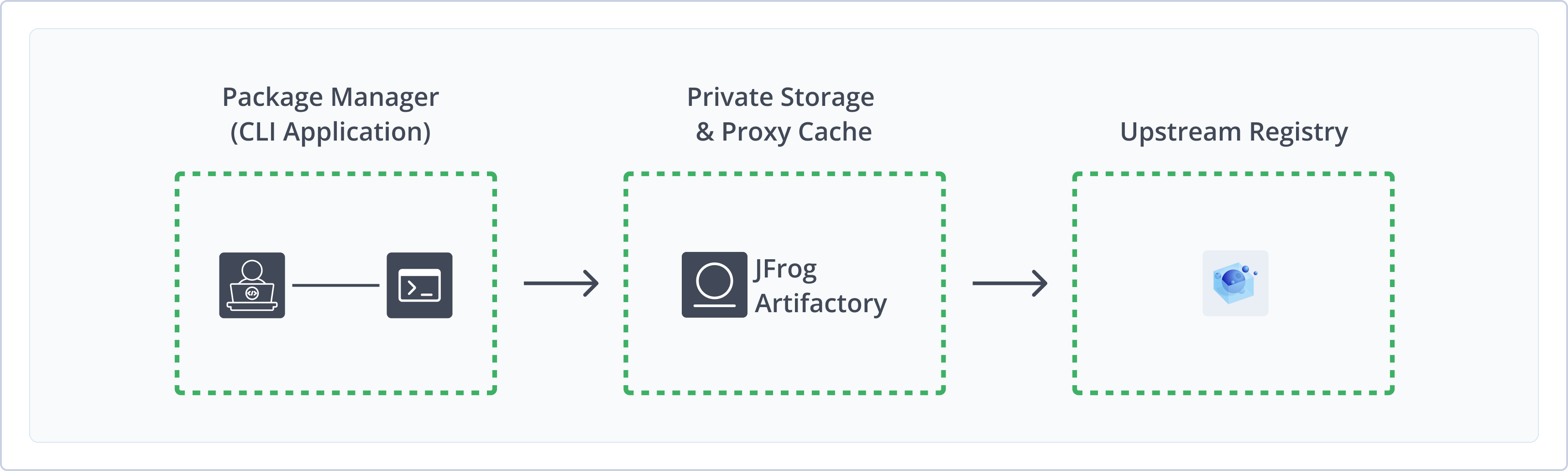
Artifactory fully supports LuaRocks repositories, including the following capabilities:
- Unified Repository Management: Consolidate rocks and rockspecs in Artifactory as a single source of truth. Set up secure local repositories, access cached versions of the public LuaRocks registry, and create a single access point for all sources with virtual repositories.
- Automated Manifest Management: Artifactory maintains the manifest index required by the LuaRocks client, so you don't need to run
luarocks-admin make-manifestmanually after each upload. - Robust Metadata Capabilities: Calculate metadata for rocks and rockspecs hosted in Artifactory local repositories to enable package browsing and search.
- Support for the LuaRocks CLI: Use the native
luarocksclient to configure, upload, and install packages against Artifactory local, remote, virtual, Smart Remote, and Federated repositories. - Secure Storage: Upload proprietary Lua modules to Artifactory local repositories with fine-grained access control.
- Package Cleanup and Archive: Apply Artifactory cleanup and archive policies to manage retention for LuaRocks packages in your repositories.
Get Started with LuaRocks
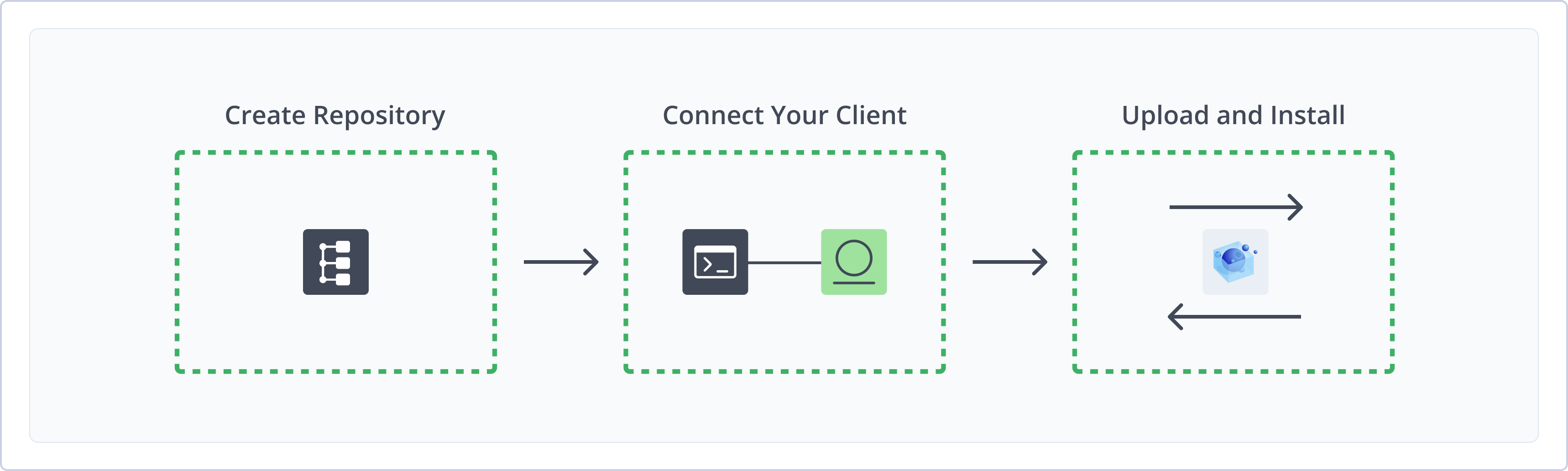
To get started working with LuaRocks repositories in Artifactory, complete the following main steps:
- Create a LuaRocks Repository
- Connect LuaRocks to Artifactory
- Install LuaRocks packages
Create a LuaRocks Repository
This topic describes how to create a LuaRocks repository. This is required before uploading and installing LuaRocks packages. The following repository types are available.
| Repository type | Description |
|---|---|
| Local | Store and share first- and second-party packages with your organization. |
| Remote | Download packages from remote locations, including the public LuaRocks registry at luarocks.org and other Artifactory instances. |
| Smart Remote | Proxy a LuaRocks repository in another Artifactory instance with content synchronization and download statistics. For more information, see Smart Remote Repositories. |
| Federated | Synchronize LuaRocks packages across multiple Artifactory instances. For more information, see Federated Repositories. |
| Virtual | Aggregate remote and local repositories and provide a single URL for multiple repository types. |
For more information on JFrog repositories, see Repository Management.
Prerequisite: You need Admin or Project Admin permissions in Artifactory to create a repository.
To create a LuaRocks repository:
-
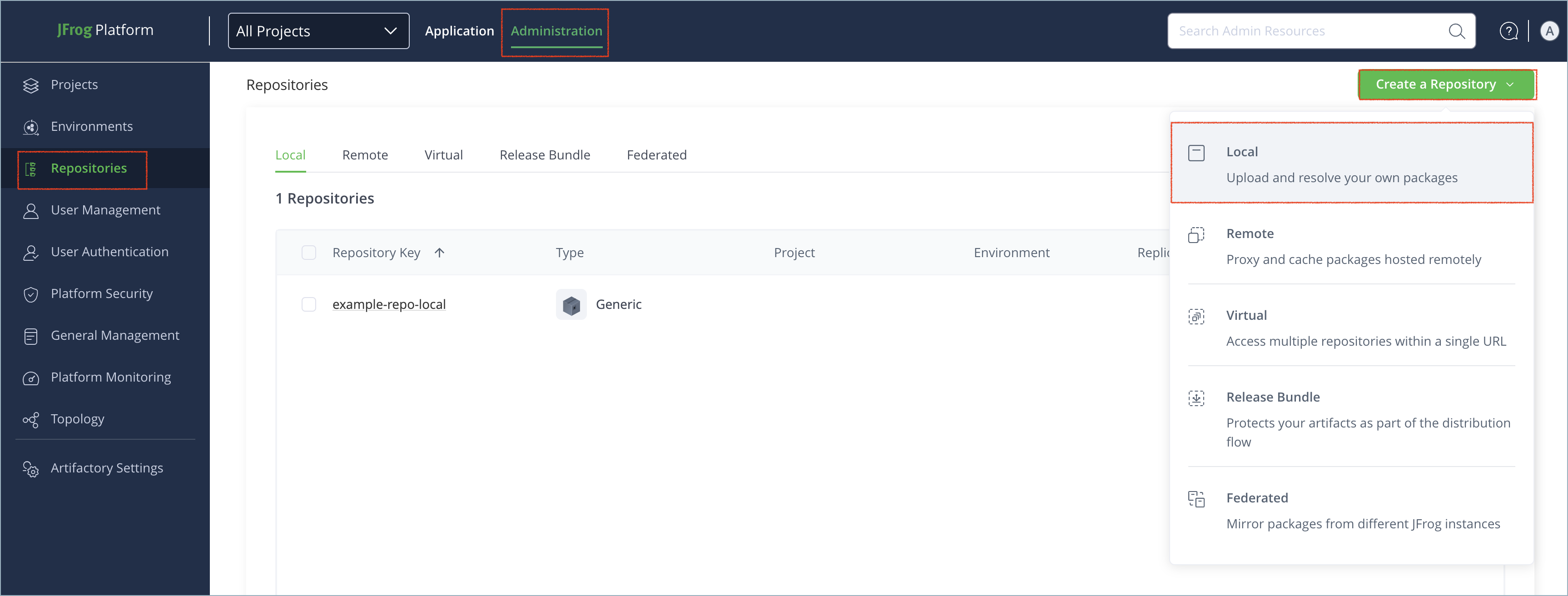
In the Administration tab, click Repositories > Create a Repository.
-
Select the type of repository you want to create: local, remote, federated, or virtual.
To create a Smart Remote repository, select Remote and point the repository URL to a LuaRocks repository in another Artifactory instance. For more information, see Configure a Smart Remote Repository.
-
Select the LuaRocks package type.
-
Configure the required fields for the repository:
- For local repositories, in the Repository Key field, type a meaningful name for the repository. For example,
luarocks-local. For more information on local repositories and their settings, see Local Repositories. - For remote repositories, verify the Repository URL and update as needed. The default remote URL points to the public LuaRocks registry at
https://luarocks.org/repositories/rocks/. To proxy another Artifactory instance, use a Smart Remote repository URL. For more information on remote repositories and their settings, see Remote Repositories. - For federated repositories, configure federation members and synchronization settings. For more information, see Federated Repositories.
- For virtual repositories, select one or more local or remote repository types to include in the virtual repository. For more information on virtual repositories and their settings, see Virtual Repositories.
- For local repositories, in the Repository Key field, type a meaningful name for the repository. For example,
-
Click Create Repository. The repository is created and the Repositories window is displayed.
Connect LuaRocks to Artifactory
To connect LuaRocks to Artifactory, set your rocks_servers to your Artifactory registry URL and add authentication.
Prerequisites:
- LuaRocks installed on your local machine or build agent. For more information, see Installing LuaRocks on GitHub.
- A LuaRocks repository in Artifactory. For more information, see Create a LuaRocks Repository.
To connect LuaRocks to Artifactory:
-
Add the following snippet to
~/.luarocks/config.lua(or~/.luarocks/config-<version>.luaon Lua 5.x), or/etc/luarocks/config.luafor system scope:rocks_servers = { "https://<HOST>/artifactory/api/luarocks/<REPOSITORY_KEY>" }Where:
<HOST>: Your JFrog Platform hostname<REPOSITORY_KEY>: The name of the target repository
For example:
rocks_servers = { "https://company.jfrog.io/artifactory/api/luarocks/luarocks-virtual" }Note
If you run Lua 5.x, create the file as
~/.luarocks/config-<version>.luamatching your Lua version (for example,config-5.5.lua). When a versioned file exists, a plainconfig.luais ignored. Runluarocks config config_filesto see which file LuaRocks reads. -
Configure authentication using a
.netrcfile:-
Add the following snippet to the same LuaRocks config file to force using curl to read authentication from the
.netrcfile:fs_use_modules = false variables = { CURL = "curl -n" } -
Add credentials to your
~/.netrcfile:machine <HOST> login <USERNAME> password <IDENTITY_TOKEN>Where:
<HOST>: Your JFrog Platform hostname<USERNAME>: Your Artifactory username<IDENTITY_TOKEN>: Your Artifactory identity token
For example:
machine company.jfrog.io login jeffry password Random_Token218fwFughbreREAI5847fnf -
Set the permissions on the credentials file:
chmod 600 ~/.netrc
Alternatively, add credentials to the
rocks_serversURL instead of using.netrc:rocks_servers = { "https://<USERNAME>:<IDENTITY_TOKEN>@<HOST>/artifactory/api/luarocks/<REPOSITORY_KEY>" }This method stores the token in plain text, so avoid it on a shared machine.
-
Note
You can also use JFrog Set Me Up to copy the snippet populated with your token and environment. For more information, see Use Artifactory Set Me Up for Configuring Package Manager Clients.
Upload LuaRocks Packages
You can upload LuaRocks packages to local repositories and virtual repositories that include a local repository with a deployment target.
Note
LuaRocks metadata and the manifest index are automatically recalculated when you add, remove, copy, or move rocks and rockspecs in a local repository. The calculation runs asynchronously and may take a short time to complete depending on system load. You can also trigger a full repository re-index from the UI. For more information, see Re-index a LuaRocks Repository.
LuaRocks reads upload settings from ~/.luarocks/upload_config.lua.
To upload a LuaRocks package:
-
Create
~/.luarocks/upload_config.luawith your identity token and server URL:key = "<IDENTITY_TOKEN>" server = "https://<USERNAME>:<IDENTITY_TOKEN>@<HOST>/artifactory/api/luarocks/<REPOSITORY_KEY>"Where:
<IDENTITY_TOKEN>: Your Artifactory identity token<USERNAME>: Your Artifactory username<HOST>: Your JFrog Platform hostname<REPOSITORY_KEY>: The name of the target local or virtual repository
For example:
key = "Random_Token218fwFughbreREAI5847fnf" server = "https://jeffry:[email protected]/artifactory/api/luarocks/luarocks-local"Note
The LuaRocks CLI ignores
Authorization: Bearerand--userand--passwordfor upload. Include credentials in theserverURL as basic authentication. -
Run the following command, passing the rockspec first:
luarocks upload ./<PACKAGE_NAME>-<VERSION>-<REVISION>.rockspecWhere:
<PACKAGE_NAME>: The package name<VERSION>: The package version<REVISION>: The rock revision
For example:
luarocks upload ./lpeg-1.0.2-1.rockspecLuaRocks packs and uploads the matching
.src.rockin the same step. The rockspec must come first.Add
--skip-packto upload only the rockspec. Use--forceto overwrite an existing revision,--signto attach GPG signatures, or--debugto print each HTTP request.
Note
You can also use JFrog Set Me Up to copy the snippet populated with your token and environment. For more information, see Use Artifactory Set Me Up for Configuring Package Manager Clients.
Next steps:
Install LuaRocks Packages
After you connect LuaRocks to Artifactory, use the luarocks install command to install packages.
Install the Latest Version
To install the latest version of a package:
-
Run the following command:
luarocks install <PACKAGE_NAME>Where
<PACKAGE_NAME>is the name of the package. For example:luarocks install lpeg
Install a Specific Version
To install a specific version of a package:
-
Run the following command:
luarocks install <PACKAGE_NAME> <VERSION>Where:
<PACKAGE_NAME>: The name of the package<VERSION>: The version to install
For example:
luarocks install lpeg 1.0.2
Install from a Specific Repository
To install from a specific repository:
-
Run the following command:
luarocks install <PACKAGE_NAME> --only-server="https://<HOST>/artifactory/api/luarocks/<REPOSITORY_KEY>"Where:
<PACKAGE_NAME>: The name of the package<HOST>: Your JFrog Platform hostname<REPOSITORY_KEY>: The name of the target repository
For example:
luarocks install lpeg --only-server="https://company.jfrog.io/artifactory/api/luarocks/luarocks-local"Leave
--only-serveroff when using a virtual repository that should fall back to a remote proxy.
Note
You can also use JFrog Set Me Up to copy the snippet populated with your token and environment. For more information, see Use Artifactory Set Me Up for Configuring Package Manager Clients.
Additional LuaRocks Information
The following topics provide additional information about working with LuaRocks repositories in Artifactory:
- LuaRocks Repository Structure
- Metadata and Package Identification
- LuaRocks Authentication
- Re-index a LuaRocks Repository
LuaRocks Repository Structure
In LuaRocks, a rocks server is an HTTP-accessible directory that contains rock and rockspec files and a manifest index. Artifactory maintains this layout for LuaRocks repositories.
Typical artifacts at the repository root include:
<package>-<version>-<revision>.rockspec<package>-<version>-<revision>.src.rock<package>-<version>-<revision>.<arch>.rock, for examplelinux-x86_64manifestandmanifest-<version>index files
Note
Upload rocks and rockspecs at the repository root. Artifactory uses these files to calculate metadata and serve the manifest required by the LuaRocks client.
Metadata and Package Identification
Artifactory extracts package identity from rock and rockspec filenames and rockspec metadata. Package name, version, and revision populate the Packages view and search results. For more information, see Viewing Packages.
The Packages page is designed for browsing available packages, identifying commonly used versions, and high-level visibility across repositories. It isn't a replacement for the LuaRocks client resolution behavior or manifest semantics.
LuaRocks Authentication
The LuaRocks client doesn't provide interactive authentication prompts for HTTP rocks servers. To authenticate with Artifactory, use one of the following methods:
- Install authentication: Configure
rocks_serversand credentials in your LuaRocks config file (~/.luarocks/config.luaor a versionedconfig-<version>.luaon Lua 5.x). For more information, see Connect LuaRocks to Artifactory. .netrcfile (Unix/Linux): On Unix-like systems, you can store credentials in~/.netrcand setfs_use_modules = falseandvariables = { CURL = "curl -n" }in your LuaRocks config file so curl reads authentication from.netrc.- Upload authentication: Include credentials in the
serverURL in~/.luarocks/upload_config.lua. The LuaRocks CLI doesn't supportAuthorization: Beareror--userand--passwordfor upload. For more information, see Upload LuaRocks Packages.
Re-index a LuaRocks Repository
You can trigger an asynchronous re-index of a local LuaRocks repository from the UI.
To re-index a LuaRocks repository in the UI:
- In the Platform tab, go to Artifactory > Artifacts.
- Select your LuaRocks repository.
- Right-click the repository and select Recalculate Index.
Note
Re-indexing recalculates the manifest and metadata for all rocks and rockspecs in the repository. Use this after bulk imports or repository layout changes.
LuaRocks Limitations in Artifactory
The following are limitations of LuaRocks repositories in Artifactory:
- Remote registry browsing: For remote repositories, only artifacts that have been pulled or uploaded are cached and appear in the Artifacts page for browsing.
- Authentication: The LuaRocks client doesn't prompt for credentials during install. Configure
.netrcor embed credentials in the URL before runningluarocks install. For upload, include credentials in theserverURL inupload_config.lua. For more information, see LuaRocks Authentication. - Version strings: LuaRocks package version strings include a revision suffix, for example
1.0.2-1. Artifactory displays the extracted name and version for browsing, but the LuaRocks client uses the full rock identity during resolution. - Binary rocks: Platform-specific binary rocks must match the client architecture. Source rocks (
.src.rock) and rockspecs are portable across platforms.
Frequently Asked Questions
This section provides answers to frequently asked questions about using LuaRocks repositories with JFrog Artifactory.
FAQs
Q: How do I connect LuaRocks to JFrog Artifactory?
A: Set rocks_servers in your LuaRocks config file (~/.luarocks/config.lua or a versioned config-<version>.lua on Lua 5.x) to your Artifactory LuaRocks API URL and configure authentication with ~/.netrc or credentials in the URL. See Connect LuaRocks to Artifactory.
Q: How do I upload a LuaRocks package to Artifactory?
A: Create ~/.luarocks/upload_config.lua with your server URL and identity token, then run luarocks upload with the rockspec file first. See Upload LuaRocks Packages.
Q: How do I install packages from an Artifactory LuaRocks repository?
A: After connecting your client, run luarocks install <PACKAGE_NAME> or specify a version or --only-server URL. See Install LuaRocks Packages.
Q: Why must upload credentials be in the server URL?
A: The LuaRocks CLI does not support Authorization: Bearer or --user and --password for upload. Include credentials as basic authentication in the server URL in upload_config.lua. See Upload LuaRocks Packages.
Q: What appears in the Artifactory UI for remote LuaRocks repositories?
A: For remote repositories, only artifacts that have been pulled or uploaded are cached and appear in the Artifacts page. See LuaRocks Limitations in Artifactory.
Related Topics
- Connect Your Package Manager to Artifactory
- Use Artifactory Set Me Up for Configuring Package Manager Clients
- Viewing Packages
- Local Repositories
- Remote Repositories
Updated 3 months ago