

Pause and Resume Synchronization
Pause and resume artifact synchronization between Federation members in JFrog Artifactory.
Pause and resume synchronization of the artifacts from your Federated repository to the other Federation members.
Who can perform this task: Platform Administrators
How It Works
When you pause a Federated repository, the other members of the Federation do not synchronize artifacts and metadata with the disabled member until you resume synchronization. If a member has been paused for a long time, you may need to trigger a Full Sync after resuming to catch up on missed events.
Pause or Resume Synchronization
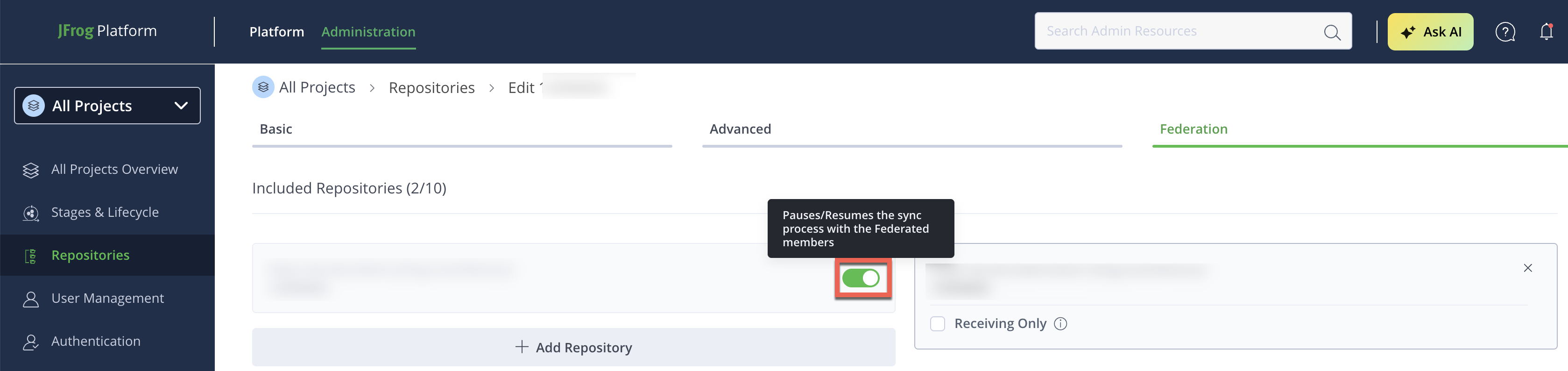
To pause or resume synchronization:
-
In the Administration module, click Repositories.
-
Use the Repositories filter to display Federated repositories.
-
Select the Federated repository from the list and click the Federation tab.
-
Use the pause/resume toggle switch next to the relevant Federation member.
To remove a member permanently instead of pausing it, see Add and Remove Federation Members.
Frequently Asked Questions
This section provides answers to frequently asked questions.
FAQs
Q: What happens to artifacts on other members while a member is paused?
A: Other Federation members don't synchronize artifacts or metadata with the disabled member until you resume synchronization. See How It Works.
Q: Do I need to do anything special to resume synchronization?
A: No. Use the same pause/resume toggle switch on the Federation tab to resume — no additional configuration is required.
Q: Will pausing and resuming cause me to lose synchronization progress?
A: Not necessarily, but if a member is paused for an extended period, you may need to trigger a Full Sync afterward to catch up on any missed events.
Related Topics
Updated 3 months ago