

Push Configuration to Federation Members
Push an updated repository configuration to out-of-sync Federation members in JFrog Artifactory.
Manually push an updated configuration to a target Federation member when members are out of sync. This can occur due to network failures or changes to your Federation members.
Who can perform this task: Platform Administrators
Using the Platform UI
To manually push an updated configuration to a target Federation member:
-
In the Administration module, click Repositories.
-
Use the Repositories filter to show Federated repositories.
-
Select the relevant Federated member, and from the Actions menu, select Push Configuration.
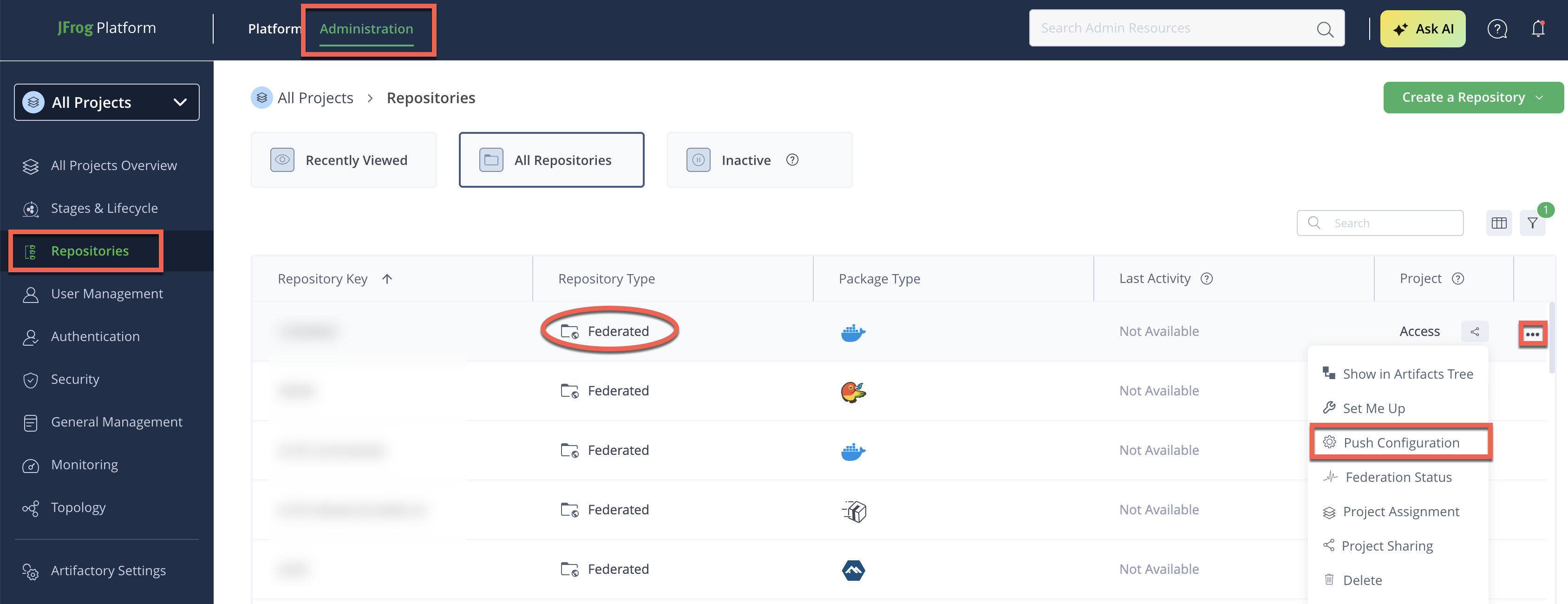
Check sync status on the Federation Dashboard after pushing configuration.
Using the REST API
To push configuration using the REST API:
-
Run the Synchronize Federated Member Configuration REST API:
POST http://localhost:<PORT>/artifactory/api/federation/configSync/<REPOSITORY_KEY>Where:
<PORT>: The port number of your Artifactory endpoint<REPOSITORY_KEY>: The key of the Federated repository whose configuration you want to synchronize
For example:
POST http://localhost:8081/artifactory/api/federation/configSync/libs-release-federated
How This Works
Repository configuration for Federated repositories isn't stored in the Artifactory Federation Service (RTFS) database. It lives in Access / Platform Config, a distributed key-value store shared across the JFrog Platform. RTFS acts as the routing layer between Artifactory and Access, and between JPDs.
When you push configuration (using the UI action or the REST API above), Artifactory forwards the updated repository configuration to RTFS over gRPC. RTFS writes it to Access / Platform Config, then fans the update out to every remote Federation member.
flowchart LR
    admin["Administrator"] -->|"Push Configuration\n(UI or REST API)"| art["Artifactory"]
    art -->|"addRepoEvents (gRPC)"| rtfs["RTFS"]
    rtfs -->|"setRepoConfig"| kv["Access / Platform\nConfig (KV store)"]
    rtfs -->|"HTTP fan-out"| remote["Remote RTFS\nmembers"]

    classDef component fill:#41b375,stroke:#389b65,stroke-width:1px,color:#fff;
    classDef secondary fill:#ffffff,stroke:#41b375,stroke-width:1.5px,color:#41b375;
    class admin secondary;
    class art,rtfs,kv,remote component;

    linkStyle default stroke:#8e9aaf,stroke-width:1.5px;
This same propagation also happens automatically and continuously through the Configuration Sync job. The manual push you trigger using the UI or REST API is primarily useful to force an immediate sync without waiting for the scheduled job interval, or to recover a specific member right away after a network failure.
Frequently Asked Questions
This section provides answers to frequently asked questions.
FAQs
Q: How do I know if a Federation member needs a configuration push?
A: Check the member's status on the Federation Dashboard. Members that are out of sync after a network failure or a configuration change are good candidates for a manual push.
Q: Does configuration sync happen automatically, or do I need to push it manually?
A: It happens automatically through the Configuration Sync job, which runs continuously. Use the manual push to force an immediate sync instead of waiting for the scheduled job.
Q: Where is Federated repository configuration actually stored?
A: It's stored in Access / Platform Config, a distributed key-value store shared across the JFrog Platform, not in the RTFS database. RTFS routes configuration updates between Artifactory and Access.
Related Topics
Updated 3 months ago