

Managing Machine Learning Assets With MLOps
Manage machine learning assets in JFrog Artifactory using Hugging Face repositories.
Machine learning operations (MLOps) is a rapidly expanding area of development, and it's becoming crucial for many companies to create machine learning solutions. This use case describes how JFrog enables you to manage and secure MLOps resources, specifically using Hugging Face repositories, and solve many of your key challenges.
Challenges
Organizations face many challenges when managing machine learning assets, such as:
- Public models may become unavailable or suffer from latency issues.
- Open-source models might contain security vulnerabilities or vulnerable dependencies.
- Large model files might overload the local storage system.
- Model versions don't have a consistent structure and are hard to monitor.
- Models trained on private or proprietary data cannot be shared publicly.
The Artifactory Solution: MLOps
To address these challenges, JFrog Artifactory offers an end-to-end MLOps solution for securely storing and managing machine learning artifacts. Artifactory fully integrates with the Hugging Face Hub machine learning model and dataset registry and provides deployment and resolution of machine learning models and files using Hugging Face repositories.
For more information, see:
Benefits of MLOps in JFrog for Developers
Developers can rely on JFrog to protect their entire workflow and ensure that they're not exposed to malicious models or unwanted licenses. Developers can also use JFrog to scale their machine learning development performance up and avoid issues.
MLOps offers the following security and scalability benefits to developers:
- Private model hosting on local repositories, including fine-grained access control for trained models, datasets, and related files containing private or proprietary information
- JFrog Curation prevents the download of models that contain security vulnerabilities
- Continuous scanning identifying policy violations and unwanted license use
- Caching proxies of public models for faster access and retrieval, improved performance, and reduced risk of models becoming unavailable
- Clear version management
- Local repositories help developers avoid storing models on their local machines and make sharing more convenient
Imagine the following scenario:
Linh is a developer at a bank, working on an image recognition model to identify legitimate checks.
She wants to branch off a public model she has found on Hugging Face Hub, but she doesn’t want to expose her organization to potential security risks. Also, she can't share the model publicly after training it on real images of checks from the bank’s customers and risk exposing sensitive information.
Using JFrog Xray, Linh can scan the model for security risks and verify that it's secure. Then, she can use a remote repository to cache the model. That way, even if it's removed from Hugging Face Hub, she can continue to work on it. Finally, she can deploy the trained and fine-tuned model to a private local repository and share it with her colleagues, without sharing it publicly.
Benefits of MLOps in JFrog for DevOps Engineers
DevOps engineers can use JFrog to create a traceable and scalable machine learning development workflow, with fine-grained access control. MLOps offers numerous security and scalability benefits for DevOps engineers:
- JFrog Curation can control which models are available to developers and avoid using vulnerable or malicious software
- Model scanning can determine which models are safe for use
- Federation syncs model availability between different regions, allowing for seamless collaboration
- Storage optimization thanks to checksum storage, which ensures that a model or related artifact is only stored once
Imagine the following scenario:
Youssef is a DevOps manager at a large software company, in charge of infrastructure for hundreds of developers. He needs to manage dozens of machine learning developers and make sure that no part of the software development lifecycle exposes private information or exposes the company to cyber attacks.
Using JFrog, he can curate the public models that the developers at his company can use, and provision appropriate resources. He can optimize storage and performance by creating a repository structure according to development levels, thus allowing him to have full control over the machine learning development process.
How MLOps Works in Artifactory
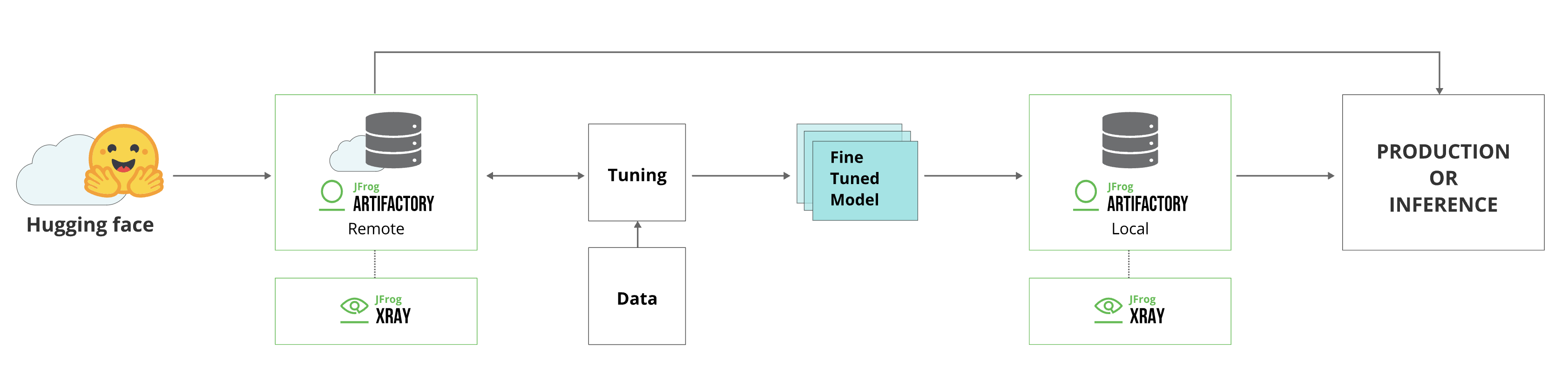
The integration of Hugging Face with Artifactory works as follows:
- A developer resolves a model or related artifact from Hugging Face Hub.
- Before starting to download the model, Curation compares it against the up-to-date catalog stored on the JFrog Platform. The catalog is always up to date with scan results of every Hugging Face model.
- If it is deemed safe, it is downloaded and cached in a remote repository.
- The model is continuously scanned using Xray, which will block the model if it finds any security issues.
- The developer tunes the model and trains it on data.
- When the tuning and training process is complete, the developer can deploy the model to a local repository. From there, it can be released for use in production or anywhere in the company.
MLOps Workflow
To create and configure the JFrog MLOps workflow, do the following:
1. Create Hugging Face Local and Remote Repositories
Follow the instructions in Create Hugging Face Repositories to create a Hugging Face repository in the JFrog Platform UI, or use the Create Repository API.
For more information about repository configurations, see Repository Configuration JSON.
2. Configure Connection Between Hugging Face Client and Artifactory
To configure the Hugging Face SDK to work with Artifactory:
-
Go to the JFrog Platform Artifacts page, select your Hugging Face repository, and click Set Me Up.
-
To create a Hugging Face token, enter your JFrog Platform password, and click Generate Token & Create Instructions.
-
Connect your HuggingFaceML repository to the Hugging Face SDK in Artifactory using the following command:
export HF_HUB_ETAG_TIMEOUT=86400
export HF_HUB_DOWNLOAD_TIMEOUT=86400
export HF_ENDPOINT=https://<JFROG_DOMAIN>/artifactory/api/huggingfaceml/<REPOSITORY_NAME>
Where:
<JFROG_DOMAIN>: Replace this placeholder with the hostname of your JFrog Platform.<REPOSITORY_NAME>: Replace this placeholder with the Hugging Face repository key in Artifactory.
For example:
export HF_HUB_ETAG_TIMEOUT=86400 export HF_HUB_DOWNLOAD_TIMEOUT=86400 export HF_ENDPOINT=https://john.jfrog.io/artifactory/api/huggingfaceml/john_HF_local -
Authenticate the Hugging Face client with Artifactory by running the following command:
export HF_TOKEN=<IDENTITY_TOKEN>Where
<IDENTITY_TOKEN>is the Hugging Face token generated in Artifactory Set Me Up.
To use Hugging Face anonymously, see Allow Anonymous Access.
3. Scan Models Using Curation and Xray
Before the download starts, JFrog Curation compares the model with the up-to-date catalog on the JFrog Platform. JFrog Xray scans the cached model and blocks the model if it finds a security issue.
For more information, see Detecting Malicious AI Models and Configure Curation.
4. Deploy Models and Additional Artifacts
To deploy models to Artifactory using the huggingface_hub library:
-
Run the following command:
from huggingface_hub import HfApi
api = HfApi()
api.upload_folder(
    folder_path="<MODEL_SOURCE_FOLDER_NAME>",
    repo_id="<MODEL_NAME>",
    revision="<MODEL_UUID>",
  )
Where:
<MODEL_SOURCE_FOLDER_NAME>: The name of the folder on your local machine where the model resides.<MODEL_NAME>: The model name, following Hugging Face repository naming structure'organization/name'. The repository path ismodels--<MODEL_NAME>.<MODEL_UUID>: A Git commit revision ID that serves as a unique identifier for your model. The repository path issnapshots/<REVISION_NAME>/...files.
For example:
from huggingface_hub import HfApi
api = HfApi()
api.upload_folder(
    folder_path="vit-base-patch16-224",         # Enter the name of the folder on your local machine where your model resides.
    repo_id="nsi319/legalpegasus",     # Enter the name of the model, following the Hugging Face repository naming structure 'organization/name'. The repository path is models--<MODEL_NAME>.
    revision="54ef2872d33bbff28eb09544bdecbf6699f5b0b8",                 # Enter a unique identifier for your model. Use a Git commit revision ID. The repository path is snapshots/<REVISION_NAME>/...files.
    repo_type="model"
)
For more information, see Deploy Hugging Face Models and Datasets.
5. Resolve Models and Additional Artifacts
To resolve a model from Artifactory:
-
Run the following command:
from huggingface_hub import snapshot_download
snapshot_download(
    repo_id="<MODEL_NAME>", revision="<MODEL_UUID>"
)
Where:
<MODEL_NAME>: The model name, following Hugging Face repository naming structure'organization/name'<MODEL_UUID>: The Git commit revision ID that serves as a unique identifier for your model
For example:
from huggingface_hub import snapshot_download
snapshot_download(
    repo_id="nsi319/legalpegasus", revision="54ef2872d33bbff28eb09544bdecbf6699f5b0b8"
)
For more information, see Resolve Hugging Face Models and Datasets.
Related Topics
Updated about 3 hours ago